- Installs
- —
- Apple does not publish download counts
- Rating
- 4.58
- Ratings
- 9.2K
- 9.2K reviews
- Version
- 5.8.7
- Updated 30 Jun 2026
- Released
- 18 Nov 2014
- Tracked since 10 May 2026
- Size
- 119 MB
- Needs 15.0
Screenshots




About Pro Camera by Moment
The description on the store listing
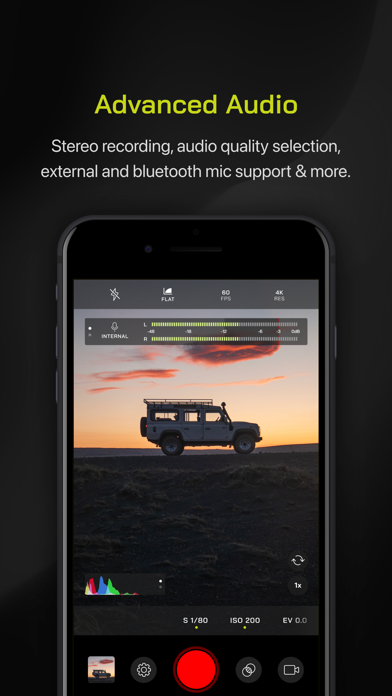
Pro Camera by Moment is the manual camera app that gives you full creative control and professional-level performance, all at an affordable price. It brings us closer to what we love about our DSLR and mirrorless cameras – exposure controls, precise focus, rich colors, smooth video, crisp audio – without being complicated.
If you are looking for a powerful and easy-to-use camera app, Pro Camera is for you. We make it fast and intuitive to switch between modes, dial in your shot, and keep shooting. Plus, we give you all the manual controls you’ll need: shutter speed, ISO, white balance, focus, and more. Your favorite settings can be saved and recalled on demand.
For filmmakers – the …
Read the full description
Pro Camera by Moment is the manual camera app that gives you full creative control and professional-level performance, all at an affordable price. It brings us closer to what we love about our DSLR and mirrorless cameras – exposure controls, precise focus, rich colors, smooth video, crisp audio – without being complicated. If you are looking for a powerful and easy-to-use camera app, Pro Camera is for you. We make it fast and intuitive to switch between modes, dial in your shot, and keep shooting. Plus, we give you all the manual controls you’ll need: shutter speed, ISO, white balance, focus, and more. Your favorite settings can be saved and recalled on demand. For filmmakers – the features you need, not the ones you don’t. LUTs, color spaces, bitrates, dual-channel audio meters, real-time waveforms, fast access to frame rates, and more. For photographers – easier than shooting on your DSLR. Shoot in RAW (even in bursts), capture brackets, and more. You can even create stunning timelapses and light trail effects (in-app purchase required). For everyone else – inspired by the pros we made the interface simple, fast, and easy to use. We provide getting started tips, video tutorials, and full-time customer service to get you set up. We love hearing from you. If you have any features, ideas, or feedback please email us at [email protected] or DM us on Instagram @moment. GENERAL FEATURES + Full manual: control shutter speed, iso, exposure, focus, and white balance with easy-to-use sliders + Focus peaking: manually dial in your focus using highlighted in-focus regions + Zebra stripes: quickly determine over- and under-exposed areas in the viewfinder + Split focus and exposure: take control of tricky lighting scenarios + Viewfinder grid: choose from thirds, square, and golden ratio + Gyroscope: ensure your shot is level with an on-screen gyroscope and haptic feedback PHOTOGRAPHY FEATURES + RAW and TIFF: shoot photos in RAW/ProRAW format for better editing, or TIFF for high-quality printing + RAW+JPG option: simultaneously get the best of both worlds + Burst mode: capture burst shots in RAW format – capture action while maintaining the uncompressed quality pros want with RAW + Bracketing: capture multiple exposures to stack later in your favorite editing apps FILMMAKER FEATURES + Import, organize, and use your favorite LUTs + Color spaces: choose between Rec.709, Rec.2020 HDR, Display P3, and Apple Log (on compatible devices) + Codecs: shoot in HEVC, H.264, or any of the 422 ProRes variants + Video bitrates: get precise control over video quality with standard, medium, and high bitrate options + RGB histogram: dial in your video color, balance, and exposure + Waveform monitor: evaluate video brightness and exposure across your shot in real time + Audio meters: get just the right sound levels with real-time, precise, dual-channel audio levels + HDMI clean feed output: preview on a bigger screen + Video stabilization: make your videos buttery smooth + Video formats: change your resolution and frame rate on screen, without digging into a settings menu + Anamorphic: use the Moment Anamorphic lens to shoot amazing, letterbox style photos and videos, with a de-squeeze option built in PREMIUM FEATURES (In-App Purchases) + Timelapse mode: capture stunning time-lapse videos + Slow Shutter mode: long exposure shots with motion blur or light trails WORKS WITH + iPhone 16 Camera Control: get quick access to manual settings + Lens control: manually control which of the triple/dual lenses you want to shoot with so you can use Moment lenses over each one + Moment lenses: access options like anamorphic de-squeeze and distortion correction + Moment battery case: works with the DSLR-like shutter button on our photography cases for half-press and full-press capture. Take better photos, faster. + Apple Watch: use your watch as a remote to shoot photos or record videos + Siri Shortcuts: quick access to capture a photo or start a video
Installs, last 30 days
Apple does not publish download counts. Estimates are in testing.
Estimated store revenue Estimated Beta
App Store, worldwide, monthly rate from the last 13 chart days to 20 Nov 2026
Below the top 100 grossing apps in the markets we calibrate. In the United States that usually means under about $6.4M a month. App Store purchases and subscriptions only, before Apple's 15 to 30% fee. Ads and web payments are not included.
Ratings
9,236 ratings, 9,236 reviews
- 5 ★82%
- 4 ★7.3%
- 3 ★3.4%
- 2 ★2.0%
- 1 ★5.6%
Recent reviews
Latest public reviews from the store
- 18 Feb 2024
Would give it a full 5 ⭐️ But ONE MAJOR PROBLEM!
I recently got the new iPhone 15 Pro Max and I love the Moment app I’ve been using it since my iPhone 13 and have gotten some amazing photos with the app so no hate in the sense that I get manual control but one thing I would say is I noticed you finally changed to ProRaw when it was just Raw originally so that’s good but I would have appreciated it if in the update you could have done something so that iPhone 15 Pro Max Users have options to switch from the Ultra Wide, Wide, 2x Zoom & 5x Zoom I know it’s kind of like a stupid thing to ask but I just feel like it should be some that’s implemented to the app I’ve been wanting to do a review on the app but that’s my only drawback that the feature still hasn’t been implemented I wanna be able to easily switch to the lens not Zoom in with my fingers which also when you zoom in the numbers don’t change so you don’t actually know how much your zooming into I know that you guys just started the app not too long ago so I’m not trying to hassle I just would like it to feel more like the native app where there’s like a dial that shows you your Zoom but keep the manual controls you guys already have an amazing app make i
- 26 Oct 2021
Elevate your mobile photo and video capture app!
Moment Inc. has given creators an excellent mobile photo and video capture tool with their Pro Camera app for smartphones. I can speak from personal experience over the last year about the quality of image and performance with this app- it's awesome! While there are some limitations in the nature of mobile photography and videography, the Pro Camera App from Moment gets us as close to the most professional performance and quality in a mobile image capture app as possible. To be candid, there have been times when the app has crashed unexpectedly, even while shooting video, and there are some features that are slow to respond. And sometimes capturing RAW photos while seeing the image on the screen versus viewing the captured photo isn't the same- typically, the captured RAW photo is darker than what I saw while composing the shot. These aren't huge setbacks, but setbacks nonetheless. However, I'm sure Moment did everything they could to develop an app that made these setbacks easier to deal with. I'm glad I made the investment in Moment's Pro Camera app. Plus, their other external tools and accessories for mobile photo and video capture are awesome too! ;)
- 21 Dec 2019
More than expected
When I saw that Moment had their own app, I was hesitant to download another camera. If you’re a full time photographer, you probably have at least a dozen or more apps for your work. Then I saw that it cost money. Even more hesitation. I’ve just been really happy with my Adobe CC apps. I decided to do it anyway because of two reasons- 1) they make a solid product with their lenses and other gear 2) I wanted to use an app that was designed to work specifically with its product - especially the anamorphic lens. Well, I’ve been continuously surprised and impressed not just every time I use it, but even just opening it up. There’s so much attention to detail and functionality. Truly well deserving of its rating in the App Store. There’s enough merit that I don’t want to write for the next hour on my phone raving about how much I like this app and why, but I probably will do something soon as an online review. All I can say is that as a full time professional photographer who really, really hates using his phone over his dslr, the Moment app is an impressive and justifiable purchase. Please keep up the good work!
- 17 Apr 2019
I’d Give It A 5 Star But Because Of Recent Updates I Changed My Mind
The app was perfect till it’s recent updates. So now when you’re taking a photo in Raw mode, the preview in Raw camera mode is not how the actual final photo looks. It actually is darker than how the photo or frame was looking, when taking the shot. So when you open up the photo in an editor, it shows up darker & less exposed than how you thought it looked when you fixed the settings already when taking the photo. This also affects the white areas, highlights & more exposed areas now. Because now when I try to fix the exposure, brightness on one area of the photo; the white areas, bright areas & highlights gets blown off or over exposed. So its not balancing out & thus have to swithc to TIFF mode which I only used when using the anamorphic lens, but now will have to use it all the time. I mean one of the purposes of a camera app is to help me show how the framing & photo will be looking when my settings are locked down. Not show me a developed photo will taking the photograph & then show me the original, less exposed photograph in editing which now will need more work on editing since now I not only do have to edit it to get the looks I want but also fix & balance exposure, br
What reviewers bring up
Topics mentioned in the latest 8 reviews, by how many reviews mention them
Liked in good reviews (4 reviews)
- moment 4
- professional 3
- camera 3
- lens 3
- raw 3
- mobile photography 2
- experience 2
- especially 2
Raised in bad reviews (3 reviews)
- off 3
- taking 2
- rather 2
- learn 2
- feels 2
- take 2
- real 2
Top chart positions
Latest App Store chart ranks by country, last 10 days
Not in any tracked top chart in the last 10 days.
Pro Camera by Moment history
Release, install milestones, listing and store changes
- First released on the store 18 Nov 2014
Update frequency
How often Pro Camera by Moment ships a new version, month by month
2 updates in the last 12 months. More often than most similar apps: they shipped a median of 1 updates in the same year.
Recent versions
Current version 5.8.7
- Version 5.8.730 Jun 2026
One final update before we shut down the original Pro Camera. Thanks for an amazing 12 years! The app will remain available on your devices, but we will no longer support it moving forward. If you'd like to upgrade to Pro Camera II, you should do so now – the discounted bundle will be removed soon.
- Version 5.8.65 Mar 2026
Bug fixes for compatibility with old iPhone models.
Listing keywords
Words and phrases Pro Camera by Moment repeats most in its store listing
Top phrases: pro camera (3), camera by moment (2), dual channel audio (2), luts color spaces (2), shutter speed iso (2).
Highlighted words also appear in the title. Counts cover the title, short description and description.
Compliance
What the listing and the app package show
- Store status
- Live
- Upkeep
- Updated 30 Jun 2026
- Age rating
- 4+
Apps like Pro Camera by Moment
 Slow Motion Video Maker EditorLoyal Foundry, Inc.★ 4.15
 Quickart Album: Photo CleanerStarpool Data Limited★ 4.32
 HD Wallpapers For TrillMohammed Yassine★ 4.62
 Add Music to Video Appnap Technologies Limited★ 4.34
 Otaku Anime Wallpapers HDMohammed Yassine★ 4.6
 Video Compressor-Shrink videos丽譞 牛★ 4.7
 IntroTube: Intro Video MakerPolymath Company Limited★ 4.56
 Phonty - Perfect Photo EditorSenfoni★ 4.41
 Ghost Lens AR Fun Movie MakerShenzhen Qianhai Happy Tour Network Technology Co., Ltd.★ 4.5
Pro Camera by Moment: questions and answers
Who makes Pro Camera by Moment?
Pro Camera by Moment is published by Moment Inc..
When was Pro Camera by Moment last updated?
The latest version (5.8.7) was released on 30 Jun 2026.
Is Pro Camera by Moment free?
No. Pro Camera by Moment is a paid app priced at $4.99.
Is Pro Camera by Moment still available?
Yes. Pro Camera by Moment is live on App Store as of 20 Nov 2026.
Track Pro Camera by Moment and its competitors
Watch any app for new versions, rating drops, chart moves and removals. Free plan, no card.