
- Installs
- —
- Apple does not publish download counts
- Rating
- 4.76
- Ratings
- 363
- 363 reviews
- Version
- 4.8.2
- Updated 25 Aug 2026
- Released
- 22 Jun 2014
- Tracked since 10 May 2026
- Size
- 16 MB
- Needs 15.5
Screenshots



About Procedure Log
The description on the store listing
View demo videos on the app's website at http://goo.gl/ZRC8gt
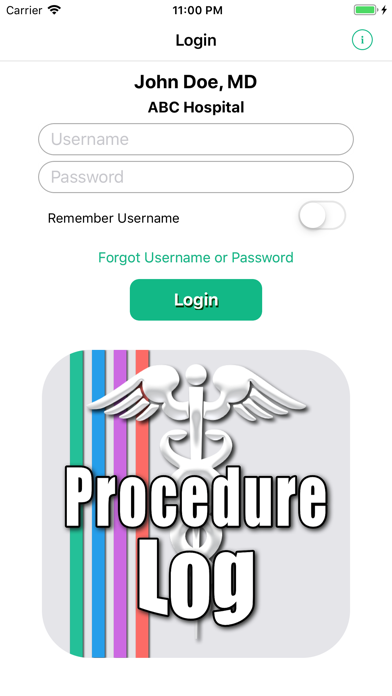
This app was created for physicians, residents, medical students, and other students in the healthcare fields to keep track of and document procedures performed. The app is highly customizable and useful in all medical specialties.
Entries are securely kept in your iOS device and are not sent to any outside server, website or database. Reports are created and saved as a password protected PDF file (encrypted using AES-128) and a CSV (comma-separated values) file that is compressed to a ZIP file (which allows password protection and is encrypted using AES-256) to comply with HIPAA security requirements. The reports can then be …
Read the full description
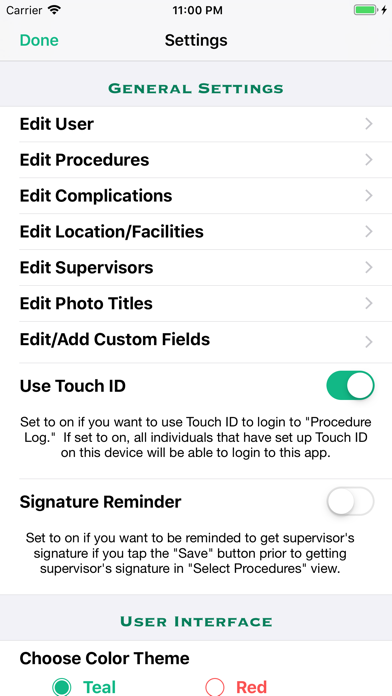
View demo videos on the app's website at http://goo.gl/ZRC8gt This app was created for physicians, residents, medical students, and other students in the healthcare fields to keep track of and document procedures performed. The app is highly customizable and useful in all medical specialties. Entries are securely kept in your iOS device and are not sent to any outside server, website or database. Reports are created and saved as a password protected PDF file (encrypted using AES-128) and a CSV (comma-separated values) file that is compressed to a ZIP file (which allows password protection and is encrypted using AES-256) to comply with HIPAA security requirements. The reports can then be emailed, accessed via iTunes and the Files app, sent using AirDrop, or copied to your iCloud Drive or DropBox. CSV files can be imported into a spreadsheet program. One should not rely on this app alone to keep track of their procedures and is advised to frequently backup the files created. Information on backing up and restoring your data is included in the app's Help/Instructions view. FEATURES • Keep a log of the procedures you have performed, assisted in, were 2nd assist in, observed, supervised, and/or interpreted for documentation purposes. • Document the patient's name, ID number, age, date performed, location, supervisor, diagnosis, complications and additional notes with the procedures performed. Also, one can take a photo with your device's camera or import a photo from your photos library from within the app, and include the photo in a record. • Option to select one or multiple diagnoses from a list of either custom diagnoses or ICD-10 diagnoses for any given procedure. • Select multiple procedures performed on a single patient. • Sort by date (ascending or descending), patient name, procedure name, medical specialty, and location/facility. • Capture supervisor's signature to attest that you performed or assisted in the procedure(s) and include the signature images in your reports. Either obtain the supervisor's signature attestation at the time you create the log entry, or save the entry without the signature and obtain the signature attestation at a later time. • Detailed help/instructions section. CUSTOMIZABLE • List of procedures, favorite diagnoses, and complications are easily customizable (you can add procedures/diagnoses/complications to or delete them from the lists). (ICD-10 diagnoses cannot be edited or deleted.) • Locations and Supervisor's names are saved and can be selected from a picker so you don't have to type them in again when adding another log entry. • Add up to four custom fields in addition to the default fields listed above in Features. REPORTS • Create reports in password protected PDF format and as a CSV file that is password protected in a ZIP format, as well as a password protected backup of your data, that can then be emailed, sent via AirDrop, sent to your iCloud Drive or Dropbox account, or downloaded using iTunes when your iOS device is connected to your computer. • Reports can be created for a specific date range, location/facility, and one can specify the primary, secondary and tertiary sort order of the PDF report. BACKUP • In addition to backing up to iCloud and/or iTunes, if you have a DropBox account, you can copy the password protected backup file and reports to DropBox from within the Procedure Log app. • You can also use the Files app to transfer files to your iCloud Drive, Dropbox account, or, if you have a Mac computer, use AirDrop to transfer it to your Mac computer. • You can also email the password protected backup file to yourself. SECURITY • App is password protected and all data is encrypted when you log off the app or the app is no longer the active app. • PDF and CSV reports are encrypted and password protected. • Retrieve your username and password if you have forgotten them; you must first answer several security questions in the "Create User" or the "Edit User" views.
Installs since 29 Aug 2026
Apple does not publish download counts. Estimates are in testing.
Estimated store revenue Estimated Beta
App Store, worldwide, monthly rate from the last 14 chart days to 21 Nov 2026
Below the top 100 grossing apps in the markets we calibrate. In the United States that usually means under about $6.4M a month. App Store purchases and subscriptions only, before Apple's 15 to 30% fee. Ads and web payments are not included.
Ratings
363 ratings, 363 reviews
No rating breakdown published for this app.
Recent reviews
Latest public reviews from the store
- 3 Jan 2024
Easy to use
Easy interface. Takes very little time to update. Editable to my specialty. Happy with the product so far.
- 24 Sep 2019
Great app, except for the color.
Great app to track your procedures, with what seems like good security. I wish you could change the color though.
- 14 Jan 2019
Great technical support
I had initially rated the App based on my frustration of a bug that was fixed immediately over the weekend. I apologize of my initial rating and I would like to change the rating to a 5 star. This App is the best one out there for residence and fellows to stay on top of their logs. I will recommend this to my fellowship program.
What reviewers bring up
Topics mentioned in the latest 8 reviews, by how many reviews mention them
Liked in good reviews (3 reviews)
- change 2
Raised in bad reviews (5 reviews)
- procedures 3
- lost 3
- data 3
- log 2
Top chart positions
Latest App Store chart ranks by country, last 10 days
- Countries ranked
- 2 of 50
- Best rank
- #48
- Top 10 placements
- 0
- of 2 chart placements
- Average rank
- #72.5
Best countries on App Store
- 🇦🇺 Australia · Top paid, Medical#48
- 🇺🇸 United States · Top paid, Medical#97
Procedure Log history
Release, install milestones, listing and store changes
- First released on the store 22 Jun 2014
Update frequency
How often Procedure Log ships a new version, month by month
5 updates in the last 12 months. More often than most similar apps: they shipped a median of 2 updates in the same year.
Recent versions
Current version 4.8.2
- Version 4.8.225 Aug 2026
• Fixed an issue that could cause a crash when entering a date field on the Retrieve Password screen on iOS 18.x.
- Version 4.8.026 Jun 2026
• Added a new toolbar button to the main Procedure Log view that opens a poll to determine the interest in having In-App Purchase access to CPT codes. This replaces the previous button used to show the search bar. Google sign-in is required so responses are limited to one per person. The poll is also available from (Info) > CPT Code Access Poll. • Added a one-time notice in the main Procedure Log view to point users to the new CPT code poll button. • Made the search bar in the main Procedure Log view permanently visible at the top of the screen. • Made additional refinements to the PDF report. • Added compatibility with the upcoming iOS 27. • Improved date selection screens and fixed date picker display issues on newer iOS versions. • Improved search behavior in Select Complications and Select Procedure views. • Made other minor UI improvements and bug fixes.
- Version 4.7.015 Jun 2026
• Added a poll to gauge interest in In-App Purchase access to CPT codes. Google sign-in is required to limit responses to one per person. Go to (Info) > CPT Code Access Poll or click here. • Added a search field to the Select Complications and Select Procedures views. • Improved database reliability. • From a record’s Details View, you can now select additional procedures when editing the procedure, as long as no signature attestation has been created for that record. Each additional procedure is saved as a new record for the same encounter, retaining the original record’s date, patient ID, supervisor, diagnosis, complications, notes, level of participation, custom field values, and related details. To replace the original procedure instead of adding new ones, deselect the current procedure and select the new one. • Improved search reliability and fixed issues that could occasionally cause crashes while searching. • Clarity improvements in the barcode scanner view when selecting captured text and using the contextual menu to make corrections. • Clarified Rename Specialty options for updating future procedures, existing logged cases, or both. • Other minor UI improvements, layout refinements, and stability fixes.
- Version 4.6.07 Jun 2026
• Improved the speed that records are sorted. • Improved the speed that the PDF and CSV reports are created. • Fixed an issue with the creation of a CSV file that if there were items separated by a comma, the CSV report would place them in the wrong column. • In the Complications and Select Procedures views, the rows now auto adjust in height to accommodate multi-line descriptions. • In the Add/Edit Procedure view, both the Specialty field and Procedure field were changed from a single line field to a multi-line field to accommodate longer entries. • If using a custom field with a picker to add selections, the top of the picker now shows Append and Replace together, with the Append option selected by default. • If using a custom field with a picker to add selections, the app will now automatically place a semicolon between the selections. • When creating the PDF report, the level of participation (performed, assisted, etc.) will display in the row after the procedure name, aligned to the right, in the same row as the specialty name. This prevents long procedure names from writing over the level of participation. • "Edit Procedures" was renamed to "Edit Specialties/Procedures": now the specialty name can be changed (all procedures listed under the old specialty name will be listed under the new specialty name). To change the specialty name, go to Settings > Edit Specialty/Procedure, tap the "Edit" button at the top, then tap the "Rename this Specialty" button in the appropriate specialty section header.
Listing keywords
Words and phrases Procedure Log repeats most in its store listing
Top phrases: password protected (8), password protected backup (3), dropbox account (3), icloud drive (3), procedures performed (3).
Highlighted words also appear in the title. Counts cover the title, short description and description.
Compliance
What the listing and the app package show
- Store status
- Live
- Upkeep
- Updated 25 Aug 2026
- Age rating
- 12+
Apps like Procedure Log
 PMcardio for IndividualsPowerful Medical★ 4.51
 AccurxAccurx Limited★ 4.83
 BP Companion Pro for iPad倩 赵★ 4.71
 myFetalLifeFetalLife★ 4.46
 HCOnline - PersonifyHealthHealthComp★ 4.49
 RxSS: Rx Savings SolutionsRx Savings, LLC.★ 4.77
 Thinkable HealthGgtude Ltd★ 4.66
 Amplifon AppAmplifon S.p.A.★ 4.6
 UpLift - Depression & AnxietyUpLift Health Inc.★ 4.49
Procedure Log: questions and answers
Who makes Procedure Log?
Procedure Log is published by Robert Kuhnhenn.
When was Procedure Log last updated?
The latest version (4.8.2) was released on 25 Aug 2026.
Is Procedure Log free?
No. Procedure Log is a paid app priced at $2.99.
Is Procedure Log still available?
Yes. Procedure Log is live on App Store as of 21 Nov 2026.
Track Procedure Log and its competitors
Watch any app for new versions, rating drops, chart moves and removals. Free plan, no card.