
- Installs
- —
- Apple does not publish download counts
- Rating
- 4.57
- Ratings
- 619
- 619 reviews
- Version
- 10.29
- Updated 27 Oct 2026
- Released
- 10 Dec 2010
- Tracked since 10 May 2026
- Size
- 98 MB
- Needs 13.0
Also on Google Play: Pulseway (5.8K ratings)
Screenshots

About Pulseway
The description on the store listing
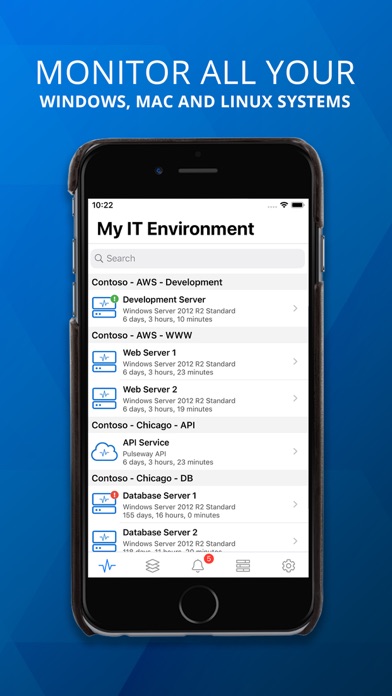
Remotely monitor and manage your IT systems securely from any smartphone or tablet. Pulseway gives you complete control of your computers and applications from anywhere, at any time.
You can monitor and control Windows, Linux and Mac Operating Systems as well as any application using the monitoring API.
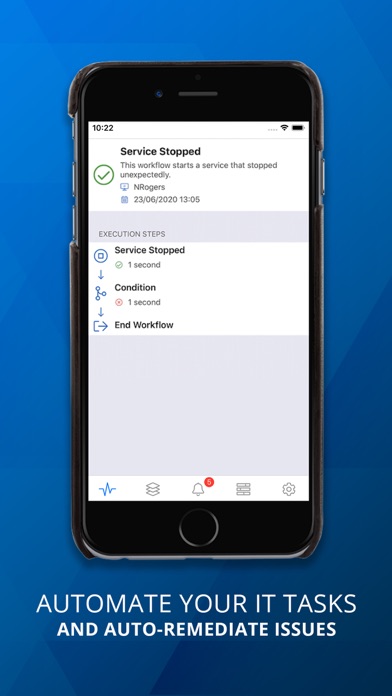
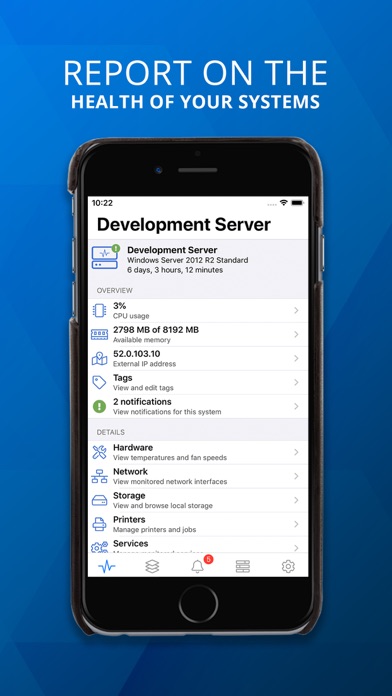
Pulseway dramatically reduces the level of manual checks for support engineers and provides them with a real time status of their monitored systems. You are the first to know about any potential issues affecting your systems and can resolve those issues immediately.
*** IMPORTANT ***
• To monitor a computer, download and install the agent software from our website;
• The …
Read the full description
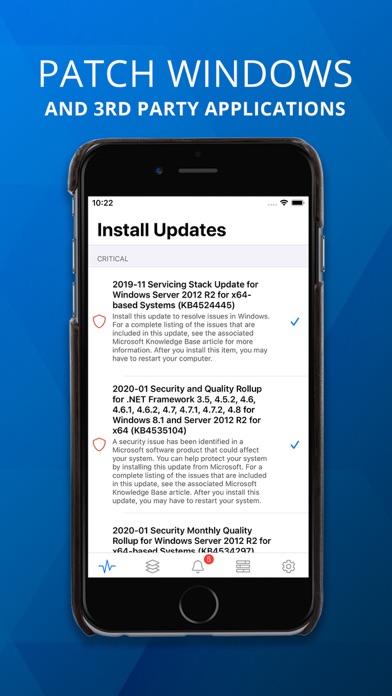
Remotely monitor and manage your IT systems securely from any smartphone or tablet. Pulseway gives you complete control of your computers and applications from anywhere, at any time. You can monitor and control Windows, Linux and Mac Operating Systems as well as any application using the monitoring API. Pulseway dramatically reduces the level of manual checks for support engineers and provides them with a real time status of their monitored systems. You are the first to know about any potential issues affecting your systems and can resolve those issues immediately. *** IMPORTANT *** • To monitor a computer, download and install the agent software from our website; • The communication between this application and the monitored computers is always encrypted. MONITOR: • The status and uptime of all systems • CPU usage and usage history chart • Current available memory and usage history chart • External IP address and the location on the map using GeoIP • Ping round trip response time and response time chart • Status of local hard disks • Services status • Network interfaces status and traffic chart • Running processes • Event logs • Scheduled tasks status • Ports status • Logged in users • Hardware details • Status of web sites and application pools in Internet Information Server • User accounts status in Active Directory including locked user accounts • View and manage Windows updates • Performance counters • ... and more MANAGE: • Start, pause, continue and stop a service • Kill a process • Start and stop a scheduled task • Log off any logged in user • Send a message to the logged in users • Command prompt and PowerShell support • Restart, wake up (Wake on WAN over Internet supported), shutdown, power off, suspend or send the computer into hibernation • Send commands to multiple systems in the same group • Start/stop/restart Internet Information Server web sites • Start/stop/recycle Internet Information Server application pools • Mobile device authorization for system commands - only selected authorized devices on your account can be allowed to send system commands • Enable, disable, unlock and reset password for user accounts in Active Directory • Add and remove groups for a user account in Active Directory • Hyper-V and VMware support, start and stop virtual machines • Run SQL Server queries • ... and more GET NOTIFIED: • When a system goes offline, starts up, shuts down, suspends and resumes • When a monitored service stopped unexpectedly • When the free memory is below a specified percentage • When the processor usage is above or below a specified percentage for a specified period of time • When the free space of a hard disk drive is below a specified percentage • When a user logs in or logs out • When ping round trip time is above a specified value for a specified period of time • When a monitored port is closed • When an event log entry is generated and it matches a specified filter (Windows only) • When the CPU, system or HDD temperature exceeds a specified threshold • When a web site or app pool stopped on Internet Information Server • ... and more The application will work even if the system cannot be directly accessed from the Internet (i.e. does not have a routable IP address or sits behind a firewall). Operating Systems supported: • Server: Windows 2003 or higher • Desktop: Windows XP or higher • Linux: All major distributions • Mac: OS X 10.8+
Installs since 29 Aug 2026
Apple does not publish download counts. Estimates are in testing.
Estimated store revenue Estimated Beta
App Store, worldwide, monthly rate from the last 12 chart days to 19 Nov 2026
Below the top 100 grossing apps in the markets we calibrate. In the United States that usually means under about $6.4M a month. App Store purchases and subscriptions only, before Apple's 15 to 30% fee. Ads and web payments are not included.
Ratings
619 ratings, 619 reviews
No rating breakdown published for this app.
Recent reviews
Latest public reviews from the store
- 2 Jun 2022
Amazing RMM app with incredible features
Pulseway has been one of the best to uitilize the Mobile RMM apps as a true productivity tool! It is powerful, feature rich and so easy to use! I have used other RMMs that don’t offer a mobile app and I’m so glad it is a high priority for Pulseway. There are SO many times I need to help a client and I only have a mobile phone or a tablet and having a true app is vital! I appreciate that this isn’t a “screen scraper” type app where it’s just a shell for a website, great job!!! With all their latest announcements and updates most of them have been features for the client/web or integrations, I just hope they don’t forget about the mobile app and keep it as a high priority and focus with features and updates!
- 8 Mar 2022
Great app
As an iOS dev myself I appreciate the work that goes in to making a quality app like this one. I love the native iOS look and feel plus support for latest iOS system features like Widgets. I use it to monitor a handful of Linux servers. If I had any requests I’d say I would like to see the Linux agent get more features - it seems like Windows agents get most of the love (probably most of the user base) but for users like me with more Linux boxes than Windows it’d be nice to integrate things like remote control (VNC/X2go perhaps?).
- 28 Jan 2022
Output from scripts is not completely shown
I'm running the latest version and have created several scripts that have worked in the past. I can choose a script and it does run successfully. However, when I select the output to view, the app does not show the complete output. As an FYI, I reported this problem once before with the mobile app and it was fixed. Somehow in the latest version the problem has been re-introduced.
- 1 Aug 2021
For companies only??
I'm trying to sign up but it seems that it requires a business email. There must be a huge market for gamers/miners who want to see stats on their phone when theyre in a game or dont want to go to the computer to see what temp their gpu is at. Is there a way a gamer could use this app?
What reviewers bring up
Topics mentioned in the latest 8 reviews, by how many reviews mention them
Liked in good reviews (6 reviews)
- monitor 3
- latest 3
- see 3
- appreciate 2
- features 2
- business 2
- servers 2
- running 2
Raised in bad reviews (2 reviews)
- software 2
- machine 2
Top chart positions
Latest App Store chart ranks by country, last 10 days
Not in any tracked top chart in the last 10 days.
Pulseway history
Release, install milestones, listing and store changes
- First released on the store 10 Dec 2010
Update frequency
How often Pulseway ships a new version, month by month
6 updates in the last 12 months. More often than most similar apps: they shipped a median of 3 updates in the same year.
Recent versions
Current version 10.29
- Version 10.2927 Oct 2026
General bug fixes and performance improvements
- Version 10.28.111 Aug 2026
General bug fixes and performance improvements
- Version 10.2724 Jun 2026
Add a Settings option to enable the legacy Systems List Add support for MDM managed iOS and Android devices, including device overview, status and commands functionality Various bug fixes and improvements
- Version 9.26.28 Jun 2026
General bug fixes and performance improvements
Listing keywords
Words and phrases Pulseway repeats most in its store listing
Top phrases: internet information server (4), information server (4), internet information (4), below specified percentage (3), active directory (3).
Highlighted words also appear in the title. Counts cover the title, short description and description.
Compliance
What the listing and the app package show
- Store status
- Live
- Upkeep
- Updated 27 Oct 2026
- Age rating
- 4+
Apps like Pulseway
 Password Manager iPassSafe+Netanel Software★ 4.39
 Voice Changer - Change Tones云涌 段★ 3.94
 Japer AI - WritBotSubhan Dastgeer★ 4.81
 Photo to PDF Converter ToolDouglas (Hangzhou) Technology Co., LTD★ 4.46
 AI Grammar Check Spell by FixyMatlub Yazilim Anonim Sirketi★ 4.71
 PDF Converter -晓珍 胡★ 4.73
 FreeWeb - Website BuilderBILLDU LTD★ 4.7
 Oblique Strategies SENicolae Gherasim★ 4.81
 WatchsmithCross Forward Consulting, LLC★ 3.86
Pulseway: questions and answers
Who makes Pulseway?
Pulseway is published by MMSOFT Design Ltd..
When was Pulseway last updated?
The latest version (10.29) was released on 27 Oct 2026.
Is Pulseway free?
Yes. Pulseway is free to download.
Is Pulseway still available?
Yes. Pulseway is live on App Store as of 14 Nov 2026.
Track Pulseway and its competitors
Watch any app for new versions, rating drops, chart moves and removals. Free plan, no card.