
- Installs
- —
- Apple does not publish download counts
- Rating
- 4.82
- Ratings
- 11
- Version
- 1.0
- Updated 30 Sep 2026
- Released
- 30 Sep 2026
- Tracked since 10 Nov 2026
- Size
- 137 MB
- Needs 16.0
Screenshots

About Putty Buddy
The description on the store listing
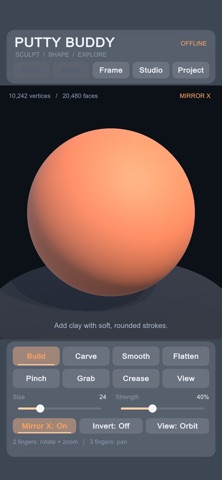
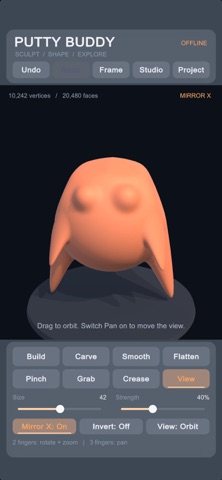
Create 3D models with your fingertips. Putty Buddy brings 3D sculpting and modeling to your device, with digital clay, seven sculpting brushes, and STL and OBJ export through the Files app.
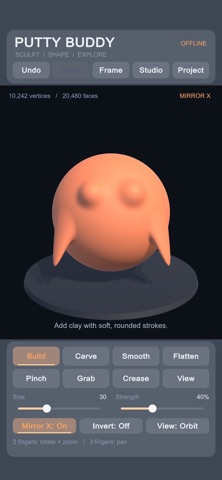
Shape characters, creatures, and abstract sculptures. Pull out ears, carve a face, smooth a surface, or sharpen a ridge. Start with a simple shape and develop it into something of your own.
One purchase includes every sculpting tool, material option, saving feature, and export format. No subscriptions, ads, or account required.
• Seven sculpting brushes
Build adds volume. Carve removes it. Smooth softens bumps, Flatten levels surfaces, Pinch sharpens ridges, Grab pulls shapes outward, and Crease …
Read the full description
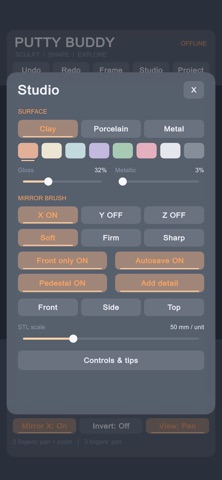
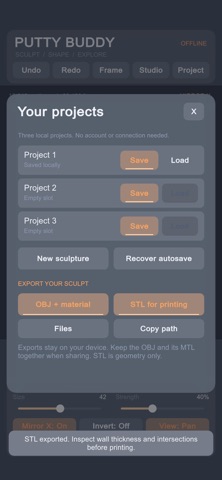
Create 3D models with your fingertips. Putty Buddy brings 3D sculpting and modeling to your device, with digital clay, seven sculpting brushes, and STL and OBJ export through the Files app. Shape characters, creatures, and abstract sculptures. Pull out ears, carve a face, smooth a surface, or sharpen a ridge. Start with a simple shape and develop it into something of your own. One purchase includes every sculpting tool, material option, saving feature, and export format. No subscriptions, ads, or account required. • Seven sculpting brushes Build adds volume. Carve removes it. Smooth softens bumps, Flatten levels surfaces, Pinch sharpens ridges, Grab pulls shapes outward, and Crease creates defined grooves. • Adjustable brushes and symmetry Control brush size, strength, and falloff for broad shaping or finer details. Reverse supported brushes with Invert. Mirror strokes across the X, Y, or Z axes to create symmetrical faces, characters, and forms. • Starting shapes and mesh detail Begin with a sphere, egg, or rounded block. Choose your starting mesh detail and subdivide the surface with Add Detail as your sculpture develops. • Colors and material finishes Choose from eight colors and clay, porcelain, or metallic appearances. Adjust gloss and metallic settings to explore different finishes. • Touch navigation Rotate, pan, and pinch to zoom. Switch to front, side, or top views, or center your sculpture with a tap. • Local projects, undo, and autosave Undo and redo edits as you experiment. Save and reopen three local projects, with autosave and backup recovery. Work offline with projects stored on your device. • OBJ + MTL export Take your sculpture into compatible 3D software. OBJ export includes mesh geometry and surface normals. The accompanying MTL file stores the base color and basic material settings. Keep both files together when transferring your model. • STL export for 3D printing workflows Export binary STL files with adjustable scale in millimeters. STL contains geometry only, without color or materials. Check your model’s wall thickness and intersections in your preferred preparation or slicing software before printing. Access exported files through the Files app to copy, share, or transfer them. Putty Buddy focuses on sculpting one model at a time from its built-in starting shapes. External model import, multi-object editing, and texture painting are not included.
Installs
Apple does not publish download counts. Estimates are in testing.
We publish iOS estimates only after they pass a back-test against real numbers. Chart history below is measured.
Estimated store revenue Estimated Beta
App Store, worldwide, monthly rate from the last 13 chart days to 20 Nov 2026
Below the top 100 grossing apps in the markets we calibrate. In the United States that usually means under about $6.4M a month. App Store purchases and subscriptions only, before Apple's 15 to 30% fee. Ads and web payments are not included.
Ratings
11 ratings
No rating breakdown published for this app.
Recent reviews
Latest public reviews from the store
No reviews in our sample for this app yet.
Top chart positions
Latest App Store chart ranks by country, last 10 days
Not in any tracked top chart in the last 10 days.
Putty Buddy history
Release, install milestones, listing and store changes
- First released on the store 30 Sep 2026
Update frequency
How often Putty Buddy ships a new version, month by month
1 updates in the last 12 months. More often than most similar apps: they shipped a median of 0 updates in the same year.
Recent versions
Current version 1.0
- Version 1.030 Sep 2026
Listing keywords
Words and phrases Putty Buddy repeats most in its store listing
Top phrases: putty buddy (3), seven sculpting brushes (2), local projects (2), mesh detail (2), obj export (2).
Highlighted words also appear in the title. Counts cover the title, short description and description.
Compliance
What the listing and the app package show
- Store status
- Live
- Upkeep
- Updated 30 Sep 2026
- Age rating
- 4+
Apps like Putty Buddy
 AI Cut - Photo Generate & EditBeijing Changhai Internet Technology Co., Ltd.★ 4.1
 Birthday Invitations Makerwilliam leandro aristizabal giraldo★ 4.7
 AI VistaSCIENJOY META TECHNOLOGY LLC★ 2.9
 Logotipo - AI Logo GeneratorMobile Ocean★ 4.02
 Anime AI Maker: DreamtuneLYKOV STUDIO LTD★ 4.34
 DIY Wallpaper Maker DIYScreenEvgenii Fomin★ 4.68
 Vintage Camera - Film FiltersPlane Cubes★ 4.42
 Color Widgets - WallpapersFlying Pigeons LLC★ 4.34
 Artimind - AI Video GeneratorAPERO TECHNOLOGIES GROUP PTE.LTD★ 1.41
Putty Buddy: questions and answers
Who makes Putty Buddy?
Putty Buddy is published by Bad Assassin Games.
When was Putty Buddy last updated?
The latest version (1.0) was released on 30 Sep 2026.
Is Putty Buddy free?
No. Putty Buddy is a paid app priced at $0.99.
Is Putty Buddy still available?
Yes. Putty Buddy is live on App Store as of 10 Nov 2026.
Track Putty Buddy and its competitors
Watch any app for new versions, rating drops, chart moves and removals. Free plan, no card.