
- Installs
- —
- Apple does not publish download counts
- Rating
- 2.86
- Ratings
- 50
- 50 reviews
- Version
- 1.0.15
- Updated 24 Sep 2026
- Released
- 28 Aug 2014
- Tracked since 10 May 2026
- Size
- 709 MB
- Needs 10.0
Also on Google Play: Pyware 3D Viewer (74 ratings)
Screenshots
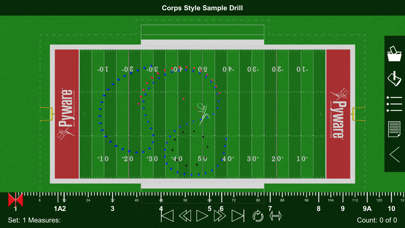
About Pyware 3D Viewer
The description on the store listing
Pyware 3D Viewer allows you to take your Pyware 3D® drills anywhere! Designed for both instructors and performers, our Pyware 3D Viewer app eliminates the need to print anything.
You’ll see your drills animate the way they were intended, because Pyware 3D Viewer actually opens Pyware 3D® files! Floats, Follow-The-Leaders, and curved pathways all animate flawlessly whether you’re watching the playback animation in fluid or step-time.
Seamlessly retrieve file updates with the press of a button. View both Production Sheet and Text Box instruction information. Open drill files for any venue: football fields, gymnasiums, parade routes; if you can design it in Pyware 3D®, you can open it in …
Read the full description
Pyware 3D Viewer allows you to take your Pyware 3D® drills anywhere! Designed for both instructors and performers, our Pyware 3D Viewer app eliminates the need to print anything. You’ll see your drills animate the way they were intended, because Pyware 3D Viewer actually opens Pyware 3D® files! Floats, Follow-The-Leaders, and curved pathways all animate flawlessly whether you’re watching the playback animation in fluid or step-time. Seamlessly retrieve file updates with the press of a button. View both Production Sheet and Text Box instruction information. Open drill files for any venue: football fields, gymnasiums, parade routes; if you can design it in Pyware 3D®, you can open it in Pyware 3D Viewer! Feature List -Open Pyware 3D® mobile drill files (.3da) -Files can be accessed from cloud storage services by entering a download link or scanning a QR code from within the app -Pinch zoom, rotate, tilt and shift to view the drill from any angle -Animation shows true pathways for all performers -Fluid or step-time animation -Up to 8x animation speed -Repeat and Play All animation controls -Count Track that allows you to stop and view any count of drill -View entire Production Sheet and Text Box instructions -Search for performers in the drill’s Cast List -Switch between ensemble view and performer view -See detailed performer coordinate instructions on any count of the drill -Spotlight an individual performer -Switch between 3D’s surfaces, flat color, and high contrast for the performance area -Loads grids for any performance area (fields, gyms, streets, stages, etc.) -Toggle step grid on/off -Easily refresh drill files to download the latest changes Compatible with Pyware 3D version 8 or greater.
Installs since 29 Aug 2026
Apple does not publish download counts. Estimates are in testing.
Estimated store revenue Estimated Beta
App Store, worldwide, monthly rate from the last 12 chart days to 19 Nov 2026
Below the top 100 grossing apps in the markets we calibrate. In the United States that usually means under about $6.4M a month. App Store purchases and subscriptions only, before Apple's 15 to 30% fee. Ads and web payments are not included.
Ratings
50 ratings, 50 reviews
No rating breakdown published for this app.
Recent reviews
Latest public reviews from the store
- 4 Aug 2025
College Use
I am my students have been using Pyware for the last 4 years and had great success learning our drills. Has save use many hours and minutes.
- 15 Aug 2018
OC Band approved
The O’Connor HS Band in Helotes, Texas approves and uses this app for every band show.
- 24 Jul 2018
Great app. Looking for more features
App works for what it says it does. Easily set up and adjusted for individual wants and needs. I would like to see in a future update, movement directions/pathways. In comparing with other apps, I found UDBapp has some of those features. An update that I have not seen that would be nice, is section selection. The ability to isolate specific sections would be useful.
What reviewers bring up
Topics mentioned in the latest 8 reviews, by how many reviews mention them
Liked in good reviews (3 reviews)
No topic comes up twice.
Raised in bad reviews (5 reviews)
- recent 2
- screen 2
- iphone 2
Top chart positions
Latest App Store chart ranks by country, last 10 days
- Countries ranked
- 1 of 50
- Best rank
- #45
- Top 10 placements
- 0
- of 1 chart placements
- Average rank
- #45
Best countries on App Store
- 🇳🇱 Netherlands · Top paid, Music#45
| Country | Chart | Category | Rank | Best (10 days) | Date |
|---|---|---|---|---|---|
| 🇳🇱 Netherlands | Top paid | Music | #45 | #22 | 19 Nov 2026 |
Pyware 3D Viewer history
Release, install milestones, listing and store changes
- First released on the store 28 Aug 2014
Update frequency
How often Pyware 3D Viewer ships a new version, month by month
2 updates in the last 12 months. More often than most similar apps: they shipped a median of 0 updates in the same year.
Recent versions
Current version 1.0.15
- Version 1.0.1524 Sep 2026
- Various bug fixes
- Version 1.0.145 Aug 2026
Various Bug Fixes
- Version 1.0.1023 Aug 2019
Adds step indicators along the performer pathway. Adds import option for Custom Surface. Adds Custom notes option. Adds import for custom notes. Corrects issue with camera permission.
Listing keywords
Words and phrases Pyware 3D Viewer repeats most in its store listing
Top phrases: pyware 3d (10), pyware 3d viewer (5), 3d viewer (5), drill files (3), fluid or step (2).
Highlighted words also appear in the title. Counts cover the title, short description and description.
Compliance
What the listing and the app package show
- Store status
- Live
- Upkeep
- Updated 24 Sep 2026
- Age rating
- 4+
Apps like Pyware 3D Viewer
 SynthMaster PlayerKV331 Audio★ 4.36
 Backroads & Beyond RadioJordan Boudreaux★ 4.82
 Q Country 107.1 - WSAQLiggett Communications★ 4.8
 Del Rio's Latino MixPaul Lomas★ 4.98
 Classical Music+Cedric Porter★ 4.67
 Antenne NiedersachsenDigital Media Hub GmbH★ 4.56
 Jam: Instant Song CreatorDreamWalk Mobile★ 3.73
 Reverse Singing Fun ChallengeNGUYEN QUY SON★ 4.51
 Radio UK: Live FM & DAB OnlineRoman Skripchak★ 4.73
Pyware 3D Viewer: questions and answers
Who makes Pyware 3D Viewer?
Pyware 3D Viewer is published by Pygraphics, Inc..
When was Pyware 3D Viewer last updated?
The latest version (1.0.15) was released on 24 Sep 2026.
Is Pyware 3D Viewer free?
No. Pyware 3D Viewer is a paid app priced at $2.99.
Is Pyware 3D Viewer still available?
Yes. Pyware 3D Viewer is live on App Store as of 14 Nov 2026.
Track Pyware 3D Viewer and its competitors
Watch any app for new versions, rating drops, chart moves and removals. Free plan, no card.