
- Installs
- —
- Apple does not publish download counts
- Rating
- —
- Ratings
- —
- Version
- 2.7.1
- Updated 29 Apr 2026
- Released
- 22 Apr 2018
- Tracked since 10 May 2026
- Size
- 5 MB
- Needs 12.4
Screenshots
About QR Capture
The description on the store listing
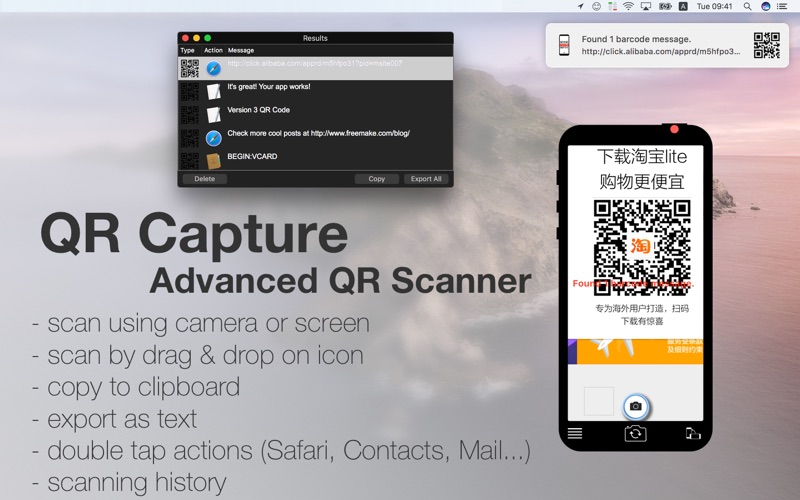
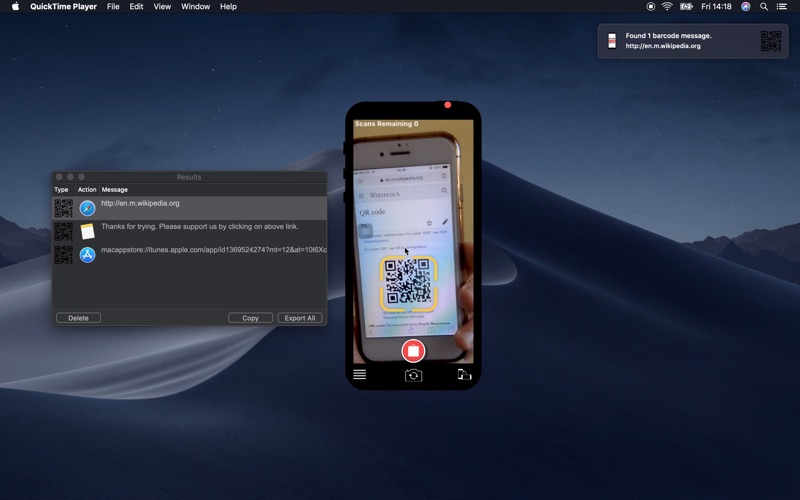
The most simple & easy QR Reader. Capture QR codes just like you would on a phone. Perfect for computer beginners. Works with iPhone & webcams (EpocCam...).
FEATURES
- Code Scanner - scans QR codes (screen, clipboard, file or camera*), scans other 2D barcodes (screen, clipboard or file)
- Drag & Drop on the app icon to scan a QR code / barcode
- Scan your clipboard for a QR code / barcode
- Full-screen barcode scanning (File-> Full-Screen scan, App Icon-> Full-Screen scan)
- Export scanned QR codes / barcodes as CSV text
- Automatic copy to clipboard (enabled in preferences )
- Quickly scan a selected area with the keyboard shortcut CMD+1 (also available from the top menu)
- Shortcuts …
Read the full description
The most simple & easy QR Reader. Capture QR codes just like you would on a phone. Perfect for computer beginners. Works with iPhone & webcams (EpocCam...). FEATURES - Code Scanner - scans QR codes (screen, clipboard, file or camera*), scans other 2D barcodes (screen, clipboard or file) - Drag & Drop on the app icon to scan a QR code / barcode - Scan your clipboard for a QR code / barcode - Full-screen barcode scanning (File-> Full-Screen scan, App Icon-> Full-Screen scan) - Export scanned QR codes / barcodes as CSV text - Automatic copy to clipboard (enabled in preferences ) - Quickly scan a selected area with the keyboard shortcut CMD+1 (also available from the top menu) - Shortcuts support - Double click to open in the corresponding app (Safari, Contacts, Mail, TextEdit, FaceTime...) - Saves all successfully scanned texts in a local database - Stage Manager ready - Keep scanning window on top of other windows (Phone->Float on Top) *(7 codes limit that can be removed using in-app) WEBCAM: - use your USB-attached webcam /iPhone or phone camera app (EpocCam) to quickly scan QR codes into your computer. Phone camera significantly improves scanning performance. IMPORTANT NOTICE: - use the button at the bottom of the screen to switch to the iSight camera. - iSight camera has no autofocus feature. It is necessary to place the QR code at the correct distance so it appears sharp. - always ensure that your room is bright to improve scanning results. Use additional light sources in semi-dark / poorly lit rooms. - iPhone as a camera requires macOS 13 Ventura, iOS 16, and iCloud. iPhone as a camera on macOS Sonoma/Ventura/Monterey requires 3rd party iOS app such as EpocCam.
Installs
Apple does not publish download counts. Estimates are in testing.
We publish iOS estimates only after they pass a back-test against real numbers. Chart history below is measured.
Estimated store revenue Estimated Beta
App Store, worldwide, monthly rate from the last 13 chart days to 20 Nov 2026
Below the top 100 grossing apps in the markets we calibrate. In the United States that usually means under about $6.4M a month. App Store purchases and subscriptions only, before Apple's 15 to 30% fee. Ads and web payments are not included.
Ratings
No rating breakdown published for this app.
Recent reviews
Latest public reviews from the store
No reviews in our sample for this app yet.
Top chart positions
Latest App Store chart ranks by country, last 10 days
Not in any tracked top chart in the last 10 days.
QR Capture history
Release, install milestones, listing and store changes
- First released on the store 22 Apr 2018
Update frequency
How often QR Capture ships a new version, month by month
1 updates in the last 12 months. About as often as similar apps, which shipped a median of 1 updates in the same year.
Recent versions
Current version 2.7.1
- Version 2.7.129 Apr 2026
NEW: - the main phone window can float on top of other windows (Top Menu → Phone → Float on Top) IMPROVED: - faster screen capture (previously, it could take up to 6 seconds if there were too many off-screen windows) FIXED: - connecting a new external display and performing a screen capture could fail in some cases (macOS 15 and later only) - File → Scan File did not work
Listing keywords
Words and phrases QR Capture repeats most in its store listing
Top phrases: qr codes (4), full screen (3), qr code (3), full screen scan (2), iphone as camera (2).
Highlighted words also appear in the title. Counts cover the title, short description and description.
Compliance
What the listing and the app package show
- Store status
- Live
- Upkeep
- Updated 29 Apr 2026
- Age rating
- 4+
Apps like QR Capture
 Library of AviationNazmi Yavuz★ 4.82
 MyNOVECNorthern Virginia Electric Cooperative★ 2.28
 打工人小组件光翔 卓★ 4.96
 TruckbaysTruckbays LLC★ 4.3
 Tornado PRO PlayerMohammed Altam★ 4.44
 VDX - Video ManagerARISEPEAK LP★ 1.74
 TV CastingZeasn Info Technology Co., Ltd.★ 1.86
 Mil-Dot BallisticsTom Holsten★ 3.82
 MySontiqSontiq, Inc.★ 2.4
QR Capture: questions and answers
Who makes QR Capture?
QR Capture is published by Marek Hrušovský.
When was QR Capture last updated?
The latest version (2.7.1) was released on 29 Apr 2026.
Is QR Capture free?
Yes. QR Capture is free to download.
Is QR Capture still available?
Yes. QR Capture is live on App Store as of 10 May 2026.
Track QR Capture and its competitors
Watch any app for new versions, rating drops, chart moves and removals. Free plan, no card.