
- Installs
- —
- Apple does not publish download counts
- Rating
- —
- Ratings
- —
- Version
- 2.1.0
- Updated 6 Dec 2023
- Released
- 22 Jun 2019
- Tracked since 10 May 2026
- Size
- 7 MB
- Needs 10.13
Screenshots



About Quick PDF Converter
The description on the store listing
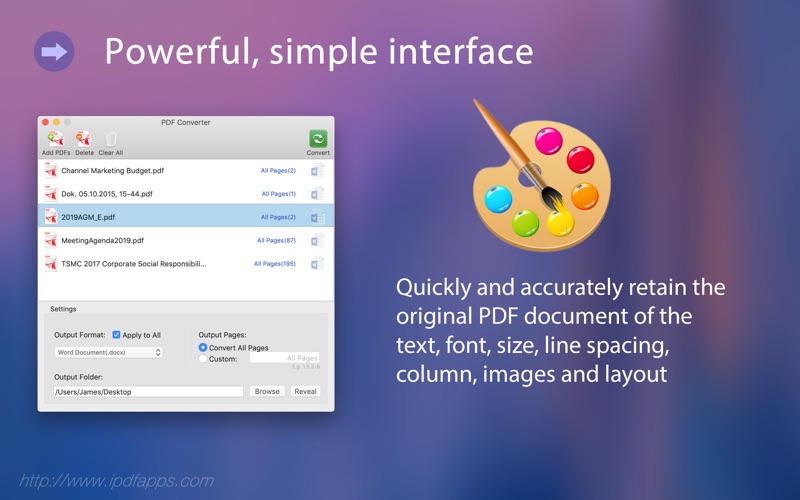
PDF Converter app is an all-in-one powerful, simple interface, easy PDF Converter software that can quickly convert to docx, pptx and xlsx file, and accurately retain the original PDF document of the text, font, size, line spacing, images, tables, columns and layout.
== This is lite version, it only convert some pages for each pdf conversion ==
The user-friendly and simple interface make it easy to operate. The fast conversion just need several seconds. After conversion, it can accurately retain the original PDF document of the text, tables, images, columns, etc. When the conversion is finished, the documents will be saved locally.
With PDF to Word Converter, Layout restore saved as …
Read the full description
PDF Converter app is an all-in-one powerful, simple interface, easy PDF Converter software that can quickly convert to docx, pptx and xlsx file, and accurately retain the original PDF document of the text, font, size, line spacing, images, tables, columns and layout. == This is lite version, it only convert some pages for each pdf conversion == The user-friendly and simple interface make it easy to operate. The fast conversion just need several seconds. After conversion, it can accurately retain the original PDF document of the text, tables, images, columns, etc. When the conversion is finished, the documents will be saved locally. With PDF to Word Converter, Layout restore saved as Word format conversion, You can easily convert a PDF to Word (.docx) format for editing and revision. With PDF to Excel Converter, Structure restore saved as Excel spreadsheet conversion, You can easily convert a PDF to Excel (.xlsx) format for editing and revision. PDF Converter not only can quickly convert PDF files into editable documents, the most important thing is that you can convert encrypted PDF to editable documents. PDF Converter is a standalone software that does not require third-party software support. Absolutely do not need Adobe Acrobat software. (This is our biggest feature). PDF Converter support Office 2008- 2019 apps, not completely compatible with iWork apps. PDF Converter support macOS 10.8 ~ 10.14 and later macOS. it has very user-friendly interface and easy to use. Very fast conversion speed and no quality is lost complete documentation, and 100% fast speed to process PDF file locally. => How to easily convert PDF to Word, Excel or PowerPoint? 1. To get started, Drag and drop PDF files to the Table. 2. Select format, Click “Convert” button on the top bar. 3. Wait until the conversion is done. That's it! => Notice This app does not support OCR, so PDF build by scanned images will be converted as image instead of editable text in Word, Excel or PowerPoint. Find More Information about this app at: http://www.iPDFApps.com/ Feel free to contact us If you have any suggestions, questions or issues at: http://www.iPDFApps.com/contact.
Installs
Apple does not publish download counts. Estimates are in testing.
We publish iOS estimates only after they pass a back-test against real numbers. Chart history below is measured.
Estimated store revenue Estimated Beta
App Store, worldwide, monthly rate from the last 14 chart days to 21 Nov 2026
Below the top 100 grossing apps in the markets we calibrate. In the United States that usually means under about $6.4M a month. App Store purchases and subscriptions only, before Apple's 15 to 30% fee. Ads and web payments are not included.
Ratings
No rating breakdown published for this app.
Recent reviews
Latest public reviews from the store
No reviews in our sample for this app yet.
Top chart positions
Latest App Store chart ranks by country, last 10 days
Not in any tracked top chart in the last 10 days.
Quick PDF Converter history
Release, install milestones, listing and store changes
- First released on the store 22 Jun 2019
Recent versions
Current version 2.1.0
- Version 2.1.06 Dec 2023
> Improve conversion quality (Table) > Fully compatible with the new macOS 14.0 now. > Bug fixes for better stability. We never prompts you for a review because we value your workflow too much to interrupt it. If you feel generous or have a couple of minutes, please leave a review. It makes a huge difference to us. Thank you in advance!
Listing keywords
Words and phrases Quick PDF Converter repeats most in its store listing
Top phrases: pdf converter (7), convert pdf (4), pdf to word (3), editing and revision (2), excel or powerpoint (2).
Highlighted words also appear in the title. Counts cover the title, short description and description.
Compliance
What the listing and the app package show
- Store status
- Live
- Upkeep
- No update since 6 Dec 2023
- Age rating
- 4+
Apps like Quick PDF Converter
 GoTime RepairAudatex North America Inc.★ 3.94
 Super VPN: Fast Private ProxyGeek Incorporated★ 4.4
 Hubtel RetailerHubtel Limited★ 4.32
 Monthly Calendar 2022 - CalistOmoboto LLC★ 4.38
 CBUS 311City of Columbus, Ohio★ 1.8
 Themes for Powerpoint - DesiGNGraphic Node★ 4.22
 iSiloDC & Co.★ 3.82
 Flashlight Pro [Multipurpose LED light]KAVAPOINT★ 3.88
 WiPryOscium LLC★ 2.68
Quick PDF Converter: questions and answers
Who makes Quick PDF Converter?
Quick PDF Converter is published by 威如 张.
When was Quick PDF Converter last updated?
The latest version (2.1.0) was released on 6 Dec 2023.
Is Quick PDF Converter free?
Yes. Quick PDF Converter is free to download.
Is Quick PDF Converter still available?
Yes. Quick PDF Converter is live on App Store as of 10 May 2026.
Track Quick PDF Converter and its competitors
Watch any app for new versions, rating drops, chart moves and removals. Free plan, no card.