
- Installs
- —
- Apple does not publish download counts
- Rating
- 3.14
- Ratings
- 29
- 29 reviews
- Version
- 7.16.0
- Updated 25 Jun 2026
- Released
- 29 Jan 2015
- Tracked since 10 May 2026
- Size
- 242 MB
- Needs 15.0
Also on Google Play: Read & Write
Screenshots






About Read&Write
The description on the store listing
Read&Write for iPad is a reading and writing app with high-quality text-to-speech, formatting controls, a wide range of fonts and styles and cloud storage integration.
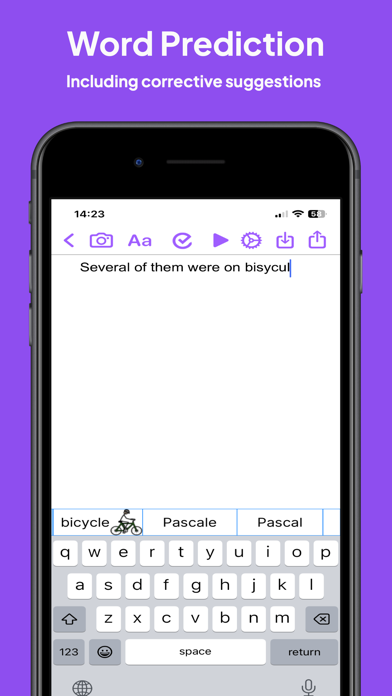
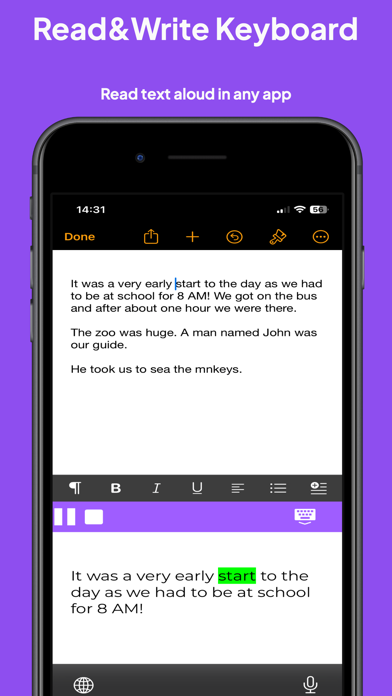
Read&Write provides visual highlighting in-sync with spoken words, a great range of colour and font settings to allow for optimum reading, and word prediction to help with writing. Read&Write is a quality app for proofreading text through listening, helping with reading and literacy development, and creating audio files from any text.
PRODUCT FEATURES
• Text-to-Speech
- Type into Read&Write and have the text read back to you. You can check text and proofread it quickly and easily.
- You can import documents into …
Read the full description
Read&Write for iPad is a reading and writing app with high-quality text-to-speech, formatting controls, a wide range of fonts and styles and cloud storage integration. Read&Write provides visual highlighting in-sync with spoken words, a great range of colour and font settings to allow for optimum reading, and word prediction to help with writing. Read&Write is a quality app for proofreading text through listening, helping with reading and literacy development, and creating audio files from any text. PRODUCT FEATURES • Text-to-Speech - Type into Read&Write and have the text read back to you. You can check text and proofread it quickly and easily. - You can import documents into Read&Write from apps such as Mail, or import directly from Dropbox, Google Drive and OneDrive.. Read&Write can open a range of document formats including Word doc, PDF and epub. - Text from any app can be copied and pasted into Read&Write ready to be read back. - Apple's speech recognition can be used to dictate text directly into Read&Write, and can be listened back to ensure it is right. - The Apple spell check works in Read&Write too, further helping accuracy. - You can save the text as an audio file using the same high-quality voice. • Word Prediction Word prediction helps with writing more quickly and accurately. • Visual Highlighting Text is highlighted as the text is read back. Highlighting allows you to coordinate reading and listening. Read&Write lets you pick the colour and style of highlighting required. There are four highlighting modes to choose from: none, word by word, word trail, or sentence by sentence highlighting. • Font & Layout Change the font type, size or colour to suit your needs. Layout the text for easier reading by adjusting the character, line and paragraph spacing and adjusting the page margins. Text can be formatted bold, italic and underlined to emphasise. Images can be inserted into the text from the camera or your library. • Save to Audio Convert any text into an audio file using any of the high-quality voices. This is quick and easy, allowing text to be listened to on the move. Great for proofreading on the go. • Share your text Text created within Read&Write can be emailed, messaged, printed, opened in another app, or copied and pasted into another app, like Safari. • Read webpages You can now read webpages in Safari and other browsers, using the "Read&Write Toolbar" extension from the share menu. * Spellcheck & Grammar check Use the Read&Write spellcheck feature that can provide you with additional word descriptions and pictures to help you find the correct word. Also included in this app is the Read&Write Keyboard app, which is a powerful keyboard replacement that works in every app. Supporting reading, writing, comprehension and vocabulary development, Read&Write provides a rich set of features which extend accessibility and provide a range of tools to help with literacy including: • Text to speech • Prediction • Dictionary / Talking dictionary • Picture Dictionary • Check It • Talk&Type (available for iOS 10 and above) • Speak as I type • OpenDyslexic font support • Language translation in Safari (French or Spanish, Locale dependent) • French language localisation The Read&Write keyboard app provides help everywhere it’s needed whether it’s working on documents, presentations, being creative or just using mail. It’s great for those with individual needs such as Dyslexia and those where English is not their first language, but it’s designed for everyone.
Installs
Apple does not publish download counts. Estimates are in testing.
We publish iOS estimates only after they pass a back-test against real numbers. Chart history below is measured.
Estimated store revenue Estimated Beta
App Store, worldwide, monthly rate from the last 12 chart days to 19 Nov 2026
Below the top 100 grossing apps in the markets we calibrate. In the United States that usually means under about $6.4M a month. App Store purchases and subscriptions only, before Apple's 15 to 30% fee. Ads and web payments are not included.
Ratings
29 ratings, 29 reviews
No rating breakdown published for this app.
Recent reviews
Latest public reviews from the store
- 11 Dec 2024
iPad.
Writhing
- 9 Feb 2021
Disappointing
I love the computer version - hoping this version would be similar but it’s missing lots of features. Was really hoping for the reader outside of Safari
- 10 Dec 2020
I wish it was available for iPhone
So I want it on my iPhone and it’s not letting me download it please make a version of this available for iPhone.
What reviewers bring up
Topics mentioned in the latest 8 reviews, by how many reviews mention them
Liked in good reviews (2 reviews)
No topic comes up twice.
Raised in bad reviews (5 reviews)
- understand 2
- computer 2
- reading 2
- worth 2
Top chart positions
Latest App Store chart ranks by country, last 10 days
Not in any tracked top chart in the last 10 days.
Read&Write history
Release, install milestones, listing and store changes
- First released on the store 29 Jan 2015
Update frequency
How often Read&Write ships a new version, month by month
3 updates in the last 12 months. More often than most similar apps: they shipped a median of 0 updates in the same year.
Recent versions
Current version 7.16.0
- Version 7.16.025 Jun 2026
This release brings major improvements to Check It, dictionary support, settings, and language coverage. * Refreshed settings experience with updated layout, icons, and clearer Check It options. * Redesigned Check It suggestions in the editor and Read&Write keyboard, with improved spacing, visuals, and easier actions for adding or ignoring words. * Check It in the editor now works as an on/off toolbar button, matching the standard Read&Write experience more closely. * Dictionary lookup is now available in the editor app. * Added support for Swedish spellcheck and dictionary lookup. * Added support for Urdu voices.
- Version 7.15.119 May 2026
Unified Read while typing settings - all read while typing settings are now available in both the Editor and Keyboard app: * Read while typing * Read sentence * Read word * Read letter name (AI voices not supported) * Read letter sound Change "use letter colors" name in keyboard to "highlight vowels" in editor settings to maintain consistency. Updated display titles in the sign in and accounts screen. Added a fallback to iOS system voices when using “Read letter names” with an AI voice selected. Fixes a bug where Read aloud continues to read even after switching to other pages. Fixes a bug where the Canadian language was loading incorrect localisation strings in the Keyboard app. Fixes a crash that could occur when importing a PDF in to Read&Write from Safari. Fixes a bug where playback would sometimes not pause correctly when speech was transitioning to the next sentence
- Version 7.15.031 Mar 2026
Added new AI text-to-speech voices for selected languages. Added word predictions for Danish, Swedish and Norwegian. Added a new live scanning feature when scanning photos: you can now choose to either have the text in the image highlighted and read aloud and/or import the scanned text as a new document. Added a new PDF open flow for better management of PDF files and directly integrates with our OrbitNote iOS app. Various bug fixes and performance improvements.
Listing keywords
Words and phrases Read&Write repeats most in its store listing
Top phrases: read write (17), text to speech (3), high quality (3), word prediction (3), copied and pasted (2).
Highlighted words also appear in the title. Counts cover the title, short description and description.
Compliance
What the listing and the app package show
- Store status
- Live
- Upkeep
- Updated 25 Jun 2026
- Age rating
- 4+
Apps like Read&Write
 Populations and Resources SimAmplify Education, Inc.★ 2.38
 Rune WriterPaul Burlov★ 4.34
 Being Moroccan ( Darija )Yasir TIRAK★ 4.56
 方格单词²上海译动智能科技有限公司★ 4.68
 Handwriting Tracing PracticeVladimir Zavada★ 4.02
 Oklahoma Learners Permit TestNilu Rathod★ 4.72
 SU CampusCharles Robinson★ 4.76
 NC CDL Permit Test PracticeNilu Rathod★ 4.82
 Mjølnir NorwegianMjølnir Learning Apps★ 4.92
Read&Write: questions and answers
Who makes Read&Write?
Read&Write is published by Everway Opco Ltd..
When was Read&Write last updated?
The latest version (7.16.0) was released on 25 Jun 2026.
Is Read&Write free?
Yes. Read&Write is free to download.
Is Read&Write still available?
Yes. Read&Write is live on App Store as of 1 Jul 2026.
Track Read&Write and its competitors
Watch any app for new versions, rating drops, chart moves and removals. Free plan, no card.