
- Installs
- —
- Apple does not publish download counts
- Rating
- —
- Ratings
- —
- Version
- 2.11.0
- Updated 1 Feb 2026
- Released
- 1 Sep 2020
- Tracked since 10 May 2026
- Size
- 5 MB
- Needs 26.0
Also on Google Play: Recordia
Screenshots

About Recordia
The description on the store listing
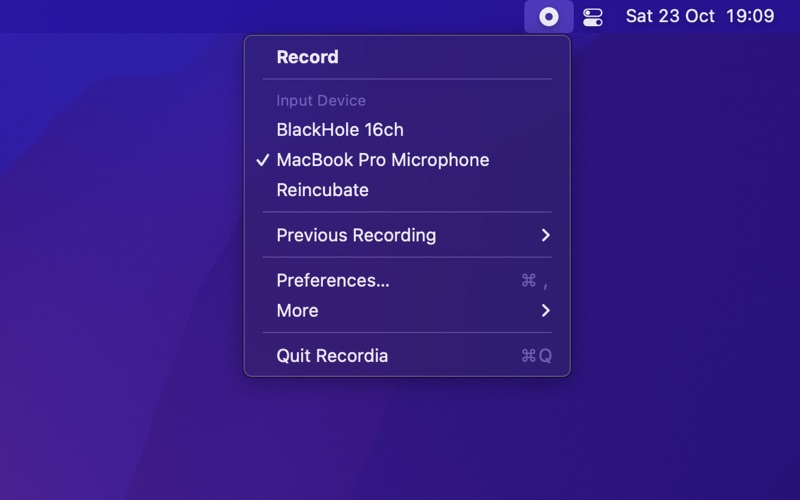
Recordia lets you record audio directly from the menu bar or with a global keyboard shortcut.
This can be useful for recording voice memos, song ideas, meetings, lectures, interviews, phone calls, voice-overs, and more.
■ Features
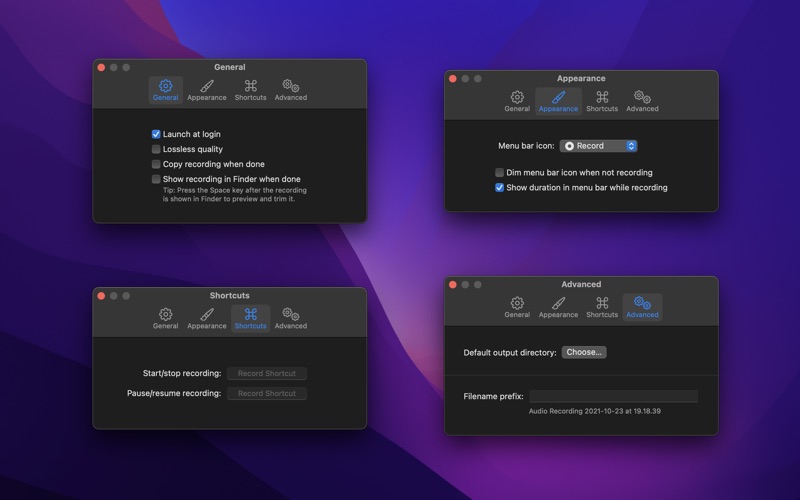
- Record compressed or lossless audio
- Customizable keyboard shortcuts to start/stop and pause/resume recording
- Change input device
- Unlimited recording duration
- Stereo
- Input monitoring
- Set default output directory
- Optionally show the recording in Finder when done
- Easily copy and share the previous recording
- Launch at login preference
- Choose between multiple menu bar icons
- Record system audio (See FAQ below)
- Shortcuts support
Technical …
Read the full description
Recordia lets you record audio directly from the menu bar or with a global keyboard shortcut. This can be useful for recording voice memos, song ideas, meetings, lectures, interviews, phone calls, voice-overs, and more. ■ Features - Record compressed or lossless audio - Customizable keyboard shortcuts to start/stop and pause/resume recording - Change input device - Unlimited recording duration - Stereo - Input monitoring - Set default output directory - Optionally show the recording in Finder when done - Easily copy and share the previous recording - Launch at login preference - Choose between multiple menu bar icons - Record system audio (See FAQ below) - Shortcuts support Technical details: It records at 48 kHz to either M4A (AAC, 256 kbps, compressed) or WAV (PCM, 16-bit, uncompressed). The recording is stereo if the input device supports it, otherwise mono. ■ FAQ ‣ How can I record system audio? Click “Record System Audio” in Recordia and follow the instructions. ‣ How can I preview the recording when done? First, ensure the “Show recording in Finder after saving” preference is enabled. When the recording is shown in Finder, press the Space key to preview it. ‣ How can I trim the recording when done? Preview the recording as described above and then click the trim button. ‣ How can I sync recordings to iCloud? Choose “iCloud Drive” as the output directory. ‣ Why 48 kHz and not 44.1 kHz? 48 kHz is the standard for audio in today's video production. It's also the internal production standard for many audio production companies. 44.1 kHz was popularized by music CDs. ■ Support Click the feedback button in the app.
Installs
Apple does not publish download counts. Estimates are in testing.
We publish iOS estimates only after they pass a back-test against real numbers. Chart history below is measured.
Estimated store revenue Estimated Beta
App Store, worldwide, monthly rate from the last 12 chart days to 19 Nov 2026
Below the top 100 grossing apps in the markets we calibrate. In the United States that usually means under about $6.4M a month. App Store purchases and subscriptions only, before Apple's 15 to 30% fee. Ads and web payments are not included.
Ratings
No rating breakdown published for this app.
Recent reviews
Latest public reviews from the store
No reviews in our sample for this app yet.
Top chart positions
Latest App Store chart ranks by country, last 10 days
Not in any tracked top chart in the last 10 days.
Recordia history
Release, install milestones, listing and store changes
- First released on the store 1 Sep 2020
Update frequency
How often Recordia ships a new version, month by month
1 updates in the last 12 months. More often than most similar apps: they shipped a median of 0 updates in the same year.
Recent versions
Current version 2.11.0
- Version 2.11.01 Feb 2026
- The app now requires macOS 26. You can get the last macOS 15 compatible version from the app's website.
Listing keywords
Words and phrases Recordia repeats most in its store listing
Top phrases: record system audio (3), record system (3), system audio (3), preview the recording (2), recording in finder (2).
Highlighted words also appear in the title. Counts cover the title, short description and description.
Compliance
What the listing and the app package show
- Store status
- Live
- Upkeep
- Updated 1 Feb 2026
- Age rating
- 4+
Apps like Recordia
 Super VPN: Fast Private ProxyGeek Incorporated★ 4.4
 Hubtel RetailerHubtel Limited★ 4.32
 Monthly Calendar 2022 - CalistOmoboto LLC★ 4.38
 Firstly: To-Do List & PlannerfocusCove LLC★ 4.7
 CBUS 311City of Columbus, Ohio★ 1.8
 Themes for Powerpoint - DesiGNGraphic Node★ 4.22
 iSiloDC & Co.★ 3.82
 Flashlight Pro [Multipurpose LED light]KAVAPOINT★ 3.88
 WiPryOscium LLC★ 2.68
Recordia: questions and answers
Who makes Recordia?
Recordia is published by Sindre Sorhus.
When was Recordia last updated?
The latest version (2.11.0) was released on 1 Feb 2026.
Is Recordia free?
No. Recordia is a paid app.
Is Recordia still available?
Yes. Recordia is live on App Store as of 10 May 2026.
Track Recordia and its competitors
Watch any app for new versions, rating drops, chart moves and removals. Free plan, no card.