
- Installs
- —
- Apple does not publish download counts
- Rating
- 4.44
- Ratings
- 2.7K
- 2.7K reviews
- Version
- 5.3.0
- Updated 19 Jun 2026
- Released
- 17 May 2015
- Tracked since 11 May 2026
- Size
- 25 MB
- Needs 11.0
Screenshots
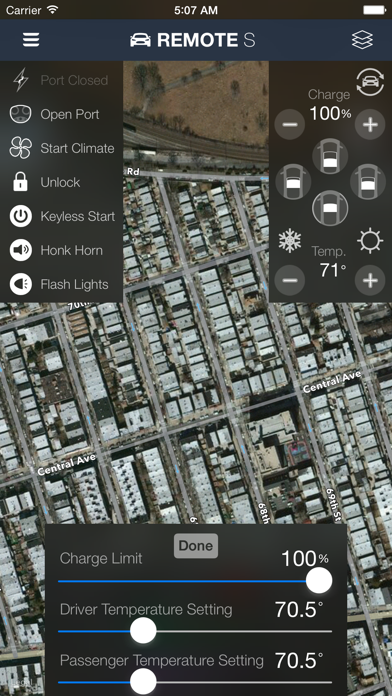
About Remote for Tesla
The description on the store listing
Add Apple Watch & Siri/Shortcut support to your Tesla vehicle
- Very reliable Siri & Shortcuts support that works even if the car is asleep. Control and get your car stats on the watch or phone without opening the app. You can combine/schedule/automate commands based on triggers/conditions such as when you're driving, if your charging cable isn't plugged in, when you're sleeping, when you're about to go to work, when you're connected to certain Bluetooth or WiFi connections, when you tap a NFC tag, when your alarm goes off, or a certain time each day. Add Shortcuts as icons on your home screen or widgets for quick access to your car's stats or to control it.
- Fully functional Apple Watch …
Read the full description
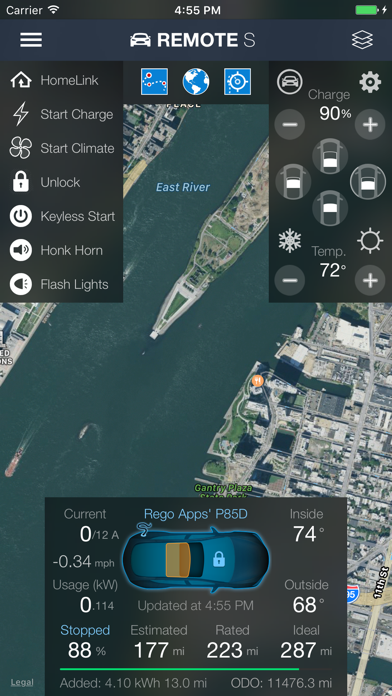
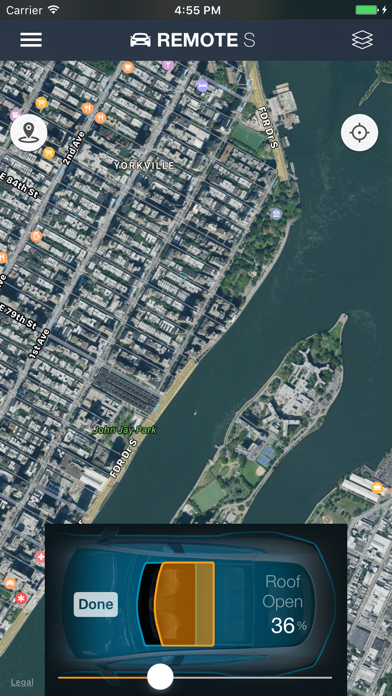
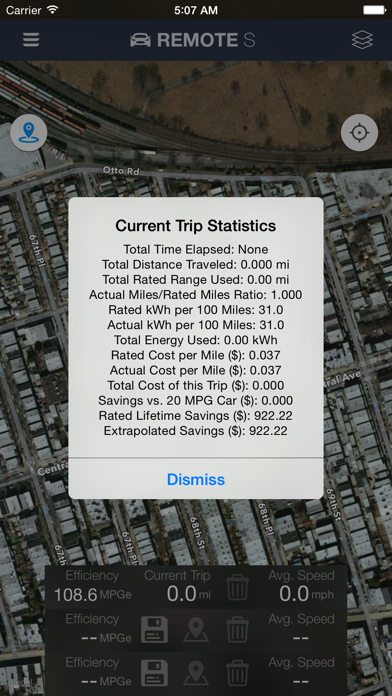
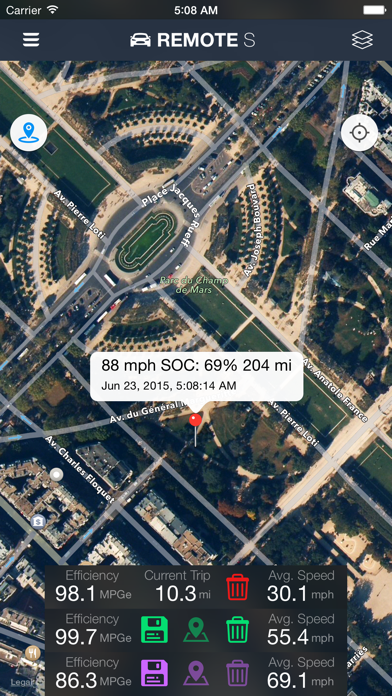
Add Apple Watch & Siri/Shortcut support to your Tesla vehicle - Very reliable Siri & Shortcuts support that works even if the car is asleep. Control and get your car stats on the watch or phone without opening the app. You can combine/schedule/automate commands based on triggers/conditions such as when you're driving, if your charging cable isn't plugged in, when you're sleeping, when you're about to go to work, when you're connected to certain Bluetooth or WiFi connections, when you tap a NFC tag, when your alarm goes off, or a certain time each day. Add Shortcuts as icons on your home screen or widgets for quick access to your car's stats or to control it. - Fully functional Apple Watch app with vehicle stats complications - Opens, connects, and issues commands faster than other Tesla apps - Queued commands. You can close the app after issuing a few commands even if your car is asleep and it'll still do them. - View your battery stats such as the current/total usable kWh of your car compared to the stated capacity, how much phantom drain your car currently has, and a history of your car's range vs its odometer/time. - Display battery/power usage even when not charging - No phantom drain or background usage. This app doesn't use your car's batteries when the app isn't in use. - See the total miles/kWh added from the last charge session - Estimated range is displayed (this estimates your battery range based on your past 30 miles of usage) - Consolidated stats and commands into one screen for quicker access to information. View all three ranges (estimated, rated, ideal/typical, odometer) at the same time and up to the nearest 1/100th mi/km - See and copy the raw vehicle data returned by Tesla's API servers - 3D Touch menu for quick commands from the Home Screen - Use HomeLink or Summon your car when not near it and without continuous press needed (autopilot required). Activate keyless start prior to Summon to avoid needing a keyfob nearby. - Avoid idle fees from Tesla by setting an in-app alarm that alerts you when charging reaches a certain kW or % level - Camp/Dog Mode allows you to keep the HVAC on in the car even though there is no activity. Normally, the car will turn off HVAC after 30 minutes. - View how many range miles are being used per hour - Use the remotes:// URL schema with parameters to issues commands - Max cool and Max heat buttons to quickly send multiple commands to your car to optimize cooling and heating - No-Commands Mode lets you log in the app for your family/friends to monitor your Tesla's location without allowing them to control to your car - Breadcrumb tracking allows you to see the path that the car has recently taken - Trip statistics shows your current MPGe, kWh used, miles traveled, kWh per 100 miles, cost savings vs. an internal combustion engine car, cost savings over the car's lifetime, and many more fun stats - Save trip routes to different save slots and compare the distance, kWh used, cost, and more for each route - In-app browser can detect commands from javascript so that you can create scheduled, queued or repeated commands - Ability to change passenger and driver temperature separately Privacy/Security notice: This app only communicates directly to Tesla's servers when sending login credentials and commands. No identifying information is stored by our company. Disclaimer: This software and documentation do not come from nor is endorsed by Tesla Inc. Use this app at your own risk. The author does not guarantee its proper functioning. Some features require certain vehicle options to work (e.g. HomeLink/Summon require the autopilot options enabled). This app attempts to use the same interface used by the official Tesla apps. However, you are responsible for any changes to your car caused by using this app. Use of this app can move or change settings to your car and we are not liable for any damages to you, your car or any other object in conjunction with the use of this app.
Installs, last 30 days
Apple does not publish download counts. Estimates are in testing.
Estimated store revenue Estimated Beta
App Store, worldwide, monthly rate from the last 13 chart days to 20 Nov 2026
Below the top 100 grossing apps in the markets we calibrate. In the United States that usually means under about $6.4M a month. App Store purchases and subscriptions only, before Apple's 15 to 30% fee. Ads and web payments are not included.
Ratings
2,746 ratings, 2,746 reviews
No rating breakdown published for this app.
Recent reviews
Latest public reviews from the store
- 19 Apr 2022
Great with Apple Shortcuts app
This app does what you would expect from the official Tesla app. It provides support for the Apple Watch, which may not sound that exciting, however this combined with support for the Apple Shortcuts app means that you can write some useful shortcuts and then run them with Siri. For example, you can write shortcuts like: “Hey Siri, open my trunk”. Think of having your hands full in the parking lot and trying to open the trunk. Or… “Hey Siri, set charge limit to 80 percent”. Or to 100 percent for that big trip later. Better tell Siri now while you’re thinking about it. “Hey Siri, is my car locked”? “Hey Siri, lock my car” For the shortcuts to run, you will need to wait for the Tesla to wake up, if it isn’t already, so don’t expect to get to your car and ask Siri to open trunk and it will immediately occur. Instead do it as you are walking to the car. Or just run another shortcut to wake up your Tesla a short time before. Like “Hey Siri, what’s the temperature in my car”. These shortcuts are not included with this app, but writing your own is not that difficult if you’re into this kind of thing. If you had problems with this in the past,
- 29 Sep 2020
Almost there
I like the app. It’s much easier to use in a lot of ways then Tesla‘s application. But there’s one problem. Using on with this app, you can’t just sit down in your car and drive away. I find myself having to hit the “keyless entry “button on the iPhone app. That is, I have to pull out the iPhone app and switch to thr “Remote for Tesla” app in order to drive the car. The primary use case for having an app at all is to be able to sit in the car and drive away without having to do anything extra. So, I ask the developers to change this app so that we can just drive away with it running and not need to run Tesla’s app too.
- 27 Oct 2019
Update: User error. The app is actually great
Update: I stand corrected. I was simply wrong. After playing more with the Apple Watch app it does do everything I was hoping it would do. It is indispensable now and perfect. I can control nearly every function of my tesla from my watch so it saves a lot of time. No complaints. Previous update: Developer responded. Unfortunately upon pressing on the screen I am still not able to see more than 4 options per screen on my watch and of those only the first 4 options in the first screen are related to controls for things like charging. This makes it hard to add value as I need to pull my phone for nearly everything. Putting 2 stars. Also requested access to the developer forum so that I can bring concerns but still have not been granted access. If I get it and can get this resolved I will be happy to upgrade the stars. Want more features for your phone then great. Want more features for your Apple Watch then forget it. You get fewer than almost any other app. I purchased one for 2.99 that I have defaulted back to as this one does not even open up the charging port. Essentially it only has 4 controls.
- 9 Jan 2019
Tesla should buy this - slick interface.
Slick app for Tesla which duplicates and adds to the function of the official Tesla App, including Apple Watch integration which is really cool. Also works with Apple Shortcuts Functions include: start car, unlock car, start HVAC, open charge port, change charge limit, adjust temperature, open/close pano roof (not tested), honk horn and flash lights. Can geo-locate vehicle and gives info on inside temperature, outside temperature, charge status, estimated, rated and ideal miles. Looks like you can also enter more than one vehicle (I only have one Tesla!) Click ‘Remotes’ on the main page to get to the web browser where you can apparently add some additional commands with a custom webpage.
What reviewers bring up
Topics mentioned in the latest 8 reviews, by how many reviews mention them
Liked in good reviews (6 reviews)
- tesla 5
- apple watch 4
- charge 4
- car 4
- official 3
- function 3
- open 3
- add 3
Raised in bad reviews (2 reviews)
- opening 2
- through 2
- trunk 2
- press 2
- opens 2
Top chart positions
Latest App Store chart ranks by country, last 10 days
- Countries ranked
- 24 of 50
- Best rank
- #19
- Top 10 placements
- 0
- of 24 chart placements
- Average rank
- #54.5
Best countries on App Store
- 🇫🇮 Finland · Top paid, Lifestyle#19
- 🇳🇴 Norway · Top paid, Lifestyle#24
- 🇭🇰 Hong Kong SAR China · Top paid, Lifestyle#26
- 🇵🇹 Portugal · Top paid, Lifestyle#28
- 🇧🇪 Belgium · Top paid, Lifestyle#33
- 🇳🇱 Netherlands · Top paid, Lifestyle#37
| Country | Chart | Category | Rank | Best (10 days) | Date |
|---|---|---|---|---|---|
| 🇫🇮 Finland | Top paid | Lifestyle | #19 | #19 | 20 Nov 2026 |
| 🇳🇴 Norway | Top paid | Lifestyle | #24 | #21 | 20 Nov 2026 |
| 🇭🇰 Hong Kong SAR China | Top paid | Lifestyle | #26 | #22 | 20 Nov 2026 |
| 🇵🇹 Portugal | Top paid | Lifestyle | #28 | #26 | 20 Nov 2026 |
| 🇧🇪 Belgium | Top paid | Lifestyle | #33 | #32 | 20 Nov 2026 |
| 🇳🇱 Netherlands | Top paid | Lifestyle | #37 | #36 | 20 Nov 2026 |
| 🇹🇼 Taiwan | Top paid | Lifestyle | #39 | #39 | 20 Nov 2026 |
| 🇩🇰 Denmark | Top paid | Lifestyle | #40 | #32 | 20 Nov 2026 |
| 🇭🇺 Hungary | Top paid | Lifestyle | #45 | #44 | 20 Nov 2026 |
| 🇦🇹 Austria | Top paid | Lifestyle | #46 | #44 | 20 Nov 2026 |
Remote for Tesla history
Release, install milestones, listing and store changes
- First released on the store 17 May 2015
Update frequency
How often Remote for Tesla ships a new version, month by month
1 updates in the last 12 months. Less often than most similar apps: they shipped a median of 7 updates in the same year.
Recent versions
Current version 5.3.0
- Version 5.3.019 Jun 2026
Fixed an issue for some users who were unable to log into the app. Keyless start now no longer requires a password.
- Version 5.2.016 Jul 2024
Bug fixes for the new API changes
Listing keywords
Words and phrases Remote for Tesla repeats most in its store listing
Top phrases: car is asleep (2), apple watch (2), cost savings (2), home screen (2), issues commands (2).
Highlighted words also appear in the title. Counts cover the title, short description and description.
Compliance
What the listing and the app package show
- Store status
- Live
- Upkeep
- Updated 19 Jun 2026
- Age rating
- 4+
Apps like Remote for Tesla
 M.Connected Home™Meritage Homes®★ 4.46
 小米音箱Beijing Xiaomi Co., Ltd★ 4.63
 WallpaperWiz -Nice WallpapersEagleStudio★ 4.63
 DoubleList - Casual EncountersDoublelist★ 4.59
 Bird Identifier: BirdScopeUnchained Mind★ 4.7
 4Plan Home & Interior PlannerAlatona★ 4.58
 Vision Board ++ Maker ManifestHero21★ 4.86
 TULU - Own Less, Live MoreTULOU LTD★ 4.84
 NooieNooie Inc.★ 4.48
Remote for Tesla: questions and answers
Who makes Remote for Tesla?
Remote for Tesla is published by Rego Apps.
When was Remote for Tesla last updated?
The latest version (5.3.0) was released on 19 Jun 2026.
Is Remote for Tesla free?
No. Remote for Tesla is a paid app priced at $24.99.
Is Remote for Tesla still available?
Yes. Remote for Tesla is live on App Store as of 20 Nov 2026.
Track Remote for Tesla and its competitors
Watch any app for new versions, rating drops, chart moves and removals. Free plan, no card.