
- Installs
- —
- Apple does not publish download counts
- Rating
- 2.91
- Ratings
- 11
- 11 reviews
- Version
- 4.0.1
- Updated 5 May 2025
- Released
- 10 Feb 2023
- Tracked since 10 May 2026
- Size
- 30 MB
- Needs 17.0
Screenshots


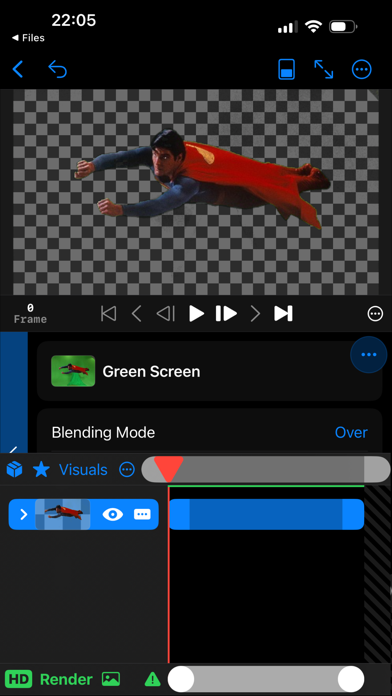


About Render - Video Composer
The description on the store listing
Render compositions with layered videos, images, audio, visuals and effects.
Import and export 3D spatial photos and video.
Import media (images, videos, GIFs, SVGs, image sequences and RAW footage) from Photos and Files.
A sequence is defined by a folder of images, each image is a frame of a video.
Visuals: shapes (rectangle, circle, capsule, star, polygon, arc, line) and solids (color, noise, gradient).
Create an adjustment layer to apply effects to all underlying layers.
Effects: levels (brightness, contrast, invert), color shift (hue, saturation), blur, transform, kaleidoscope, corner pin, chroma key (green screen).
Effect packs: funny mirror, glitch, CRT, smoke, vignette.
Mask, …
Read the full description
Render compositions with layered videos, images, audio, visuals and effects. Import and export 3D spatial photos and video. Import media (images, videos, GIFs, SVGs, image sequences and RAW footage) from Photos and Files. A sequence is defined by a folder of images, each image is a frame of a video. Visuals: shapes (rectangle, circle, capsule, star, polygon, arc, line) and solids (color, noise, gradient). Create an adjustment layer to apply effects to all underlying layers. Effects: levels (brightness, contrast, invert), color shift (hue, saturation), blur, transform, kaleidoscope, corner pin, chroma key (green screen). Effect packs: funny mirror, glitch, CRT, smoke, vignette. Mask, displace or luma blur a layer with another layer. Blending modes: add, subtract, multiply, divide, screen, lighten, darken, minimum, maximum, gamma, power and difference. Timeline features: - Snapping of layers while dragging. - Keyframe properties with bezier curves. - Motion blur with blending modes. - Pre-compose layers. - Split layers. - Time remap. Zoom in to pixel level to inspect your graphics. Write expressions for any property. Import and export LUTs in the .cube format. There are rendered previews of visuals, blending modes, effects and samples. Samples is a way to visualize what the composition will look like for a property at different values. The render engine caches all played frames, so re-playing is quicker. Caches frames are indicated by a green bar in the top of the timeline. Render out a still frame as image, render a region or the full composition as a video or image sequence. Projects are saved in Files and media is bundled in the project file. XDR display support. Create graphics in high color depth (16bit & 32bit). Export video in h264 and ProRes on supported devices. Audio is supported.
Installs
Apple does not publish download counts. Estimates are in testing.
We publish iOS estimates only after they pass a back-test against real numbers. Chart history below is measured.
Estimated store revenue Estimated Beta
App Store, worldwide, monthly rate from the last 14 chart days to 21 Nov 2026
Below the top 100 grossing apps in the markets we calibrate. In the United States that usually means under about $6.4M a month. App Store purchases and subscriptions only, before Apple's 15 to 30% fee. Ads and web payments are not included.
Ratings
11 ratings, 11 reviews
No rating breakdown published for this app.
Recent reviews
Latest public reviews from the store
No reviews in our sample for this app yet.
Top chart positions
Latest App Store chart ranks by country, last 10 days
Not in any tracked top chart in the last 10 days.
Render - Video Composer history
Release, install milestones, listing and store changes
- First released on the store 10 Feb 2023
Recent versions
Current version 4.0.1
- Version 4.0.15 May 2025
Spatial Video Export Fix
Listing keywords
Words and phrases Render - Video Composer repeats most in its store listing
Top phrases: blending modes (3), import and export (2).
Highlighted words also appear in the title. Counts cover the title, short description and description.
Compliance
What the listing and the app package show
- Store status
- Live
- Upkeep
- Updated 5 May 2025
- Age rating
- 4+
Apps like Render - Video Composer
 Video CollageaZeR DiLLs★ 4.08
 Vee for VideoMedious★ 2.98
 Beauty Camera -Selfie, StickerBhuvan Gupta★ 4.5
 FinalCamXShenzhen Xiaozhen Technology Co.,Ltd.★ 4.44
 Magic Studio - AI Photo EditorMagicStudio.com★ 4.62
 Foto Impresiones: 1 Hr PhotoSoftwareX★ 4.98
 SnapGeo - AI Location FinderRECEP ASLAN★ 4.24
 Family Photo Maker - AIRick-y Media★ 4.12
 BeautifAI: AI Try OnJAI UYGULAMA VE YAPAY ZEKA TEKNOLOJILERI ANONIM SIRKETI★ 4.36
Render - Video Composer: questions and answers
Who makes Render - Video Composer?
Render - Video Composer is published by Anton Heestand.
When was Render - Video Composer last updated?
The latest version (4.0.1) was released on 5 May 2025.
Is Render - Video Composer free?
Yes. Render - Video Composer is free to download.
Is Render - Video Composer still available?
Yes. Render - Video Composer is live on App Store as of 1 Jul 2026.
Track Render - Video Composer and its competitors
Watch any app for new versions, rating drops, chart moves and removals. Free plan, no card.