
- Installs
- —
- Apple does not publish download counts
- Rating
- 4.04
- Ratings
- 10.1K
- 10.1K reviews
- Version
- 4.64.3
- Updated 27 Oct 2026
- Released
- 6 Jun 2015
- Tracked since 10 May 2026
- Size
- 508 MB
- Needs 15.1
Also on Google Play: Reolink (42.9K ratings)
Screenshots



About Reolink
The description on the store listing
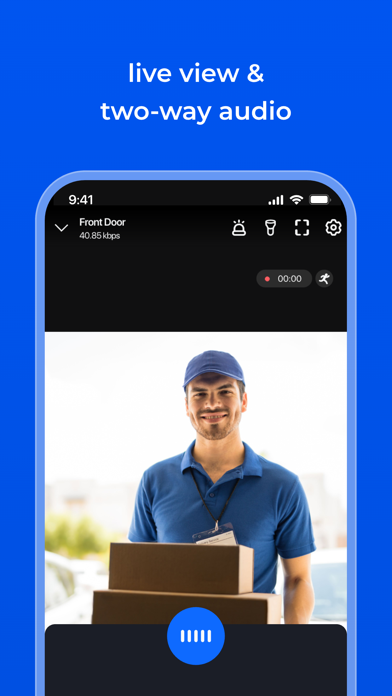
Reolink App is an easy-to-use security camera system surveillance app. It enables you to locally or remotely access your IP cameras and NVRs on mobile devices. You can monitor and watch live streaming of your home and business anywhere and anytime. It helps you easily get peace of mind.
Key Features:
1. Only 3 steps to access cameras and NVRs (at the same local network) --- the easiest solution ever.
2. Easy and friendly interface for all users to use.
3. Remotely monitor and watch live streaming via 3G/4G or WiFi anywhere and anytime.
4. Multi-channel viewing (up to 16 channels) on screen at the same time.
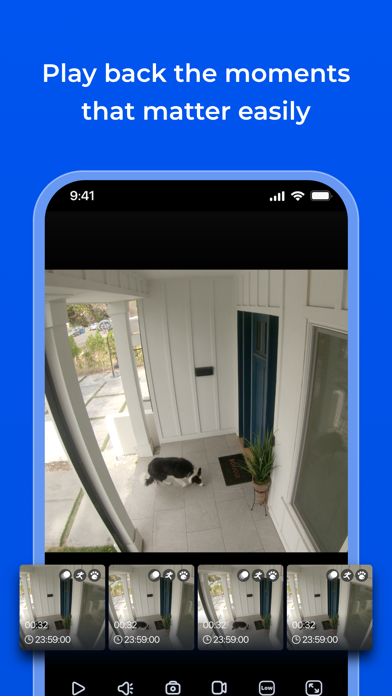
5. Remotely playback video recording from your camera SD card and NVR HDD.
6. …
Read the full description
Reolink App is an easy-to-use security camera system surveillance app. It enables you to locally or remotely access your IP cameras and NVRs on mobile devices. You can monitor and watch live streaming of your home and business anywhere and anytime. It helps you easily get peace of mind. Key Features: 1. Only 3 steps to access cameras and NVRs (at the same local network) --- the easiest solution ever. 2. Easy and friendly interface for all users to use. 3. Remotely monitor and watch live streaming via 3G/4G or WiFi anywhere and anytime. 4. Multi-channel viewing (up to 16 channels) on screen at the same time. 5. Remotely playback video recording from your camera SD card and NVR HDD. 6. Capture video from live view channels on your mobile device to playback. 7. Capture single and multiple images to save on your mobile device. 8. Get emails or push notifications in real time when motion detection is triggered. 9. Schedule video recording (including motion-triggered recording) at anytime. 10. Control PTZ (pan-tilt-zoom) cameras remotely (left, right, up and down). Note: Reolink App is compatible with NVRs and IP Cams from Reolink. More Supports: Facebook: https://www.facebook.com/ReolinkTech/ Twitter: https://twitter.com/ReolinkTech Contact: https://reolink.com/contact-us/ YouTube: https://www.youtube.com/channel/UCEHKZX6fFVtWd4tnnRkzrMA
Installs, last 30 days
Apple does not publish download counts. Estimates are in testing.
Estimated store revenue Estimated Beta
App Store, worldwide, monthly rate from the last 12 chart days to 19 Nov 2026
Below the top 100 grossing apps in the markets we calibrate. In the United States that usually means under about $6.4M a month. App Store purchases and subscriptions only, before Apple's 15 to 30% fee. Ads and web payments are not included.
Ratings
10,101 ratings, 10,101 reviews
No rating breakdown published for this app.
Recent reviews
Latest public reviews from the store
- 10 May 2026
Latest app update broke single camera view
Hello the latest update for me on multiple iPhones has been a pain. I used to be able to load the app and click a camera see a live feed. Right now it doesn’t work. I’ve reset my home network , and also the cameras themselves. The pc app works flawless on desktop for single view but on iOS since last week I updated I can’t click a single camera and watch the feed. It states connect, starting live viewing , connects but endlessly buffers loading stream. I can hear sound and see I’m connected at around 4800kbps. I have 4 cameras this is on the same WiFi network and via 5guw either way it doesn’t display. I can hear audio however. If I click on the 4 view pane and then select 4 view/multiview again all the cameras instantly connect and display on both networks. I can then select a single camera view to view that specific feed. Again it doesn’t load a single view camera feed any longer when launching the app unless I select multi pane view. Please fix the app or reach out to me via email to troubleshoot I have spent around 1500$ on these lovely cameras.
- 25 Mar 2025
Very customizable
This isn’t your everyday surveillance system—it’s a breath of fresh air for anyone tired of clunky, one-size-fits-all security setups. Right out of the box, it’s incredibly user-friendly, making it easy for beginners to get started, yet it’s packed with customization options that let you tailor it to your exact needs. One standout feature? The ability to fine-tune alerts. If you’re drowning in notifications, you can adjust settings like object size or rely on the smart AI built into both the software and cameras to filter out the noise. It’s a system that adapts to you, not the other way around, striking a rare balance of simplicity and sophistication for tech newbies and control freaks alike. That said, the hardware consistency leaves something to be desired. I had two identical cameras running the same software, and their PTZ (pan-tilt-zoom) performance didn’t match up. One camera tracked only horizontally, which is what I expected based on the specs. But the other? It unexpectedly tracked both horizontally and vertically—a feature I actually loved, even though it wasn’t supposed to do that. I was thrilled with the added vertical tracking, but also a little d
- 9 Nov 2024
Motion filter updates made this worse
The new version of the app that filters playback motion by type has made this so much less usable. First, now I have to check boxes and then hit OK in order to filter, whereas I could simply tap the icons and it automatically filtered in the old version. Two steps note when it used to be one. Then the worst part is that in the old version when I had filtered to just people or vehicles I could quickly find an event, but then while reviewing just the short clip of the event could unfiltere while watching the video and it would take me to the larger 30 min clip. The motion detection isn’t perfect and so often it would cut an event off before it actually completed and I will need to see a bit before or after the motion capture event. And again, this new version makes that much more difficult. As now. I need to completely remove the filter and then go find the event again by time. This is a great example of a programmer or designer not actually using the app that they’re developing and reducing usability in favor of a change that perhaps looks nicer, but is way less functional. Please revert to the old filtering method or revise the new filtering method to allow to get back t
- 28 Jul 2023
1 step forward, 2 steps back
// === July 2023 === The main issue from March seems to be fixed now. However one of the recent versions introduced a new problem: Loading camera streams are SLOW. Before, I could open the app and within a second or two all four cameras are streaming the live view. Now, loading even a single cam takes on the order of 10 seconds before I get a picture. If I remain in the app, subsequent views seem to load quickly like before, but if the app has been in the background and I respond to a motion detection notification, the ~10 second wait is unacceptable as whatever triggered the detection has moved on. // === March 2023 === The recent UI overhaul (March 2023) brought about undesirable functionality: In 4-cam mode, double tapping one of the cameras enters single-cam mode for the double tapped cam. Previously, this action would open the single-cam with the last used quality setting for that cam (for me, high/clear most of the time). Now, this action always opens single-cam mode with low/fluent quality setting. I presume single-cam view is maintaining the quality setting from 4-cam view, which forces all four cams to low anyway. When one of the four cams is double tapped the transition
What reviewers bring up
Topics mentioned in the latest 8 reviews, by how many reviews mention them
Liked in good reviews (5 reviews)
- playback 3
- cameras 3
- other 3
- both 3
- see 3
- live viewing 2
- completely 2
- difficult 2
Raised in bad reviews (1 reviews)
No topic comes up twice.
Top chart positions
Latest App Store chart ranks by country, last 10 days
- Countries ranked
- 10 of 50
- Best rank
- #26
- Top 10 placements
- 0
- of 10 chart placements
- Average rank
- #73.1
Best countries on App Store
- 🇦🇹 Austria · Top free, Utilities#26
- 🇩🇪 Germany · Top free, Utilities#49
- 🇨🇭 Switzerland · Top free, Utilities#64
- 🇦🇺 Australia · Top free, Utilities#75
- 🇮🇪 Ireland · Top free, Utilities#76
- 🇫🇮 Finland · Top free, Utilities#78
| Country | Chart | Category | Rank | Best (10 days) | Date |
|---|---|---|---|---|---|
| 🇦🇹 Austria | Top free | Utilities | #26 | #18 | 19 Nov 2026 |
| 🇩🇪 Germany | Top free | Utilities | #49 | #27 | 19 Nov 2026 |
| 🇨🇭 Switzerland | Top free | Utilities | #64 | #43 | 19 Nov 2026 |
| 🇦🇺 Australia | Top free | Utilities | #75 | #74 | 19 Nov 2026 |
| 🇮🇪 Ireland | Top free | Utilities | #76 | #76 | 14 Nov 2026 |
| 🇫🇮 Finland | Top free | Utilities | #78 | #52 | 18 Nov 2026 |
| 🇳🇴 Norway | Top free | Utilities | #82 | #59 | 19 Nov 2026 |
| 🇳🇱 Netherlands | Top free | Utilities | #89 | #89 | 14 Nov 2026 |
| 🇧🇪 Belgium | Top free | Utilities | #94 | #64 | 19 Nov 2026 |
| 🇳🇿 New Zealand | Top free | Utilities | #98 | #60 | 19 Nov 2026 |
Reolink history
Release, install milestones, listing and store changes
- First released on the store 6 Jun 2015
Update frequency
How often Reolink ships a new version, month by month
7 updates in the last 12 months. More often than most similar apps: they shipped a median of 2 updates in the same year.
Recent versions
Current version 4.64.3
- Version 4.64.327 Oct 2026
1. Added support for iPhone Duo, including basic features such as live view and playback. 2. Optimized the landscape mode on iPad, with support for all four orientations and Picture-in-Picture display. 3. Added a confirmation prompt when manually activating the Siren to prevent unexpected loud sounds.
- Version 4.62.027 Aug 2026
[0ther] Bugs fixed and user experience improved
- Version 4.61.028 Jul 2026
【Other】Bugs fixed and user experience improved
- Version 4.60.416 Jun 2026
【Other】Bugs fixed and user experience improved
Listing keywords
Words and phrases Reolink repeats most in its store listing
Top phrases: anywhere and anytime (2), cameras and nvrs (2), monitor and watch (2), watch live streaming (2), live streaming (2).
Highlighted words also appear in the title. Counts cover the title, short description and description.
Compliance
What the listing and the app package show
- Store status
- Live
- Upkeep
- Updated 27 Oct 2026
- Age rating
- 4+
Apps like Reolink
 MyLebaraLebara Media Services★ 4.64
 Find My iPhoneApple★ 4.15
 LogTen Pilot LogbookCoradine Aviation Systems★ 4.66
 Translate AI Pocket TranslatorHeavy Plumb Apps, SOCIEDAD LIMITADA★ 4.54
 VPN iNinja - Fast & UnlimitediNinja VPN★ 4.71
 InCalc海斌 焦★ 4.73
 CalculatorApple★ 3.06
 TranslateApple★ 2.35
 Snap & Translate - TranslatorApalon Apps★ 4.5
Reolink: questions and answers
Who makes Reolink?
Reolink is published by Reolink Digital Technology Co., Ltd.
When was Reolink last updated?
The latest version (4.64.3) was released on 27 Oct 2026.
Is Reolink free?
Yes. Reolink is free to download.
Is Reolink still available?
Yes. Reolink is live on App Store as of 19 Nov 2026.
Track Reolink and its competitors
Watch any app for new versions, rating drops, chart moves and removals. Free plan, no card.