
- Installs
- —
- Apple does not publish download counts
- Rating
- 4.74
- Ratings
- 18.7K
- 18.7K reviews
- Version
- 7.06
- Updated 25 Jul 2026
- Released
- 1 May 2020
- Tracked since 11 May 2026
- Size
- 179 MB
- Needs 16.6
Also on Google Play: Retouch AI - Remove Objects
Screenshots


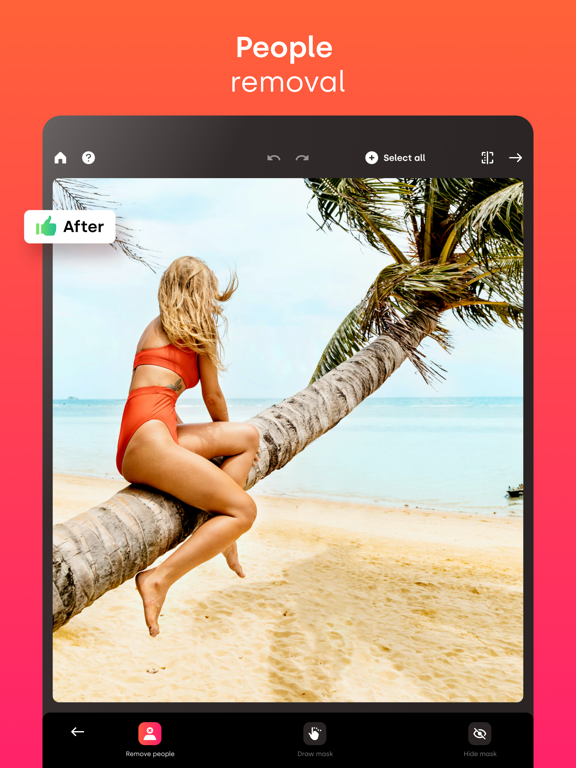


About Retouch AI - Remove Objects
The description on the store listing
Tired of being photobombed? Thinking about getting rid of some imperfections in the background of the photo but don’t know how? Need to erase unwanted objects from your pictures to get them just right? All these annoying things shouldn’t be a problem anymore with our AI-driven photo editor. RetouchAI is that magic button that will help you easily transform poorly taken photos into the ones you actually deserve.
User-friendly interface, comprehensible functionality, the capability to remove imperfections in “one-click” are features that RetouchAI offers for you, specifically:
• People auto-detection
RetouchAI offers you highly convenient tools to identify strangers and crowd. The editor …
Read the full description
Tired of being photobombed? Thinking about getting rid of some imperfections in the background of the photo but don’t know how? Need to erase unwanted objects from your pictures to get them just right? All these annoying things shouldn’t be a problem anymore with our AI-driven photo editor. RetouchAI is that magic button that will help you easily transform poorly taken photos into the ones you actually deserve. User-friendly interface, comprehensible functionality, the capability to remove imperfections in “one-click” are features that RetouchAI offers for you, specifically: • People auto-detection RetouchAI offers you highly convenient tools to identify strangers and crowd. The editor will precisely auto-detect the borders and highlight them for further auto removal. You just need to single them out in one tap • Imperfections removal • Lines removal • Blemish removal The app declutters photo imperfections and retouches them in an extremely simplified, yet smart way. The editor makes sure that the chosen area is erased without the photo distortion and is repaired appropriately. • Multiple retouch algorithms Once you select a particular area in your photo that needs to be restored, the app will offer you multiple variants. You may choose the one that looks the most natural and will be the best fit. • Background edit With the RetouchAI photo editor background replacement feature, you can cut out the existing background of your photo easily and replace it with one of the templates from the gallery. In case you don’t want to change the background, the app provides you with the convenient functionality to blur the background to the required extent. • Efficient clone stamp tool When you erase certain objects from the photo, the editor needs to restore the marked area with correctly chosen colors. This is done via the clone stamp tool that uses the surrounding area as a context to restore the photo precisely. • Teeth whitening The tool allows you to whiten your teeth and make your smile even more fabulous than it is now. Everything is simple: select the necessary area, adjust the intensity of the brush, and boom, everything is ready. Explore a natural teeth whitening feature now. • Stretching Allows you to modify the selected area both vertically and horizontally. It's no longer a problem to increase your height, enlarge your hips, or adjust anything else. You just need to choose the place you need to stretch and modify it to the extent you want. • Helpful tooltips & friendly support Despite being rather intuitively obvious, the app has numerous embedded tooltips that pop up once you start using the photo editor. All the tooltips were designed to make your photo editing process seamless and pleasant so that you say goodbye to sophisticated interfaces, confusing buttons, and annoying welcome tutorials. Download RetouchAI and make your photos great again. Enjoy! Don’t forget to check our privacy policy and terms of service: http://retouch-ai.com/privacy-policy.html http://retouch-ai.com/terms-of-service.html SUBSCRIPTION INFO: • Subscription for Retouch AI for full access to all features. • Subscription length: one week, one month, 12 months and lifetime. • Your payment will be charged to your iTunes Account as soon as you confirm your purchase. • You can manage your subscriptions and turn off auto-renewal from your Account Settings after the purchase. • Your subscription will renew automatically, unless you turn off auto-renew at least 24 hours before the end of the current period. • The cost of renewal will be charged to your account in the 24 hours prior to the end of the current period. • When canceling a subscription, your subscription will stay active until the end of the period. Auto-renewal will be disabled, but the current subscription will not be refunded. • Any unused portion of a free trial period, if offered, will be forfeited when purchasing a subscription.
Installs, last 30 days
Apple does not publish download counts. Estimates are in testing.
Estimated store revenue Estimated Beta
App Store, worldwide, monthly rate from the last 12 chart days to 19 Nov 2026
Below the top 100 grossing apps in the markets we calibrate. In the United States that usually means under about $6.4M a month. App Store purchases and subscriptions only, before Apple's 15 to 30% fee. Ads and web payments are not included.
Ratings
18,697 ratings, 18,697 reviews
No rating breakdown published for this app.
Recent reviews
Latest public reviews from the store
- 11 Jun 2025
One time purchase so worth it!
This app works perfectly, and I decided to buy the one time purchase a few years ago. All the way to this point, today, this app has worked so well, just as advertised! I hate subscriptions so much, and this app is so refreshing while being completely functional. Worth it 100%!
- 22 Aug 2024
Could use some work but really good
This app is great for getting rid of people in the background. It sometimes works better than photoshop beta. Sometimes it doesn’t work great and gives me weird looking blurry results but most of the time it’s really nice for what it is. I definitely recommend having it for getting distant people out of the background (doesn’t work well for close up people, but for distant it’s perfect!). I use it all the time.
- 21 May 2022
So far, so good!
So I have only used this app for about 30 minutes but so far, so good! PERKS: (noticed so far) - It seems to be great for certain features/types of photos. You will have to see what I mean when you try it! It is hard to specify especially since I just started! I will definitely use it for photos needing a couple of “easy/quick” yet precise changes. However, I do not know how well it will work for super specific , hard to deal with “touch-ups” as they need more precise and more of a variety of tools! Hopefully I can remember I have a 3 day trial over the weekend so I can play around with it and decide if it is a keeper! :) Thank you guys for the trial! It is much appreciated! 3 days may not seem like much but as long as you have some extra time here and there, it should be sufficient! So make sure you start the trial when you predict the extra time! DOWNFALL(s): (noticed so far) - Does not seem to work well for touch ups SO FaR but most importantly- as others have mentioned - the reason I was not tempted to continue passed 30 minutes when I had other things I should have been doing at the time ;) is because it crashed! :( It was loading 2/3 options to chose for replacing
- 31 Mar 2022
Still love this app BUT
i still love this app but i have discovered a bug, i think… whenever i try to remove the background to a photo, it scans it but then says “sorry something went wrong, try again later.” haven’t found a solution or a reason for this yet but hope that it gets fixed soon!
What reviewers bring up
Topics mentioned in the latest 8 reviews, by how many reviews mention them
Liked in good reviews (6 reviews)
- definitely 3
- recommend 2
- results 2
- objects 2
- photos 2
- reason 2
- worth 2
- tools 2
Raised in bad reviews (2 reviews)
- remove 2
- money 2
- right 2
Top chart positions
Latest App Store chart ranks by country, last 10 days
Not in any tracked top chart in the last 10 days.
Retouch AI - Remove Objects history
Release, install milestones, listing and store changes
- First released on the store 1 May 2020
Update frequency
How often Retouch AI - Remove Objects ships a new version, month by month
2 updates in the last 12 months. About as often as similar apps, which shipped a median of 2 updates in the same year.
Recent versions
Current version 7.06
- Version 7.0625 Jul 2026
- Bug Fixes and Performance Improvements.
- Version 7.056 May 2026
- Bug Fixes and Performance Improvements.
Listing keywords
Words and phrases Retouch AI - Remove Objects repeats most in its store listing
Top phrases: photo editor (3), clone stamp tool (2), turn off auto (2), auto renewal (2), clone stamp (2).
Highlighted words also appear in the title. Counts cover the title, short description and description.
Compliance
What the listing and the app package show
- Store status
- Live
- Upkeep
- Updated 25 Jul 2026
- Age rating
- 4+
Apps like Retouch AI - Remove Objects
 Superhero Wallpaper HDAbdelkrim Mabkhout★ 4.61
 Videorama Text & Video EditorLife Fertility Tracker IVS★ 4.68
 Shots: AI Photo Video CreatorDeePix AI★ 4.46
 Blur Photo BackgroundSUNWOONG JANG★ 4.25
 Basketball WallpaperAbdelkrim Mabkhout★ 4.77
 Stream Tracker for Twitch LiveEdouard Barbier★ 4.74
 Watermark: Watermark Maker XDaneco Ltd.★ 4.37
 Cut Paste Photos Pro Edit ChopVECTOR WAVE TECH PTE. LTD.★ 4.37
 Photo Collage Montage MakerAlan Cushway★ 4.84
Retouch AI - Remove Objects: questions and answers
Who makes Retouch AI - Remove Objects?
Retouch AI - Remove Objects is published by Yalex FZC LLC.
When was Retouch AI - Remove Objects last updated?
The latest version (7.06) was released on 25 Jul 2026.
Is Retouch AI - Remove Objects free?
Yes. Retouch AI - Remove Objects is free to download.
Is Retouch AI - Remove Objects still available?
Yes. Retouch AI - Remove Objects is live on App Store as of 19 Nov 2026.
Track Retouch AI - Remove Objects and its competitors
Watch any app for new versions, rating drops, chart moves and removals. Free plan, no card.