
- Installs
- —
- Apple does not publish download counts
- Rating
- 4.29
- Ratings
- 5K
- 5K reviews
- Version
- 8.22
- Updated 9 Aug 2023
- Released
- 22 Jul 2013
- Tracked since 10 May 2026
- Size
- 36 MB
- Needs 13.0
Screenshots




About RoomScan Classic
The description on the store listing
RoomScan Classic is our older app — ten years old in fact! For recent iPhone and iPad models, please use RoomScan Pro LiDAR.
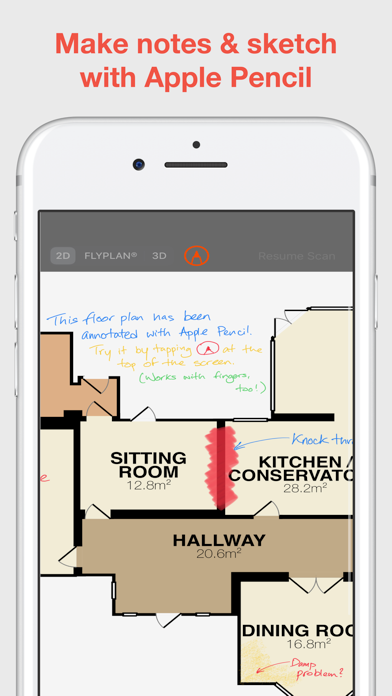
RoomScan Classic creates floor plans using "Touch Phone Against Walls" — perfect where the view of the floor is blocked or poorly-lit, just touch your phone against each wall for a rapid plan.
You can also "Draw Manually & Use Laser" — take advantage of slick integration with Leica & Bosch laser measures to get precise measurements onto your plan in moments.
RoomScan Classic can scan building exteriors, yards and gardens too, with the ExteriorScan & PlotScan features.
Export, saving, sending and printing of your plans as standard image files is free. Unlock …
Read the full description
RoomScan Classic is our older app — ten years old in fact! For recent iPhone and iPad models, please use RoomScan Pro LiDAR. RoomScan Classic creates floor plans using "Touch Phone Against Walls" — perfect where the view of the floor is blocked or poorly-lit, just touch your phone against each wall for a rapid plan. You can also "Draw Manually & Use Laser" — take advantage of slick integration with Leica & Bosch laser measures to get precise measurements onto your plan in moments. RoomScan Classic can scan building exteriors, yards and gardens too, with the ExteriorScan & PlotScan features. Export, saving, sending and printing of your plans as standard image files is free. Unlock RoomScan Classic with an annual auto-renewable subscription for unlimited export in PDF, DXF, FLYPLAN®, 3D models and other formats. Payment will be charged to iTunes Account at confirmation of purchase. Subscription automatically renews unless auto-renew is turned off at least 24-hours before the end of the current period. Account will be charged for renewal within 24-hours prior to the end of the current period. Subscriptions may be managed and auto-renewal may be turned off by going to your iTunes Account Settings after purchase. Any unused portion of a free trial period will be forfeited if you purchase a subscription. "This app is incredible. It draws a floor plan after you tap it against the wall a few times." — LIFEHACKER "It's incredibly simple, but seems to work really well." — HUFFINGTON POST "You can trade your tape measure for this slick app called RoomScan" — GIZMODO Questions or comments? We're here to help: [email protected] US Patent 8868375 UK Patent Pending http://locometric.com/privacy.html https://www.locometric.com/terms-and-conditions
Installs, last 30 days
Apple does not publish download counts. Estimates are in testing.
Estimated store revenue Estimated Beta
App Store, worldwide, monthly rate from the last 13 chart days to 20 Nov 2026
Below the top 100 grossing apps in the markets we calibrate. In the United States that usually means under about $6.4M a month. App Store purchases and subscriptions only, before Apple's 15 to 30% fee. Ads and web payments are not included.
Ratings
4,954 ratings, 4,954 reviews
No rating breakdown published for this app.
Recent reviews
Latest public reviews from the store
- 24 Oct 2019
Wasn’t going to try...
....because of a lot of recent negative reviews. However, all of the measurement apps have a lot of negative reviews and I liked the way the developers here responded. So I went ahead. Measured and joined 2 rooms in approximately 20 minutes. Easy-Peasy. Love it! Read the instructions. Dig around a bit in settings. There are 2 places you need to hit to change all measurements from meters to feet or vice-versa- that’s the only moment of passing frustration I had. I would like to be able to measure windows and doors in the app, is the only thing I feel is missing so far- and there might be a way to do that I haven’t found yet. This is great! Get it.
- 25 Dec 2018
Very useful!
Great for Quickly measuring out the dimensions of the room. I have my iPad or iPhone with me more often then a notepad and tape measure. The only issue is sometimes walls can be hard to get to but a little planning Solves that. I only use the touch against the walls featuring have been very happy with the results. I had thought about deducting a star for the export feature. The free export comes with the iPad movements superimposed on the floor plan. The ‘paid’ export images do not have these Swishes all over. However, as a workaround open the clean image in the paid for section and take a screenshot. The app tries to block this but it is too slow.
- 18 Aug 2018
Glad I found it
I am glad I found this app, because my room plans have some unusual angles with small doorways. I needed a floor plan to plan for a bathroom remodel. This app is very difficult to learn how to work with. Yes, I read the instructions, and was able to use the “touch” method with my phone. However, it kept telling me I had not touched after returning to the wall after the start point, when I had. So, I had to keep trying over and over. I couldn’t get the AR method to work for me. I tried the Get Assistance email, but no one got back to me today. I also had problems with linking another room thru a doorway—the two rooms weren’t properly aligned (remember the doorways are narrow—24” wide, and set at angles), and I had problems trying to rotate and slide them into position. In two rooms, the measurements surrounding a window area aren’t accurate, and I don’t know how to correct that. Needs more support FAQs, or instructions.
- 1 Aug 2018
Great tool!
I admire the app’s comprehensive functionality to map the entire plan of a home or building, especially the wall touch feature. I would like to provide one major recommendation. But first, a prelude . . . . I read some of the reviews and I noted a single common thread among those that have a problem with the app. The app has many complex features that require practice to handle. Some of the features are not inherently obvious. It took me at least twelves times to map my home adequately. This implies, along with the looking at some of the reviews, that there is a steep learning curve to understand the app at a competent level. With that said, my recommendation is to provide more extensive videos and/or training instructions for users. The current videos are helpful, but is lacks how to accomplish the finer details on essential functions to pull all the information together harmoniously - like how to add additional rooms to existing rooms, adding openings, editing, etc. These are some of the things I grappled with. I saw the potential, so I stuck with it until I found the solutions. In summary, the this app has powerful capacities, yet it currently requires the user t
What reviewers bring up
Topics mentioned in the latest 8 reviews, by how many reviews mention them
Liked in good reviews (3 reviews)
- instructions 2
- reviews 2
- however 2
- feature 2
- found 2
- touch 2
- these 2
- read 2
Raised in bad reviews (4 reviews)
- room 4
- professional 2
- completely 2
- measuring 2
- literally 2
- unusable 2
- accurate 2
- absolute 2
Top chart positions
Latest App Store chart ranks by country, last 10 days
Not in any tracked top chart in the last 10 days.
RoomScan Classic history
Release, install milestones, listing and store changes
- First released on the store 22 Jul 2013
Update frequency
How often RoomScan Classic ships a new version, month by month
0 updates in the last 12 months. Less often than most similar apps: they shipped a median of 3 updates in the same year.
Recent versions
Current version 8.22
- Version 8.229 Aug 2023
- Exported PDF files containing photos are much smaller - Fixed slight misalignment of symbols on the plan - Plans can now be mirrored as well as rotated
Listing keywords
Words and phrases RoomScan Classic repeats most in its store listing
Top phrases: roomscan classic (5), current period (2), itunes account (2), phone against (2), purchase subscription (2).
Highlighted words also appear in the title. Counts cover the title, short description and description.
Compliance
What the listing and the app package show
- Store status
- Live
- Upkeep
- No update since 9 Aug 2023
- Age rating
- 4+
Apps like RoomScan Classic
 Breezeline WiFi+Plume Design, Inc.★ 4.09
 One Cleaner: Clean up storageHONG KONG TOPONE NETWORK TECHNOLOGY CO.,LIMITED★ 4.47
 KeepClean AI: Storage CleanerOlosera Limited★ 4.24
 JustIN MobileSalto Systems★ 4.64
 QR Code & Barcode Scanner app.Minimodev Technologies LTD★ 4.69
 System Status Pro: hw monitorTechet★ 4.77
 EMF Field Detector RF ScannerJorge Gregorio Martin Bello★ 4.46
 Unzip - Unarchive Expert青青 余★ 4.61
 iSecurity: Total ProtectionPDO Apps Limited★ 4.35
RoomScan Classic: questions and answers
Who makes RoomScan Classic?
RoomScan Classic is published by Locometric.
When was RoomScan Classic last updated?
The latest version (8.22) was released on 9 Aug 2023.
Is RoomScan Classic free?
Yes. RoomScan Classic is free to download.
Is RoomScan Classic still available?
Yes. RoomScan Classic is live on App Store as of 20 Nov 2026.
Track RoomScan Classic and its competitors
Watch any app for new versions, rating drops, chart moves and removals. Free plan, no card.