
- Installs
- —
- Apple does not publish download counts
- Rating
- 4.77
- Ratings
- 53
- 53 reviews
- Version
- 2026.29
- Updated 23 Jun 2026
- Released
- 29 Jun 2023
- Tracked since 10 May 2026
- Size
- 59 MB
- Needs 17.2
Screenshots


About S3 Client - Files location
The description on the store listing
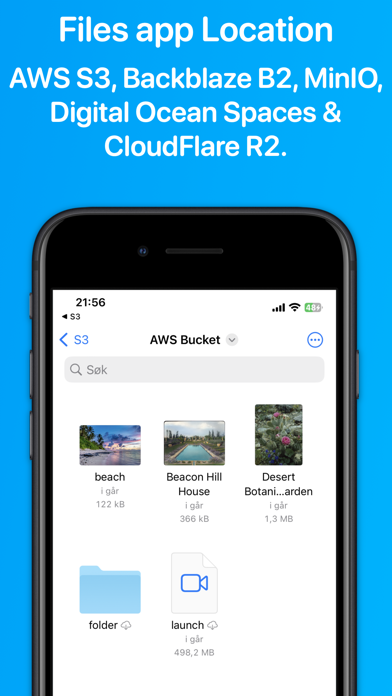
Access your S3 storage directly from the Files app, Finder, and other applications on iPhone, iPad, and Mac. Developed by the creator of Working Copy, this application provides seamless integration with S3-compatible storage services.
Once configured, S3 buckets appear alongside other cloud storage providers, with files available on demand. Files are downloaded as needed and automatically synchronized back to S3 when modified.
The app supports a wide range of S3-compatible services, including AWS S3, BackBlaze B2, CloudFlare R2, DigitalOcean Spaces, MinIO, and others.
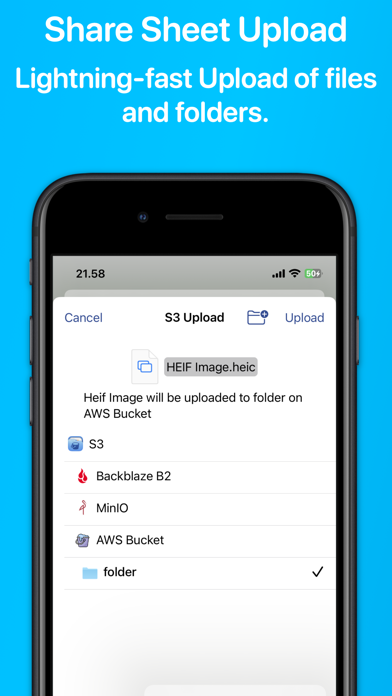
Files and directories can be uploaded through the system share sheet on iOS and the Services menu on macOS. The app …
Read the full description
Access your S3 storage directly from the Files app, Finder, and other applications on iPhone, iPad, and Mac. Developed by the creator of Working Copy, this application provides seamless integration with S3-compatible storage services. Once configured, S3 buckets appear alongside other cloud storage providers, with files available on demand. Files are downloaded as needed and automatically synchronized back to S3 when modified. The app supports a wide range of S3-compatible services, including AWS S3, BackBlaze B2, CloudFlare R2, DigitalOcean Spaces, MinIO, and others. Files and directories can be uploaded through the system share sheet on iOS and the Services menu on macOS. The app remembers preferred upload destinations for different file types, streamlining file management. Pre-signed sharing links can be generated directly from Finder and the Files app, allowing temporary access to files for up to seven days. Support for server-side encryption with customer-provided keys (SSE-C) and client-side AES-GCM encryption compatible with the Amazon S3 Encryption Client. Comprehensive support for Shortcuts automation enables operations such as listing, downloading, uploading, and moving files. The app is free to use with a single server. A Pro Unlock is required for multiple servers, available as a one-time purchase or a monthly subscription, with access shared across iPhone, iPad, and Mac. A one-week free trial allows users to evaluate Pro features before purchase.
Installs
Apple does not publish download counts. Estimates are in testing.
We publish iOS estimates only after they pass a back-test against real numbers. Chart history below is measured.
Estimated store revenue Estimated Beta
App Store, worldwide, monthly rate from the last 13 chart days to 20 Nov 2026
Below the top 100 grossing apps in the markets we calibrate. In the United States that usually means under about $6.4M a month. App Store purchases and subscriptions only, before Apple's 15 to 30% fee. Ads and web payments are not included.
Ratings
53 ratings, 53 reviews
No rating breakdown published for this app.
Recent reviews
Latest public reviews from the store
No reviews in our sample for this app yet.
Top chart positions
Latest App Store chart ranks by country, last 10 days
Not in any tracked top chart in the last 10 days.
S3 Client - Files location history
Release, install milestones, listing and store changes
- First released on the store 29 Jun 2023
Update frequency
How often S3 Client - Files location ships a new version, month by month
3 updates in the last 12 months. More often than most similar apps: they shipped a median of 0 updates in the same year.
Recent versions
Current version 2026.29
- Version 2026.2923 Jun 2026
Directory syncs started in the app now show progress as you switch to other apps. (iOS 26) New Sync Status widget for the Home Screen and StandBy. Check a synced folder at a glance.
- Version 2026.2526 May 2026
New pro feature to sync folders on S3 with folders in the Finder / Files app configured in Settings → Sync. Faster renaming and moving of directories containing many files.
- Version 2026.2429 Apr 2026
Improvements to Request Upload from Finder/Files app. Fixes issue where Finder/Files app location would sometimes switch to Paused state.
Listing keywords
Words and phrases S3 Client - Files location repeats most in its store listing
Top phrases: ipad and mac (2), iphone ipad (2), s3 compatible (2).
Highlighted words also appear in the title. Counts cover the title, short description and description.
Compliance
What the listing and the app package show
- Store status
- Live
- Upkeep
- Updated 23 Jun 2026
- Age rating
- 4+
Apps like S3 Client - Files location
 The Hit ListKarelia Software LLC★ 3.55
 Audio Notebook PocketQrayon, LLC★ 4.67
 Milk for UsDaniel Rinser★ 3.73
 JotLinkT-One Corporation★ 4.29
 Oriole - Text to Speech ReaderOriole AI Inc.★ 4.62
 Code Master - Source Code EditorJustin Bush★ 2.71
 ASUS AiCloudASUS★ 2.42
 Samepage: Team CollaborationPaylocity★ 3.49
 AI Writer Master & AssistantSmash Inc★ 4.75
S3 Client - Files location: questions and answers
Who makes S3 Client - Files location?
S3 Client - Files location is published by Anders Borum ApS.
When was S3 Client - Files location last updated?
The latest version (2026.29) was released on 23 Jun 2026.
Is S3 Client - Files location free?
Yes. S3 Client - Files location is free to download.
Is S3 Client - Files location still available?
Yes. S3 Client - Files location is live on App Store as of 1 Jul 2026.
Track S3 Client - Files location and its competitors
Watch any app for new versions, rating drops, chart moves and removals. Free plan, no card.