
- Installs
- —
- Apple does not publish download counts
- Rating
- 4.49
- Ratings
- 1.8K
- 1.8K reviews
- Version
- 6.0.1
- Updated 22 Oct 2026
- Released
- 4 May 2014
- Tracked since 11 May 2026
- Size
- 77 MB
- Needs 10.3
Screenshots


About ScoreCam - Embedded Scoreboard
The description on the store listing
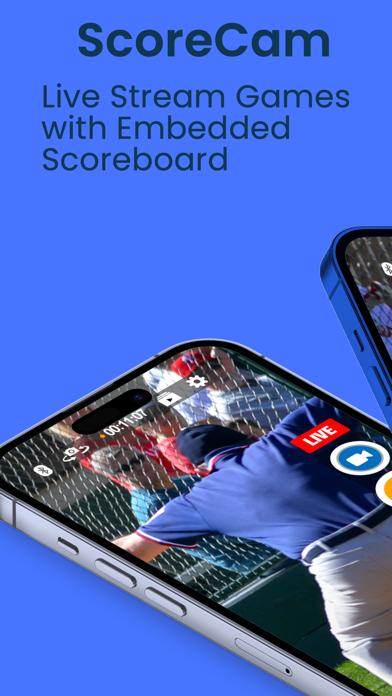
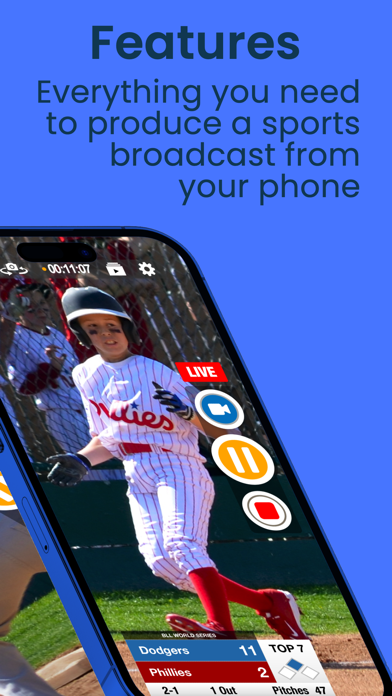
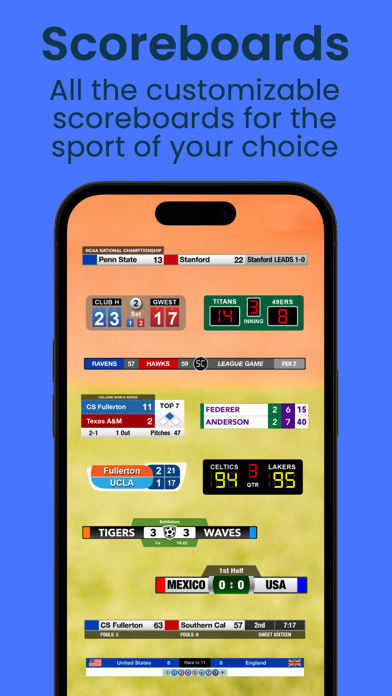
Meet ScoreCam, the first Recording and Live Streaming App with embedded scoreboard technology. It's simply the best way to Live Stream, record and score your next volleyball, basketball, football, hockey, soccer or baseball/softball game with customizable scoreboards for each sport. Tennis and billiards/snooker scoreboards are also available.
Here are just a few reasons why we think you'll love ScoreCam:
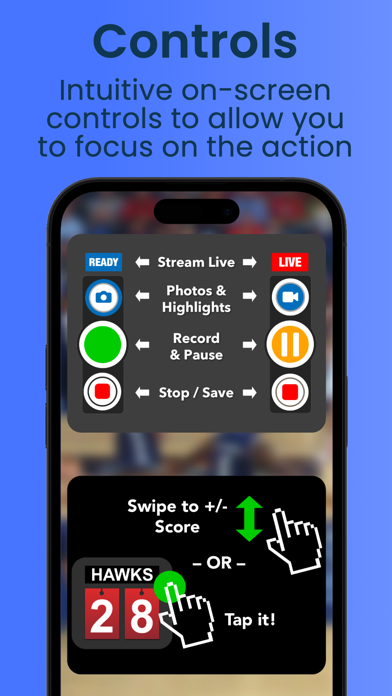
• Embedded, Interactive and Configurable Scoreboard - With ScoreCam you can embed a scoreboard into the video feed and easily update scores on screen or with our remote. Its just like a real sportscast, only you're in control!
• Live Streaming (subscription) - Now parents and fans who …
Read the full description
Meet ScoreCam, the first Recording and Live Streaming App with embedded scoreboard technology. It's simply the best way to Live Stream, record and score your next volleyball, basketball, football, hockey, soccer or baseball/softball game with customizable scoreboards for each sport. Tennis and billiards/snooker scoreboards are also available. Here are just a few reasons why we think you'll love ScoreCam: • Embedded, Interactive and Configurable Scoreboard - With ScoreCam you can embed a scoreboard into the video feed and easily update scores on screen or with our remote. Its just like a real sportscast, only you're in control! • Live Streaming (subscription) - Now parents and fans who can't make a game won't miss any action with ScoreCam's Live Streaming feature. • Branding and Ads (subscription) - Our newest feature now includes the ability to add multiple graphics or ads to your broadcast. Perfect way to monetize for your program, club or school. • Team Logos - Add your team’s logo to a supported scoreboard and you are now recording and streaming like a pro! • Capture Highlight Video Clips - Ever see a great play and wish there was a way to instantly capture a highlight clip for later watching? Now you can with Highlights! • Pause/Resume Video Recording - One of the main features you need to record a game is missing from Apple's Camera app. No worries, we have you covered. Use a dedicated button to freeze the action during time-outs or lulls in the play. Reduce a 2 hour game to an hour or less! • Audio Mute - Great optional feature to mute audio for live streams and video recordings during timeouts or between games ... or when you want to talk about your favorite player! • Quickly Share Scores, photos or Messages - With Score Sharing configured, you can now Message, email, tweet, or post the score without leaving ScoreCam! ScoreCam offers the following Subscriptions: 1) Live Streaming/PRO (1 Year): ONE YEAR of access to ScoreCam with Live Streaming and any updates during that period. This includes all PRO features. Comes with 1 week of FREE ACCESS. 2) Live Streaming/PRO (1 Month): ONE MONTH of access to ScoreCam with Live Streaming and any updates during that period. This includes all PRO features. Comes with 1 week of FREE ACCESS. 3) Branding/Live Streaming (1 Year): ONE YEAR of ScoreCam plus ability to add a Branding or Advertising image to a broadcast or video recording. This includes Live Streaming and all PRO features. 4) Branding/Live Streaming (1 Month): ONE MONTH of ScoreCam plus ability to add a Branding or Advertising image to a broadcast or video recording. This includes Live Streaming and all PRO features. Additional Information on Subscriptions • Payments will be charged to iTunes Account at confirmation of purchase and after the 1 week trial period. • Subscription will automatically renew unless auto-renew is turned off at least 24-hours before the end of the current period. • Account will be charged for renewal within 24-hours prior to the end of the current period. Price is subject to change at any time but any increase will require direct re-approval by the user. • Subscriptions may be managed by the user and auto-renewal may be turned off by going to the user's Account Settings after purchase. • All upgrades and downgrades are automatically handled. You will not be double charged as you can only have one subscription at a time. • Any unused portion of a free trial period, if offered, will be forfeited when the user purchases a subscription, where applicable. See our Terms of Use at: http://scorecam.pydmsw.com/terms.html Questions? Visit our website for FAQs, feedback, tips, tricks and more. (See 'ScoreCam Help & Support' under settings for a link to our support site)
Installs, last 30 days
Apple does not publish download counts. Estimates are in testing.
Estimated store revenue Estimated Beta
App Store, worldwide, monthly rate from the last 13 chart days to 20 Nov 2026
Below the top 100 grossing apps in the markets we calibrate. In the United States that usually means under about $6.4M a month. App Store purchases and subscriptions only, before Apple's 15 to 30% fee. Ads and web payments are not included.
Ratings
1,844 ratings, 1,844 reviews
- 5 ★79%
- 4 ★7.7%
- 3 ★2.4%
- 2 ★2.4%
- 1 ★8.0%
Recent reviews
Latest public reviews from the store
- 13 Dec 2025
Maybe the best livestream app, some tweaks to make it better imo
I livestream ice hockey games, a lot of the negative reviews I am reading here have not been an issue for me. So light work getting acquainted with the app and it is very easy to use. The Bluetooth remote app that was made for this app also helps a ton! Here are some ideas to improve the app in my opinion. Please add ability to manually adjust white balance and camera focus. More options to customize scoreboard, interchange some of the options (clock/penalty clock/penalty clock description) between sports into a simple linear option or stacked corner option. Just think how the pros game look...that's what I want to replicate. Maybe a ribbon that goes across the bottom of the screen (full screen left to right). Scoreboard team logo options. Maybe I want the logo to appear as a backdrop with a lower opacity, but current display works well too. Sizing of logo can be difficult to manipulate at times. Usually I can save a team logo from a simple google search. Sometimes I need to adjust in photoshop or express. What would also be great is to be able to save some presets to my account. I don't want to recreate what I had if I want to experiment with scoreboard options. H
- 30 Dec 2024
Best for Live-streaming Hockey
I’ve been using this for 4 months and have live-streamed over 40 hockey games. It has been a learning curve to get to the point where I’m doing play-by-play, keeping score and running the camera, but very doable now. Pretty easy to set-up the livestream on a YT channel. Video available almost immediately for future viewing on YT as well—my kids and their teammates enjoy finding their highlights immediately after the game. Also, you can simultaneously save the recording to your Apple device! You have to make sure you have a reliable internet connection to livestream. That was my biggest mistake initially. In venues where wifi and cellular service are poor you can simply record the game to your device and manually upload it to YT or other social media. ScoreCam has many useful customizations and settings. The imbedded scoreboard has many styles, sizes and color customization options. These are super easy to change on the fly. The app has numerous options for video resolution and frame-rate settings. You can pause and restart throughout the game. You can easily mute and unmute which becomes important when there’s copyrighted music playing in the background during
- 24 Aug 2023
Full Featured Scoreboard
I have been using this app for four years and it has been nothing but rocksolid. If you invest some time it has customization to make the logos look very professional. I video hockey so the easy to use power play clock and shots on goal are features most other scoreboards do not have. The remote control app is brilliant. The zoom buttons are smart. We are now looking to use the branding to bring in some sponsors. The live streaming feature became very popular during Covid, and has now been a staple in our organization. there are so many features. ScoreCam has so many features that I haven’t even used such as highlight button and score updating. If you’re a one-man band, then this is a great solution. I am hoping for a instant slomo replay button but I know that’s a lot to ask since this is a feature that requires production truck crews.
- 1 Oct 2020
Great App with some Needs
I've been using this all for some time to record volleyball games. The condensed video is priceless and the scoreboard/video controls are intuitive. I'm having a few issues though and I would like to name a request. Lately the app stops working and disconnects from the ScoreCam remote when my recording device (iPhone XR) gets a 10% and/or 20% "Battery Low" notification. It has also shut down the app at that time. When this happens I have to recover the videos, but they are all separated videos based on each point being recorded. Defeats the purpose of the app if I have to then compile. The request is for someone to figure out how to broadcast to Facebook live. I realize the notes state that this is in Beta, however I have never been able to get it to work and the process is incredibly difficult to even understand. I paid money for the live-streaming and have never even broadcasted a single second of gameplay.
What reviewers bring up
Topics mentioned in the latest 8 reviews, by how many reviews mention them
Liked in good reviews (6 reviews)
- scoreboard 5
- remote 4
- during 4
- video 4
- able 4
- recording 3
- scorecam 3
- hockey 3
Raised in bad reviews (1 reviews)
No topic comes up twice.
Top chart positions
Latest App Store chart ranks by country, last 10 days
- Countries ranked
- 1 of 50
- Best rank
- #72
- Top 10 placements
- 0
- of 1 chart placements
- Average rank
- #72
Best countries on App Store
- 🇸🇪 Sweden · Top grossing, Photo & Video#72
| Country | Chart | Category | Rank | Best (10 days) | Date |
|---|---|---|---|---|---|
| 🇸🇪 Sweden | Top grossing | Photo & Video | #72 | #72 | 15 Nov 2026 |
ScoreCam - Embedded Scoreboard history
Release, install milestones, listing and store changes
- First released on the store 4 May 2014
Update frequency
How often ScoreCam - Embedded Scoreboard ships a new version, month by month
4 updates in the last 12 months. More often than most similar apps: they shipped a median of 1 updates in the same year.
Recent versions
Current version 6.0.1
- Version 5.7.522 Oct 2026
A new Full Reset for every scoreboard, Hockey penalties that sync with the Scoreboard Remote, and lots of fixes for Tennis, Football and Pickleball. Using Scoreboard Remote? Please update it too. Older versions of Scoreboard Remote can't connect to this version of ScoreCam. - Full Reset: one tap in Scoreboard Settings resets the scores, period, clock and more on any scoreboard, and the Scoreboard Remote matches. - Hockey: penalties set on ScoreCam or the Scoreboard Remote now stay in sync on both. - Hockey has its own Period Label Library (Intermission, Final), and Half or long custom period labels now fill the clock panel so they're easy to read. - The period pad has one-tap keys, with buttons from your Period Label Library (hold to reorder). - One number pad style everywhere (clock times, durations and zoom), and it follows Light and Dark mode. - Tennis: taps and swipes follow your Tennis Scoring setting and sync to the Scoreboard Remote, plus a new Reset Matches button. - Scoreboards and branding images now fade in and out when you show or hide them. - The Scoreboard Remote now matches ScoreCam's zoom and Hockey Score Type when it connects. - Score Sharing lists the leading team first. - Clock fixes: the count-up clock no longer loses a second when you open Scoreboard Settings, and the Scoreboard Remote clock now matches ScoreCam. - Scoring fixes for Tennis, Football and Pickleball, so your score, AD, down and distance, and completed games stay put. - Numerous other stability and performance improvements, including Hide Controls when Connected and the Flash setting. Most of this list came from your emails, bug reports and reviews. Please keep them coming.
- Version 5.7.02 Sep 2026
WHAT'S NEW - Branding upgrade: Add up to 5 branding or ad images per profile and arrange them in a redesigned editor with drag-to-reorder and swipe-to-delete, plus a new Branding Only layout that shows just your graphics or ads. (Branding subscription) - Team logos in the Team Library: Save a team's logo once and it follows that team across every profile, including when you pick a team from the on-screen controls or the Scoreboard Remote. - Place it where you want: Drag to move and pinch to resize the scoreboard and your branding images right on the camera preview. (PRO) - Added support for USB audio mixers and interfaces: Record and live stream through a connected mixer or multi-channel interface, and ScoreCam mixes it down to clean stereo. - On-screen controls: Press and hold controls to open its settings, drag follows your finger live, pinch to resize, and a Draggable toggle can lock the controls in place. - Scoreboard Remote: Trigger Highlights and Instant Replay, take a photo, share the score from the remote when it has internet, and show or hide your branding, all from the sideline. Sync between devices has beem simplified and improved. IMPROVEMENTS AND FIXES - Audio: microphone now stays locked while recording and streaming (a mic plugged in mid-game is ignored), and audio stays in sync on long games with frequent pause/resume cycles. - Settings Updates: Switch profiles from the first page of Scoreboard Settings and added more logical flow. - Saving files at end of games is now less confusing with a new unified save overlay - Overheating warning: Warning when your device is getting too hot (will display on Scoreboard Remote when connected). - Idle preview runs cooler until you start recording or streaming. - On-screen controls: Show/Hide the team and period header, where applicable. - Each built-in profile now starts with its own scoreboard's default colors. - Live streams start at full frame rate right away, with sharper Instant Replay when you are streaming only. - Video settings now fill in a recommended bitrate when you change format or resolution. - Added Fit and Original crop options for branding and replay images. - Search your saved teams and labels. - Footboard: one-tap "1st & 10" reset in the yardage keypad. - "Pause on Recording Pause" now pauses the clock even when on-screen controls are hidden, including Hockey's penalty clock. - External Scoreboard (HDMI or AirPlay) bug fixes. - Every board with on-screen controls has one Show Controls toggle. - Fixed game clock issues: no jump-back on Start, count-up reset corrected, and other minor fixes. - Fixed recordings that Photos or some USB interfaces used to reject. - Fixed zoom presets not sticking on ultra-wide devices. - Fixed tap-and-hold AE/AF lock; add lock reticle with channel icons - Reliability/data-loss fixes to Highlights; Added a close (x) button to cancel a highlight. - Numerous other stability and performance improvements
- Version 5.6.13 Aug 2026
NEW SCOREBOARDS - Footboard (PRO): A new football scoreboard with team colors, score, down and distance, quarter, game clock, play clock, and timeouts. Full on-screen controls, plus touchdown and penalty-flag animations. Works with the Scoreboard Remote app. - Pickleboard (PRO): A new pickleball scoreboard that tracks scores across up to 5 games, with a serve-indicator dot, completed-game history, and a TIMEOUT/FINAL popup. Supports singles and doubles. WHAT'S NEW - Fixed Highlights Reel bug on muted recordings - Added ability to Live Stream to Facebook Live without a second device PREVIOUS UPDATES: - Instant Replay Prompt: Choose your clip length and speed, then Play Now or Add to Queue (up to 4). On-screen replay pills can be dragged to reposition, with adjustable opacity. The Scoreboard Remote can capture, play, and discard queued replays. - Redesigned on-screen controls: Now draggable and scalable on every supported scoreboard, with a Reset button in each profile's On-Screen Controls section. - Period pad now includes a label picker with Half and Final built in, plus your own saved custom labels. - Hockeyboard: Added penalty-timer presets. Set your own minor and major penalty lengths (default 2:00 and 5:00) under Game Clock in the scoreboard settings. Penalty lengths now save per profile. - Scoreboard Remote: Improved sync, with all actions now working in both directions. IMPROVEMENTS AND FIXES - Tapping Replay while not streaming (or with Replay turned off) now shows a helpful message instead of doing nothing. - Fixed a live-stream crash on audio startup. - Fixed a crash in the background replay recorder on iOS 26. - Fixed a crash that could occur if an external drive was unplugged during recording. - Fixed rare crashes when using score animations. - Added contrasting text color for the Hockeyboard power-play popup. - The background replay recorder now skips starting if free space is below 50 MB. - Numerous other bug fixes and performance improvements
- Version 5.511 Jul 2026
Scoreboard Profiles — The biggest update yet. Create profiles for each team you cover: names, colors, logos, and settings all saved and ready to go. Switch between teams in seconds. Instant Replay — One tap to replay the big moment for your live stream viewers. Customize the transition style, hold duration, and speed in Settings. Live Streaming — Added Twitch Authentication. YouTube now supports scheduled events. Live Stream Setup Wizard. Account selection streamlined. Team Library — Save team names and colors once, reuse them across any profile. Highlight Reel: Create a Highlight Reel where ScoreCam automatically stitches your Highlights at the end using the transition of your choice Score Animations — 6 styles to choose from when scores update: None, Fade Fast, Fade Slow, Dissolve, Pop, or Flip. Baseboard II — New on-screen controls for baseball. Other Updates: - External Drive: record to USB; file appears in Files app - iCloud Sync: Now saves your settings when you delete the app - Volume buttons: volume-up starts/pauses/resumes recording; volume-down stops (iOS 17+) - Logo, Branding and Replay images now support PDF and transparency - Numerous bug fixes and performance improvements
Listing keywords
Words and phrases ScoreCam - Embedded Scoreboard repeats most in its store listing
Top phrases: live streaming (11), pro features (4), ability to add (3), video recording (3), access to scorecam (2).
Highlighted words also appear in the title. Counts cover the title, short description and description.
Compliance
What the listing and the app package show
- Store status
- Live
- Upkeep
- Updated 22 Oct 2026
- Age rating
- 4+
Apps like ScoreCam - Embedded Scoreboard
 VFX : Video Editing & FiltersXLABS DIJITAL HIZMETLER ANONIM SIRKETI★ 4.64
 Luma 3D CaptureLuma AI, Inc.★ 4.51
 GoSexy - Face and Body EditorKasaba Bilgi Teknolojileri Ticaret A.S.★ 4.06
 Teleplay - Green Screen StudioNickolay Lamm★ 3.83
 GifShare: Post GIFs for Instagram as VideosDaneco Ltd.★ 4.18
 Type Art: Animated Text VideosYeara Livny★ 4.54
 Helios - Golden Hour ForecastMatic Conradi★ 4.75
 Dots Memories: your storyonelife★ 4.74
 Add Music to Video, MakerAlan Cushway★ 4.64
ScoreCam - Embedded Scoreboard: questions and answers
Who makes ScoreCam - Embedded Scoreboard?
ScoreCam - Embedded Scoreboard is published by Pachyderm Software.
When was ScoreCam - Embedded Scoreboard last updated?
The latest version (6.0.1) was released on 22 Oct 2026.
Is ScoreCam - Embedded Scoreboard free?
Yes. ScoreCam - Embedded Scoreboard is free to download.
Is ScoreCam - Embedded Scoreboard still available?
Yes. ScoreCam - Embedded Scoreboard is live on App Store as of 20 Nov 2026.
Track ScoreCam - Embedded Scoreboard and its competitors
Watch any app for new versions, rating drops, chart moves and removals. Free plan, no card.