- Installs
- —
- Apple does not publish download counts
- Rating
- —
- Ratings
- —
- Version
- 4.0
- Updated 1 Mar 2023
- Released
- 11 Mar 2018
- Tracked since 10 May 2026
- Size
- 13 MB
- Needs 10.11
Screenshots

About Screenshot to Folder
The description on the store listing
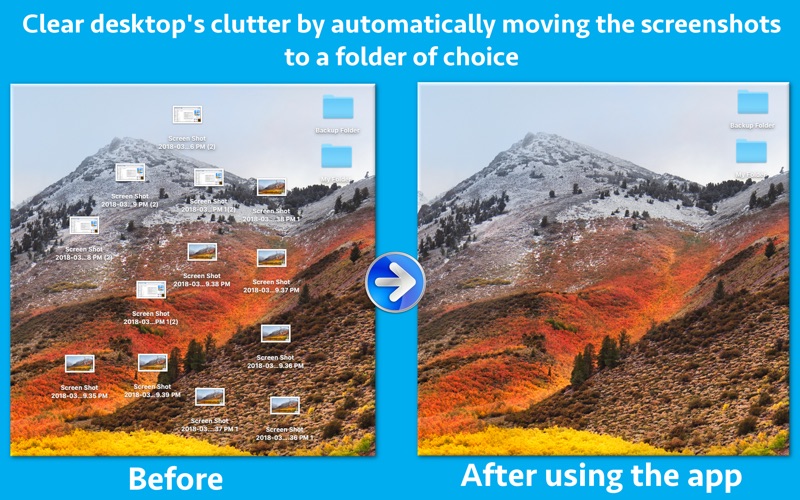
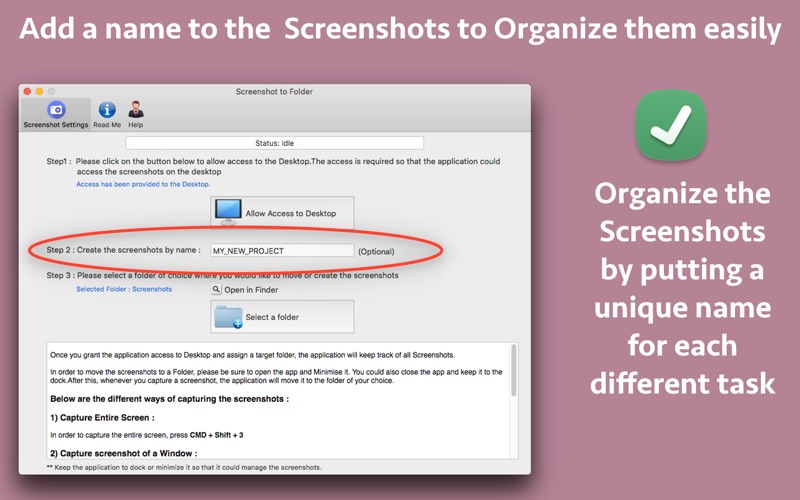
The application automatically moves the Screenshots from Desktop to a folder of choice.While moving, it could also rename the screenshots as per the requirements.It uses a special algorithm so that only the screenshots are identified and moved. It does not process any other images or photos.
This helps to clean the clutter from Desktop and organize the screenshots in an efficient way.
** The application works in Real Time.This means that it will move the Screenshots from Desktop to a specified folder as soon as you capture it.It will also rename the Screenshots if specified by the user.
With time, when we capture the screenshots , these start getting accumulated on the desktop.This …
Read the full description
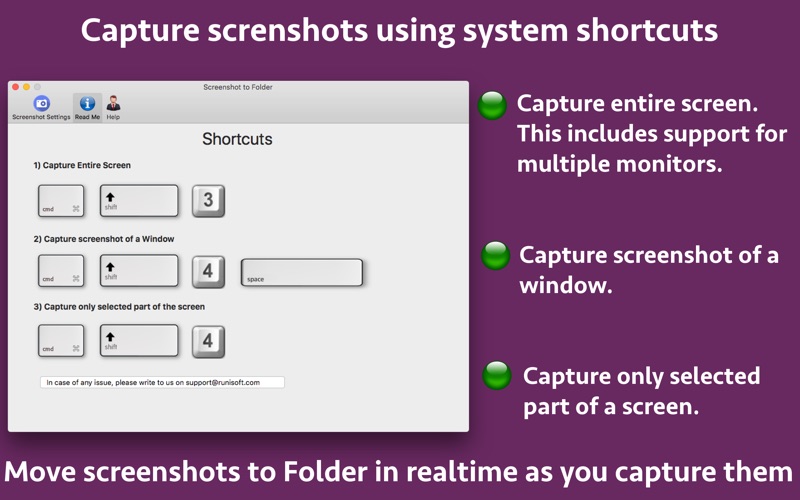
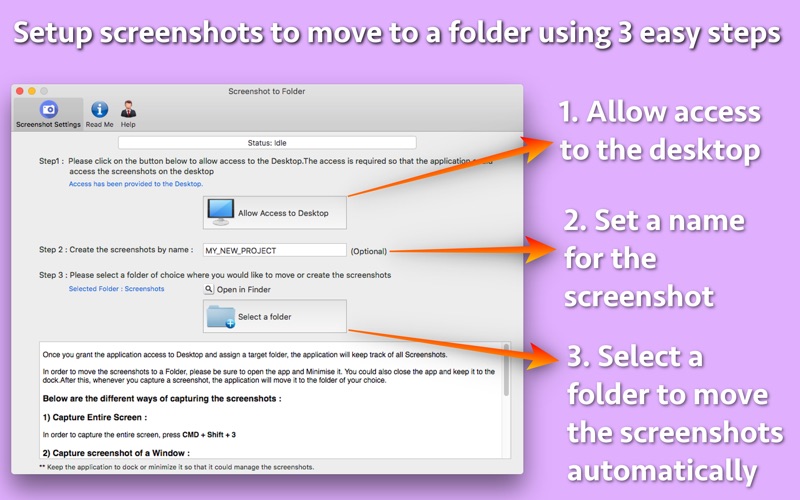
The application automatically moves the Screenshots from Desktop to a folder of choice.While moving, it could also rename the screenshots as per the requirements.It uses a special algorithm so that only the screenshots are identified and moved. It does not process any other images or photos. This helps to clean the clutter from Desktop and organize the screenshots in an efficient way. ** The application works in Real Time.This means that it will move the Screenshots from Desktop to a specified folder as soon as you capture it.It will also rename the Screenshots if specified by the user. With time, when we capture the screenshots , these start getting accumulated on the desktop.This makes desktop look messy and slowly makes finding the files difficult on the desktop. Since all screenshots have the same name, it makes it difficult to recognize the purpose for which the screenshots were taken. The application helps to improve the productivity by cleaning up the desktop and putting a meaningful name to the screenshots.(as specified by the user) The application is fully compatible with the system wide shortcuts for capturing the screenshots. You could capture entire screen, a window or a selection. The screen could be captured from multiple monitors as well. The application is very easy to use. Just give the application access to Desktop. After this, select a folder where you would like the screenshots to be created or moved. After this, please minimize the app or leave it in the Dock. Now, whenever you capture the screenshots using the shortcut, the application will automatically move it to the specified folder in real time. If you have specified a name for the screenshot, the application will take care of renaming them automatically as well.
Installs
Apple does not publish download counts. Estimates are in testing.
We publish iOS estimates only after they pass a back-test against real numbers. Chart history below is measured.
Estimated store revenue Estimated Beta
App Store, worldwide, monthly rate from the last 13 chart days to 20 Nov 2026
Below the top 100 grossing apps in the markets we calibrate. In the United States that usually means under about $6.4M a month. App Store purchases and subscriptions only, before Apple's 15 to 30% fee. Ads and web payments are not included.
Ratings
No rating breakdown published for this app.
Recent reviews
Latest public reviews from the store
No reviews in our sample for this app yet.
Top chart positions
Latest App Store chart ranks by country, last 10 days
Not in any tracked top chart in the last 10 days.
Screenshot to Folder history
Release, install milestones, listing and store changes
- First released on the store 11 Mar 2018
Update frequency
How often Screenshot to Folder ships a new version, month by month
0 updates in the last 12 months. Less often than most similar apps: they shipped a median of 1 updates in the same year.
Recent versions
Current version 4.0
- Version 4.01 Mar 2023
- Minor bug fixes. In case of any issue or questions, please write to us on [email protected]. We will be happy to assist.
Listing keywords
Words and phrases Screenshot to Folder repeats most in its store listing
Top phrases: capture the screenshots (2), rename the screenshots (2), screenshots from desktop (2), specified folder (2).
Highlighted words also appear in the title. Counts cover the title, short description and description.
Compliance
What the listing and the app package show
- Store status
- Live
- Upkeep
- No update since 1 Mar 2023
- Age rating
- 4+
Apps like Screenshot to Folder
 Library of AviationNazmi Yavuz★ 4.82
 MyNOVECNorthern Virginia Electric Cooperative★ 2.28
 打工人小组件光翔 卓★ 4.96
 TruckbaysTruckbays LLC★ 4.3
 Tornado PRO PlayerMohammed Altam★ 4.44
 VDX - Video ManagerARISEPEAK LP★ 1.74
 TV CastingZeasn Info Technology Co., Ltd.★ 1.86
 Mil-Dot BallisticsTom Holsten★ 3.82
 MySontiqSontiq, Inc.★ 2.4
Screenshot to Folder: questions and answers
Who makes Screenshot to Folder?
Screenshot to Folder is published by Ruchira Ramesh.
When was Screenshot to Folder last updated?
The latest version (4.0) was released on 1 Mar 2023.
Is Screenshot to Folder free?
No. Screenshot to Folder is a paid app priced at $4.99.
Is Screenshot to Folder still available?
Yes. Screenshot to Folder is live on App Store as of 10 May 2026.
Track Screenshot to Folder and its competitors
Watch any app for new versions, rating drops, chart moves and removals. Free plan, no card.