- Installs
- —
- Apple does not publish download counts
- Rating
- 4.73
- Ratings
- 49
- 49 reviews
- Version
- 1.7.1
- Updated 23 Jul 2020
- Released
- 25 May 2020
- Tracked since 11 May 2026
- Size
- 8 MB
- Needs 13.0
Also on Google Play: Secure Scanner
Screenshots



About Secure Scanner
The description on the store listing
Scan, Encrypt and Password Protect all your documents for free in your iOS device.
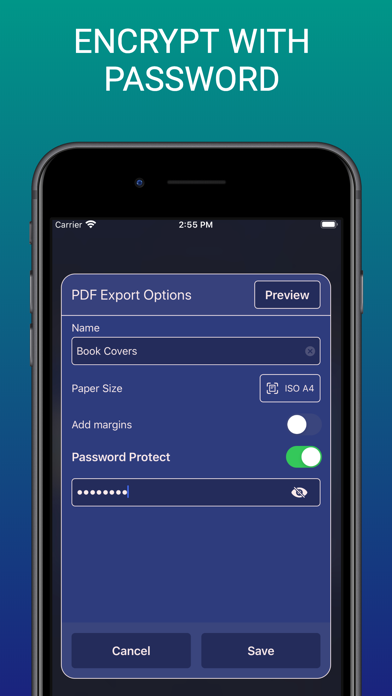
Secure Scanner is an extremely secure and powerful document scanner app which allows you to password protect scanned pdf files inside the app itself. The password will protect your documents even if you share the document outside the app. That’s something, isn’t it?
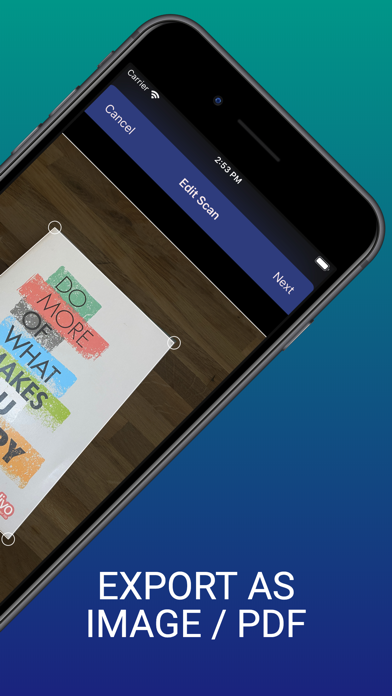
Secure scanner has an auto-shutter feature, which automatically scans the image if the app is able to find all borders correctly. You can do manual scans as well, while the app is finding the borders. Also, if you want finer control, you can change the borders manually too.
Create multi page PDF files from your scans or save them as JPEG images …
Read the full description
Scan, Encrypt and Password Protect all your documents for free in your iOS device. Secure Scanner is an extremely secure and powerful document scanner app which allows you to password protect scanned pdf files inside the app itself. The password will protect your documents even if you share the document outside the app. That’s something, isn’t it? Secure scanner has an auto-shutter feature, which automatically scans the image if the app is able to find all borders correctly. You can do manual scans as well, while the app is finding the borders. Also, if you want finer control, you can change the borders manually too. Create multi page PDF files from your scans or save them as JPEG images in camera roll. You can import image from camera roll and Secure Scanner will scan document from image. You can save to camera roll or save as PDF document that is encrypted and protected with password. You can scan all of your documents, be it book page, paper notes, receipts, fax, newspaper, or even business cards. Secure Scanner supports embedding your scanned documents in a variety of page sizes. A4, A3, Letter as well as Original size are some example paper sizes. Secure Scanner supports full fledged folder hierarchy, which supports as many levels of subfolders as you need. You can create, rename and delete folders. Organise files inside the app by moving, renaming or deleting selected files and folders. You can share files with a tap of button to Email, Chat, or any of your other favourite apps that support pdf files. Or you can print document directly from inside the app. There is NO server side processing of your documents. All the processing of documents happens inside the your iOS device, and all files are stored locally inside the app. Your privacy is something we are holding dear to our core values. App Features: Scanning:- - Scan documents in high quality - Encrypt and save documents as pdf files - Protect scanned documents with password - Save as JPEG files in camera roll (No encryption) - Save scanned files in color or grayscale - Automatic shutter and border detection - Manual shutter and border correction - Scan multiple pages in one go - Rearrange scanned pages before exporting as PDF - Preview PDF document before export - Add margins to PDF document - Supports a variety of page sizes US sizes - Letter, Legal, Ledger, Tabloid, Executive, ANSI C, ANSI D, ANSI E ISO A sizes - A0, A1, A2, A3, A4, A5, A6, A7, A8 Original size of the scanned document Organising:- - Folder structure with support to multiple levels of folders - Add, delete and rename folders - Move files and folders - Arrange scans inside folders for better organisation - Multiple files and folders can be selected to delete easily Sharing Documents:- - Share scans through mail, chats, and any other app that supports pdf files - Save scans as photos to iOS camera roll - Print documents directly from the app using printers via WiFi You won’t need those bulky scanners at office or home anymore. Keep a secure and powerful scanner in your pocket all the time. A great alternative for cam scanner. Privacy Policy: https://securescanner.app/en/privacy-policy/ Terms & Conditions: https://securescanner.app/en/terms-and-conditions/ Support: https://securescanner.app/en/support/
Installs
Apple does not publish download counts. Estimates are in testing.
We publish iOS estimates only after they pass a back-test against real numbers. Chart history below is measured.
Estimated store revenue Estimated Beta
App Store, worldwide, monthly rate from the last 15 chart days to 22 Nov 2026
Below the top 100 grossing apps in the markets we calibrate. In the United States that usually means under about $6.4M a month. App Store purchases and subscriptions only, before Apple's 15 to 30% fee. Ads and web payments are not included.
Ratings
49 ratings, 49 reviews
No rating breakdown published for this app.
Recent reviews
Latest public reviews from the store
No reviews in our sample for this app yet.
Top chart positions
Latest App Store chart ranks by country, last 10 days
Not in any tracked top chart in the last 10 days.
Secure Scanner history
Release, install milestones, listing and store changes
- First released on the store 25 May 2020
Update frequency
How often Secure Scanner ships a new version, month by month
0 updates in the last 12 months. Less often than most similar apps: they shipped a median of 1 updates in the same year.
Recent versions
Current version 1.7.1
- Version 1.7.123 Jul 2020
Bug fixes & Performance enhancements
Listing keywords
Words and phrases Secure Scanner repeats most in its store listing
Top phrases: secure scanner (6), camera roll (5), pdf files (5), files and folders (3), pdf document (3).
Highlighted words also appear in the title. Counts cover the title, short description and description.
Compliance
What the listing and the app package show
- Store status
- Live
- Upkeep
- No update since 23 Jul 2020
- Age rating
- 4+
Apps like Secure Scanner
 UnovonVoyzze Communications Inc★ 1.2
 CHI MPEA TaxCity of Chicago★ 2.29
 Fore MobilityAgo Technologies LLC★ 1.93
 AgentDash for Real EstateRealty Search Solutions Network, LLC★ 3.64
 My Alliance WiFiAlliance Communications★ 4.84
 Kaakateeya Marriages since1980Kaakateeya.com India Private Limited★ 3.4
 HDBoxDawar Karim★ 3.6
 REKK - Call RecorderCLEVERCONTROL LLC★ 3.31
 Gold Price TodayQais Ali★ 4.47
Secure Scanner: questions and answers
Who makes Secure Scanner?
Secure Scanner is published by Suraj Thomas.
When was Secure Scanner last updated?
The latest version (1.7.1) was released on 23 Jul 2020.
Is Secure Scanner free?
Yes. Secure Scanner is free to download.
Is Secure Scanner still available?
Yes. Secure Scanner is live on App Store as of 1 Jul 2026.
Track Secure Scanner and its competitors
Watch any app for new versions, rating drops, chart moves and removals. Free plan, no card.