
- Installs
- —
- Apple does not publish download counts
- Rating
- 1.85
- Ratings
- 543
- 543 reviews
- Version
- 3.4
- Updated 11 Aug 2021
- Released
- 19 Oct 2019
- Tracked since 10 May 2026
- Size
- 42 MB
- Needs 9.1
Screenshots
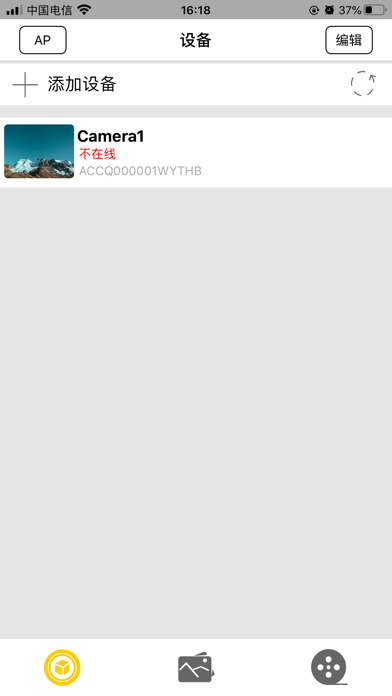
About SEEONE
The description on the store listing
"Little Stars" is a free video service product for home users. Through the video control service of "Little Stars", you can easily view the real-time video and video review of your home and other places. [Remote monitoring] view your camera remotely through app, and view the situation anytime and anywhere; [Voice talk] no matter how far away it is, it can interact with each other at any time.
Installs since 29 Aug 2026
Apple does not publish download counts. Estimates are in testing.
Estimated store revenue Estimated Beta
App Store, worldwide, monthly rate from the last 12 chart days to 19 Nov 2026
Below the top 100 grossing apps in the markets we calibrate. In the United States that usually means under about $6.4M a month. App Store purchases and subscriptions only, before Apple's 15 to 30% fee. Ads and web payments are not included.
Ratings
543 ratings, 543 reviews
No rating breakdown published for this app.
Recent reviews
Latest public reviews from the store
- 9 Aug 2023
Little stars application
It does what you need it to, I just wish it had notifications for motion sensors it’s a difficult process to set it up if you arnt tech savvy once it’s set up though it’ll work as long as your Wi-Fi it on and it’s plugged in, I had mine unplugged and off for weeks, just plugged it back in since it’s posted in the same spot, and it instantly re connected like nothing happened so once you know how to use it, it works, I wish they’d update the app and make it more intricate
- 18 Sep 2022
Horrible to setup, but did get it
I’m pretty tech savvy when it comes to things like this but this was very difficult and frustrating to set up. Took about 20 minutes of back and forth with it. This is what worked for me. Plug it up with charger, turn on with blue flashing light, go to app, click add device, connect to YOUR wifi first, then connect to the first uncommon wifi without a password the boom, SHOULD work. The camera wifi name was not the same as the one that actually worked for it. Now I haven’t used the camera yet but did turn on and was working. I’m sure I’ll have to tweak it some. Hope this helps!
- 24 Oct 2021
The camera does work.
Like Rossco818 said just connect to the WiFi camera it will say it doesn’t support your WiFi but just ignore that and then go back to the app and don’t try to change any of the settings it does it automatically for you where it says admin on it, just press the done button on the top right corner where it say done and then click on the ap button top left and it will show you The live feed your camera is on I wish I could show pictures on here that way I could show you How it’s done very simple don’t give up it works I even clicked a few picks without an sd card and it shows them On the screen where it says click done or ap lol so simple after tinkering with this crap.
- 5 Sep 2021
Bad, will select “5” WiFi vs 2.4, read on
Rosco, that helped. App is poorly put together. Even though I followed every part, initially it still failed. Most routers pick 5g vs 2.4, unless you specifically limit to 2.4 or have 2.4 or 5 included in the name. Centurylink chooses for you so not as easy to do. Start by connecting to your router in 2.4 mode, start app, select new device. Enter the ACCQ number in Id, then click net dist…, next if your router ssid is filled out good sign, if not check camera blue light is flashing >10 /second, not steady on or flashing 4/ second. With ssid enter router WiFi password, then click next. Get to WiFi in settings change router to now connect to ACCQ… WiFi. This works for ios installs: NOTE: blue light flashes 10/second vs steady on or 4/second. If not, Hold mode until blue light flashes 10/second. 1. Confirm your router is in 2.4 WiFi mode, Centurylink for example chooses 5g so is a problem to fix. I also had a WiFi with separate 2.4 and 5 written in WiFi ssid. 2. Connect iPhone to your 2.4 WiFi router. 3. Open App 4. Select “+ add device” 5. Select “ap distribution network” 6. SSID is filled in, just input your WiFi password. If ssid is blank, consider and start again, may
What reviewers bring up
Topics mentioned in the latest 8 reviews, by how many reviews mention them
Liked in good reviews (3 reviews)
- settings 2
- change 2
- click 2
- wish 2
- wifi 2
Raised in bad reviews (4 reviews)
- camera 4
- instructions 3
- absolutely 2
- connection 2
- software 2
- internet 2
- better 2
- video 2
Top chart positions
Latest App Store chart ranks by country, last 10 days
Not in any tracked top chart in the last 10 days.
SEEONE history
Release, install milestones, listing and store changes
- First released on the store 19 Oct 2019
Update frequency
How often SEEONE ships a new version, month by month
0 updates in the last 12 months. Less often than most similar apps: they shipped a median of 1 updates in the same year.
Recent versions
Current version 3.4
- Version 3.411 Aug 2021
1. Improve the problem of video flashing; 2. Modify other known problems
Listing keywords
Words and phrases SEEONE repeats most in its store listing
Top phrases: little stars (2).
Highlighted words also appear in the title. Counts cover the title, short description and description.
Compliance
What the listing and the app package show
- Store status
- Live
- Upkeep
- No update since 11 Aug 2021
- Age rating
- 4+
Apps like SEEONE
 SpicyGF: My AI Girlfriend ChatOnyx Tech Inc★ 4.59
 BolitaCubaYoangel Rivaflecha★ 4.77
 TV5MONDETV5MONDE★ 4.63
 Makeup DIY: Spa Makeover GamesVery Pink Company Ltd★ 4.51
 CMC California Music ChannelCMC Broadcasting Company, Incorporated★ 4.83
 LEGO® Powered UpLEGO★ 3.58
 FaceAi - Reface & Dream FaceVisualCraftsman★ 4.33
 Brainrot Makeover:DIY ItalianOuafae Abriji★ 4.59
 DeepLove AI:Dream AI Love ChatDuSichuan★ 4.64
SEEONE: questions and answers
Who makes SEEONE?
SEEONE is published by 波 周.
When was SEEONE last updated?
The latest version (3.4) was released on 11 Aug 2021.
Is SEEONE free?
Yes. SEEONE is free to download.
Is SEEONE still available?
Yes. SEEONE is live on App Store as of 14 Nov 2026.
Track SEEONE and its competitors
Watch any app for new versions, rating drops, chart moves and removals. Free plan, no card.