- Installs
- —
- Apple does not publish download counts
- Rating
- 4.57
- Ratings
- 50K
- 50K reviews
- Version
- 6.7
- Updated 19 Oct 2026
- Released
- 4 Jun 2019
- Tracked since 10 May 2026
- Size
- 8 MB
- Needs 13.0
Screenshots




About Shortcuts
The description on the store listing
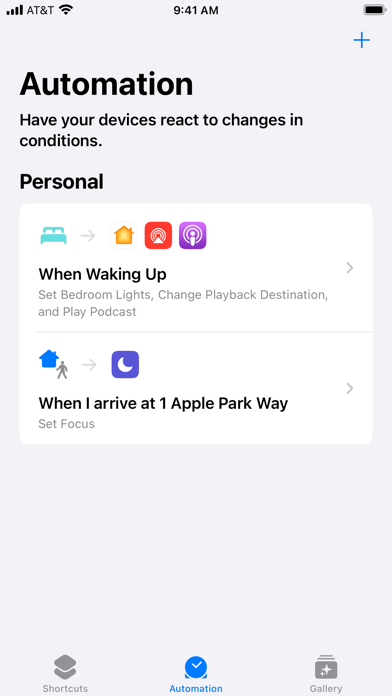
Create custom automations or choose from hundreds of built-in actions in your favorite apps — like Calendar, Camera, Reminders, and more — to help you accomplish everyday tasks with a simple tap from the Home Screen, by asking Siri, or even automatically. Use the Shortcuts app to: • Add a Home Screen icon that calls a loved one • Make animated GIFs • Make PDFs from Safari And so much more... Shortcuts opens up incredible possibilities to automate things you do regularly on your iPhone and iPad.
Installs, last 30 days
Apple does not publish download counts. Estimates are in testing.
Estimated store revenue Estimated Beta
App Store, worldwide, monthly rate from the last 12 chart days to 19 Nov 2026
Below the top 100 grossing apps in the markets we calibrate. In the United States that usually means under about $6.4M a month. App Store purchases and subscriptions only, before Apple's 15 to 30% fee. Ads and web payments are not included.
Ratings
49,997 ratings, 49,997 reviews
- 5 ★81%
- 4 ★7.5%
- 3 ★3.5%
- 2 ★2.1%
- 1 ★5.8%
Recent reviews
Latest public reviews from the store
- 10 Jul 2025
Great app! Just a few suggestions
Shortcuts is such a great and hidden app by most Apple users. I found out about this online and said “I need to get this app!” Until I found out that it was automatically installed. I mostly use it for styling my home screen and apps. However, I have a few suggestions for the app. When you can “add to Home Screen”, you can select and adjust a photo for the appearance. When you adjust it, however, the “zoom space” (or wtvr you want to call it) isn’t the exact size and shape as an app icon on the Home Screen. It’s more of a rectangle, which eliminates the option of trying it center something exactly. If apple could make the size and shape that of an app, that’d be great! My last suggestion is to make the automations more customizable. I use one to play a song as an alarm in the morning, but when you select the “time” type of automation, it doesn’t let you customize anything, like setting it only on certain days or having it repeat every 2 weeks. Otherwise, this app is really great! Rant over :)
- 21 Oct 2023
Such an absolute gold mine that people ignore ⭐️
This app is far more than what meets the eye at first. I don't understand why anyone would give this a 3 star rating or lower unless they just hadn't seen the extent of its features yet or weren't into programming small little scripts that basically don't require any coding knowledge at all to do. You can do so much with this app and I feel that too much of it goes way too unnoticed!! I personally enjoy using it for fun little projects like creating a mastermind game using shortcut menus and if-then scripts and stuffs, but it has a ton of practical use as well for the average person. And yeah, I understand that there are some bugs every now and then like really big shortcuts freezing up or taking awhile to run, but for what it gives in return I can overlook the little bugs and appreciate the whole far better. So in conclusion... this is a GREAT app, and should be used by and recommended to more people. Probably one of Apple's best factory default apps which deserves more love and attention.
- 4 Oct 2022
I love using this app!!! A couple of big problems though…
I love to use this app, but I have 2 really big problems. When scrolling through shortcuts with many scripts, there is a lot of lag. I’m unsure if it’s a hardware problem or if it’s the software. Second of all, the app randomly freezes but doesn’t crash. There isn’t a black screen or visual glitches. I’m 99% sure that it has nothing to do with the display, because my device works fine and will shut off like normal. It just stays paused on the frame before it freezes and will not work unless I close it and wait several minutes before opening it again. This is a pretty annoying bug, but everything works fine otherwise! It’s pretty cool to program and use your device in unique ways using it! I will continue to use Shortcuts (as I enjoy making these types of programs) but will contact the devs of the Shortcuts app if anything else goes wrong. Welp, that’s all I gotta say! I’m gonna go finish making a jumpscare prank on here!
- 27 May 2022
Great Potential, But Please Stop The Banners
I love the potential of this app. Customization and organization are very important to me. But the constant notification banners that pop down every time you open an app are absolutely maddening (a common complaint, from what I've seen.) I scoured forums and found a way to disable them for when I open a single app (although I really think there needs to be a simple, permanent option that doesn't require screen time and running an automation) but I still get a banner every time I select an app option from a menu. (Especially frustrating considering I'd like to pair multiple camera apps in a menu together under one icon, but the banner freezes the camera screen for a full few seconds making it impossible to snap a quick photo.) Also, it would be great if we could choose custom photos for shortcuts added to widgets like we can for shortcuts added to the home screen. Lastly, if possible, it would be lovely to have notification badges display on the shortcut icons like they do on the originals, so I can customize my mail and messages apps and still be able to see the number of new emails and texts. Thank you for taking the time to read this and (hopefully) take this into consideration f
What reviewers bring up
Topics mentioned in the latest 8 reviews, by how many reviews mention them
Liked in good reviews (3 reviews)
- otherwise 2
- scripts 2
- screen 2
- unless 2
- enjoy 2
- such 2
- goes 2
- big 2
Raised in bad reviews (3 reviews)
- shortcut 2
- however 2
- example 2
- change 2
- iphone 2
- apple 2
- first 2
- until 2
Top chart positions
Latest App Store chart ranks by country, last 10 days
Not in any tracked top chart in the last 10 days.
Shortcuts history
Release, install milestones, listing and store changes
- First released on the store 4 Jun 2019
Update frequency
How often Shortcuts ships a new version, month by month
2 updates in the last 12 months. Less often than most similar apps: they shipped a median of 5 updates in the same year.
Recent versions
Current version 6.7
- Version 6.719 Oct 2026
Bug Fixes and Feature Enhancements
- Version 6.212 Dec 2025
Bug Fixes and Feature Enhancements
Listing keywords
Words and phrases Shortcuts repeats most in its store listing
Top phrases: home screen (2).
Highlighted words also appear in the title. Counts cover the title, short description and description.
Compliance
What the listing and the app package show
- Store status
- Live
- Upkeep
- Updated 19 Oct 2026
- Age rating
- 17+
Apps like Shortcuts
 Authenticator App2Stable★ 4.64
 VPN Proxy -Unlimited Super VPNVPN Apps★ 4.67
 Forest: Focus for ProductivitySEEKRTECH CO., LTD.★ 4.79
 My Scans, best PDF Scanner AppTOP APP d.o.o.★ 4.77
 Any.do: To do list & PlannerAny.DO★ 4.62
 To Do List MinimaList & WidgetInnerGrow★ 4.77
 Sam Smart TV Remote- Things TVUNIVERSAL REMOTE LABS COMPANY LIMITED★ 4.32
 RoboForm Password ManagerSiber Systems, Inc.★ 4.73
 Proton Mail - Encrypted EmailProton AG★ 4.75
Shortcuts: questions and answers
Who makes Shortcuts?
Shortcuts is published by Apple.
When was Shortcuts last updated?
The latest version (6.7) was released on 19 Oct 2026.
Is Shortcuts free?
Yes. Shortcuts is free to download.
Is Shortcuts still available?
Yes. Shortcuts is live on App Store as of 19 Nov 2026.
Track Shortcuts and its competitors
Watch any app for new versions, rating drops, chart moves and removals. Free plan, no card.