
- Installs
- —
- Apple does not publish download counts
- Rating
- —
- Ratings
- —
- Version
- 2.5
- Updated 6 Mar 2023
- Released
- 14 Jan 2015
- Tracked since 10 May 2026
- Size
- 2 MB
- Needs 10.14.6
Screenshots
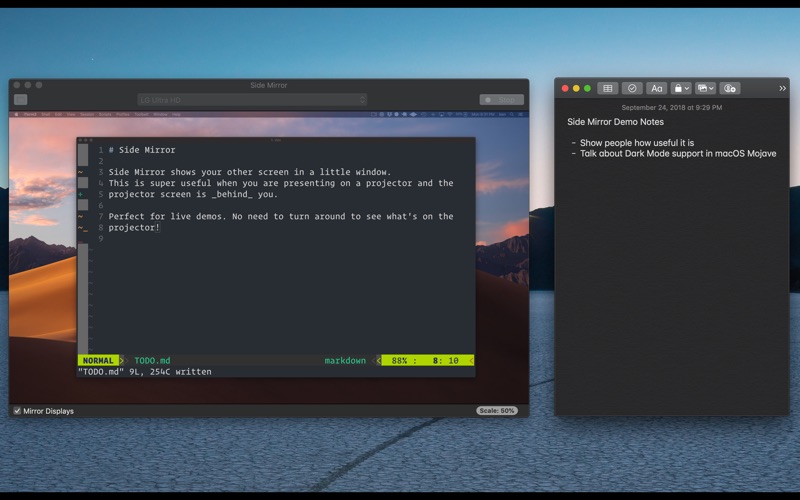


About Side Mirror - for Presenters
The description on the store listing
Side Mirror is the ultimate 2nd display utility for presenters.
Presenting on Zoom but don't want to share your entire screen? Using a cheap dummy HDMI dongle you can use Side Mirror to view and interact with the virtual display (this requires a separate hardware HDMI dongle).
Doing an in-person presentation, but don't want to mirror your displays? Stop looking over your shoulder! Side Mirror gives you a preview window of what's happening on the other display so you can do live demos without having to crane your neck back at the projector screen.
You can kind of think of it as a "VNC for your other display".
Not mirroring your display offers some advantages during presentations:
- Have …
Read the full description
Side Mirror is the ultimate 2nd display utility for presenters. Presenting on Zoom but don't want to share your entire screen? Using a cheap dummy HDMI dongle you can use Side Mirror to view and interact with the virtual display (this requires a separate hardware HDMI dongle). Doing an in-person presentation, but don't want to mirror your displays? Stop looking over your shoulder! Side Mirror gives you a preview window of what's happening on the other display so you can do live demos without having to crane your neck back at the projector screen. You can kind of think of it as a "VNC for your other display". Not mirroring your display offers some advantages during presentations: - Have a set of notes you can refer to - Keep a list of code snippets to copy/paste - Keep a folder of presentation files you need quick access to in an open Finder window - Click through the window to magically teleport your mouse to the other display, exactly where you clicked Side Mirror is an essential tool for: - Presenters - Educators - Live Demos Take Side Mirror for a spin today!
Installs
Apple does not publish download counts. Estimates are in testing.
We publish iOS estimates only after they pass a back-test against real numbers. Chart history below is measured.
Estimated store revenue Estimated Beta
App Store, worldwide, monthly rate from the last 15 chart days to 22 Nov 2026
Below the top 100 grossing apps in the markets we calibrate. In the United States that usually means under about $6.4M a month. App Store purchases and subscriptions only, before Apple's 15 to 30% fee. Ads and web payments are not included.
Ratings
No rating breakdown published for this app.
Recent reviews
Latest public reviews from the store
No reviews in our sample for this app yet.
Top chart positions
Latest App Store chart ranks by country, last 10 days
Not in any tracked top chart in the last 10 days.
Side Mirror - for Presenters history
Release, install milestones, listing and store changes
- First released on the store 14 Jan 2015
Update frequency
How often Side Mirror - for Presenters ships a new version, month by month
0 updates in the last 12 months. Less often than most similar apps: they shipped a median of 1 updates in the same year.
Recent versions
Current version 2.5
- Version 2.56 Mar 2023
This is a huge update! **New Resize option** Resize the Side Mirror window to match the target display resolution. You're given 3 options to scale the Side Mirror window to match the target display. If it the main display can't accommodate it, it does a best fit. **Snap Back Cursor** Enable this in preferences. This is a keyboard shortcut to have your mouse jump back to the Side Mirror window. **Cursor Hinting** Enable this in preferences. This will highlight the Side Mirror preview when your mouse moves to the target display. This can be useful as a guide to let you know which display your mouse is on. You can customize the color in preferences as well. **Remember last display** Side Mirror will now remember the last display used and automatically select it on subsequent launches, if it is available. **Keyboard Shortcuts** There’s now a keyboard shortcut to stop/start the preview **Bug Fixes** - disable click-through after stopping recording - stop recording if a display suddenly becomes unavailable - show “Untitled” for displays that report an empty name - Fix an issue that would cause the preview to suddenly stop *This will be the last release that supports macOS Catalina.*
Listing keywords
Words and phrases Side Mirror - for Presenters repeats most in its store listing
Top phrases: side mirror (6), hdmi dongle (2), live demos (2).
Highlighted words also appear in the title. Counts cover the title, short description and description.
Compliance
What the listing and the app package show
- Store status
- Live
- Upkeep
- No update since 6 Mar 2023
- Age rating
- 4+
Apps like Side Mirror - for Presenters
 Robin - Mobile AppRobin Powered, Inc★ 3.32
 Bright AisleMedia Solutions Corp★ 2.52
 Rhingie: phone call 2nd numberDating onlain, ooo★ 3.96
 PayClockLathem Time Corporation★ 2.08
 云电话-网络电话虚拟隐私小号国辉 李★ 4.74
 QuicklynQuicklyn★ 4.86
 Diligent BoardsDiligent Corporation★ 3.32
 vMEyeSuperGuangzhou Kedi Intelligence Technology Co., Ltd.★ 3.14
 Voice Dictation for PagesQuanticapps★ 3.82
Side Mirror - for Presenters: questions and answers
Who makes Side Mirror - for Presenters?
Side Mirror - for Presenters is published by Fickle Bits, LLC.
When was Side Mirror - for Presenters last updated?
The latest version (2.5) was released on 6 Mar 2023.
Is Side Mirror - for Presenters free?
No. Side Mirror - for Presenters is a paid app priced at $24.99.
Is Side Mirror - for Presenters still available?
Yes. Side Mirror - for Presenters is live on App Store as of 10 May 2026.
Track Side Mirror - for Presenters and its competitors
Watch any app for new versions, rating drops, chart moves and removals. Free plan, no card.