
- Installs
- —
- Apple does not publish download counts
- Rating
- —
- Ratings
- —
- Version
- 1.0
- Updated 12 Aug 2026
- Released
- 12 Aug 2026
- Tracked since 18 Aug 2026
- Size
- 15 MB
- Needs 26.2
Screenshots

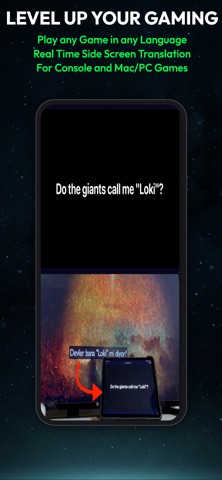
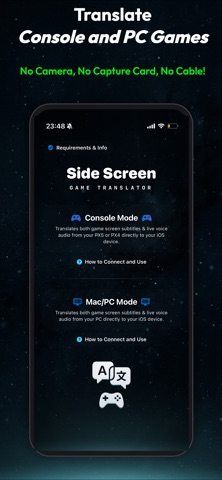


About Side Screen: Game Translator
The description on the store listing
Side Screen: Game Translator - Your Ultimate Real-Time Gaming Companion
IMPORTANT NOTICE: This app is designed exclusively as a companion "side screen" for external hardware (Console (PX5 / PX4), Mac and PC). It does NOT translate native iOS games or mobile apps. You play your games on your TV or PC monitor, and your iOS device acts as a dedicated wireless translation display.
Play console or PC game in your native language in real-time. Side Screen: Game Translator captures your game's visuals and audio over Wi-Fi, delivering instant translation without a camera, microphone, or capture card.
Powered by the Apple Neural Engine, text and voice are processed 100% offline with zero latency …
Read the full description
Side Screen: Game Translator - Your Ultimate Real-Time Gaming Companion IMPORTANT NOTICE: This app is designed exclusively as a companion "side screen" for external hardware (Console (PX5 / PX4), Mac and PC). It does NOT translate native iOS games or mobile apps. You play your games on your TV or PC monitor, and your iOS device acts as a dedicated wireless translation display. Play console or PC game in your native language in real-time. Side Screen: Game Translator captures your game's visuals and audio over Wi-Fi, delivering instant translation without a camera, microphone, or capture card. Powered by the Apple Neural Engine, text and voice are processed 100% offline with zero latency and maximum privacy. NO SUBSCRIPTIONS. NO CREDITS. Pay once and enjoy seamless translation in your favorite games. CORE MODES: - Console Mode (Headless Remote Play) Connect via your local network. Side Screen streams game data to your iOS device in the background. Frame the subtitle area for instant OCR text translation or listen to digital audio for live speech translation (STT). Wireless and camera-free! - External PC & Mac Mode Connect your computer via Wi-Fi. Side Screen captures your PC's screen text (OCR) and system audio (STT) for instant translation straight to your iPhone or iPad. WHY SIDE SCREEN? - Direct Digital Capture: Say goodbye to holding your phone up to the TV. Audio and video are captured directly over Wi-Fi. No cameras, background noise, or microphones. - Dual-Engine Translation: Lightning-fast OCR for on-screen subtitles, plus advanced STT for live, un-subtitled dialogue. - Context-Aware AI: The engine remembers previous dialogue lines, delivering accurate translations (e.g., character genders and lore). - 100% Offline & Private: All processing happens on-device using downloaded Apple Language Packs. - Zero Subscriptions & No Credits: Unlike cloud translators charging by the minute, Side Screen is a true premium app. Pay once for full access with no time limits. FREQUENTLY ASKED QUESTIONS (FAQ) Q: How do console translations work without a capture card? A: Side Screen acts as a headless Remote Play receiver over Wi-Fi. While you play on your TV, your iOS device displays real-time translations. Q: Do I need to point my phone's camera at the TV? A: No! Direct digital capture over Wi-Fi means room lighting or background noise never affect translation. Q: Can I translate PC/Mac games? A: Yes! Connect your computer via Wi-Fi to capture screen text (OCR) or system audio (STT) for instant translation. Q: Does it translate native iOS mobile games? A: No, Side Screen is exclusively a companion tool for external hardware (consoles and PCs). Q: Is it really offline? A: Yes. Once Apple language packs are downloaded, all OCR, STT, and translation processing run entirely on-device via the Neural Engine. Q: Why use Apple Neural Engine instead of online cloud APIs or custom API keys? A: Online cloud APIs introduce network latency and recurring server costs that force subscription models or credit limits. Custom API keys add setup complexity. Side Screen uses Apple Neural Engine for zero-latency, 100% offline translation with a seamless, plug-and-play user experience—pay once with no subscriptions, credits, or API key configuration required. SUPPORTED LANGUAGES: English, Spanish, French, German, Italian, Portuguese, Turkish, Russian, Chinese, Japanese, Korean, Arabic, Dutch, Indonesian, Polish, Thai, Ukrainian, Vietnamese. (18 languages supported for offline real-time translation). Note: Requires the Apple "Translate" app and downloaded language packs to function offline. Level up your gaming experience. Download Side Screen: Game Translator today and play the world's best games in your language.
Installs
Apple does not publish download counts. Estimates are in testing.
We publish iOS estimates only after they pass a back-test against real numbers. Chart history below is measured.
Estimated store revenue Estimated Beta
App Store, worldwide, monthly rate from the last 13 chart days to 20 Nov 2026
Below the top 100 grossing apps in the markets we calibrate. In the United States that usually means under about $6.4M a month. App Store purchases and subscriptions only, before Apple's 15 to 30% fee. Ads and web payments are not included.
Ratings
No rating breakdown published for this app.
Recent reviews
Latest public reviews from the store
No reviews in our sample for this app yet.
Top chart positions
Latest App Store chart ranks by country, last 10 days
- Countries ranked
- 2 of 50
- Best rank
- #4
- Top 10 placements
- 1
- of 4 chart placements
- Average rank
- #45.3
Best countries on App Store
- 🇸🇦 Saudi Arabia · Top free, Utilities#4
- 🇹🇷 Türkiye · Top free, Utilities#91
| Country | Chart | Category | Rank | Best (10 days) | Date |
|---|---|---|---|---|---|
| 🇸🇦 Saudi Arabia | Top free | Utilities | #4 | #4 | 20 Nov 2026 |
| 🇸🇦 Saudi Arabia | Top free | All apps | #27 | #27 | 20 Nov 2026 |
| 🇸🇦 Saudi Arabia | Top grossing | Utilities | #59 | #59 | 20 Nov 2026 |
| 🇹🇷 Türkiye | Top free | Utilities | #91 | #91 | 20 Nov 2026 |
Side Screen: Game Translator history
Release, install milestones, listing and store changes
- First released on the store 12 Aug 2026
Update frequency
How often Side Screen: Game Translator ships a new version, month by month
1 updates in the last 12 months. About as often as similar apps, which shipped a median of 1 updates in the same year.
Recent versions
Current version 1.0
- Version 1.012 Aug 2026
Listing keywords
Words and phrases Side Screen: Game Translator repeats most in its store listing
Top phrases: side screen (12), wi fi (6), screen game translator (4), side screen game (4), game translator (4).
Highlighted words also appear in the title. Counts cover the title, short description and description.
Compliance
What the listing and the app package show
- Store status
- Live
- Upkeep
- Updated 12 Aug 2026
- Age rating
- 17+
Apps like Side Screen: Game Translator
 Library of AviationNazmi Yavuz★ 4.82
 MyNOVECNorthern Virginia Electric Cooperative★ 2.28
 打工人小组件光翔 卓★ 4.96
 TruckbaysTruckbays LLC★ 4.3
 Tornado PRO PlayerMohammed Altam★ 4.44
 VDX - Video ManagerARISEPEAK LP★ 1.74
 TV CastingZeasn Info Technology Co., Ltd.★ 1.86
 Mil-Dot BallisticsTom Holsten★ 3.82
 MySontiqSontiq, Inc.★ 2.4
Side Screen: Game Translator: questions and answers
Who makes Side Screen: Game Translator?
Side Screen: Game Translator is published by ERTUGRUL GULERYUZ.
When was Side Screen: Game Translator last updated?
The latest version (1.0) was released on 12 Aug 2026.
Is Side Screen: Game Translator free?
No. Side Screen: Game Translator is a paid app priced at $0.29.
Is Side Screen: Game Translator still available?
Yes. Side Screen: Game Translator is live on App Store as of 18 Aug 2026.
Track Side Screen: Game Translator and its competitors
Watch any app for new versions, rating drops, chart moves and removals. Free plan, no card.