
- Installs
- —
- Apple does not publish download counts
- Rating
- 4.65
- Ratings
- 98
- 98 reviews
- Version
- 2.91.1
- Updated 2 Nov 2026
- Released
- 19 Dec 2010
- Tracked since 10 May 2026
- Size
- 32 MB
- Needs 9.0
Screenshots



About SideBooks
The description on the store listing
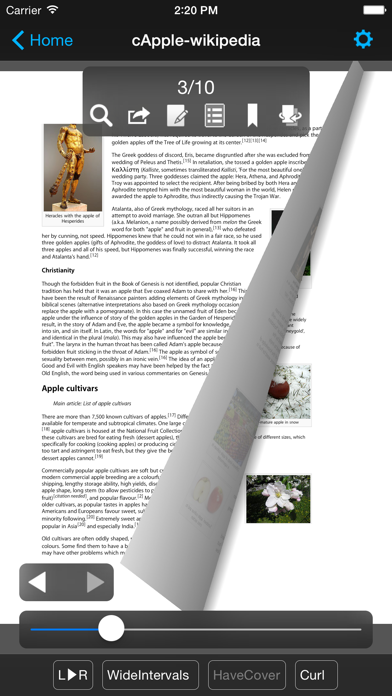
SideBooks is a high performance, high speed PDF viewer that allows you to enjoy reading with the feel of actual paper.
=Features=
Curl animation that simulates the actual turning of paper pages has been added to the standard page slide function.
Supports viewing from 3 directions, documents that open left to right, right to left and vertically. It provides the optimal environment for viewing any book.
All zoom rates have been optimized providing high speed, dynamic screen display.
An infinite hierarchy of folders can be created, moved, deleted, renamed, etc. using the enhanced bookshelf management function.
Real visual bookshelf function that corresponds to back cover style display.
Files …
Read the full description
SideBooks is a high performance, high speed PDF viewer that allows you to enjoy reading with the feel of actual paper. =Features= Curl animation that simulates the actual turning of paper pages has been added to the standard page slide function. Supports viewing from 3 directions, documents that open left to right, right to left and vertically. It provides the optimal environment for viewing any book. All zoom rates have been optimized providing high speed, dynamic screen display. An infinite hierarchy of folders can be created, moved, deleted, renamed, etc. using the enhanced bookshelf management function. Real visual bookshelf function that corresponds to back cover style display. Files can be imported by 3 methods, Network transfer through Dropbox, USB transfer through iTunes and direct transfer from other applications. Books can be protected so others cannot view them by using the password protected locking function. This is a universal application that operates on the iPhone, iPod Touch and iPad. =Functions= Overall: *Brightness Adjustment *Screen rotates to match the orientation of the device *Screen Rotation Lock *Password Protected Start-up Lock Viewer: *Support PDF,ZIP,CBZ,RAR and CBR format *Page Turning: Choose from slide or curl *Viewing Directions: Choose from opening left to right / right to left / vertically *Page Spacing: Choose form wide / narrow / none *Facing Pages: Choose the pair of facing pages by setting the cover to on or off *Trim function within the range of page display *Cache pre-read function for the previous and next pages *Set the display for each book and remember the page number of the last page read *Text search function (list display type) *Contents function (also supports hierarchy type) *Bookmark function (with editable memos) *Edit handwritten notes *Send to other applications (Open-In) *Send by email *Printing function (Air Print) *In-page link function *Link to outside URL function (built-in browser / Safari / Printing) *Display / Don't Display link buttons *Page turning function using tap or swipe *Expansion / Contraction function using pinch and double tap (1-1024x zoom) *Viewing of encrypted PDF files with password protection *Display / non-display of statusbar when reading Bookshelf: *Display form: Choose form list bookshelf / visual bookshelf *Function to set theme of visual bookshelf with each folder *Bookshelf thema extension pack (Add-On) *Cover editing function (corresponds to the trim) *File editing function: create, move, delete, setting for all books in folder *Bookmark list *Reading history list *Unread list *Edit of mark choose form already read / unread *Book name search function *Network transfer through Dropbox *USB transfer through iTunes *Direct transfer from other applications Special thanks to, "Give My Regards to Black Jack" SHUHO SATO Manga on Web http://mangaonweb.com
Installs since 29 Aug 2026
Apple does not publish download counts. Estimates are in testing.
Estimated store revenue Estimated Beta
App Store, worldwide, monthly rate from the last 12 chart days to 19 Nov 2026
Below the top 100 grossing apps in the markets we calibrate. In the United States that usually means under about $6.4M a month. App Store purchases and subscriptions only, before Apple's 15 to 30% fee. Ads and web payments are not included.
Ratings
98 ratings, 98 reviews
No rating breakdown published for this app.
Recent reviews
Latest public reviews from the store
No reviews in our sample for this app yet.
Top chart positions
Latest App Store chart ranks by country, last 10 days
- Countries ranked
- 3 of 50
- Best rank
- #75
- Top 10 placements
- 0
- of 3 chart placements
- Average rank
- #85.3
Best countries on App Store
- 🇯🇵 Japan · Top free, Books#75
- 🇫🇮 Finland · Top free, Books#90
- 🇬🇷 Greece · Top free, Books#91
SideBooks history
Release, install milestones, listing and store changes
- First released on the store 19 Dec 2010
Update frequency
How often SideBooks ships a new version, month by month
4 updates in the last 12 months. More often than most similar apps: they shipped a median of 1 updates in the same year.
Recent versions
Current version 2.91.1
- Version 2.91.12 Nov 2026
*Fixed an issue where the window control buttons in the top-left corner would overlap with the "Back" button when using the app in a window on an iPad running iOS 26 or later.
- Version 2.90.421 Aug 2026
*Minor functional adjustments and bug fixes.
- Version 2.89.219 May 2026
*Readjusted the behavior of swiping left to right to go back to the previous screen while browsing files in iOS 26 environments.
- Version 2.89.010 May 2026
*Minor bug fixes.
Listing keywords
Words and phrases SideBooks repeats most in its store listing
Top phrases: choose form (3), visual bookshelf (3), dropbox usb transfer (2), transfer through dropbox (2), transfer through itunes (2).
Highlighted words also appear in the title. Counts cover the title, short description and description.
Compliance
What the listing and the app package show
- Store status
- Live
- Upkeep
- Updated 2 Nov 2026
- Age rating
- 4+
Apps like SideBooks
 African Proverbs-Wisdom QuotesVERSELINGO COMMUNICATIONS LIMITED★ 4.8
 咪咕云书店Migu Digital Media Co., Ltd.★ 4.66
 AI Chat: Talk with characterShoghik Avagyan★ 4.49
 Audiobooks - 2,947 Classics For Free. The Ultimate Audiobook LibraryDigital Press Publishing★ 4.41
 أين وصلتAhmad Altamimi★ 4.69
 WazaifFerox Solutions Inc★ 4.73
 长佩阅读北京长佩网络科技有限公司★ 2.43
 Readify: AI Natural Read AloudNew Port LLC★ 4.71
 BiblioBookBites★ 4.73
SideBooks: questions and answers
Who makes SideBooks?
SideBooks is published by Tatsumi-system Co., Ltd..
When was SideBooks last updated?
The latest version (2.91.1) was released on 2 Nov 2026.
Is SideBooks free?
Yes. SideBooks is free to download.
Is SideBooks still available?
Yes. SideBooks is live on App Store as of 14 Nov 2026.
Track SideBooks and its competitors
Watch any app for new versions, rating drops, chart moves and removals. Free plan, no card.