
- Installs
- —
- Apple does not publish download counts
- Rating
- 4.42
- Ratings
- 105
- 105 reviews
- Version
- 2.2.0
- Updated 25 Sep 2015
- Released
- 30 Apr 2013
- Tracked since 10 May 2026
- Size
- 12 MB
- Needs 6.0
Screenshots

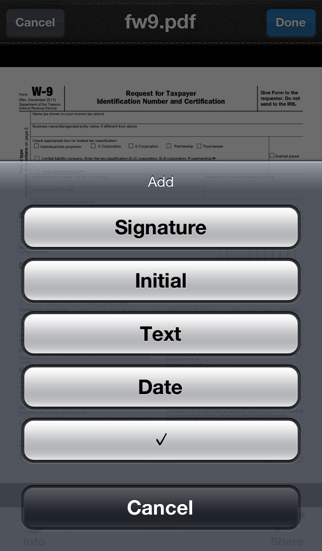


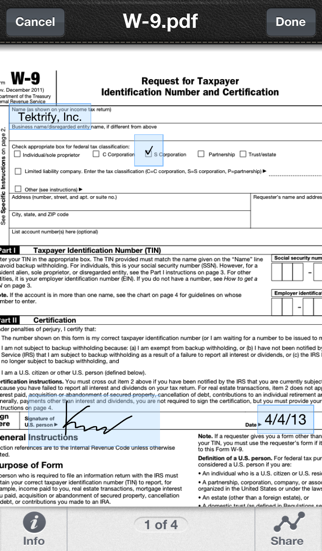
About SignPDF - Quickly Annotate PDF
The description on the store listing
Sign documents anywhere with your iPhone/iPod/iPad! No account required!
Need to sign or fill out a document? SignPDF makes it quick and easy to do both and forget about printing, scanning, or faxing. Simply:
1) Open any PDF from your iPhone, iPod or iPad’s Email, Dropbox, Google Drive, Box.Net, etc...
2) Fill out form with your name, initial, date, check boxes and sign realistically with your finger
3) Email the signed document to anyone, print it or upload to Dropbox, Google Drive, Box.Net, etc...
SignPDF is typically use to sign and fill documents including NDA’s, sales agreements, celebrity endorsements, real estate contracts, financing agreements, permission slips, marriage …
Read the full description
Sign documents anywhere with your iPhone/iPod/iPad! No account required! Need to sign or fill out a document? SignPDF makes it quick and easy to do both and forget about printing, scanning, or faxing. Simply: 1) Open any PDF from your iPhone, iPod or iPad’s Email, Dropbox, Google Drive, Box.Net, etc... 2) Fill out form with your name, initial, date, check boxes and sign realistically with your finger 3) Email the signed document to anyone, print it or upload to Dropbox, Google Drive, Box.Net, etc... SignPDF is typically use to sign and fill documents including NDA’s, sales agreements, celebrity endorsements, real estate contracts, financing agreements, permission slips, marriage documents, and more... *** Key Features: - Sign documents with just a finger - No need to print, sign, or fax documents again - Easily add name, initial, date, check boxes and signature to PDF - Your important docs stays with you on your device. We don't upload it our server! - No sign up process or account is needed. Simply sign docs! - Open documents from your email inbox, Dropbox, and more - Export documents to use in other apps - Printing - Print any document with AirPrint enabled printers Pro Version: - Will have 9 credits - No Advertisement How credits work: - Sign and share one document will consume 1 credit, no matter how many pages long the document is.
Installs since 29 Aug 2026
Apple does not publish download counts. Estimates are in testing.
Estimated store revenue Estimated Beta
App Store, worldwide, monthly rate from the last 12 chart days to 19 Nov 2026
Below the top 100 grossing apps in the markets we calibrate. In the United States that usually means under about $6.4M a month. App Store purchases and subscriptions only, before Apple's 15 to 30% fee. Ads and web payments are not included.
Ratings
105 ratings, 105 reviews
No rating breakdown published for this app.
Recent reviews
Latest public reviews from the store
- 7 Jul 2017
Super Convenient
Easy to use and convenient when there is no printer available.
- 14 Apr 2017
Great app
Works great for editing and signing documents on my mobile device. It's a bit annoying that you have to purchase credits after a vey small allotted credits offered
- 24 Oct 2016
Easy to Use
After I figured out how to send PDFs to this app (in my e-mail, I selected the PDF attachment and then scrolled right to "Copy to SignPDF"), it was easy to use. It came in handy when working from home.
- 17 Oct 2016
Very user friendly. Almost easier than pen & paper.
Such a user friendly interface. I use this to submit claim forms practically effortless! And free to boot!
What reviewers bring up
Topics mentioned in the latest 8 reviews, by how many reviews mention them
Liked in good reviews (7 reviews)
- documents 2
- such 2
Raised in bad reviews (1 reviews)
No topic comes up twice.
Top chart positions
Latest App Store chart ranks by country, last 10 days
Not in any tracked top chart in the last 10 days.
SignPDF - Quickly Annotate PDF history
Release, install milestones, listing and store changes
- First released on the store 30 Apr 2013
Update frequency
How often SignPDF - Quickly Annotate PDF ships a new version, month by month
0 updates in the last 12 months. Less often than most similar apps: they shipped a median of 1 updates in the same year.
Recent versions
Current version 2.2.0
- Version 2.2.025 Sep 2015
- Fix crash and black screen when opening a doc - Fix freeze when first load up
Listing keywords
Words and phrases SignPDF - Quickly Annotate PDF repeats most in its store listing
Top phrases: date check boxes (2), drive box net (2), dropbox google drive (2), google drive box (2), initial date check (2).
Highlighted words also appear in the title. Counts cover the title, short description and description.
Compliance
What the listing and the app package show
- Store status
- Live
- Upkeep
- No update since 25 Sep 2015
- Age rating
- 4+
Apps like SignPDF - Quickly Annotate PDF
 Text2DriveText2Drive★ 1.85
 Lemongrass Spa CentralLemongrass Spa★ 4.88
 Cinquo - Reviews optimizationLOCALBOSS SL★ 4.94
 Jeenie: 24/7 Live InterpretingGlobal Professional Search★ 4.26
 123NET Softphone123.Net, Inc.★ 4.33
 Deskera: Business & AccountingDeskera Holdings Ltd.★ 4.83
 Invoice Maker LiteAnthony Chuinard★ 4.79
 Nectar - Employee RecognitionPerkCity LLC★ 4.36
 Road Ranger: Ranger RewardsRoad Ranger★ 4.41
SignPDF - Quickly Annotate PDF: questions and answers
Who makes SignPDF - Quickly Annotate PDF?
SignPDF - Quickly Annotate PDF is published by Tektrify, Inc.
When was SignPDF - Quickly Annotate PDF last updated?
The latest version (2.2.0) was released on 25 Sep 2015.
Is SignPDF - Quickly Annotate PDF free?
Yes. SignPDF - Quickly Annotate PDF is free to download.
Is SignPDF - Quickly Annotate PDF still available?
Yes. SignPDF - Quickly Annotate PDF is live on App Store as of 14 Nov 2026.
Track SignPDF - Quickly Annotate PDF and its competitors
Watch any app for new versions, rating drops, chart moves and removals. Free plan, no card.