
- Installs
- —
- Apple does not publish download counts
- Rating
- 4.32
- Ratings
- 139
- 139 reviews
- Version
- 1.2.2
- Updated 18 Dec 2025
- Released
- 26 Sep 2018
- Tracked since 11 May 2026
- Size
- 4 MB
- Needs 15.6
Screenshots


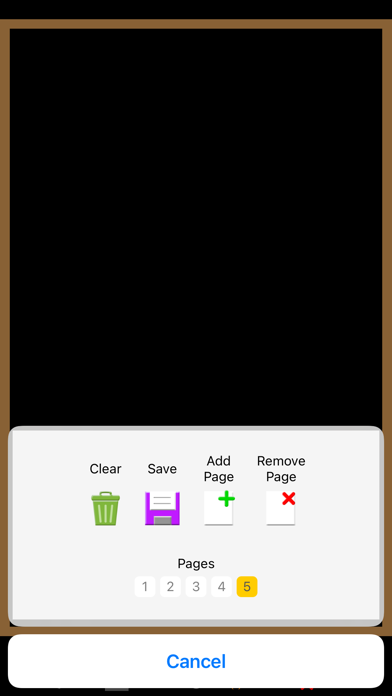


About Simple Blackboard
The description on the store listing
This app allows you to draw on a simple blackboard (or whiteboard). You can use it for drawing, jotting down, illustrations, math calculations and etc. The key features are:
- You can choose blackboard or whiteboard.
- You have various brush sizes and huge number of paint colors.
- You can draw various shapes such as line, arrow, circle, oval, square, rectangle, triangle, and polygon.
- You can type text with adjustable font size.
- You can load photo to the board.
- You can record video from your drawing screen with sound from your device microphone.
- You can save your drawing to your device.
- You can add or remove pages.
- You can set your favourite paint colors and color opacity.
- …
Read the full description
This app allows you to draw on a simple blackboard (or whiteboard). You can use it for drawing, jotting down, illustrations, math calculations and etc. The key features are: - You can choose blackboard or whiteboard. - You have various brush sizes and huge number of paint colors. - You can draw various shapes such as line, arrow, circle, oval, square, rectangle, triangle, and polygon. - You can type text with adjustable font size. - You can load photo to the board. - You can record video from your drawing screen with sound from your device microphone. - You can save your drawing to your device. - You can add or remove pages. - You can set your favourite paint colors and color opacity. - Your last drawing is always saved. - The device screen never goes off while you are using the app. The premium purchase removes all ads, enables adding text, loading photo, drawing shapes and grid, setting favorite paint colors, and paint color opacity.
Installs since 29 Aug 2026
Apple does not publish download counts. Estimates are in testing.
Estimated store revenue Estimated Beta
App Store, worldwide, monthly rate from the last 12 chart days to 19 Nov 2026
Below the top 100 grossing apps in the markets we calibrate. In the United States that usually means under about $6.4M a month. App Store purchases and subscriptions only, before Apple's 15 to 30% fee. Ads and web payments are not included.
Ratings
139 ratings, 139 reviews
No rating breakdown published for this app.
Recent reviews
Latest public reviews from the store
- 21 Apr 2024
Blackboard simple
Open photo to the board
- 23 Apr 2020
Good App
This is really nice. I love the blackboard feature it really makes things pop. The one downfall is I REALLY need the screen to flip horizontally. I’m using this to complete math problems online for students and there isn’t enough room vertical to write the entire equation without writing very small. I’d love to have the feature of when you turn the phone horizontally the screen would do the same. Until then , I’ll have to stick to a different app even though I prefer this one for everything else.
What reviewers bring up
Topics mentioned in the latest 6 reviews, by how many reviews mention them
Liked in good reviews (0 reviews)
No topic comes up twice.
Raised in bad reviews (4 reviews)
- pencil 2
- mode 2
Top chart positions
Latest App Store chart ranks by country, last 10 days
Not in any tracked top chart in the last 10 days.
Simple Blackboard history
Release, install milestones, listing and store changes
- First released on the store 26 Sep 2018
Update frequency
How often Simple Blackboard ships a new version, month by month
1 updates in the last 12 months. Less often than most similar apps: they shipped a median of 2 updates in the same year.
Recent versions
Current version 1.2.2
- Version 1.2.218 Dec 2025
- Small changes.
Listing keywords
Words and phrases Simple Blackboard repeats most in its store listing
Top phrases: paint colors (3), blackboard or whiteboard (2), color opacity (2).
Highlighted words also appear in the title. Counts cover the title, short description and description.
Compliance
What the listing and the app package show
- Store status
- Live
- Upkeep
- Updated 18 Dec 2025
- Age rating
- 4+
Apps like Simple Blackboard
 CV+ Resume MakerMajed Hariri★ 4.66
 2 factor - Authenticator App25 Degrees Apps LLC★ 4.44
 Chore Chart: Family Rewards舜 吕★ 4.69
 HouwiyetiAGENCE NATIONALE DU REGISTRE DES POPULATIONS ET DES TITRES SECURISES★ 4.15
 TheBrain: Smart Notes & LinksTheBrain Technologies LP★ 4.82
 CalamariHubert Lisek★ 4.53
 Coin Pic IdentifierTech Consolidated Inc★ 4.07
 Clippit: AI Text To SpeechSpencer Yen★ 4.59
 Ai humanizer humanize ai textABDELHAFID BASAFOU★ 4.61
Simple Blackboard: questions and answers
Who makes Simple Blackboard?
Simple Blackboard is published by Bita Sobhani.
When was Simple Blackboard last updated?
The latest version (1.2.2) was released on 18 Dec 2025.
Is Simple Blackboard free?
Yes. Simple Blackboard is free to download.
Is Simple Blackboard still available?
Yes. Simple Blackboard is live on App Store as of 14 Nov 2026.
Track Simple Blackboard and its competitors
Watch any app for new versions, rating drops, chart moves and removals. Free plan, no card.