- Installs
- —
- Apple does not publish download counts
- Rating
- 3.32
- Ratings
- 47
- Version
- 3.3.8
- Updated 5 Mar 2020
- Released
- 24 Nov 2010
- Tracked since 16 Jul 2026
- Size
- 21 MB
- Needs 10.0
Screenshots

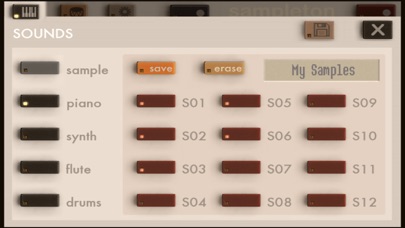
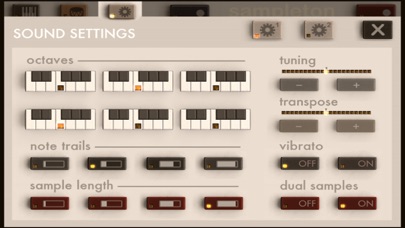
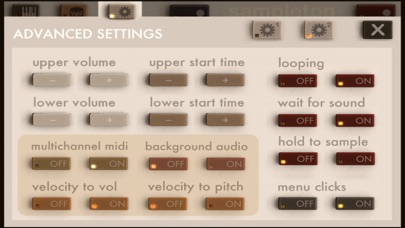

About sir Sampleton
The description on the store listing
"surprisingly powerful" - Wall Street Journal
used by DJ/producer Zedd! // supports Audiobus, MIDI, iOS13
Sir Sampleton is a sampling musical keyboard inspired by Casio and Yamaha samplers from the 80s. The app allows you to record sounds through the microphone and then play them on dual piano keyboards accompanied by a rhythm machine. You'll be surprised at the lush, complex musical sounds that can be created with samples of your voice, musical instruments, and other noises. Samples can be looped, customized, saved, and emailed, and we offer free samples for download on our website.
Supports Audiobus, Inter-app Audio, CoreMIDI, MIDI Mobilizer 1 and 2. Works as a virtual instrument …
Read the full description
"surprisingly powerful" - Wall Street Journal used by DJ/producer Zedd! // supports Audiobus, MIDI, iOS13 Sir Sampleton is a sampling musical keyboard inspired by Casio and Yamaha samplers from the 80s. The app allows you to record sounds through the microphone and then play them on dual piano keyboards accompanied by a rhythm machine. You'll be surprised at the lush, complex musical sounds that can be created with samples of your voice, musical instruments, and other noises. Samples can be looped, customized, saved, and emailed, and we offer free samples for download on our website. Supports Audiobus, Inter-app Audio, CoreMIDI, MIDI Mobilizer 1 and 2. Works as a virtual instrument for apps like Cubasis, Beatmaker 2, and Genome sequencer. Capable of sampling other apps and effects through Audiobus. Sampleton applies a subtle stereo effects process to the audio giving it a fuller, warmer sound that you'd typically get from sampling a monaural microphone. If you like my apps please leave ratings or reviews! For support email [email protected] FEATURES: • Sample from the microphone and immediately play your sounds on dual keyboards • Save and email sample packs to friends, or to yourself for backup/transfer • Download free samples from our website • Built-in beats and computer beat generator • Adjust tuning, release, vibrato, sample time, and much more • Record, add effects, and sample from other apps (requires Audiobus app) • Put a different sample on each keyboard in dual-sample mode • Multitouch with 18 voices for rich sound • Automatic smart microphone level adjustment • Supports all CoreMIDI devices, Line6 MIDI Mobilizer 1 and 2 • Virtual MIDI for compatibility with Cubasis, Beatmaker 2, and Genome • Multichannel MIDI mode places different samples on each MIDI channel, up to 24 samples • Supports iRig external audio input adapter and iRig microphone • Low latency • Coming soon: Audio copy/paste, additional sample banks, and more! INSTRUCTIONS: TO SAMPLE: press the red button and speak into the microphone. It will sample for about 3 seconds. TO PLAY A DRUM BEAT: press the drum icon button in the upper left to open the Rhythm Menu, and then select the beat you want to play. To change the tempo or beat volume, use the buttons on the right. Press the X to return to the keyboard. TO GENERATE A RANDOM BEAT: press the drum icon button to open the Rhythm Menu, and then press the RANDOM button. To generate a new random beat, press the button again. TO SAVE A SAMPLE: press the keyboard icon button in the upper left to open the Sounds Menu. Press SAVE and then choose one of the flashing numbered buttons. Your sample is then saved on that button. Press the X to return to the keyboard. TO LOAD A SAMPLE: press the keyboard icon button in the upper left to open the Sounds Menu. Press the numbered button where you saved the sample. Press the X to return to the keyboard. TO PREVIEW A SAVED SAMPLE: press and hold the numbered button in the Sounds Menu. TO SAVE CHANGES TO A SAMPLE'S SOUND SETTINGS: press and hold the 'save' button in the Sounds Menu.
Installs
Apple does not publish download counts. Estimates are in testing.
We publish iOS estimates only after they pass a back-test against real numbers. Chart history below is measured.
Estimated store revenue Estimated Beta
App Store, worldwide, monthly rate from the last 13 chart days to 20 Nov 2026
Below the top 100 grossing apps in the markets we calibrate. In the United States that usually means under about $6.4M a month. App Store purchases and subscriptions only, before Apple's 15 to 30% fee. Ads and web payments are not included.
Ratings
47 ratings
- 5 ★43%
- 4 ★4.3%
- 3 ★19%
- 2 ★11%
- 1 ★23%
Recent reviews
Latest public reviews from the store
No reviews in our sample for this app yet.
Top chart positions
Latest App Store chart ranks by country, last 10 days
Not in any tracked top chart in the last 10 days.
sir Sampleton history
Release, install milestones, listing and store changes
- First released on the store 24 Nov 2010
Recent versions
Current version 3.3.8
- Version 3.3.85 Mar 2020
Fixed issue with importing samples in iOS 13
Listing keywords
Words and phrases sir Sampleton repeats most in its store listing
Top phrases: sample press (5), icon button (4), sounds menu (4), left to open (3), beat press (3).
Highlighted words also appear in the title. Counts cover the title, short description and description.
Compliance
What the listing and the app package show
- Store status
- Live
- Upkeep
- No update since 5 Mar 2020
- Age rating
- 4+
Apps like sir Sampleton
 SynthMaster PlayerKV331 Audio★ 4.36
 Backroads & Beyond RadioJordan Boudreaux★ 4.82
 Q Country 107.1 - WSAQLiggett Communications★ 4.8
 Del Rio's Latino MixPaul Lomas★ 4.98
 Classical Music+Cedric Porter★ 4.67
 Antenne NiedersachsenDigital Media Hub GmbH★ 4.56
 Jam: Instant Song CreatorDreamWalk Mobile★ 3.73
 Reverse Singing Fun ChallengeNGUYEN QUY SON★ 4.51
 Radio UK: Live FM & DAB OnlineRoman Skripchak★ 4.73
sir Sampleton: questions and answers
Who makes sir Sampleton?
sir Sampleton is published by Paul Slocum.
When was sir Sampleton last updated?
The latest version (3.3.8) was released on 5 Mar 2020.
Is sir Sampleton free?
No. sir Sampleton is a paid app priced at $0.99.
Is sir Sampleton still available?
Yes. sir Sampleton is live on App Store as of 16 Jul 2026.
Track sir Sampleton and its competitors
Watch any app for new versions, rating drops, chart moves and removals. Free plan, no card.