
- Installs
- —
- Apple does not publish download counts
- Rating
- 4.4
- Ratings
- 10
- 10 reviews
- Version
- 2.5
- Updated 12 Jan 2025
- Released
- 5 Dec 2016
- Tracked since 10 May 2026
- Size
- 19 MB
- Needs 12.0
Also on Google Play: Smart PDF- Document Scanner
Screenshots


About Smart PDF Document Scanner
The description on the store listing
Ditch the office scanner!
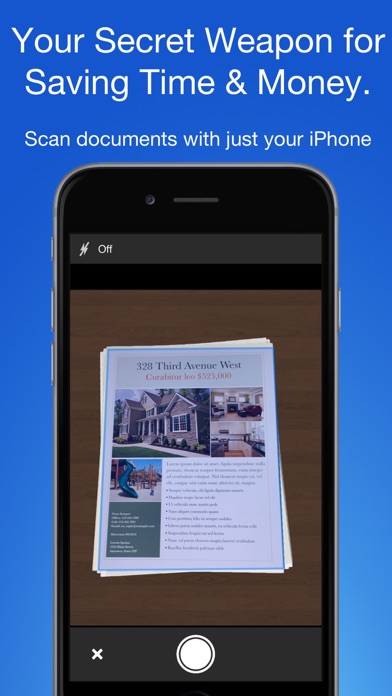
Just snap a photo of your document, and get a PDF file you can instantly send to your colleagues, all from your phone or iPad.
TACK SHARP SCANS
That processor in your phone is quite a little monster. Smart Scanner uses it fully to make the best possible scans. Even full-page articles come out tack-sharp and easy to read.
It automatically detects the page edges and corrects for perspective. Pick full-color scans, grayscale, or black-and-white for maximum legibility. FlashAssist can take perfect scans even in poor lighting conditions. You can even change the correction and enhancement settings after the fact.
POWERFUL COLOR-CODED ORGANIZATION
Scanning is just half …
Read the full description
Ditch the office scanner! Just snap a photo of your document, and get a PDF file you can instantly send to your colleagues, all from your phone or iPad. TACK SHARP SCANS That processor in your phone is quite a little monster. Smart Scanner uses it fully to make the best possible scans. Even full-page articles come out tack-sharp and easy to read. It automatically detects the page edges and corrects for perspective. Pick full-color scans, grayscale, or black-and-white for maximum legibility. FlashAssist can take perfect scans even in poor lighting conditions. You can even change the correction and enhancement settings after the fact. POWERFUL COLOR-CODED ORGANIZATION Scanning is just half the problem. You need a good way to keep all your documents organized, and easy to find later. Smart Scanner uses a simple tagging system that is much easier and more powerful than the regular folder system. File documents under custom color-coded categories with just a couple taps. Browse and sort files by category with a couple more. It's the way filing should work. FOR ALL YOUR SCANNING NEEDS + Quickly scan and send contracts and forms + Keep scans of important documents in your pocket, separate form the Photo Library + Scan all your travel receipts for easy expense reports + Keep digital copies of your notes and sketches + Scan articles to read later + And more! TIPS AND TRICKS Here are a few tips to get the best scans: + Place your document on a darker surface to improve the edge auto-detection. + You can drag the corners of the blue rectangle to fine tune it after taking a photo. + Make sure there is adequate lighting. Use the flash in low-light conditions. + You can tap on a page to edit its scan settings (including edges) after the fact.
Installs
Apple does not publish download counts. Estimates are in testing.
We publish iOS estimates only after they pass a back-test against real numbers. Chart history below is measured.
Estimated store revenue Estimated Beta
App Store, worldwide, monthly rate from the last 12 chart days to 19 Nov 2026
Below the top 100 grossing apps in the markets we calibrate. In the United States that usually means under about $6.4M a month. App Store purchases and subscriptions only, before Apple's 15 to 30% fee. Ads and web payments are not included.
Ratings
10 ratings, 10 reviews
No rating breakdown published for this app.
Recent reviews
Latest public reviews from the store
No reviews in our sample for this app yet.
Top chart positions
Latest App Store chart ranks by country, last 10 days
Not in any tracked top chart in the last 10 days.
Smart PDF Document Scanner history
Release, install milestones, listing and store changes
- First released on the store 5 Dec 2016
Update frequency
How often Smart PDF Document Scanner ships a new version, month by month
0 updates in the last 12 months. Less often than most similar apps: they shipped a median of 1 updates in the same year.
Recent versions
Current version 2.5
- Version 2.512 Jan 2025
+ Minor updates
Listing keywords
Words and phrases Smart PDF Document Scanner repeats most in its store listing
Top phrases: after the fact (2), smart scanner uses (2), color coded (2), scanner uses (2), smart scanner (2).
Highlighted words also appear in the title. Counts cover the title, short description and description.
Compliance
What the listing and the app package show
- Store status
- Live
- Upkeep
- Updated 12 Jan 2025
- Age rating
- 4+
Apps like Smart PDF Document Scanner
 Robin - Mobile AppRobin Powered, Inc★ 3.32
 Bright AisleMedia Solutions Corp★ 2.52
 Rhingie: phone call 2nd numberDating onlain, ooo★ 3.96
 PayClockLathem Time Corporation★ 2.08
 云电话-网络电话虚拟隐私小号国辉 李★ 4.74
 QuicklynQuicklyn★ 4.86
 Diligent BoardsDiligent Corporation★ 3.32
 DATABASICSDATABASICS★ 3.8
 vMEyeSuperGuangzhou Kedi Intelligence Technology Co., Ltd.★ 3.14
Smart PDF Document Scanner: questions and answers
Who makes Smart PDF Document Scanner?
Smart PDF Document Scanner is published by Qrayon, LLC.
When was Smart PDF Document Scanner last updated?
The latest version (2.5) was released on 12 Jan 2025.
Is Smart PDF Document Scanner free?
Yes. Smart PDF Document Scanner is free to download.
Is Smart PDF Document Scanner still available?
Yes. Smart PDF Document Scanner is live on App Store as of 1 Jul 2026.
Track Smart PDF Document Scanner and its competitors
Watch any app for new versions, rating drops, chart moves and removals. Free plan, no card.