- Installs
- —
- Apple does not publish download counts
- Rating
- 4.73
- Ratings
- 472
- 472 reviews
- Version
- 2.6
- Updated 9 Oct 2026
- Released
- 14 Nov 2014
- Tracked since 10 May 2026
- Size
- 20 MB
- Needs 12.0
Screenshots

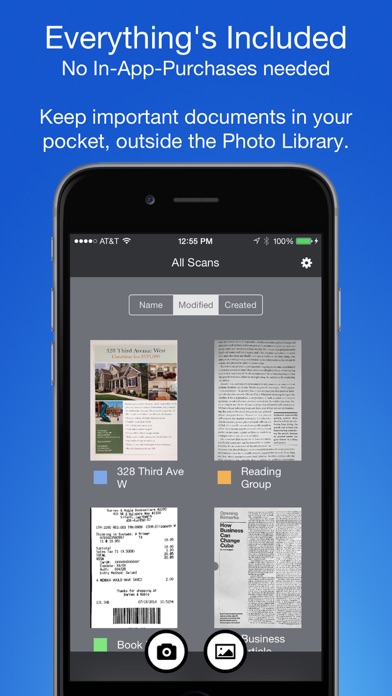
About Smart PDF Scanner
The description on the store listing
Ditch the office scanner!
Just snap a photo of your document, and get a PDF file you can instantly send to your colleagues, all from your iPhone or iPad.
TACK SHARP SCANS
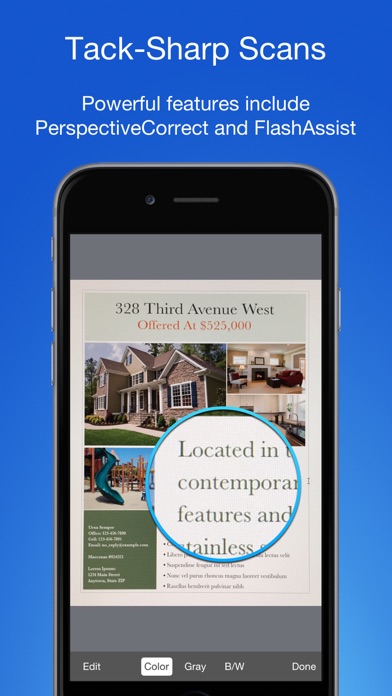
That processor in your phone is quite a little monster. Smart PDF Scanner uses it fully to make the best possible scans. Even full-page articles come out tack-sharp and easy to read.
It automatically detects the page edges and corrects for perspective. Pick full-color scans, grayscale, or black-and-white for maximum legibility. FlashAssist can take perfect scans even in poor lighting conditions. You can even change the correction and enhancement settings after the fact.
POWERFUL COLOR-CODED ORGANIZATION
Scanning is just …
Read the full description
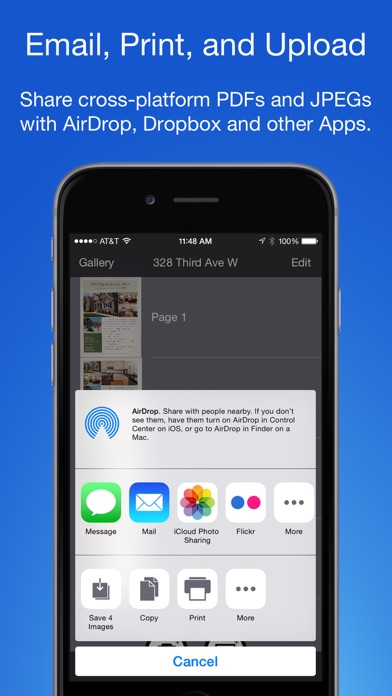
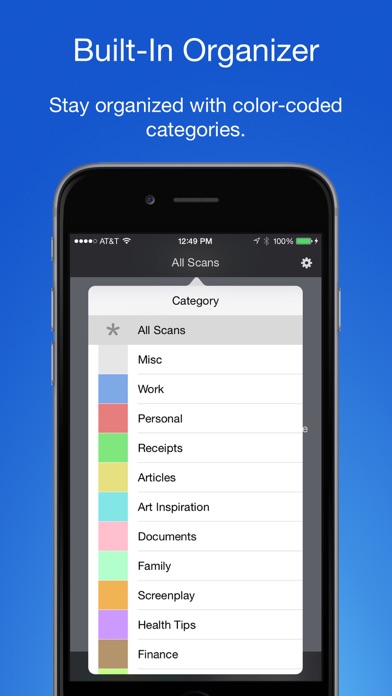
Ditch the office scanner! Just snap a photo of your document, and get a PDF file you can instantly send to your colleagues, all from your iPhone or iPad. TACK SHARP SCANS That processor in your phone is quite a little monster. Smart PDF Scanner uses it fully to make the best possible scans. Even full-page articles come out tack-sharp and easy to read. It automatically detects the page edges and corrects for perspective. Pick full-color scans, grayscale, or black-and-white for maximum legibility. FlashAssist can take perfect scans even in poor lighting conditions. You can even change the correction and enhancement settings after the fact. POWERFUL COLOR-CODED ORGANIZATION Scanning is just half the problem. You need a good way to keep all your documents organized, and easy to find later. Smart PDF Scanner uses a simple tagging system that is much easier and more powerful than the regular folder system. File documents under custom color-coded categories with just a couple taps. Browse and sort files by category with a couple more. It's the way filing should work. EASY TO SHARE Export scans as PDFs or images, and email or print directly from the App. Files can also be shared via AirDrop, or sent to another App. Easily upload to Dropbox, Google Drive, and other cloud services with the corresponding third party App. Send PDFs and images to services such as Evernote or OneNote to take advantage of their OCR capabilities. FOR ALL YOUR SCANNING NEEDS + Quickly scan and send contracts and forms + Keep scans of important documents in your pocket, separate form the Photo Library + Scan all your travel receipts for easy expense reports + Keep digital copies of your notes and sketches + Scan articles and send them to iBooks to read on the go + And more! APPS BUILT FOR PROFESSIONALS Smart PDF Scanner uses the latest technologies packed into your iPhone and iPad, but we've worked hard to make it as easy and fast to use as possible. Intelligent image processing eliminates the need for fiddling with complicated controls. That way, you can focus on getting the job done, and doing what you do best. TIPS AND TRICKS Here are a few tips to get the best scans: + Place your document on a darker surface to improve the edge auto-detection. + You can drag the corners of the blue rectangle to fine tune it after taking a photo. + Make sure there is adequate lighting. Use the flash in low-light conditions. + You can tap on a page to edit its scan settings (including edges) after the fact. MADE BY DEVELOPERS WHO CARE We are dedicated to handcrafting the best possible Apps for your iPhone and iPad, and we hope you enjoy using Smart PDF Scanner. If you have any additional questions, please drop us a line via our feedback page. Best regards, -- The App Makers @ Qrayon.
Installs since 29 Aug 2026
Apple does not publish download counts. Estimates are in testing.
Estimated store revenue Estimated Beta
App Store, worldwide, monthly rate from the last 12 chart days to 19 Nov 2026
Below the top 100 grossing apps in the markets we calibrate. In the United States that usually means under about $6.4M a month. App Store purchases and subscriptions only, before Apple's 15 to 30% fee. Ads and web payments are not included.
Ratings
472 ratings, 472 reviews
No rating breakdown published for this app.
Recent reviews
Latest public reviews from the store
- 21 Mar 2025
Definitely a 5 star app
I downloaded a bunch of scanning apps for my iphone, tried them 1 by one over the course of a few weeks. I deleted them all except for this one. It does what I need it to do. WAY better than taking a photo of a document. At the moment there aren't many reviews, I'm surprised at this for a 10 year old app. They don't charge for it yet update it. What's not to love about it?
- 5 Dec 2019
Extremely useful
I use this app to shoot pics of documents I need to share. And can instantly send them as a PDF or an image and send them to whomever needs it either via email or text message. I highly recommend this app for anybody we need to send documents immediately. It’s awesome!!!
- 22 Oct 2018
Better shots of page
Needs a better way to scan the page. It only gets part of the page.
- 24 Sep 2018
Incredibly useful and easy to use!
This app is so easy to use and super useful! I work at a school and we don’t have a copy machine in the classroom, but sometimes I like to make copies of (in-house, non-confidential) forms before we submit them, mostly just so I have proof that I submitted them and can easily redo them if they get misplaced by admin (sigh...). This way I can just take a picture and email it to my work email and there’s my copy, instantly. I can save the pdf to my computer files and print it out for my paper files if I need to. I’ll use it the same way at home too, rather than fighting with my printer/scanner, just take a picture, email the pdf and there’s my copy. Seriously one of the most useful apps I’ve downloaded.
What reviewers bring up
Topics mentioned in the latest 8 reviews, by how many reviews mention them
Liked in good reviews (8 reviews)
- scanner 3
- better 3
- useful 3
- save 3
- send documents 2
- downloaded 2
- instantly 2
- taking 2
Raised in bad reviews (0 reviews)
No topic comes up twice.
Top chart positions
Latest App Store chart ranks by country, last 10 days
- Countries ranked
- 11 of 50
- Best rank
- #19
- Top 10 placements
- 0
- of 11 chart placements
- Average rank
- #64.1
Best countries on App Store
- 🇬🇧 United Kingdom · Top paid, Business#19
- 🇸🇦 Saudi Arabia · Top paid, Business#43
- 🇮🇱 Israel · Top paid, Business#48
- 🇺🇸 United States · Top paid, Business#51
- 🇪🇬 Egypt · Top paid, Business#58
- 🇨🇿 Czechia · Top paid, Business#71
| Country | Chart | Category | Rank | Best (10 days) | Date |
|---|---|---|---|---|---|
| 🇬🇧 United Kingdom | Top paid | Business | #19 | #19 | 19 Nov 2026 |
| 🇸🇦 Saudi Arabia | Top paid | Business | #43 | #42 | 19 Nov 2026 |
| 🇮🇱 Israel | Top paid | Business | #48 | #46 | 19 Nov 2026 |
| 🇺🇸 United States | Top paid | Business | #51 | #20 | 19 Nov 2026 |
| 🇪🇬 Egypt | Top paid | Business | #58 | #57 | 19 Nov 2026 |
| 🇨🇿 Czechia | Top paid | Business | #71 | #71 | 19 Nov 2026 |
| 🇬🇷 Greece | Top paid | Business | #71 | #71 | 19 Nov 2026 |
| 🇭🇰 Hong Kong SAR China | Top paid | Business | #75 | #73 | 19 Nov 2026 |
| 🇻🇳 Vietnam | Top paid | Business | #84 | #83 | 19 Nov 2026 |
| 🇹🇼 Taiwan | Top paid | Business | #86 | #84 | 19 Nov 2026 |
Smart PDF Scanner history
Release, install milestones, listing and store changes
- First released on the store 14 Nov 2014
Update frequency
How often Smart PDF Scanner ships a new version, month by month
1 updates in the last 12 months. Less often than most similar apps: they shipped a median of 2 updates in the same year.
Recent versions
Current version 2.6
- Version 2.69 Oct 2026
+ Stability improvements
- Version 2.513 Jan 2025
+ Updated for the latest OS and devices
Listing keywords
Words and phrases Smart PDF Scanner repeats most in its store listing
Top phrases: smart pdf scanner (5), pdf scanner (5), smart pdf (5), pdf scanner uses (3), scanner uses (3).
Highlighted words also appear in the title. Counts cover the title, short description and description.
Compliance
What the listing and the app package show
- Store status
- Live
- Upkeep
- Updated 9 Oct 2026
- Age rating
- 4+
Apps like Smart PDF Scanner
 Invoice Creator by FreshBooksFreshBooks★ 4.83
 KLO – пальне, бонуси, гаманецьKLO★ 4.82
 PDF Scanner Document Converter兰 陈★ 4.55
 PDF Photos. Convert JPG to PDF7270356 Canada Inc★ 4.72
 Flight Schedule ProFlight Schedule Pro★ 3.62
 Airbus Safety firstAirbus SAS★ 4.91
 Delivered, by Lowe'sLowe's Companies, Inc.★ 1.87
 Для профиProfi.ru★ 3.33
 Khata Tracker Business LedgerANJU SIIMA TECHNOLOGIES PRIVATE LIMITED★ 4.63
Smart PDF Scanner: questions and answers
Who makes Smart PDF Scanner?
Smart PDF Scanner is published by Qrayon, LLC.
When was Smart PDF Scanner last updated?
The latest version (2.6) was released on 9 Oct 2026.
Is Smart PDF Scanner free?
No. Smart PDF Scanner is a paid app priced at $4.99.
Is Smart PDF Scanner still available?
Yes. Smart PDF Scanner is live on App Store as of 14 Nov 2026.
Track Smart PDF Scanner and its competitors
Watch any app for new versions, rating drops, chart moves and removals. Free plan, no card.