
- Installs
- —
- Apple does not publish download counts
- Rating
- 4.36
- Ratings
- 53
- 53 reviews
- Version
- v13.4.0
- Updated 27 Oct 2024
- Released
- 22 Sep 2009
- Tracked since 10 May 2026
- Size
- 1 MB
- Needs 15.6
Also on Google Play: SmartPlaylist
Screenshots


About SmartPlaylist
The description on the store listing
SmartPlaylist is the most advanced playlist generator for iPod/iPhone/iPad with many unique features.
SmartPlaylist uses the titles stored in your Music library on your device.
There are 26 smart playlists (SmartPlaylist A-Z) which you can use and name as you wish.
In each SmartPlaylist you can combine more than 20 search rules to filter and sort your iTunes music library. These rules can be saved in iCloud.
Available search criteria:
● Text search: Genre, Grouping, Composer, Artist, Album-Artist, Album, Title, Comments, Lyrics and/or iTunes-Playlist
Search for exact matches („is equal to“), for any partial matches („contains“) or use wildcards („is like“ ?/*).
Use logical operators to …
Read the full description
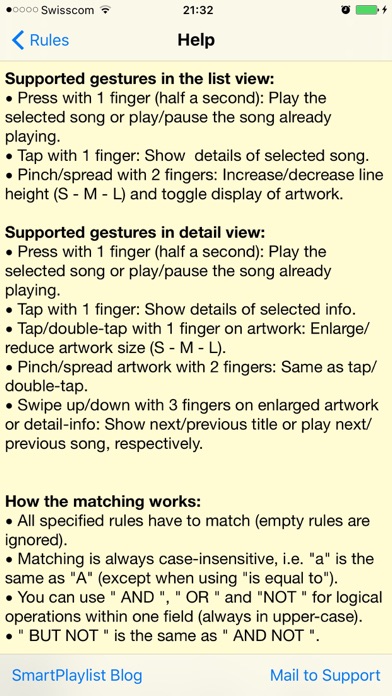
SmartPlaylist is the most advanced playlist generator for iPod/iPhone/iPad with many unique features. SmartPlaylist uses the titles stored in your Music library on your device. There are 26 smart playlists (SmartPlaylist A-Z) which you can use and name as you wish. In each SmartPlaylist you can combine more than 20 search rules to filter and sort your iTunes music library. These rules can be saved in iCloud. Available search criteria: ● Text search: Genre, Grouping, Composer, Artist, Album-Artist, Album, Title, Comments, Lyrics and/or iTunes-Playlist Search for exact matches („is equal to“), for any partial matches („contains“) or use wildcards („is like“ ?/*). Use logical operators to unite (" OR “), intersect (" AND “) or exclude (“ NOT “) certain songs Example: The rule "Genre contains blu OR zz" will give you all your blues and jazz songs in 1 playlist. ● Numerical search: Rating, Play Count, Skip Count, Duration, Track Number, BPM and/or Year. ● Date search: Added, Last Played, Last Skipped, Released (how many days, weeks, months or years ago) You can search for values less than, equal to / from-to (=) or more than the limit you set ● Property search: is in compilation, is in iCloud, is music video (all/yes/no) The titles loaded in SmartPlaylist also become the playback queue of the Music app and the now playing title is also shown in the lock screen and the control center, where you can play/pause, fast-forward, skip, etc. There are many settings to configure, e.g. what search rules you want to use and what info you want to see in the list of titles. General procedure: 1. Select a smart playlist (a) 2. Set the search rules (a) 3. Tap „Load titles“ (a) 4. Scroll through the list of matching titles (b) 5. Press on a title in the list to play it or tap to see all its details (c). a) THE MAIN SCREEN: The search rules of a smart playlist (e.g. „SmartPlaylist A“) ● Use „Menu“ to open the settings and help, copy/paste rules and backup/restore with iCloud ● Use „(i)“ to open the details of a search rule (there, use „(+)“ to open the pick list for genre, artist, etc.) ● Use „All/Active“ to toggle between showing all search rules and showing only the active rules (yellow) ● Browse your music collection hierarchically by Genres > Composers > Artists > Albums > Titles ● Use list operations to add, subtract or intersect the results of SmartPlaylists ● Limit the number of titles per artist or per album, or limit the list to x minutes, hours or titles ● Sort with multiple criteria, e.g. 1. by Artist, 2. by Rating (per artist), 3. by playCount (per rating) ● With „Show only“ you can load another SmartPlaylist while the previous list is still playing in the background ● If you do not set any search rules „Load titles“ will load all titles in your music library b) THE LIST VIEW: The list of titles matching the search rules ● Long-press on a title to play/pause ● Pinch in/out to change the row height (S-M-L) and toggle the display of the artwork ● Use quick-search to search within the loaded list or mark certain titles ● Scroll to the now playing song in the list with „Now playing“ c) THE DETAIL VIEW: All the details/infos for the selected song ● If you have selected a song which is not being played, you can scroll up and down through the title list with „^“ / „v“ ● When you are in the „Now playing mode“, „^“ / „v“ will play the previous or next song, respectively. ● Enlarge the cover artwork up to full screen (tap/double-tap or pinch in/out) ● Tap on a line to open the values in a text view where you can copy the text or look up the definition of words, etc. (e.g. in the lyrics) ● Add the selected song to another smart playlist or remove it from the current one (i.e. make exceptions to the rules, which can also be edited in the corresponding search rule) ● Load all songs with the same genre, artist, year, etc. as the selected song
Installs since 29 Aug 2026
Apple does not publish download counts. Estimates are in testing.
Estimated store revenue Estimated Beta
App Store, worldwide, monthly rate from the last 14 chart days to 21 Nov 2026
Below the top 100 grossing apps in the markets we calibrate. In the United States that usually means under about $6.4M a month. App Store purchases and subscriptions only, before Apple's 15 to 30% fee. Ads and web payments are not included.
Ratings
53 ratings, 53 reviews
No rating breakdown published for this app.
Recent reviews
Latest public reviews from the store
No reviews in our sample for this app yet.
Top chart positions
Latest App Store chart ranks by country, last 10 days
Not in any tracked top chart in the last 10 days.
SmartPlaylist history
Release, install milestones, listing and store changes
- First released on the store 22 Sep 2009
Recent versions
Current version v13.4.0
- Version v13.4.027 Oct 2024
Help text scrollable again (Menu > Help...)
Listing keywords
Words and phrases SmartPlaylist repeats most in its store listing
Top phrases: search rules (7), selected song (4), music library (3), smart playlist (3), list of titles (2).
Highlighted words also appear in the title. Counts cover the title, short description and description.
Compliance
What the listing and the app package show
- Store status
- Live
- Upkeep
- No update since 27 Oct 2024
- Age rating
- 4+
Apps like SmartPlaylist
 SynthMaster PlayerKV331 Audio★ 4.36
 Backroads & Beyond RadioJordan Boudreaux★ 4.82
 Q Country 107.1 - WSAQLiggett Communications★ 4.8
 Del Rio's Latino MixPaul Lomas★ 4.98
 Classical Music+Cedric Porter★ 4.67
 Antenne NiedersachsenDigital Media Hub GmbH★ 4.56
 Jam: Instant Song CreatorDreamWalk Mobile★ 3.73
 RIG 600 PRO NAVIGATORNacon★ 2.44
 Reverse Singing Fun ChallengeNGUYEN QUY SON★ 4.51
SmartPlaylist: questions and answers
Who makes SmartPlaylist?
SmartPlaylist is published by daenu.
When was SmartPlaylist last updated?
The latest version (v13.4.0) was released on 27 Oct 2024.
Is SmartPlaylist free?
No. SmartPlaylist is a paid app priced at $1.99.
Is SmartPlaylist still available?
Yes. SmartPlaylist is live on App Store as of 21 Nov 2026.
Track SmartPlaylist and its competitors
Watch any app for new versions, rating drops, chart moves and removals. Free plan, no card.