
- Installs
- —
- Apple does not publish download counts
- Rating
- —
- Ratings
- —
- Version
- 1.11.6
- Updated 24 Mar 2026
- Released
- 11 Mar 2016
- Tracked since 10 May 2026
- Size
- 19 MB
- Needs 10.10
Screenshots



About SnailGit – Git for Finder
The description on the store listing
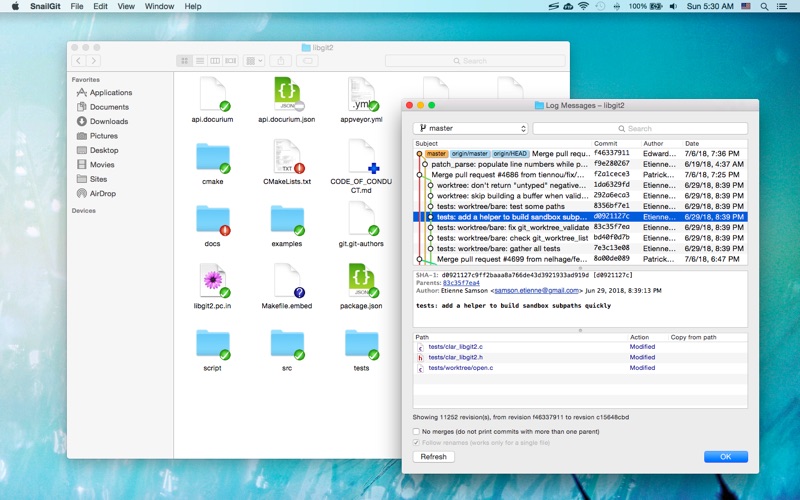
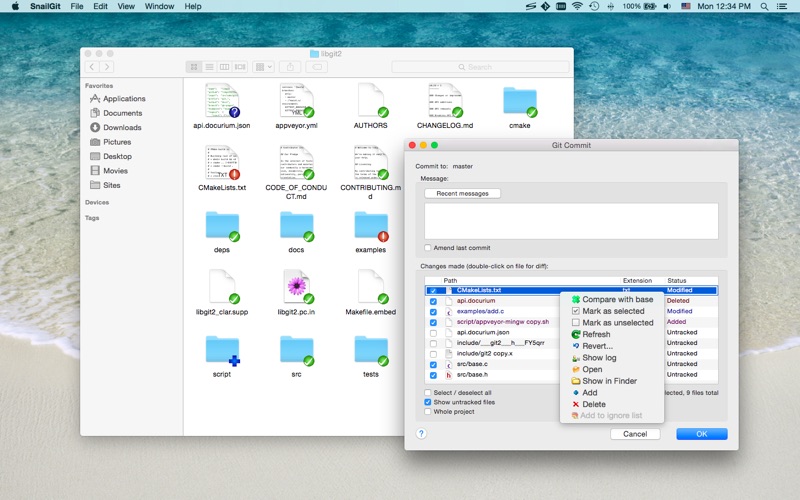
SnailGit is a TortoiseGit-like Git client, implemented as a Finder extension.
SnailGit allows you to access the most frequently used Git features from the Finder context menu.
SnailGit also adds icon overlays to your Git repositories in Finder. It tracks your Git repositories and updates the icon overlays automatically, providing visual feedback of the current state of the repositories.
In a few steps, you can start using SnailGit easily:
1. Enable "SnailGit Extension" in "System Preferences » Extensions".
2. Clone a Git repository with SnailGit (File » Git Clone...) or add an existing Git repository to SnailGit.
3. Navigate to your repository in Finder and right click to access SnailGit …
Read the full description
SnailGit is a TortoiseGit-like Git client, implemented as a Finder extension. SnailGit allows you to access the most frequently used Git features from the Finder context menu. SnailGit also adds icon overlays to your Git repositories in Finder. It tracks your Git repositories and updates the icon overlays automatically, providing visual feedback of the current state of the repositories. In a few steps, you can start using SnailGit easily: 1. Enable "SnailGit Extension" in "System Preferences » Extensions". 2. Clone a Git repository with SnailGit (File » Git Clone...) or add an existing Git repository to SnailGit. 3. Navigate to your repository in Finder and right click to access SnailGit functionalities. * FAQ Q: There is no icon overlays / context menu for the files? A: Please make sure that you've enabled "SnailGit Extension" in "System Preferences » Extensions", and also make sure that you've added the repository to SnailGit Preferences. If your Git repository is monitored by multiple Finder extensions, please make sure that SnailGit Extension comes first in "System Preferences » Extensions » Finder", you can drag and drop the extensions to adjust the order. If the problem persists, please disable "SnailGit Extension" in "System Preferences » Extensions" and then enable it again. The last resort is to relaunch Finder or restart your computer. Q: What kind of URL schemes does SnailGit support? A: SnailGit supports the following URL schemes: • http:// • https:// • git:// • ssh:// Q: Does SnailGit work well with other Git clients? A: In theory, SnailGit works with any kinds of Git clients that is compatible with Git 2.6, from the command line client to the GUI apps. Q: SnailGit command-line interface? A: The SnailGit command-line interface is located at "/Applications/SnailGit.app/Contents/Resources/snailgit.sh". Q: Does SnailGit work for file managers other than Finder? A: SnailGit is primarily a Finder extension, so it is likely that it will not work for other file managers.
Installs
Apple does not publish download counts. Estimates are in testing.
We publish iOS estimates only after they pass a back-test against real numbers. Chart history below is measured.
Estimated store revenue Estimated Beta
App Store, worldwide, monthly rate from the last 12 chart days to 19 Nov 2026
Below the top 100 grossing apps in the markets we calibrate. In the United States that usually means under about $6.4M a month. App Store purchases and subscriptions only, before Apple's 15 to 30% fee. Ads and web payments are not included.
Ratings
No rating breakdown published for this app.
Recent reviews
Latest public reviews from the store
No reviews in our sample for this app yet.
Top chart positions
Latest App Store chart ranks by country, last 10 days
Not in any tracked top chart in the last 10 days.
SnailGit – Git for Finder history
Release, install milestones, listing and store changes
- First released on the store 11 Mar 2016
Update frequency
How often SnailGit – Git for Finder ships a new version, month by month
1 updates in the last 12 months. More often than most similar apps: they shipped a median of 0 updates in the same year.
Recent versions
Current version 1.11.6
- Version 1.11.624 Mar 2026
• Improved diff tool detection • Supports copying paths with Command-C
Listing keywords
Words and phrases SnailGit – Git for Finder repeats most in its store listing
Top phrases: system preferences extensions (4), preferences extensions (4), snailgit extension (4), system preferences (4), extension in system (3).
Highlighted words also appear in the title. Counts cover the title, short description and description.
Compliance
What the listing and the app package show
- Store status
- Live
- Upkeep
- Updated 24 Mar 2026
- Age rating
- 4+
Apps like SnailGit – Git for Finder
 iProxy - Sys admin toolsN-Lab★ 4.06
 WA Virtual Number - WANoMarkakod Reklam Tasarim ve Yazilim Hizmetleri Ticaret Limited★ 4.44
 C/C++ LLVM Clang小文 黄★ 4.32
 StoreView: App Screenshot ToolElshan Aliyev★ 4.53
 Yomo: Docker & Portainer春晖 杜★ 4.79
 Termux -TERMUX LIMITED LIABILITY COMPANY★ 4.4
 Debug Anywhere浩鑫 庄★ 4.62
 Easy SSHArgsment Limited★ 4.55
 SSL CheckerOrave Technologies★ 4.61
SnailGit – Git for Finder: questions and answers
Who makes SnailGit – Git for Finder?
SnailGit – Git for Finder is published by 兰桂 吴.
When was SnailGit – Git for Finder last updated?
The latest version (1.11.6) was released on 24 Mar 2026.
Is SnailGit – Git for Finder free?
No. SnailGit – Git for Finder is a paid app priced at $14.99.
Is SnailGit – Git for Finder still available?
Yes. SnailGit – Git for Finder is live on App Store as of 10 May 2026.
Track SnailGit – Git for Finder and its competitors
Watch any app for new versions, rating drops, chart moves and removals. Free plan, no card.