
- Installs
- —
- Apple does not publish download counts
- Rating
- 5.0
- Ratings
- 1
- 1 reviews
- Version
- 2.9
- Updated 25 Apr 2026
- Released
- 27 May 2025
- Tracked since 10 May 2026
- Size
- 22 MB
- Needs 15.0
Screenshots


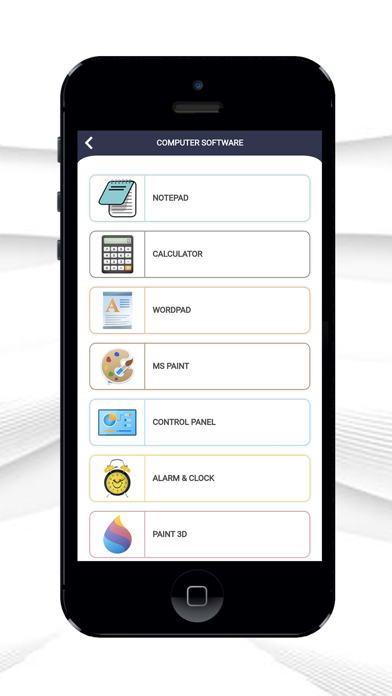
About Software Course through images
The description on the store listing
Master computer fundamentals and boost your digital knowledge with this all-in-one learning app. Whether you're a student, beginner, or preparing for interviews, this app provides everything you need to understand computers from the ground up in a simple and structured way.
The app includes a complete guide to computer basics, covering introduction, history of computers, types of computers, generations, programming languages, and core components. Learn about memory, storage, file management, disk management, and number systems in a clear and easy-to-understand format.
Explore detailed sections on computer hardware and software. Understand input and output devices, processing units, …
Read the full description
Master computer fundamentals and boost your digital knowledge with this all-in-one learning app. Whether you're a student, beginner, or preparing for interviews, this app provides everything you need to understand computers from the ground up in a simple and structured way. The app includes a complete guide to computer basics, covering introduction, history of computers, types of computers, generations, programming languages, and core components. Learn about memory, storage, file management, disk management, and number systems in a clear and easy-to-understand format. Explore detailed sections on computer hardware and software. Understand input and output devices, processing units, storage devices, and computer ports. Discover commonly used software tools like Notepad, Calculator, WordPad, Paint, Control Panel, Snipping Tool, Voice Recorder, and more, along with their functions. Dive into computer networking concepts, including LAN technologies, network types, topologies, OSI model layers, and communication protocols. Learn about computer security, viruses, and protection methods to stay safe in the digital world. This app also provides a powerful collection of Windows and Mac shortcut keys to improve your productivity. You can mark your favorite shortcuts for quick access anytime. Prepare for job interviews with over 160+ carefully selected computer-related questions and answers. Save important questions to your favorites for quick revision. Enhance your knowledge with 50+ useful computer tips and 25+ troubleshooting solutions to solve common problems. Easily bookmark tips and solutions you use frequently. Test your knowledge with an interactive quiz system featuring four levels: Bronze, Silver, Gold, and Diamond. Earn certificates upon completion and track your progress with quiz history. The app is designed for a smooth learning experience with both light mode and dark mode themes. Each content page includes zoom in, zoom out, and reset options for better readability. Navigation is simple with next and previous buttons to move easily between topics. All your favorite items, including shortcuts, questions, tips, and troubleshooting guides, are saved in one place for quick access. This app is your complete companion for learning computers, improving skills, and preparing for exams or interviews—all in one place. Why choose this app? This app is designed with simplicity and clarity in mind, making it perfect for beginners as well as advanced learners. Each topic is explained in a structured way so you can easily understand and remember concepts without confusion. From basic computer knowledge to advanced networking concepts, everything is organized step-by-step. Whether you are preparing for school exams, competitive exams, or job interviews, this app acts as your complete study companion. The quiz system helps you test your knowledge in a fun and interactive way. With multiple levels and instant feedback, you can track your improvement and gain confidence. The certificate feature adds motivation and helps you showcase your learning achievements. Shortcut keys section improves your daily productivity by helping you perform tasks faster on both Windows and Mac systems. You can mark frequently used shortcuts and access them instantly. Troubleshooting guides are very helpful for solving common computer problems without needing expert help. This makes the app practical and useful in real-life situations. With offline access, you can learn anytime and anywhere without an internet connection. The clean design, smooth performance, and user-friendly interface ensure a distraction-free learning experience. Regular updates will bring more features, questions, and improvements to make your learning journey even better. Perfect for students, beginners, and professionals. Improve your computer skills, boost productivity, and prepare for exams and interviews easily. Download now and start mastering computers with ease!
Installs
Apple does not publish download counts. Estimates are in testing.
We publish iOS estimates only after they pass a back-test against real numbers. Chart history below is measured.
Estimated store revenue Estimated Beta
App Store, worldwide, monthly rate from the last 13 chart days to 20 Nov 2026
Below the top 100 grossing apps in the markets we calibrate. In the United States that usually means under about $6.4M a month. App Store purchases and subscriptions only, before Apple's 15 to 30% fee. Ads and web payments are not included.
Ratings
1 ratings, 1 reviews
No rating breakdown published for this app.
Recent reviews
Latest public reviews from the store
No reviews in our sample for this app yet.
Top chart positions
Latest App Store chart ranks by country, last 10 days
Not in any tracked top chart in the last 10 days.
Software Course through images history
Release, install milestones, listing and store changes
- First released on the store 27 May 2025
Update frequency
How often Software Course through images ships a new version, month by month
1 updates in the last 12 months. More often than most similar apps: they shipped a median of 0 updates in the same year.
Recent versions
Current version 2.9
- Version 2.925 Apr 2026
Faster and smoother performance for a better overall experience Improved animations and enhanced user interface design for easier navigation Optimized system performance for more accurate and reliable results Fixed various bugs and improved overall app stability Added support for dark mode and light mode themes Enhanced content loading speed across all sections Improved quiz performance and result tracking Better user experience with minor UI refinements and usability improvements
Listing keywords
Words and phrases Software Course through images repeats most in its store listing
Top phrases: test your knowledge (2), tips and troubleshooting (2), windows and mac (2), job interviews (2), learn about (2).
Highlighted words also appear in the title. Counts cover the title, short description and description.
Compliance
What the listing and the app package show
- Store status
- Live
- Upkeep
- Updated 25 Apr 2026
- Age rating
- 4+
Apps like Software Course through images
 Quran Audio in Arabic, EnglishISLAMOBILE★ 3.7
 Himnario Gracia y DevociónBaldomero Cho★ 4.7
 Opera: Carmina BuranaAppCube Ltd★ 3.06
 Amelia - Story Book for KidsOhNoo Studio★ 4.5
 산책: 내가 산 책들별책★ 4.66
 MangaMax秀娟 桑★ 3.3
 Giant Print Women BibleAPPS STARS DESENVOLVEDORES★ 4.64
 French English Audio Bible良普 李★ 4.12
 ASV Bible*RAVINDHIRAN SUMITHRA★ 4.78
Software Course through images: questions and answers
Who makes Software Course through images?
Software Course through images is published by Merbin Joe.
When was Software Course through images last updated?
The latest version (2.9) was released on 25 Apr 2026.
Is Software Course through images free?
Yes. Software Course through images is free to download.
Is Software Course through images still available?
Yes. Software Course through images is live on App Store as of 1 Jul 2026.
Track Software Course through images and its competitors
Watch any app for new versions, rating drops, chart moves and removals. Free plan, no card.