
- Installs
- —
- Apple does not publish download counts
- Rating
- —
- Ratings
- —
- Version
- 2.5
- Updated 9 Jan 2026
- Released
- 10 Aug 2011
- Tracked since 10 May 2026
- Size
- 8 MB
- Needs 11.5
Screenshots




About Sonance
The description on the store listing
Sound You Can See !
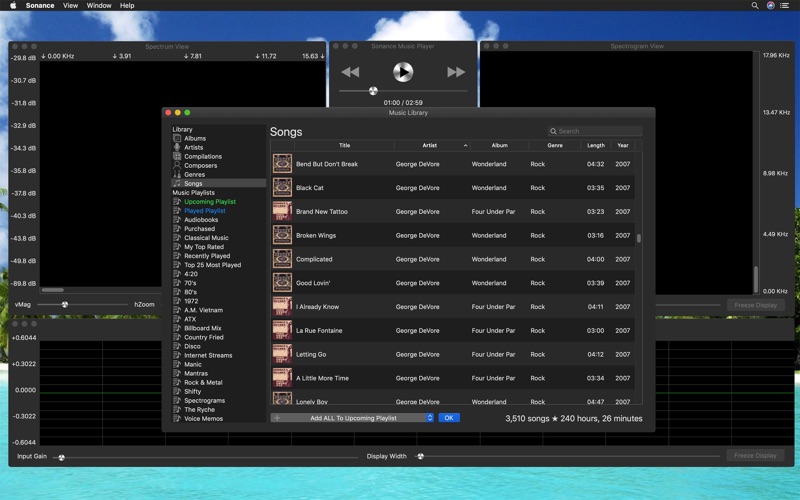
Sonance is an Audio Spectrum Analyzer & Spectrograph App, and a Music Player. It analyzes sound from songs played by the music player or from the built in microphone, or from the Line in input device, and displays the results in three separate views.
The music player plays songs from the local iTunes library. These songs must be local to the mac where Sonance is installed. Home sharing from another mac is not supported by the iTunes Library Framework at this time. Support for iTunes library assets that are internet streams or internet radio stations is supported in a limited fashion. It will play those selections, however raw audio data is not always available, in …
Read the full description
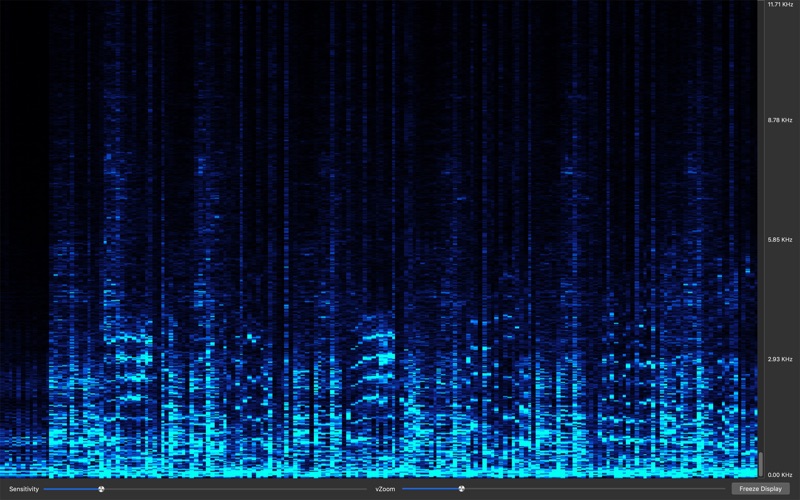
Sound You Can See ! Sonance is an Audio Spectrum Analyzer & Spectrograph App, and a Music Player. It analyzes sound from songs played by the music player or from the built in microphone, or from the Line in input device, and displays the results in three separate views. The music player plays songs from the local iTunes library. These songs must be local to the mac where Sonance is installed. Home sharing from another mac is not supported by the iTunes Library Framework at this time. Support for iTunes library assets that are internet streams or internet radio stations is supported in a limited fashion. It will play those selections, however raw audio data is not always available, in that case the displays only work though what the microphone picks up. The waveform view displays the raw input signal as a continuous wavy line, where each wave is a pulse of sound. The decibel level is also displayed. The spectrum view displays the frequency distribution as vertical bars, each bar represents a group of frequencies, the height indicating the strength of those frequencies within the audio signal. The spectrogram view displays a two dimensional view of audio spectrum frequencies, over time. Each pixel represents a group of frequencies, it's color indicates the strength of those frequencies. The vertical rows represent different frequencies, and the horizontal columns represent time. Frequencies range from 0 hertz to 48000 Hertz or 48K, this is half the sample rate of 96000 audio samples per second of a macbook pro internal microphone maximum sample rate. The display frequencies are half of the input device sample rate, which can be 44100, 48000, 88200, or 96000 samples per second. For music played via the music player, it depends on the rate contained within each song, most are in a range from 0 to 22050 Hertz, or half the 44100 samples per second used in compac disc recordings. Since it also uses the microphone, any sound the mic can pick up is analyzed and displayed, so you can play music on your computer, or use a different sound system and see the frequency distribution, spectral density, and waveform. In the Waveform View, you can adjust the Input Gain ( waveform height ), Display Width on the fly, and freeze the display. The horizontal scale represents time in seconds. The vertical scale shows the audio sample value. For the 32-bit floating point audio codec, values range from -1.0 to 1.0. Input levels differ greatly between recorded audio, and the microphone. Sonance has independant settings for both modes, and will switch automatically. This affects Input Gain on the waveform view, vMag on the spectrum view, and sensitivity on the spectrograph view. In the Spectrum View, you can adjust the Vertical Magnification ( vMag ) and Horizontal Zoom ( hZoom ) on the fly. The vertical magnification adjusts the bar height, and the horizontal zoom, allows you to zoom in on specific frequencies. After changing the hZoom slider, you can use the scrollbar to see the entire spectrum, albeit zoomed in. In the Spectrogram View, you can adjust the Sensitivity slider to control the color intensity. The Vertical Zoom ( vZoom ) slider, acts much likes the hZoom slider on the spectrum view. Once you have adjusted your zoom level, you can use the scrollbar to see the entire spectrum, albeit zoomed in. Use the button to freeze and unfreeze the display. Full screen display is available for each of these three views. Select the View menu item, then Full Screen Display, or you can use the Command-F keystroke. You can also click the full screen display in the View menu. This will put the key or active window into fullscreen display mode. You can record a spectrogram for later viewing too. By selecting View -> Spectrogram Recording Control Panel, you can start and stop recording and save your data.
Installs
Apple does not publish download counts. Estimates are in testing.
We publish iOS estimates only after they pass a back-test against real numbers. Chart history below is measured.
Estimated store revenue Estimated Beta
App Store, worldwide, monthly rate from the last 13 chart days to 20 Nov 2026
Below the top 100 grossing apps in the markets we calibrate. In the United States that usually means under about $6.4M a month. App Store purchases and subscriptions only, before Apple's 15 to 30% fee. Ads and web payments are not included.
Ratings
No rating breakdown published for this app.
Recent reviews
Latest public reviews from the store
No reviews in our sample for this app yet.
Top chart positions
Latest App Store chart ranks by country, last 10 days
Not in any tracked top chart in the last 10 days.
Sonance history
Release, install milestones, listing and store changes
- First released on the store 10 Aug 2011
Update frequency
How often Sonance ships a new version, month by month
1 updates in the last 12 months. About as often as similar apps, which shipped a median of 1 updates in the same year.
Recent versions
Current version 2.5
- Version 2.59 Jan 2026
Liquid Glass, macOS 26 Icon. Fix for macOS 26, where stop music button doesn't work. Tweaked user interface for macOS 26.
Listing keywords
Words and phrases Sonance repeats most in its store listing
Top phrases: music player (4), spectrum view (4), full screen display (3), samples per second (3), full screen (3).
Highlighted words also appear in the title. Counts cover the title, short description and description.
Compliance
What the listing and the app package show
- Store status
- Live
- Upkeep
- Updated 9 Jan 2026
- Age rating
- 4+
Apps like Sonance
 Library of AviationNazmi Yavuz★ 4.82
 MyNOVECNorthern Virginia Electric Cooperative★ 2.28
 打工人小组件光翔 卓★ 4.96
 TruckbaysTruckbays LLC★ 4.3
 Tornado PRO PlayerMohammed Altam★ 4.44
 VDX - Video ManagerARISEPEAK LP★ 1.74
 TV CastingZeasn Info Technology Co., Ltd.★ 1.86
 Mil-Dot BallisticsTom Holsten★ 3.82
 MySontiqSontiq, Inc.★ 2.4
Sonance: questions and answers
Who makes Sonance?
Sonance is published by Rare Works, LLC.
When was Sonance last updated?
The latest version (2.5) was released on 9 Jan 2026.
Is Sonance free?
No. Sonance is a paid app priced at $2.99.
Is Sonance still available?
Yes. Sonance is live on App Store as of 10 May 2026.
Track Sonance and its competitors
Watch any app for new versions, rating drops, chart moves and removals. Free plan, no card.