
- Installs
- —
- Apple does not publish download counts
- Rating
- 4.46
- Ratings
- 1.8K
- 1.8K reviews
- Version
- 7.8.3
- Updated 18 Oct 2026
- Released
- 20 Feb 2013
- Tracked since 10 May 2026
- Size
- 35 MB
- Needs 11.0
Screenshots




About SP Camera
The description on the store listing
Want to secretly capture photos and videos without anyone notices, here is the app that you need: SP Camera.
With SP Camera, you can record video, or take pictures without being seen while the device shows one of fake backgrounds.
Simulate that you are browsing the web, a blog or leave the device on a table showing a still image or a time clock while recording.
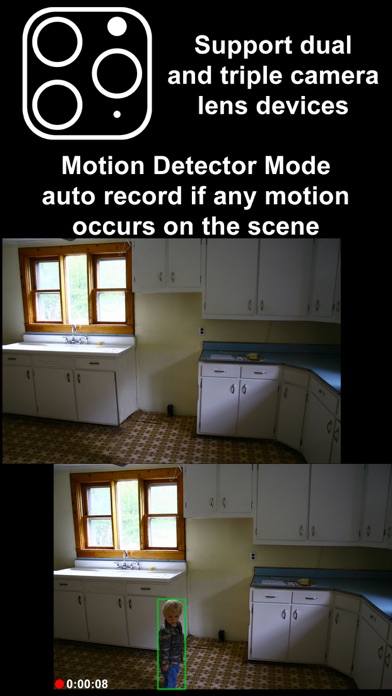
Automatically record and save video if any motion occurs on the scene with Motion Detector Sensor.
With built-in Photo Timer, this app automatically captures photos every few seconds without touching the capture button again.
Save your photos and videos in the password protected private folder.
Moreover, you can hide all the UI …
Read the full description
Want to secretly capture photos and videos without anyone notices, here is the app that you need: SP Camera. With SP Camera, you can record video, or take pictures without being seen while the device shows one of fake backgrounds. Simulate that you are browsing the web, a blog or leave the device on a table showing a still image or a time clock while recording. Automatically record and save video if any motion occurs on the scene with Motion Detector Sensor. With built-in Photo Timer, this app automatically captures photos every few seconds without touching the capture button again. Save your photos and videos in the password protected private folder. Moreover, you can hide all the UI control buttons to simulate a real spy experience. MODE * Photo: automatically capture photo without tap any buttons with Photo Timer up to 48MP * Video: record video and capture still photo at the same time (snap 8MP photo while recording 4K video) * Motion Detector: automatically record only if any motion occurs on the scene * Slow Motion: support high frame rate or slow motion video recording on both front and rear camera * Timelapse: record video in fast motion action up to 32x * Horizontal: always record video in landscape even the device is held in portrait orientation * Double Cameras: simultaneously record video with two different camera lens CAMERA • Manual camera control with focus, exposure, ISO, and white balance adjustment • Ability for photo capturing & video recording at the same time for all video modes • Save more storage with changeable video recording resolution between QVGA 240p, VGA 480p, HD 720p, FullHD 1080p or 4K 2160p • Ability to zoom in & zoom out up to 10x • Support dual and triple rear camera lens devices • Automatically boost low light photo & video visibility and quality • Limitable video recording duration and numbers of Photo Timer photos • Cinematic video stabilization support for shake-free video recording • Tap on camera view area to focus and adjust exposure • Adjustable auto or manual focus and exposure • Ability to record silent video (without sound) • Support volume buttons actions for photo capturing and video recording • Save photo and video in passcode protected private app folder or save to camera roll • Ability to add date and time stamp when capturing photo or recording motion detector video • Choose different styles of Double Cameras mode recording including Picture-in-Picture, Split View, and Dual Files INTERFACE • Automatic Mode: auto perform record action and other actions when app launch • Easy Mode: easily tap any area to take photo and double tap to start/stop video recording • Screen is completely black simulate the device is turned off • No camera flash or on-screen flash is appeared • Fake other people that you're on other activities by using fake backgrounds • Alternative image slideshow or animated clock or reactive web browsing fake backgrounds • Ability to your own image fake backgrounds • Dimmed screen with zero brightness in black background • Adjustable the visibilty of the UI transparency • Movable and resizable camera preview • Clarify the actions correctly with Text, Voice, and Haptic Feedback PASSCODE • No one can stop your recording by secure the recording and lock UI buttons with passcode • Advanced passcode system can lock app startup, lock camera UI buttons, or lock gallery viewing • Hide App Folder private photos and videos with failed passcode input GALLERY • Built-in gallery for viewing photos and videos and easy sharing • Recover deleted photos and videos within 7 days with Trash Folder REMOTE • Wireless Apple Watch Remote supported for recording control NOTES: • Built-in Gallery Viewer unable to play slow-mo video in slow motion action. • Double Cameras mode required iPhone or iPad with A12 or A12X chipset or later. • 48MP photos capturing required iPhone 14 Pro series or iPhone 15 series or later. • 4K 120fps recording required iPhone 16 Pro series or later.
Installs, last 30 days
Apple does not publish download counts. Estimates are in testing.
Estimated store revenue Estimated Beta
App Store, worldwide, monthly rate from the last 12 chart days to 19 Nov 2026
Below the top 100 grossing apps in the markets we calibrate. In the United States that usually means under about $6.4M a month. App Store purchases and subscriptions only, before Apple's 15 to 30% fee. Ads and web payments are not included.
Ratings
1,767 ratings, 1,767 reviews
No rating breakdown published for this app.
Recent reviews
Latest public reviews from the store
- 12 Oct 2025
Buggy
Edit: thanks for the clarification and I was wondering if it possible you can add another “capture photo” icon on the screen or allow us to do that from a settings or something Pressing volume down to record once I try to press it again to stop recording, it would sometimes stop and then record again immediately somehow. Is there a multiple selections to delete in the photo/video viewing? I have tried selecting the image by holding down the picture but all it does is prompt save. No there isn’t anything at the top right saying to select more during gallery viewing to delete them. No option to do multiple selection during gallery listing cause that’s for importing photos, not to delete. That is multiple selection for importing photos from iPhone photos to gallery listing
- 14 Nov 2023
Favorite camera app right now
This app is great. I only wish you could change the “recording started” and “recording stopped” notifications to be more subtle, like maybe a browser icon to look like wireless interference. Otherwise, you’d have to hug the camera to your chest, which would be a very sus giveaway. Otherwise thanks!
- 17 Feb 2020
?
User issue or app issue? When I enter easy mode and all my buttons disappear except the preview screen I can’t ever get the buttons to reappear. It’s beyond frustrating. I really like the many options this app offers, but this issue is enough to make me not want to use the app at all. Also when it’s giving you tips it would be easier while learning the actions if a note popped up letting you know you did select option properly. Trying to figure things out and not knowing if I properly did something it suggested leaves the learning ability unknown...
- 14 Feb 2020
Fantastic
Thank you for all the time and hard work that’s put into this app. My only wish is for an option to disable the time being recorded along with the flashing red light next to it when recording video. Possibly instead of seconds and a red indicator maybe what looks to be a “loading indicator “similar to when you load a webpage in safari and it shows the amount of the page it’s loaded. Anyway y’all rock thanks again
What reviewers bring up
Topics mentioned in the latest 8 reviews, by how many reviews mention them
Liked in good reviews (7 reviews)
- recording 4
- video 4
- possible 3
- photos 3
- maybe 3
- sometimes 2
- fantastic 2
- capture 2
Raised in bad reviews (0 reviews)
No topic comes up twice.
Top chart positions
Latest App Store chart ranks by country, last 10 days
- Countries ranked
- 16 of 50
- Best rank
- #12
- Top 10 placements
- 0
- of 17 chart placements
- Average rank
- #56.4
Best countries on App Store
- 🇮🇳 India · Top paid, Photo & Video#12
- 🇨🇱 Chile · Top paid, Photo & Video#17
- 🇬🇧 United Kingdom · Top paid, Photo & Video#18
- 🇮🇱 Israel · Top paid, Photo & Video#21
- 🇦🇹 Austria · Top paid, Photo & Video#30
- 🇮🇩 Indonesia · Top paid, Photo & Video#35
| Country | Chart | Category | Rank | Best (10 days) | Date |
|---|---|---|---|---|---|
| 🇮🇳 India | Top paid | Photo & Video | #12 | #12 | 19 Nov 2026 |
| 🇨🇱 Chile | Top paid | Photo & Video | #17 | #13 | 13 Nov 2026 |
| 🇬🇧 United Kingdom | Top paid | Photo & Video | #18 | #4 | 19 Nov 2026 |
| 🇮🇱 Israel | Top paid | Photo & Video | #21 | #7 | 18 Nov 2026 |
| 🇦🇹 Austria | Top paid | Photo & Video | #30 | #10 | 12 Nov 2026 |
| 🇮🇩 Indonesia | Top paid | Photo & Video | #35 | #32 | 17 Nov 2026 |
| 🇪🇬 Egypt | Top paid | Photo & Video | #39 | #38 | 19 Nov 2026 |
| 🇹🇭 Thailand | Top paid | Photo & Video | #40 | #22 | 14 Nov 2026 |
| 🇪🇸 Spain | Top paid | Photo & Video | #46 | #6 | 18 Nov 2026 |
| 🇩🇪 Germany | Top paid | Photo & Video | #77 | #28 | 11 Nov 2026 |
SP Camera history
Release, install milestones, listing and store changes
- First released on the store 20 Feb 2013
Update frequency
How often SP Camera ships a new version, month by month
2 updates in the last 12 months. About as often as similar apps, which shipped a median of 2 updates in the same year.
Recent versions
Current version 7.8.3
- Version 7.8.318 Oct 2026
- Bugs fixed and performance improvement
- Version 7.8.222 Mar 2026
- Bug fixed related with Interface settings scrollview
Listing keywords
Words and phrases SP Camera repeats most in its store listing
Top phrases: video recording (7), photos and videos (5), record video (5), fake backgrounds (4), double cameras (3).
Highlighted words also appear in the title. Counts cover the title, short description and description.
Compliance
What the listing and the app package show
- Store status
- Live
- Upkeep
- Updated 18 Oct 2026
- Age rating
- 17+
Apps like SP Camera
 Video to GIF - GIF MakerNgo Ngoc Chien★ 4.4
 Face Swap Live LiteAI Tools Apps SRL★ 4.27
 SANNCE HOMEShenzhen Kean Digital co., LTD.★ 4.74
 Video Recovery: Restore FilesKyle Allen★ 4.46
 Teleprompter: Floating Notes万其 沈★ 4.63
 تصميم فيديو- مونتاج مع اغنيةahmed shaqoura★ 3.63
 Face & Body Photo editorUniqo Lab.★ 4.67
 Santa Video Call – Fake ChatMeza Apps SL★ 4.72
 Photo Album Private ManagerEben Software Private Limited★ 4.49
SP Camera: questions and answers
Who makes SP Camera?
SP Camera is published by Ratha Sou.
When was SP Camera last updated?
The latest version (7.8.3) was released on 18 Oct 2026.
Is SP Camera free?
No. SP Camera is a paid app priced at $9.99.
Is SP Camera still available?
Yes. SP Camera is live on App Store as of 19 Nov 2026.
Track SP Camera and its competitors
Watch any app for new versions, rating drops, chart moves and removals. Free plan, no card.