
- Installs
- —
- Apple does not publish download counts
- Rating
- 5.0
- Ratings
- 1
- Version
- 1.5.0
- Updated 5 Nov 2026
- Released
- 2 Sep 2026
- Tracked since 10 Nov 2026
- Size
- 45 MB
- Needs 26.2
Screenshots
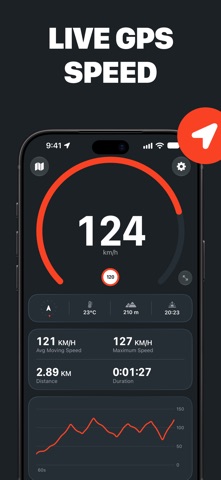


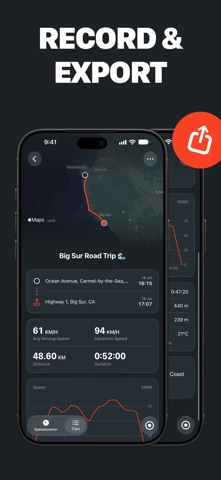

About Speedometer Ultra
The description on the store listing
Measure, record and track your speed wherever you’re moving with Speedometer Ultra, the all-in-one GPS speedometer, HUD and trip logger for iPhone.
From a morning ride to a highway drive, a hike to a harbor crossing, Speedometer Ultra makes it easy to see your speed, stay aware of the limit and keep a detailed record of every journey.
Precision Speed, Wherever You Go: Read your speed straight from your iPhone’s GPS, without installing or calibrating a wheel sensor. Choose from nine modes – walking, running, cycling, driving, motorcycle, truck, train, boat and plane – each with a gauge scaled to the speeds you expect. Display speed in mph, km/h or knots. When the signal isn’t good enough …
Read the full description
Measure, record and track your speed wherever you’re moving with Speedometer Ultra, the all-in-one GPS speedometer, HUD and trip logger for iPhone. From a morning ride to a highway drive, a hike to a harbor crossing, Speedometer Ultra makes it easy to see your speed, stay aware of the limit and keep a detailed record of every journey. Precision Speed, Wherever You Go: Read your speed straight from your iPhone’s GPS, without installing or calibrating a wheel sensor. Choose from nine modes – walking, running, cycling, driving, motorcycle, truck, train, boat and plane – each with a gauge scaled to the speeds you expect. Display speed in mph, km/h or knots. When the signal isn’t good enough to trust, Speedometer Ultra shows – rather than a guess. Stay Under the Limit: Set a speed limit and see it clearly on the gauge. Cross it and the app warns you with a chime and a tap, helping you stay informed without taking your attention off the road. Turn the sound off if you prefer a visual warning, and keep recently used limits one tap away as the road changes. Record the Whole Journey: Start recording to save your route, distance, average moving speed, maximum speed, moving time, elevation, average temperature and a graph of your speed throughout the trip. Any time without reliable location data is shown as a signal gap, so you can judge how completely the journey was measured. Rename trips, add notes and export the underlying route data as CSV. Trips stay on your device and sync privately through your own iCloud account. Keep the Journey in View: Follow your position on a live map while keeping your speed front and center. Switch between north-up and heading-up, pan freely, or use the compass, altitude, temperature and time until sunset for more context. While recording, time, distance and average speed remain on the Lock Screen and in the Dynamic Island, with a Stop button that works without reopening the app. Use HUD at Night: Switch to a large, high-contrast heads-up display for a speed reading you can take in at a glance. Mirror it when you want the reflection in the windshield to read the right way around, or leave it as it is and keep your iPhone on the dash. The screen stays awake while the app is open. Download now and use the GPS speedometer, nine movement modes, live map, compass, speed limits and trip recording for free. Choose PRO to unlock HUD mode, live and recorded speed graphs, and CSV trip exports. GPS accuracy and availability depend on your device, surroundings and signal conditions. Speedometer Ultra is not a substitute for a vehicle’s certified instruments or safe driving practices. Do not interact with the app while driving. Terms of Use: https://speedometerultra.com/terms Privacy Policy: https://speedometerultra.com/privacy
Installs
Apple does not publish download counts. Estimates are in testing.
We publish iOS estimates only after they pass a back-test against real numbers. Chart history below is measured.
Estimated store revenue Estimated Beta
App Store, worldwide, monthly rate from the last 12 chart days to 19 Nov 2026
Below the top 100 grossing apps in the markets we calibrate. In the United States that usually means under about $6.4M a month. App Store purchases and subscriptions only, before Apple's 15 to 30% fee. Ads and web payments are not included.
Ratings
1 ratings
No rating breakdown published for this app.
Recent reviews
Latest public reviews from the store
No reviews in our sample for this app yet.
Top chart positions
Latest App Store chart ranks by country, last 10 days
- Countries ranked
- 4 of 50
- Best rank
- #84
- Top 10 placements
- 0
- of 4 chart placements
- Average rank
- #90.5
Best countries on App Store
- 🇵🇹 Portugal · Top grossing, Navigation#84
- 🇧🇷 Brazil · Top grossing, Navigation#92
- 🇦🇹 Austria · Top grossing, Navigation#93
- 🇮🇹 Italy · Top grossing, Navigation#93
| Country | Chart | Category | Rank | Best (10 days) | Date |
|---|---|---|---|---|---|
| 🇵🇹 Portugal | Top grossing | Navigation | #84 | #59 | 15 Nov 2026 |
| 🇧🇷 Brazil | Top grossing | Navigation | #92 | #61 | 19 Nov 2026 |
| 🇦🇹 Austria | Top grossing | Navigation | #93 | #54 | 17 Nov 2026 |
| 🇮🇹 Italy | Top grossing | Navigation | #93 | #93 | 17 Nov 2026 |
Speedometer Ultra history
Release, install milestones, listing and store changes
- First released on the store 2 Sep 2026
Update frequency
How often Speedometer Ultra ships a new version, month by month
1 updates in the last 12 months. About as often as similar apps, which shipped a median of 1 updates in the same year.
Recent versions
Current version 1.5.0
- Version 1.5.05 Nov 2026
Speedometer Ultra now speaks Japanese. It follows your iPhone's language, or you can choose a language for this app alone in Settings › Apps › Speedometer. And if iOS closes the app while you're recording a trip, the recording now picks up where it left off instead of ending early. The timer in the Live Activity also no longer flickers.
Listing keywords
Words and phrases Speedometer Ultra repeats most in its store listing
Top phrases: speedometer ultra (5), gps speedometer (2), live map (2), speed wherever (2).
Highlighted words also appear in the title. Counts cover the title, short description and description.
Compliance
What the listing and the app package show
- Store status
- Live
- Upkeep
- Updated 5 Nov 2026
- Age rating
- 4+
Apps like Speedometer Ultra
 Canals.UKMARK MANSER★ 4.74
 Chevron Car WashDigital Mosaic Corporation★ 1.62
 hitta.sehittapunktse AB★ 4.6
 NextStop - NYC SubwayPliable Matter LLC★ 3.74
 E-Charge HKHong Kong EV Power Limited★ 4.34
 Simply NorthBusyBytes GmbH★ 4.08
 Doyle GuidesChris Doyle Publishing Limited★ 4.32
 Speedometer Speed MPH TrackerRihab Mehboob★ 4.62
 Property Line Finder - ParcelHealth & Wellness Apps Limited★ 4.28
Speedometer Ultra: questions and answers
Who makes Speedometer Ultra?
Speedometer Ultra is published by Ultrafine.
When was Speedometer Ultra last updated?
The latest version (1.5.0) was released on 5 Nov 2026.
Is Speedometer Ultra free?
Yes. Speedometer Ultra is free to download.
Is Speedometer Ultra still available?
Yes. Speedometer Ultra is live on App Store as of 10 Nov 2026.
Track Speedometer Ultra and its competitors
Watch any app for new versions, rating drops, chart moves and removals. Free plan, no card.