
- Installs
- —
- Apple does not publish download counts
- Rating
- 4.47
- Ratings
- 47
- 47 reviews
- Version
- 6.8.0
- Updated 14 Mar 2026
- Released
- 3 Aug 2018
- Tracked since 10 May 2026
- Size
- 12 MB
- Needs 18.0
Screenshots




About SQLiteFlow - SQLite Editor
The description on the store listing
Two-week free trial! So you can purchase SQLiteFlow after you know you like it! SQLiteFlow is an SQLite editor for Mac & iOS which is intuitive, stable and reliable to use.
It contains features as described below:
Browse
• Manage files. Supports add, remove, duplicate, rename folders, SQLite databases, SQL files, CSV files, etc.
• Supports import database from iCloud Drive by the file picker.
• Supports open external SQL files, CSV files and Filter files.
• Supports open external folders. Requires iOS 13.0 or iPadOS 13.0.
• Supports show recents files.
Query Editor
• Multi-query execution.
• Syntax highlighting.
• SQL auto-completion.
• Format query.
Data Editor
• View, edit or add table …
Read the full description
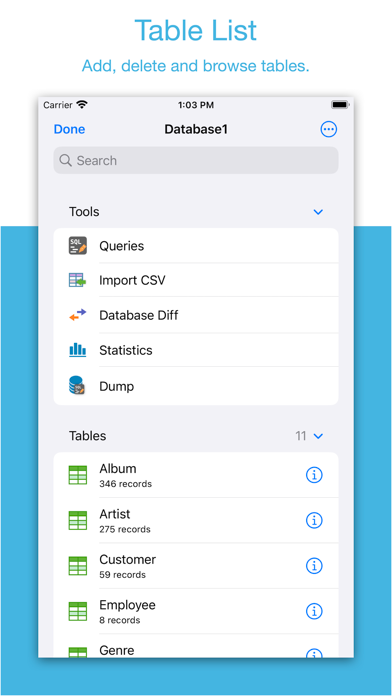
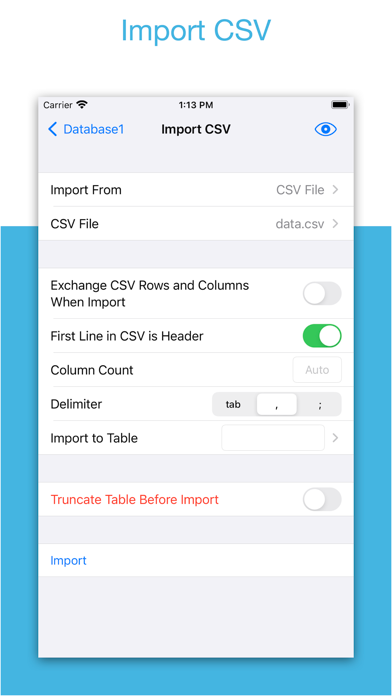
Two-week free trial! So you can purchase SQLiteFlow after you know you like it! SQLiteFlow is an SQLite editor for Mac & iOS which is intuitive, stable and reliable to use. It contains features as described below: Browse • Manage files. Supports add, remove, duplicate, rename folders, SQLite databases, SQL files, CSV files, etc. • Supports import database from iCloud Drive by the file picker. • Supports open external SQL files, CSV files and Filter files. • Supports open external folders. Requires iOS 13.0 or iPadOS 13.0. • Supports show recents files. Query Editor • Multi-query execution. • Syntax highlighting. • SQL auto-completion. • Format query. Data Editor • View, edit or add table data. • Multiple cells/rows/columns selection. • View table data with a convenient filter. • Sort records by tapping on column title. • Edit blob data as hex or show it as preview if possible. Alter Table • View, edit or add table fields, indexes, foreign keys, checks. • View triggers. • View DDL. Table List: • Supports display each table's name and records count. Connect • Supports let SQLiteFlow(macOS) connect databases in this app. One use case is that you can debug query performance issue on your iPhone or iPad directly through your Mac. Drag and Drop • Supports drag and drop to import or export SQLite databases and SQL files in iPad. Database Statistics • Supports show records count of each table. • Supports show total size of each table • Supports show size of each table's content. • Supports show size of each table's index. This feature may help you get more insight about your SQLite databases' data storage information, which may let you see if there're any chances to let SQLite working in a more effective way in your device. ER Diagram • Supports display ER diagram. • Supports toggle field type hide or show. • Supports Relationship Guessing. • Supports copy as Mermaid markdown. Database Diff • Supports generate SQL text that can let you transform a database content into another. • Supports show a summary of the differences between two databases. Import • Supports import CSV data. • Supports import JSON data. Export • In Data Editor or Query Results, supports export data to CSV, JSON, Markdown or List. • In Data Editor, supports export data to Insert Statement or Update Statement if possible. Multiple Windows • Supports multiple windows for iPadOS 13 or later. Dark Mode • Supports dark mode. visionOS • Supports visionOS. Shortcuts • Supports "Run Query" action. • Supports "Import CSV" action. • Supports "Import JSON" action. Create Function • Supports create scalar function using a simple JavaScript routine. Terms of Use: https://www.apple.com/legal/internet-services/itunes/dev/stdeula/
Installs
Apple does not publish download counts. Estimates are in testing.
We publish iOS estimates only after they pass a back-test against real numbers. Chart history below is measured.
Estimated store revenue Estimated Beta
App Store, worldwide, monthly rate from the last 12 chart days to 19 Nov 2026
Below the top 100 grossing apps in the markets we calibrate. In the United States that usually means under about $6.4M a month. App Store purchases and subscriptions only, before Apple's 15 to 30% fee. Ads and web payments are not included.
Ratings
47 ratings, 47 reviews
No rating breakdown published for this app.
Recent reviews
Latest public reviews from the store
- 17 May 2025
Absolutely Wonderful
Although I Won’t use the app after the free trial it’s extremely easy to use User-Friendly Interface and it’s Compact Usefulness Is Unmatched by Any Other SQLite Editor I’ve Used (I Have Used 5)
- 16 Apr 2024
Well done!!
Perfect companion for Apple shortcuts.
- 17 Jan 2022
Yes! It works perfectly!
Honestly, I’ve tried many SQLite applications and this one is by far the best!
- 17 Dec 2020
The only SQLite tool I’ve found for my needs
I was surprised there aren’t any SQLite apps on iOS considering how iOS itself is built on SQLite. This one works and fits my needs. It’s not perfect or the “ultimate” but they keep updating and I haven’t seen any alternatives so this is the answer regardless.
What reviewers bring up
Topics mentioned in the latest 8 reviews, by how many reviews mention them
Liked in good reviews (6 reviews)
- sqlite 4
- tool 2
Raised in bad reviews (1 reviews)
No topic comes up twice.
Top chart positions
Latest App Store chart ranks by country, last 10 days
- Countries ranked
- 23 of 50
- Best rank
- #27
- Top 10 placements
- 0
- of 26 chart placements
- Average rank
- #75.9
Best countries on App Store
- 🇸🇪 Sweden · Top grossing, Developer Tools#27
- 🇸🇦 Saudi Arabia · Top grossing, Developer Tools#37
- 🇹🇷 Türkiye · Top grossing, Developer Tools#39
- 🇦🇺 Australia · Top grossing, Developer Tools#46
- 🇳🇬 Nigeria · Top grossing, Developer Tools#61
- 🇹🇼 Taiwan · Top grossing, Developer Tools#65
| Country | Chart | Category | Rank | Best (10 days) | Date |
|---|---|---|---|---|---|
| 🇸🇪 Sweden | Top grossing | Developer Tools | #27 | #11 | 19 Nov 2026 |
| 🇸🇦 Saudi Arabia | Top grossing | Developer Tools | #37 | #13 | 19 Nov 2026 |
| 🇹🇷 Türkiye | Top grossing | Developer Tools | #39 | #30 | 19 Nov 2026 |
| 🇦🇺 Australia | Top grossing | Developer Tools | #46 | #46 | 19 Nov 2026 |
| 🇳🇬 Nigeria | Top grossing | Developer Tools | #61 | #61 | 19 Nov 2026 |
| 🇹🇼 Taiwan | Top grossing | Developer Tools | #65 | #64 | 19 Nov 2026 |
| 🇮🇱 Israel | Top free | Developer Tools | #69 | #69 | 15 Nov 2026 |
| 🇦🇷 Argentina | Top free | Developer Tools | #70 | #70 | 19 Nov 2026 |
| 🇺🇸 United States | Top grossing | Developer Tools | #71 | #71 | 19 Nov 2026 |
| 🇨🇿 Czechia | Top free | Developer Tools | #73 | #73 | 19 Nov 2026 |
SQLiteFlow - SQLite Editor history
Release, install milestones, listing and store changes
- First released on the store 3 Aug 2018
Update frequency
How often SQLiteFlow - SQLite Editor ships a new version, month by month
1 updates in the last 12 months. About as often as similar apps, which shipped a median of 1 updates in the same year.
Recent versions
Current version 6.8.0
- Version 6.8.014 Mar 2026
• Table Schema. Avoid generating same default new field name when adding new fields. • Table Schema. When remove a column through UI, if this column has a single-column unique constraint, this unique constraint will be removed alongside with this column to avoid further alter table grammar error.
Listing keywords
Words and phrases SQLiteFlow - SQLite Editor repeats most in its store listing
Top phrases: supports show (6), supports import (5), data editor (3), sql files (3), sqlite databases (3).
Highlighted words also appear in the title. Counts cover the title, short description and description.
Compliance
What the listing and the app package show
- Store status
- Live
- Upkeep
- Updated 14 Mar 2026
- Age rating
- 4+
Apps like SQLiteFlow - SQLite Editor
 C/C++ LLVM Clang小文 黄★ 4.32
 WA Virtual Number - WANoMarkakod Reklam Tasarim ve Yazilim Hizmetleri Ticaret Limited★ 4.44
 iProxy - Sys admin toolsN-Lab★ 4.06
 StoreView: App Screenshot ToolElshan Aliyev★ 4.53
 Yomo: Docker & Portainer春晖 杜★ 4.79
 Termux -TERMUX LIMITED LIABILITY COMPANY★ 4.4
 Debug Anywhere浩鑫 庄★ 4.62
 Easy SSHArgsment Limited★ 4.55
 SQL Server Mobile ClientFilippo Maguolo★ 4.21
SQLiteFlow - SQLite Editor: questions and answers
Who makes SQLiteFlow - SQLite Editor?
SQLiteFlow - SQLite Editor is published by 晨亮 贾.
When was SQLiteFlow - SQLite Editor last updated?
The latest version (6.8.0) was released on 14 Mar 2026.
Is SQLiteFlow - SQLite Editor free?
Yes. SQLiteFlow - SQLite Editor is free to download.
Is SQLiteFlow - SQLite Editor still available?
Yes. SQLiteFlow - SQLite Editor is live on App Store as of 1 Jul 2026.
Track SQLiteFlow - SQLite Editor and its competitors
Watch any app for new versions, rating drops, chart moves and removals. Free plan, no card.