
- Installs
- —
- Apple does not publish download counts
- Rating
- 4.0
- Ratings
- 657
- 657 reviews
- Version
- 1.6.9
- Updated 4 Nov 2026
- Released
- 4 Feb 2020
- Tracked since 10 May 2026
- Size
- 1020.2 MB
- Needs 14.5
Screenshots
About StaffPad
The description on the store listing
MADE FOR COMPOSERS
-------------------------
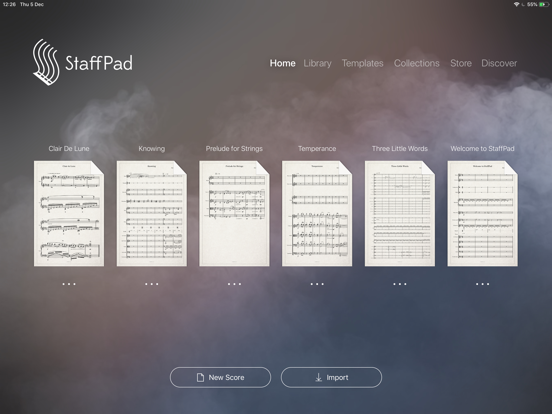
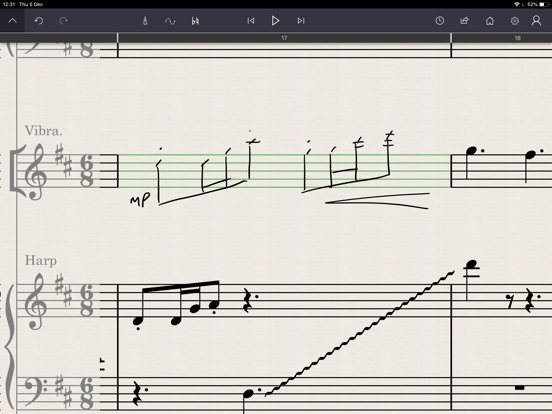
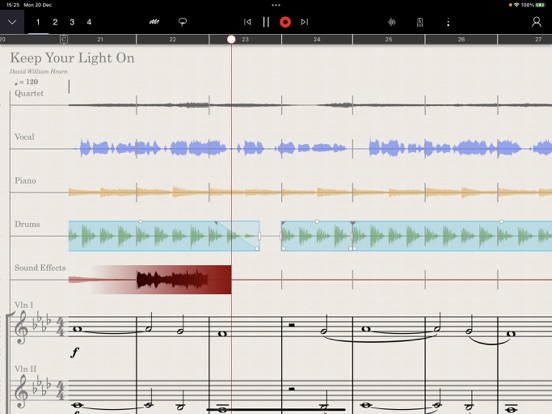
StaffPad is designed for composers who want to write music effortlessly, using music notation and audio. Write your music using Apple Pencil, and the app will transform your writing into beautifully typeset notation that can be edited, played back, printed and shared. Record or import audio directly onto your score and edit it intuitively with Apple Pencil. Magically convert your real piano playing or existing recordings into notation using advanced on-device machine learning. Add video, smart symbols and use world leading sample libraries and mix your score with a suite of studio effects. From basic idea to a full film score; StaffPad is the …
Read the full description
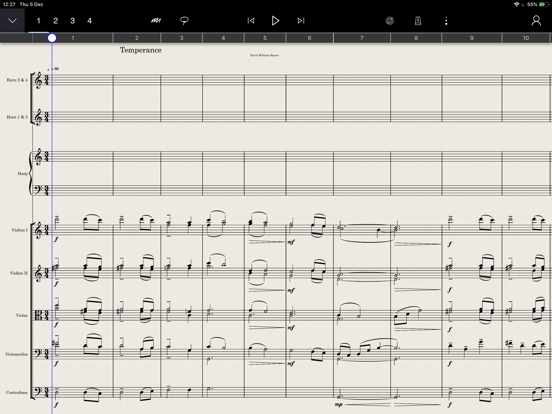
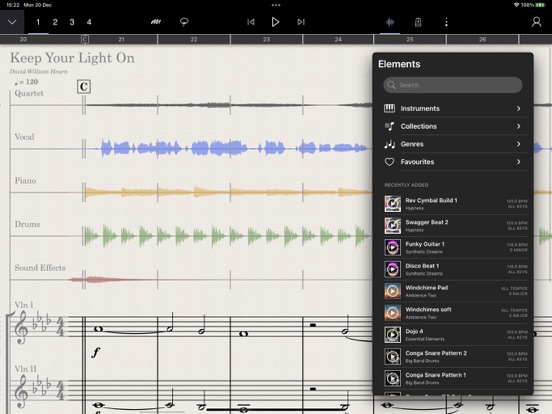
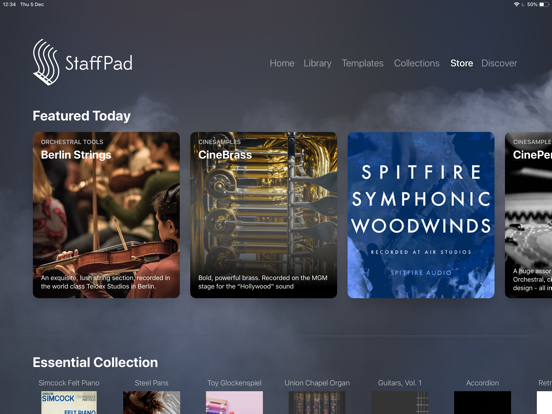
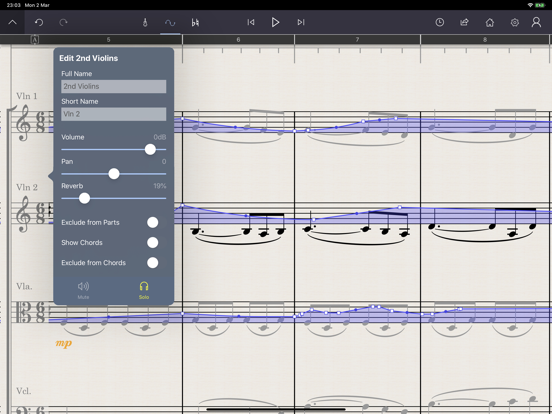
MADE FOR COMPOSERS ------------------------- StaffPad is designed for composers who want to write music effortlessly, using music notation and audio. Write your music using Apple Pencil, and the app will transform your writing into beautifully typeset notation that can be edited, played back, printed and shared. Record or import audio directly onto your score and edit it intuitively with Apple Pencil. Magically convert your real piano playing or existing recordings into notation using advanced on-device machine learning. Add video, smart symbols and use world leading sample libraries and mix your score with a suite of studio effects. From basic idea to a full film score; StaffPad is the easiest, most powerful and most intuitive way to compose music on iPad. WRITE NATURALLY ------------------- Write your score with the fluidity of natural handwriting. Use touch and Apple Pencil to quickly edit your notation. Transpose, repeat and structure your score with intuitive gestures and tools. Customise the tempo with a unique tempo staff (or import a tempo map from a MIDI file), add chords either manually or automatically with the chord staff. You can even copy music written in StaffPad into other apps, simply using the normal copy and paste functions. HEAR YOUR MASTERPIECE ---------------------------- With a groundbreaking playback engine and over 55 included instruments, StaffPad is ready to perform your written piece instantly. Add industry-standard sample libraries, adapted and customised for StaffPad, from some of the world's leading sample developers. This is a leap forward for composers working at the highest levels. SHARE WITH SCORESYNC --------------------------- Once you're ready to perform or record your work, tap the ScoreSync button in StaffPad and your score is instantly shared across a Wi-Fi network to any device running the free StaffPad Reader app (available in the App Store). The Readers present each individual musical part beautifully formatted, update in realtime with any changes you make to your score, handle automatic page turns, and play back in perfect time with a synchronised metronome, for capturing the perfect recording every time. IMPORT AND EXPORT --------------------------- StaffPad imports and exports MusicXML and MIDI files for easily working with other music apps. You can also export your playback as WAV, AAC or MP3. You can import audio files into your score, with support for most major audio formats. WORK WITH AUDIO AND VIDEO -------------------------------- For the first time, you can seamlessly mix audio with your notated score. Record directly onto the score canvas using your device's in-built microphones, or import loops, Tempo map freeform/rubato performances using the tempo staff. Add shine to your production with a suite of studio quality DSP effects, and polish with precise automation. PIANO AND MIDI CAPTURE --------------------------- Record your real piano and convert it into notation. Don't have a real piano? Don't worry - you can connect a USB or Bluetooth MIDI keyboard and record your performance in realtime, converting to notation as you play. PRINT / PDF ------------ As well as digital parts via ScoreSync, StaffPad will automatically format and print parts or export PDFs for you. Customise the paper size, bar number styles, number of bars per line, scaling, margins, multi-bar consolidation and more. StaffPad automatically formats the score for consistent presentation.
Installs since 29 Aug 2026
Apple does not publish download counts. Estimates are in testing.
Estimated store revenue Estimated Beta
App Store, worldwide, monthly rate from the last 14 chart days to 21 Nov 2026
Below the top 100 grossing apps in the markets we calibrate. In the United States that usually means under about $6.4M a month. App Store purchases and subscriptions only, before Apple's 15 to 30% fee. Ads and web payments are not included.
Ratings
657 ratings, 657 reviews
No rating breakdown published for this app.
Recent reviews
Latest public reviews from the store
- 20 Sep 2024
PLEASE ADD ACCIDENTALS TO TOOL BAR
I really enjoy this app but it is excessively difficult to consistently draw the accidentals correctly. Flats in particular are especially hard to get right. It’s moments like this that can really kill the momentum of writing. Adding accidentals to the tool bar will be a very simple fix to this issue that way I can just toggle to the accidental I need instead of fighting with my iPad to draw the accidentals perfectly. You should also add note values to the tool bar. Just about every notation software has this option and will be a game changer for this app. Again, instead of fighting with my iPad to write out the notes perfectly, I can just select the note value I need and put it on the staff. In fact, why not combine both of those ideas. For example, if you need to draw quarter notes, just select the quarter note value in the tool bar before you draw the notes. That way, the software knows no matter how poorly the note is drawn that its supposed to recognize the notes as quarter notes. Same thing with tuplets. These two things alone will easily make this the best music notation software bar none. The interface is gorgeous and the sounds are phenomenal. However, all of that is u
- 3 Aug 2022
Unique tool; I required some practice to enter notation effectively
Unusual app that allows handwritten notation to be rendered as standard "engraved" music. Initially, I had some trouble getting the app to recognize my handwriting. However, with time and a few workarounds, I was able to manage to get my notes into the program fairly efficiently. There are some useful tricks that can be used. For instancel;l, rather than trying to position notes on distant ledger lines or in other awkward positions, initially place them centrally on the staff and then move them into position. One thing I very much like about this app is that there are relatively few modes, and the toolbars are for the most part logically laid out without too many submenus in layers. Rather than have to select a different tool for rests, slurs, ties, etc., the single pencil mode can be used for all. The built-in sound samples are phenomenal (including various keyboards and a full range of orchestral instruments), and there are plenty of libraries available for more specific needs (solo violin, viola, cello, etc.). Scores can be exported as serviceable PDF files for printing. The layout options are somewhat limited, as is the control over the systems and pagination. However, StaffPad
- 13 Jun 2021
Outstanding - give a little time to learn
This is one of the absolute best music composition, notation and composition and notation learning tools on iOS. The software can be very frustrating at first, but remember creating quality music notation with pencil and paper by hand can be laborious as well. Take time to work through the tutorials and practice using the software with the Apple Pencil. Within a day at most, you’ll find it to be one of the best tools on the market. Also, the in-app sample libraries built for StaffPad are ALL fantastic high-quality libraries for a good price. No, the libraries are not the complete libraries for use with DAWs like Logic Pro X, but they are substantial versions of those same libraries specifically built to work with StaffPad. The libraries are very nicely integrated with the StaffPad notation library - articulations, volume, et al. If you’re starting out, and you want to get good at composition and orchestration, this is a great tool to have at your side while studying the art. Further, StaffPad is a great tool for those with a lot of experience as well. Want to use it in combination with your DAW for portions of film scores? Your StaffPad compositions can be readily exported in
- 19 May 2021
What you’ve done is amazing!
I wrote a review shortly after I bought the app and shared my enthusiasm at the time. Well, my appreciation for this app has only grown. I have bought the Berlin sound libraries, a number of fine samples libraries, and Voxos ( about $800 worth of sound libraries in total). This app, with sound libraries of this quality, is truly the fulfillment of a lifelong dream…write out musical ideas and realize them in high quality with ease. I look forward to how the app will evolve, but I hope that you continue to build on the core vision, which, for me, is the support for easily inputting notation by hand and translating it into high quality sounds. Currently, I get 80-90 percent of the way there with StaffPad. And, I am grateful for that! To get the last 10-20 percent, requires exporting midi or xml in order to fine tune performance with more fully featured sound samples (For example, VSL synchron series or EWQL libraries). Unfortunately, the last 10-20 percent requires almost starting from scratch in a DAW (Cubase or Studio One for me) as almost none of the performance subtlety output via midi or xml translates. Not sure what the best solution would be…integration with more libraries,
What reviewers bring up
Topics mentioned in the latest 8 reviews, by how many reviews mention them
Liked in good reviews (4 reviews)
- staffpad 4
- libraries 3
- practice 3
- notation 3
- pencil 3
- music 3
- sound 3
- compositions 2
Raised in bad reviews (3 reviews)
- handwriting 3
- composers 3
- playback 2
- problem 2
- project 2
- better 2
- easily 2
- amount 2
Top chart positions
Latest App Store chart ranks by country, last 10 days
Not in any tracked top chart in the last 10 days.
StaffPad history
Release, install milestones, listing and store changes
- First released on the store 4 Feb 2020
Update frequency
How often StaffPad ships a new version, month by month
1 updates in the last 12 months. About as often as similar apps, which shipped a median of 1 updates in the same year.
Recent versions
Current version 1.6.9
- Version 1.6.84 Nov 2026
StaffPad 1.6.8 Faster - Scores open much faster, especially large ones - Faster layout and scrolling in large scores - Closing scores with many versions is faster Playback - Glissandi on instruments without glissando samples no longer play notes that are too short or disappear - Portamento on instruments without portamento samples is now simulated - Naturale or Nat now also reset articulations Fixes - Scores with damaged beams or slurs can now be recovered instead of failing to open - Number and letter keyboard shortcuts work again - Crash when finishing a lasso selection on some scores - Crash when pasting lyrics with extension lines into the last bar - Crash when audio could not be started while opening a score; StaffPad now shows a message instead - Renaming and deleting scores on iPads set to a language other than English - Deleted scores reappearing in the library when iCloud is off - The library and home lists sometimes disappearing after returning from a score when search was active - A second AirPrint job printing nothing until StaffPad was restarted - Videos that could not be resized by pinching - Long pressing the playhead in the ruler no longer opens bar numbering - The top bar sometimes showing a cut-off palette strip, with no way to get back home - Cancel and OK on the in their usual order - Clearer message whened because of iCloud or low storage
- Version 1.6.410 Nov 2023
This update contains fixes and enhancements - Fixes a problem with display of tuplets when using Piano Capture - Fixes an issue with the Muse Solo Cello - Fixes an issue that could affect playback if a tempo point was created at the very end of the score - Eliminates clicks/artifacts that could sometimes be present in score audio export. - Fixes an issue with symbol placement above the stave in certain situations. - Improved the way that instrument changes are represented in the "ghost staff" - i.e when scrolling past the initial instrument name - Fixed an issue that can cause the score to continue playing even after the document has been closed - Fixed some silent notes that could occur when using the built-in Oboe sound
Listing keywords
Words and phrases StaffPad repeats most in its store listing
Top phrases: apple pencil (3), real piano (3), ready to perform (2), suite of studio (2), directly onto (2).
Highlighted words also appear in the title. Counts cover the title, short description and description.
Compliance
What the listing and the app package show
- Store status
- Live
- Upkeep
- Updated 4 Nov 2026
- Age rating
- 4+
Apps like StaffPad
- Navichord Lite chord sequencerDenis Kutuzov★ 4.69
 HOT 96.9 BostonBeasley Broadcast Group★ 4.8
 Voxvibe Offline Music Player加明 陈★ 4.48
 Piano - Play any song & sheetsT.V CO., LTD★ 4.22
 La Radio De Moda EcuadorMANOLO SERVICES, INC.★ 4.64
 Wireless Audio Multiroom : PadSamsung Electronics Co., Ltd.★ 4.34
 Unceasing WorshipInternational House of Prayer★ 4.82
 La 91 FMLA 91 FM★ 4.81
 Tap That TempoNorman Sander★ 4.73
StaffPad: questions and answers
Who makes StaffPad?
StaffPad is published by StaffPad Ltd..
When was StaffPad last updated?
The latest version (1.6.9) was released on 4 Nov 2026.
Is StaffPad free?
No. StaffPad is a paid app priced at $49.99.
Is StaffPad still available?
Yes. StaffPad is live on App Store as of 21 Nov 2026.
Track StaffPad and its competitors
Watch any app for new versions, rating drops, chart moves and removals. Free plan, no card.