
- Installs
- —
- Apple does not publish download counts
- Rating
- 4.38
- Ratings
- 8
- 8 reviews
- Version
- 1.9
- Updated 21 Jul 2025
- Released
- 12 Feb 2014
- Tracked since 10 May 2026
- Size
- 2 MB
- Needs 13.0
Screenshots



About Stop Motion Plus
The description on the store listing
Stop Motion for iOS
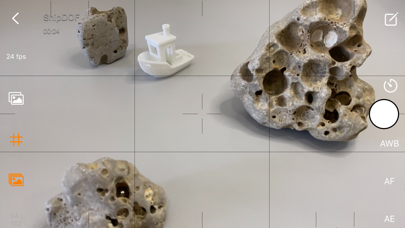
Simple and robust stop motion app. Create amazing stop-motion videos with ease. Perfect for casual users with an easy-to-use control panel.
Project Management:
• Rename, delete project, or export movie option via long press.
• Projects are copyable to other devices using the Files app. Go to Stop Motion and copy the project folder.
Stop Motion Plus Camera Features:
• Default highest photo quality output depending on device.
• Support for dual-lens or triple-lens devices.
• Auto/Lock White Balance.
• Auto/Touch Focus/Exposure control.
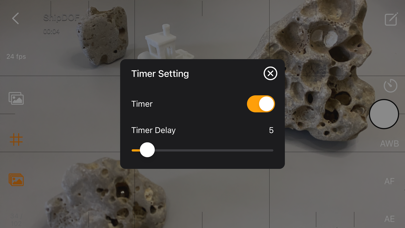
• Timer for interval capture ranging from 1–60 seconds.
• Show/Hide grid option.
• Option to show onion/overlay of previous frames for …
Read the full description
Stop Motion for iOS Simple and robust stop motion app. Create amazing stop-motion videos with ease. Perfect for casual users with an easy-to-use control panel. Project Management: • Rename, delete project, or export movie option via long press. • Projects are copyable to other devices using the Files app. Go to Stop Motion and copy the project folder. Stop Motion Plus Camera Features: • Default highest photo quality output depending on device. • Support for dual-lens or triple-lens devices. • Auto/Lock White Balance. • Auto/Touch Focus/Exposure control. • Timer for interval capture ranging from 1–60 seconds. • Show/Hide grid option. • Option to show onion/overlay of previous frames for reference — up to 3 overlay frames. • Opacity adjustment for onion/overlay frames. • Capture background reference to support object removal. • Photos are saved immediately to prevent accidental data loss. • Photos are saved to internal storage and available for external editing (access files via iTunes or Files app). • Support for voice control to capture images. • Simple UI and easy to use. Stop Motion Plus Edit Panel Features: • Set movie frame rate (FPS) from 1–60 fps. • Edit images by removing supporting structures using background reference. • Add sound to project — sounds are placed in Files app > Stop Motion > [Project Name] > Audio folder. • Preview stop motion animation. • Switch between Camera Panel and Edit Panel. • Select a frame in Edit Panel, switch back to Camera Panel, and new capture will be inserted after the selected frame. • Long press frame thumbnail to access Copy/Paste/Delete frame options. • Add freeze-frame duration for delay/pause effect. • Copy All Frames / Paste Frames / Paste Inverted Frames. • Copy Selected Frames / Paste Frames / Paste Inverted Frames. • Movie info available for better understanding of video length. Render Panel: • Video name matches the project title (e.g., Ship.mp4). • Set video resolution: HD, Full HD, or 4K. • Set video aspect ratio: 16:9, 4:3, or 1:1. • Render output as animated GIF or APNG. • Size options for GIF/APNG: 1280x720, 640x360, or 320x180. • Videos and animated GIFs are saved to the camera roll. • Animated APNGs are saved into the project folder. Quick Start Guide: 1. Tap on the Create button and enter a name. 2. Tap on the project name to load it. 3. Position your camera and start capturing. 4. After finishing, go to the Edit Panel. 5. Set your desired FPS and preview your animation. 6. Hit Render and your video will be saved to the camera roll. 2 Types of Background Reference: • Global Reference – for static backgrounds; uses a single background image. • Current Reference – for dynamic backgrounds; captures individual background images for each frame. Tips: • Use the overlay image feature to help position objects precisely. • Use the grid for better object alignment. • Start your project in a well-lit environment. Ideally, use a dedicated light source. • Use voice control to capture frames if your hands are occupied. • Create your project in multiple scenes and use iMovie for advanced video editing. What is Stop Motion? Stop motion is an animated filmmaking technique in which objects are physically manipulated in small increments between individually photographed frames. When played in sequence, the objects appear to move independently. Dolls with movable joints or clay figures are often used because they are easy to reposition. Stop-motion animation using plasticine is called clay animation or claymation. However, stop motion isn't limited to figures or models. It can also involve humans, household items, or everyday objects—often used for comedic or creative effects. Sequential drawings can also be used, similar to traditional animation, like a flipbook. When stop motion involves human actors, it's referred to as pixilation or pixillated animation. Thanks for your support! Visit nitrio.com for more apps for your iOS devices.
Installs
Apple does not publish download counts. Estimates are in testing.
We publish iOS estimates only after they pass a back-test against real numbers. Chart history below is measured.
Estimated store revenue Estimated Beta
App Store, worldwide, monthly rate from the last 12 chart days to 19 Nov 2026
Below the top 100 grossing apps in the markets we calibrate. In the United States that usually means under about $6.4M a month. App Store purchases and subscriptions only, before Apple's 15 to 30% fee. Ads and web payments are not included.
Ratings
8 ratings, 8 reviews
No rating breakdown published for this app.
Recent reviews
Latest public reviews from the store
No reviews in our sample for this app yet.
Top chart positions
Latest App Store chart ranks by country, last 10 days
Not in any tracked top chart in the last 10 days.
Stop Motion Plus history
Release, install milestones, listing and store changes
- First released on the store 12 Feb 2014
Recent versions
Current version 1.9
- Version 1.921 Jul 2025
- Updated for the newest devices. - Minor bugs fixed.
Listing keywords
Words and phrases Stop Motion Plus repeats most in its store listing
Top phrases: stop motion (14), edit panel (4), frames paste (4), stop motion plus (3), background reference (3).
Highlighted words also appear in the title. Counts cover the title, short description and description.
Compliance
What the listing and the app package show
- Store status
- Live
- Upkeep
- Updated 21 Jul 2025
- Age rating
- 4+
Apps like Stop Motion Plus
 Video CollageaZeR DiLLs★ 4.08
 Vee for VideoMedious★ 2.98
 Beauty Camera -Selfie, StickerBhuvan Gupta★ 4.5
 FinalCamXShenzhen Xiaozhen Technology Co.,Ltd.★ 4.44
 Magic Studio - AI Photo EditorMagicStudio.com★ 4.62
 Foto Impresiones: 1 Hr PhotoSoftwareX★ 4.98
 SnapGeo - AI Location FinderRECEP ASLAN★ 4.24
 Family Photo Maker - AIRick-y Media★ 4.12
 BeautifAI: AI Try OnJAI UYGULAMA VE YAPAY ZEKA TEKNOLOJILERI ANONIM SIRKETI★ 4.36
Stop Motion Plus: questions and answers
Who makes Stop Motion Plus?
Stop Motion Plus is published by Heng Jia Liang.
When was Stop Motion Plus last updated?
The latest version (1.9) was released on 21 Jul 2025.
Is Stop Motion Plus free?
No. Stop Motion Plus is a paid app priced at $4.99.
Is Stop Motion Plus still available?
Yes. Stop Motion Plus is live on App Store as of 1 Jul 2026.
Track Stop Motion Plus and its competitors
Watch any app for new versions, rating drops, chart moves and removals. Free plan, no card.