
- Installs
- —
- Apple does not publish download counts
- Rating
- 4.5
- Ratings
- 3.2K
- 3.2K reviews
- Version
- 11.5.0
- Updated 10 Nov 2026
- Released
- 17 Jun 2011
- Tracked since 10 May 2026
- Size
- 297 MB
- Needs 15.0
Also on Google Play: Superimpose (3.1K ratings)
Screenshots
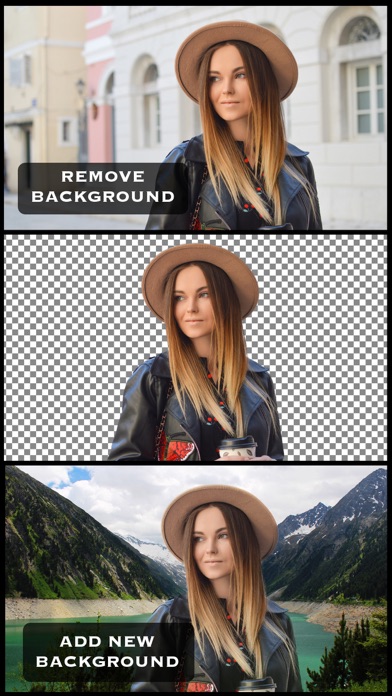

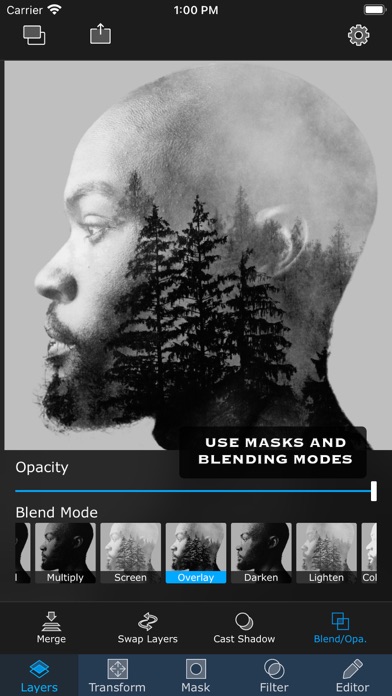
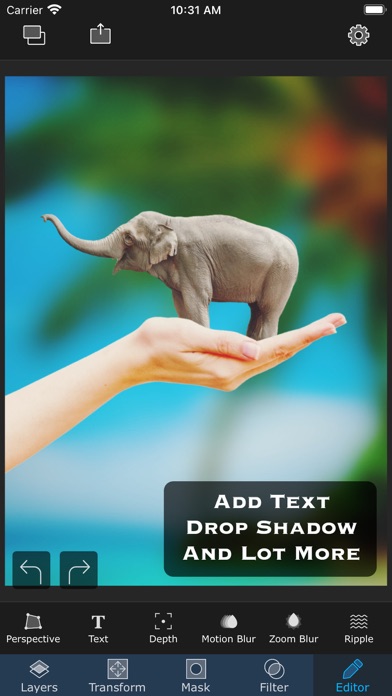


About Superimpose
The description on the store listing
Superimpose lets you unleash your creativity with your photo editing skills. Combine multiple photos to create artistic double exposure, surreal or just fun juxtaposed photo.
Superimpose provides a very simple workflow, which almost anyone can follow. Yet, it provides a wide range of tools suitable even for advanced users, to create complex compositions.
Blend/mix/combine/cut/copy and paste one photo on another. Creating double exposure photo is as easy as loading two photos and then choosing opacity and blending modes.
With advanced masking tools, you can manually or semi-automatically erase portions from one image and then blend that with another photo. From magic lasso, that cuts out …
Read the full description
Superimpose lets you unleash your creativity with your photo editing skills. Combine multiple photos to create artistic double exposure, surreal or just fun juxtaposed photo. Superimpose provides a very simple workflow, which almost anyone can follow. Yet, it provides a wide range of tools suitable even for advanced users, to create complex compositions. Blend/mix/combine/cut/copy and paste one photo on another. Creating double exposure photo is as easy as loading two photos and then choosing opacity and blending modes. With advanced masking tools, you can manually or semi-automatically erase portions from one image and then blend that with another photo. From magic lasso, that cuts out an image from a roughly painted boundary to a simple brush masking tool, you can use wide range of masking tools to create all sorts of masking, using this app. The app has tons of masking tools like brush, smart brush, magic wand, magic lasso, lasso, polygon, rectangle, ellipse, linear and radial gradient and color range. Text masking tool and you can even create a mask from an image. And how do you cut out hair or fur of your pet? You can create fine mask of hair, using hair masking tool even to cut out hair! To keep the flow simple, Superimpose works with two photos at a time. But you can keep merging and keep adding more and more layers of photos to create complex compositions. To blend two photos even better, the app supports a set of adjustment tools like exposure, saturation, hue, color balance, curve etc. Apart from blending, advanced masking and filters, Superimpose comes equipped with assorted set of editing tools like perspective correction, adding text with extensive text settings and tools like motion blur, zoom blur etc. Creating a natural shadow of objects that you blend with a photo is easier than ever. A dedicated tool just to create a shadow. Store all your cut outs, stickers or masks in a built-in mask library. For example, you can take photo of your products, mask them and then save them in the mask library. You can later add those cut outs on a background you want to add it to. Create a fun photo by adding one part of the photo as a foreground and another photo as a background. Save images in high resolution either in JPEG, PNG or HEIC format. Terms of use: https://www.superimposeapp.com/terms-of-use--superimpose-classic-.html Privacy Policy: https://www.superimposeapp.com/privacy2.html
Installs, last 30 days
Apple does not publish download counts. Estimates are in testing.
Estimated store revenue Estimated Beta
App Store, worldwide, monthly rate from the last 12 chart days to 19 Nov 2026
Below the top 100 grossing apps in the markets we calibrate. In the United States that usually means under about $6.4M a month. App Store purchases and subscriptions only, before Apple's 15 to 30% fee. Ads and web payments are not included.
Ratings
3,204 ratings, 3,204 reviews
- 5 ★82%
- 4 ★5.5%
- 3 ★2.1%
- 2 ★2.1%
- 1 ★8.2%
Recent reviews
Latest public reviews from the store
- 16 May 2026
🔥🔥🔥
Perfect for making quick PNGs
- 11 May 2026
Amazing for transparents!
.
- 3 May 2026
I love it been using this app I paid for , for years
Love it! 100/100
- 20 Apr 2026
Perfect
Easy to use, I use it all the time. Real stuff never AI
What reviewers bring up
Topics mentioned in the latest 50 reviews, by how many reviews mention them
Liked in good reviews (40 reviews)
- features 4
- editing 4
- around 4
- tool 4
- intuitive 3
- projects 3
- making 3
- useful 3
Raised in bad reviews (9 reviews)
- subscription 4
- disappointing 3
- superimpose 3
- different 3
- paywall 3
- anymore 3
- ruined 3
- behind 3
Top chart positions
Latest App Store chart ranks by country, last 10 days
Not in any tracked top chart in the last 10 days.
Superimpose history
Release, install milestones, listing and store changes
- First released on the store 17 Jun 2011
Update frequency
How often Superimpose ships a new version, month by month
10 updates in the last 12 months. More often than most similar apps: they shipped a median of 0 updates in the same year.
Recent versions
Current version 11.5.0
- Version 11.4.310 Nov 2026
• Crop, Pattern and Paste: dragging on the picture no longer swipes you back to the previous screen by accident. • AI features now always open the photo picker on Photos. • AI features: Create More stays disabled until you enter a prompt. • AI features now use their own coin price. • Text to Image: Typography now uses the style and aspect ratio you choose. • Fixed: Enhance's Continue Editing closing the screen, and the Quick Edits list showing three columns. • AI videos are no longer lost if you leave or close the app while they're being made: they're saved to Photos when you return, or refunded. • Trending: the intro screen now shows the template's preview.
- Version 11.4.25 Nov 2026
• Mask edits are no longer lost if the app closes unexpectedly while you're masking. • Fixed two crashes: when deleting a project, and when saving an AI result. • Pattern picker: the colour circles now always have an outline, so you can find them even when the colour is black. • Security update: the app's secure connection to its online services has been updated.
- Version 11.0.224 Aug 2026
Bug fixes and improvements
- Version 11.0.114 Aug 2026
Bug fixes and improvements
Listing keywords
Words and phrases Superimpose repeats most in its store listing
Top phrases: masking tool (3), masking tools (3), create complex compositions (2), cut out hair (2), photos to create (2).
Highlighted words also appear in the title. Counts cover the title, short description and description.
Compliance
What the listing and the app package show
- Store status
- Live
- Upkeep
- Updated 10 Nov 2026
- Age rating
- 4+
Apps like Superimpose
 InkworkCode Organa★ 4.79
 MAKEOVER - Body photo editorAppyfurious LLC★ 4.28
 ArtCam: Cartoon & Animal FaceLuca Lentini★ 3.46
 KnockOut HD Pro-Photo EditorBest Cool Video Image Editing Co., Limited★ 4.51
 PICFX Picture Editor & BordersActive Development Limited★ 4.55
 Albumii - Photo PrintingKode Aap Inc.★ 4.81
 Tagstagram - Hashtag GeneratorBYOApps, LLC★ 4.78
 FaceAI - AI Photos & Face SwapDOFA TECH YAZILIM HIZMETLERI ANONIM SIRKETI★ 4.77
 Duplicate Photos FixerShrishail Rana★ 4.18
Superimpose: questions and answers
Who makes Superimpose?
Superimpose is published by Pankaj Goswami.
When was Superimpose last updated?
The latest version (11.5.0) was released on 10 Nov 2026.
Is Superimpose free?
No. Superimpose is a paid app.
Is Superimpose still available?
Yes. Superimpose is live on App Store as of 19 Nov 2026.
Track Superimpose and its competitors
Watch any app for new versions, rating drops, chart moves and removals. Free plan, no card.