
- Installs
- —
- Apple does not publish download counts
- Rating
- 3.63
- Ratings
- 8
- 8 reviews
- Version
- 1.0.12
- Updated 24 Sep 2024
- Released
- 18 Apr 2020
- Tracked since 11 May 2026
- Size
- 27 MB
- Needs 13.2
Screenshots

About SurfTideWatch (Tide graph)
The description on the store listing
"SurfTideWatch" is an app that show a tide graph on Apple Watch.
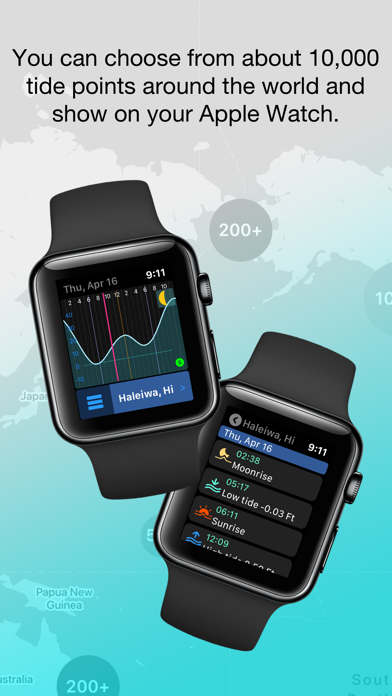
It can be able to select the places to use from about 10,000 tide points around the world on iPhone and synchronize with Apple Watch.
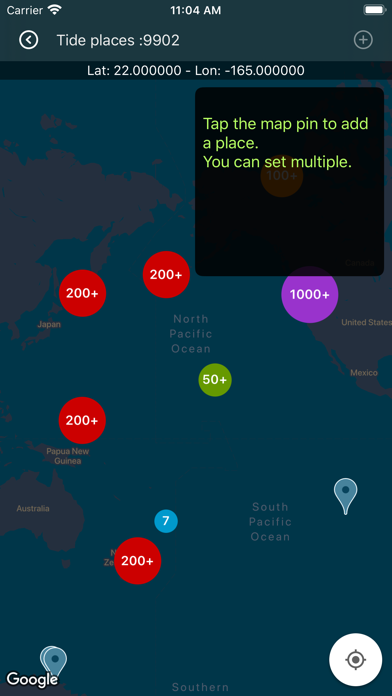
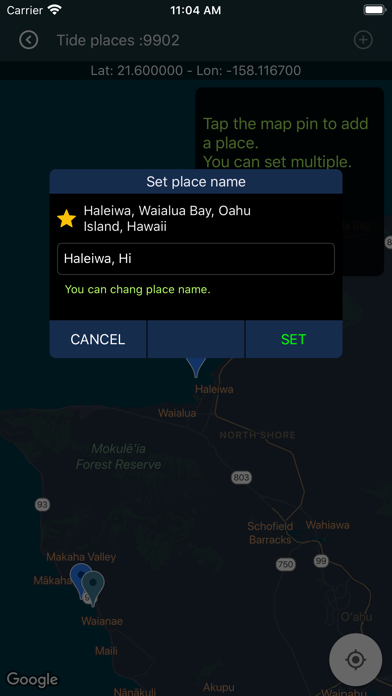
You can select from the map a tide place. Also you can change the place name to make it easier to understand.
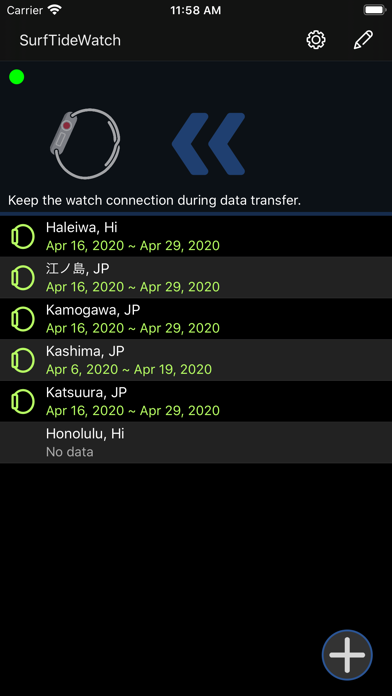
It can store up to 5 places on Apple Watch.
It can be saved is for 2 weeks of tide data, but it can be updated from your iPhone at any time.
It can be shown graphically and you can check astronomical events such as sunrise, sunset, high tide, low tide and more infomation.
It also supports watch's complications. Some complications can display the next tide event information.
The …
Read the full description
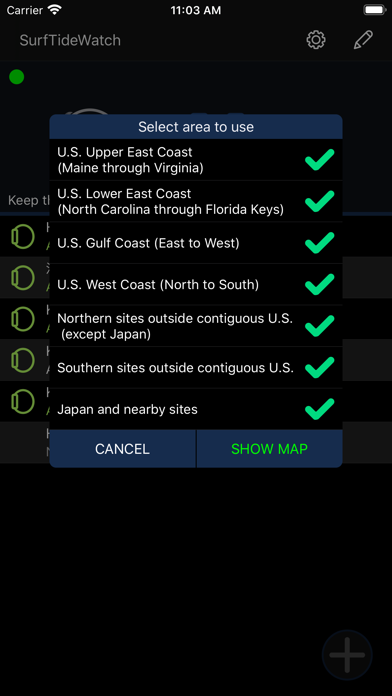
"SurfTideWatch" is an app that show a tide graph on Apple Watch. It can be able to select the places to use from about 10,000 tide points around the world on iPhone and synchronize with Apple Watch. You can select from the map a tide place. Also you can change the place name to make it easier to understand. It can store up to 5 places on Apple Watch. It can be saved is for 2 weeks of tide data, but it can be updated from your iPhone at any time. It can be shown graphically and you can check astronomical events such as sunrise, sunset, high tide, low tide and more infomation. It also supports watch's complications. Some complications can display the next tide event information. The following is a simple method for creating tide data on your iPhone. For details, check to "Help & Support" from "Settings" in the app. ----- 1, Tap the "+" button at the bottom right of the main screen 2, Select which area tide places will be shown on the map You can choose from the following 7 areas. - U.S. Upper East Coast (Maine through Virginia) - U.S. Lower East Coast (North Carolina through Florida Keys) - U.S. Gulf Coast (East to West) - U.S. West Coast (North to South) - Northern sites outside contiguous U.S. (except Japan) - Southern sites outside contiguous U.S. - Japan and nearby sites When the selection is over, it will be the map screen It takes some time to process the first time. 3, Tap the map pin shown on the map and select the place to register Places that are close together are clustered. Clustering is released when you zoom the map. You can select multiple places. 4, Tap the "+" navigation button at the top right of the map screen and to return to the main screen 5, Tap "Update All" on the right side of the screen to get tide data This takes a little time. The operation up to this point , the preparation of tide data is complete. Finally, send the tide data to your Apple Watch. If Apple Watch is connected to iPhone, tap "≪" at the top center of the screen to synchronize. If it is not connected, tap "Save to iCloud". In this case, Apple Watch will automatically sync when it comes online. ----- Note: This app is an app for showing a tide information on Apple Watch. It cannot show tide data on the iPhone alone. This app can be used for marine sports such as surfing and fishing, but please do not use it for nautical purposes. To use iCloud, you must be signed in to iCloud on your iPhone.
Installs
Apple does not publish download counts. Estimates are in testing.
We publish iOS estimates only after they pass a back-test against real numbers. Chart history below is measured.
Estimated store revenue Estimated Beta
App Store, worldwide, monthly rate from the last 12 chart days to 19 Nov 2026
Below the top 100 grossing apps in the markets we calibrate. In the United States that usually means under about $6.4M a month. App Store purchases and subscriptions only, before Apple's 15 to 30% fee. Ads and web payments are not included.
Ratings
8 ratings, 8 reviews
No rating breakdown published for this app.
Recent reviews
Latest public reviews from the store
No reviews in our sample for this app yet.
Top chart positions
Latest App Store chart ranks by country, last 10 days
Not in any tracked top chart in the last 10 days.
SurfTideWatch (Tide graph) history
Release, install milestones, listing and store changes
- First released on the store 18 Apr 2020
Update frequency
How often SurfTideWatch (Tide graph) ships a new version, month by month
0 updates in the last 12 months. Less often than most similar apps: they shipped a median of 3 updates in the same year.
Recent versions
Current version 1.0.12
- Version 1.0.1224 Sep 2024
Reduced the load on the weather information server.
Listing keywords
Words and phrases SurfTideWatch (Tide graph) repeats most in its store listing
Top phrases: apple watch (7), tide data (6), sites outside contiguous (2), coast north (2), east coast (2).
Highlighted words also appear in the title. Counts cover the title, short description and description.
Compliance
What the listing and the app package show
- Store status
- Live
- Upkeep
- No update since 24 Sep 2024
- Age rating
- 4+
Apps like SurfTideWatch (Tide graph)
 Digital LinkCompetition Electronics★ 3.02
 Powder ProjectAdventure Projects Inc.★ 4.26
 Takes: Sports Quiz & PicksTakes Incorporated★ 4.86
 NFL Collect by Topps®The Topps Company, Inc.★ 3.86
 Temple OwlsTemple University★ 4.6
 Bowling Score Keeper ToolkitBiographics Consultoria e Design LTDA★ 4.42
 Hunting Calls: CrowSergii Nesterenko★ 4.52
 ProdefySaga Group★ 3.82
 Goodland PickleballPINGPOD INC★ 5.0
SurfTideWatch (Tide graph): questions and answers
Who makes SurfTideWatch (Tide graph)?
SurfTideWatch (Tide graph) is published by Mitsuhiro Shirai.
When was SurfTideWatch (Tide graph) last updated?
The latest version (1.0.12) was released on 24 Sep 2024.
Is SurfTideWatch (Tide graph) free?
Yes. SurfTideWatch (Tide graph) is free to download.
Is SurfTideWatch (Tide graph) still available?
Yes. SurfTideWatch (Tide graph) is live on App Store as of 1 Jul 2026.
Track SurfTideWatch (Tide graph) and its competitors
Watch any app for new versions, rating drops, chart moves and removals. Free plan, no card.