
- Installs
- —
- Apple does not publish download counts
- Rating
- 4.62
- Ratings
- 47
- 47 reviews
- Version
- 6.3
- Updated 28 Jan 2025
- Released
- 22 Sep 2017
- Tracked since 11 May 2026
- Size
- 79 MB
- Needs 16.0
Screenshots


About SwiftDocs: PDF Document Maker
The description on the store listing
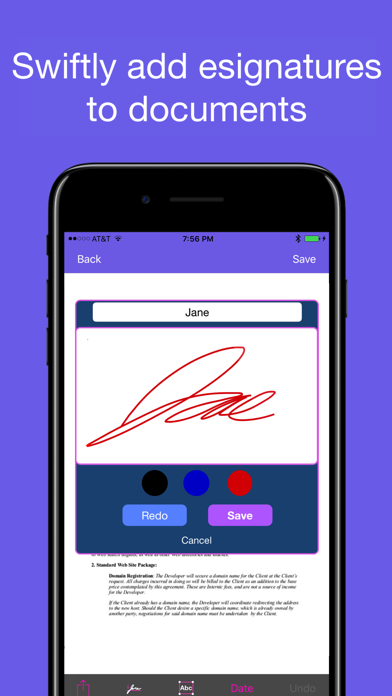
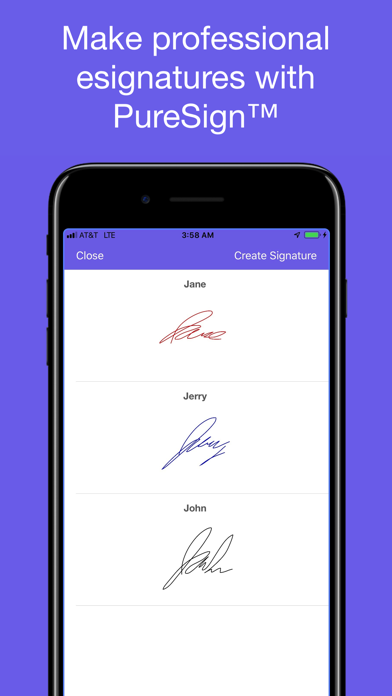
Sign, markup, scan, and convert documents to PDF with SwiftDocs. Our PureSign™ system smooths out signatures to recreate the appearance of ink on the page.
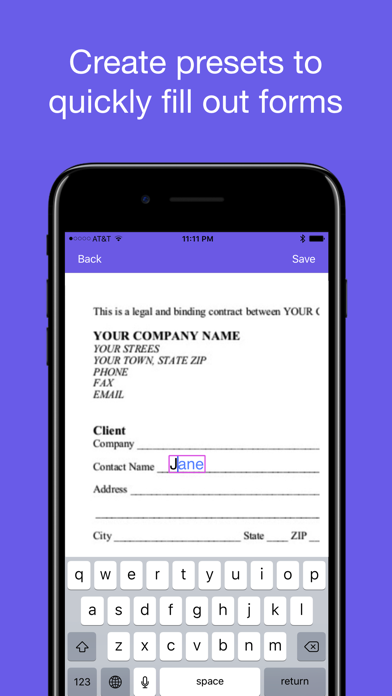
SwiftDocs brings the power of a desktop document editor to your fingertips, while enabling you to markup documents more swiftly than you would on your computer. Sign documents in a few seconds with PureSign, our system that removes shaky lines from your eSignatures. Overlay text onto PDFs to fill out forms, using presets to save you from having to type out commonly asked questions. Scan, import, and export PDFs to manage all of your documents. Never let being away from a computer, printer, or scanner slow you down again.
Sign …
Read the full description
Sign, markup, scan, and convert documents to PDF with SwiftDocs. Our PureSign™ system smooths out signatures to recreate the appearance of ink on the page. SwiftDocs brings the power of a desktop document editor to your fingertips, while enabling you to markup documents more swiftly than you would on your computer. Sign documents in a few seconds with PureSign, our system that removes shaky lines from your eSignatures. Overlay text onto PDFs to fill out forms, using presets to save you from having to type out commonly asked questions. Scan, import, and export PDFs to manage all of your documents. Never let being away from a computer, printer, or scanner slow you down again. Sign documents professionally: Quickly import a doc into the app, sign it, and send it. SwiftDocs allows you to create and store as many signatures as you want, perfect for if you need to initial or if you want to change the color of your signature. Esignatures usually have a tell-tale shakiness, but PureSign™ stabilizes your signature so it emulates the inking of a handwritten signature (it may look better than your actual signature). Save yourself a trip to the printer and the time involved. Add text to docs: Markup your documents with text. SwiftDocs allows you to open up a text view in a single tap, making it quicker to edit on the app than on your desktop. You can also add preset values for your name, address, or other common pieces of information. Manage documents swiftly: SwiftDocs simplifies your whole work flow for document management. It is the little things that matter, like having a document open to the markup area when you first import it, or adding a text view with the current date in a single tap. This convenience is exemplified by our Swift Markup feature, which saves you time when just need to create and markup a one page document. The app gets out of your way so you can just scan and sign your name on the dotted line, and then have it ready for your records and to send it to where it needs to go. SwiftDocs go anywhere you want them to: SwiftDocs is the starting point for managing all of your documents on the go. From SwiftDocs you can print, email, airdrop, and even store your docs to your iCloud Drive. Is it a longer document you want to read? Save your doc to iBooks in just a tap. Anything you could possibly want to do with a document you can do from the app. Make your mark(up): Bring an elegant and powerful document editor to the palm of your hands by downloading SwiftDocs. Upgrade to a premium document management experience that meets the needs of your busy day. Make your mark(up) with SwiftDocs. Features: •Sign documents and save your signatures to have on hand in a moments notice •The PureSign™ signature system smoothes out the edges of your signature to give you a professional and clean looking esignature •Markup documents with text and use presets to save precious time filling out your name, address, or other standard form questions •Import PDF documents into SwiftDocs from your email. It'll automatically bring you to the markup page so you can have an important form signed in seconds •Scan documents and create PDFs that you can print, email, airdrop, or store on iCloud •SwiftMarkup: One page document scanning for when you immediately want to markup a document and send it •Complete functionality without creating an account: one less password to remember (and may we mention one less app storing your personal data?) Terms of Use and Privacy Agreement: https://thebasicsoftwarecompany.com/swiftdocs-privacy-policy
Installs
Apple does not publish download counts. Estimates are in testing.
We publish iOS estimates only after they pass a back-test against real numbers. Chart history below is measured.
Estimated store revenue Estimated Beta
App Store, worldwide, monthly rate from the last 13 chart days to 20 Nov 2026
Below the top 100 grossing apps in the markets we calibrate. In the United States that usually means under about $6.4M a month. App Store purchases and subscriptions only, before Apple's 15 to 30% fee. Ads and web payments are not included.
Ratings
47 ratings, 47 reviews
No rating breakdown published for this app.
Recent reviews
Latest public reviews from the store
- 24 Apr 2026
SwiftDocs is Great
So easy to use. Great app for scanning PDFs and adding esignatures.
- 10 Nov 2024
Great For Signing PDF’s
Really happy with SwiftDocs, it does exactly what I needed it to do
- 21 May 2024
Best scanner
Best iPhone scanner
- 29 Apr 2024
Simple to create pdfs
This app has been super useful for quickly scanning multiple textbook pages and combining them into a pdf. Also super useful for handing application forms that require filling in information and signing them within the app. Great and timely service!
What reviewers bring up
Topics mentioned in the latest 22 reviews, by how many reviews mention them
Liked in good reviews (20 reviews)
- documents 9
- signing 6
- swiftdocs 5
- scanner 5
- pdfs 4
- esignatures 3
- scanning 3
- service 3
Raised in bad reviews (2 reviews)
- take 2
Top chart positions
Latest App Store chart ranks by country, last 10 days
Not in any tracked top chart in the last 10 days.
SwiftDocs: PDF Document Maker history
Release, install milestones, listing and store changes
- First released on the store 22 Sep 2017
Update frequency
How often SwiftDocs: PDF Document Maker ships a new version, month by month
0 updates in the last 12 months. Less often than most similar apps: they shipped a median of 2 updates in the same year.
Recent versions
Current version 6.3
- Version 6.328 Jan 2025
SwiftDocs 6 introduces SwiftDocs Pro and Cloud Documents! Upgrade to SwiftDocs Pro to sync cloud documents across multiple iCloud Devices
Listing keywords
Words and phrases SwiftDocs: PDF Document Maker repeats most in its store listing
Top phrases: sign documents (3), documents with text (2), presets to save (2), print email airdrop (2), document editor (2).
Highlighted words also appear in the title. Counts cover the title, short description and description.
Compliance
What the listing and the app package show
- Store status
- Live
- Upkeep
- Updated 28 Jan 2025
- Age rating
- 4+
Apps like SwiftDocs: PDF Document Maker
 UnovonVoyzze Communications Inc★ 1.2
 AgentDash for Real EstateRealty Search Solutions Network, LLC★ 3.64
 My Alliance WiFiAlliance Communications★ 4.84
 Kaakateeya Marriages since1980Kaakateeya.com India Private Limited★ 3.4
 HDBoxDawar Karim★ 3.6
 REKK - Call RecorderCLEVERCONTROL LLC★ 3.31
 Gold Price TodayQais Ali★ 4.47
 Firstpath-StaffFirstPath Inc★ 2.0
 ServiceMonsterServiceMonster LLC★ 2.78
SwiftDocs: PDF Document Maker: questions and answers
Who makes SwiftDocs: PDF Document Maker?
SwiftDocs: PDF Document Maker is published by The Basic Software Company.
When was SwiftDocs: PDF Document Maker last updated?
The latest version (6.3) was released on 28 Jan 2025.
Is SwiftDocs: PDF Document Maker free?
No. SwiftDocs: PDF Document Maker is a paid app priced at $2.99.
Is SwiftDocs: PDF Document Maker still available?
Yes. SwiftDocs: PDF Document Maker is live on App Store as of 1 Jul 2026.
Track SwiftDocs: PDF Document Maker and its competitors
Watch any app for new versions, rating drops, chart moves and removals. Free plan, no card.