- Installs
- —
- Apple does not publish download counts
- Rating
- 3.56
- Ratings
- 9
- 9 reviews
- Version
- 2020
- Updated 18 Aug 2020
- Released
- 18 Dec 2010
- Tracked since 10 May 2026
- Size
- 22 MB
- Needs 12.0
Screenshots


About SyncSpace
The description on the store listing
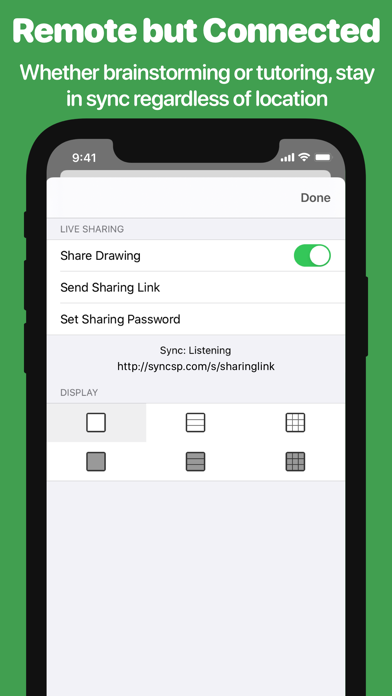
SyncSpace lets people express and explore visual ideas together, wherever you are. It is a zoomable drawing space that can be shared in real time over the net. It is a shared whiteboard plus a whole lot more.
∞ DEEP ZOOMING
Sketch out your ideas in a nearly limitless, zoomable drawing space. Never again be limited by the size of the canvas or the amount of space remaining in an existing sketch. You can always zoom in to add detail or zoom out to add context to a drawing. With SyncSpace's zooming, handwriting on a 10" screen actually becomes feasible.
∞ SKETCH TOGETHER
SyncSpace drawings can be updated by anyone who also has SyncSpace, anywhere on the Internet. You can invite others to …
Read the full description
SyncSpace lets people express and explore visual ideas together, wherever you are. It is a zoomable drawing space that can be shared in real time over the net. It is a shared whiteboard plus a whole lot more. ∞ DEEP ZOOMING Sketch out your ideas in a nearly limitless, zoomable drawing space. Never again be limited by the size of the canvas or the amount of space remaining in an existing sketch. You can always zoom in to add detail or zoom out to add context to a drawing. With SyncSpace's zooming, handwriting on a 10" screen actually becomes feasible. ∞ SKETCH TOGETHER SyncSpace drawings can be updated by anyone who also has SyncSpace, anywhere on the Internet. You can invite others to collaborate on sketches by sending a link via iMessage or email. In meetings, conferences and schools, SyncSpace can discover and broadcast the existence of nearby shared drawings using Bonjour. There are no limits to the number of people who can collaborate on a drawing. ∞ SHARING IS NICE Your drawings can be shared via Facebook, Twitter, 37 Signals' Campfire, your photo library, or emailed as PDF files. You can also send SyncSpace drawings to any app that handles PDF files, including Dropbox, GoodReader, Evernote, iBooks and thousands more! Sketches can be displayed on a nearby AppleTV or any HDMI or VGA-connected display. Any shared drawings are also advertised on the local network using Bonjour. ∞ SHARE ANYWHERE Collaborate on drawings using SyncSpace or view them with zooming and real-time updates using a web browser on a PC, Mac or mobile device. In addition, SyncSpace makes note taking and sketching easy with a plethora of fantastic features: - Palm/wrist protection for writing notes - Advanced line smoothing - Shared drawings can be embedded on any web page, with real-time updates and zooming - Rotate drawings however you like - Zoom-extents button quickly takes you to the outer limits of the drawing (and back to your original position with a second tap) - Export to email or other apps as a high resolution PDF file. The SyncSpace Collaboration service requires a paid subscription. If you choose to subscribe, payment will be charged to your iTunes account, and your account will be charged for renewal 24 hours prior to the end of the current period. Auto-renewal may be turned off at any time by going to your settings in the iTunes Store after purchase. The current price for collaboration subscription is $2.99 USD per month or $24.99 per year, and may vary from country to country. Terms of Use: https://infinitekind.com/syncspace-terms Privacy Policy: https://infinitekind.com/syncspace-privacy-policy
Installs
Apple does not publish download counts. Estimates are in testing.
We publish iOS estimates only after they pass a back-test against real numbers. Chart history below is measured.
Estimated store revenue Estimated Beta
App Store, worldwide, monthly rate from the last 12 chart days to 19 Nov 2026
Below the top 100 grossing apps in the markets we calibrate. In the United States that usually means under about $6.4M a month. App Store purchases and subscriptions only, before Apple's 15 to 30% fee. Ads and web payments are not included.
Ratings
9 ratings, 9 reviews
No rating breakdown published for this app.
Recent reviews
Latest public reviews from the store
No reviews in our sample for this app yet.
Top chart positions
Latest App Store chart ranks by country, last 10 days
Not in any tracked top chart in the last 10 days.
SyncSpace history
Release, install milestones, listing and store changes
- First released on the store 18 Dec 2010
Recent versions
Current version 2020
- Version 202018 Aug 2020
Welcome to SyncSpace 2020 - a massive update with a plethora of improvements: First, we've updated the subscription policy so that only the creator of a drawing must have a subscription. The result is that teachers with a subscription can share documents without their pupils needing to pay anything. Secondly, we've improved external display support via AirPlay, HDMI, or even USB adapters. Your canvas now utilizes the full resolution of an external display and displays your drawing in all its glory. Thirdly, we've added the ability to resize or rotate parts of your drawing. Use the selection tool to select any items you like, and then use the dots at the corners of the selection rectangle to resize and rotate the selection. Fourthly, we added an old-fashioned eraser tool that deletes anything it touches. Don't worry if you are zoomed in to a part of the drawing, as it won't delete anything larger than the current view, such as background elements. Fifthly, we've updated the sharing feature to export PDF or image representations of drawings, and there's an option to export either the currently visible part of the canvas or the entire picture. Finally, we've updated Pencil support. Use with the side of the Pencil's tip to highlight parts of the canvas. With 2nd generation Pencils, a double-tap will perform the action you've set in system settings: switch to the last used tool, toggle eraser, or show the color palette.
Listing keywords
Words and phrases SyncSpace repeats most in its store listing
Top phrases: shared drawings (3), real time updates (2), zoomable drawing space (2), drawing space (2), pdf files (2).
Highlighted words also appear in the title. Counts cover the title, short description and description.
Compliance
What the listing and the app package show
- Store status
- Live
- Upkeep
- No update since 18 Aug 2020
- Age rating
- 4+
Apps like SyncSpace
 Super VPN: Fast Private ProxyGeek Incorporated★ 4.4
 Hubtel RetailerHubtel Limited★ 4.32
 Monthly Calendar 2022 - CalistOmoboto LLC★ 4.38
 Firstly: To-Do List & PlannerfocusCove LLC★ 4.7
 CBUS 311City of Columbus, Ohio★ 1.8
 Themes for Powerpoint - DesiGNGraphic Node★ 4.22
 iSiloDC & Co.★ 3.82
 Flashlight Pro [Multipurpose LED light]KAVAPOINT★ 3.88
 WiPryOscium LLC★ 2.68
SyncSpace: questions and answers
Who makes SyncSpace?
SyncSpace is published by The Infinite Kind Limited.
When was SyncSpace last updated?
The latest version (2020) was released on 18 Aug 2020.
Is SyncSpace free?
Yes. SyncSpace is free to download.
Is SyncSpace still available?
Yes. SyncSpace is live on App Store as of 1 Jul 2026.
Track SyncSpace and its competitors
Watch any app for new versions, rating drops, chart moves and removals. Free plan, no card.