
- Installs
- —
- Apple does not publish download counts
- Rating
- 3.25
- Ratings
- 8
- 8 reviews
- Version
- 2.5.15
- Updated 26 Jan 2025
- Released
- 4 Jun 2017
- Tracked since 11 May 2026
- Size
- 46 MB
- Needs 14.0
Also on Google Play: SynScan (358 ratings)
Screenshots


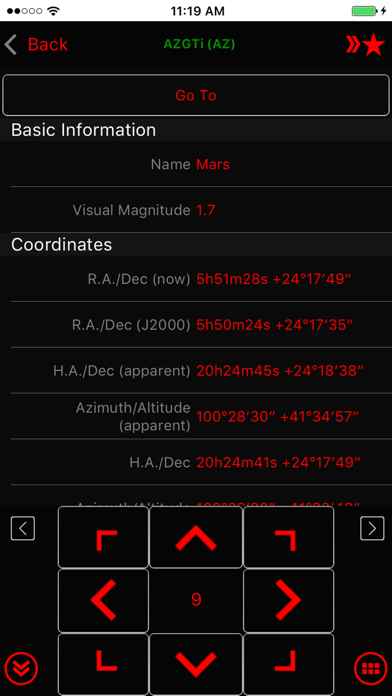


About SynScan
The description on the store listing
Use the SynScan app to control Sky-Watcher telescope mounts via Wi-Fi or Bluetooth LE. Mounts without built-in Wi-Fi can be supported via a SynScan Wi-Fi adapter.
This version of the SynScan app is suited for novice users using alt-azimuth mounts.
Features
- Control telescope mount to slew, align, GOTO and track.
- Point And Track: track celestial objects (including the Sun and planets) without aligning.
- Support gamepad navigation.
- Browse a catalog of stars, comets, and deep sky objects. Or, save your own objects.
- Provide access to mount for use by third-party apps, including ASCOM clients, SkySafari, Luminos, Stellarium Mobile Plus, Stellarium Desktop or customer-developed apps. …
Read the full description
Use the SynScan app to control Sky-Watcher telescope mounts via Wi-Fi or Bluetooth LE. Mounts without built-in Wi-Fi can be supported via a SynScan Wi-Fi adapter. This version of the SynScan app is suited for novice users using alt-azimuth mounts. Features - Control telescope mount to slew, align, GOTO and track. - Point And Track: track celestial objects (including the Sun and planets) without aligning. - Support gamepad navigation. - Browse a catalog of stars, comets, and deep sky objects. Or, save your own objects. - Provide access to mount for use by third-party apps, including ASCOM clients, SkySafari, Luminos, Stellarium Mobile Plus, Stellarium Desktop or customer-developed apps. Also set up mount alignment for Luminos, Skysafari. - Support access to the mount and the SynScan app from any platform that supports TCP/UDP connections. - Provide emulator mount for testing and practicing. - Track fast-moving earth satellites by working with the PreviSat app on Windows PC or the Lumios app on iOS devices.
Installs
Apple does not publish download counts. Estimates are in testing.
We publish iOS estimates only after they pass a back-test against real numbers. Chart history below is measured.
Estimated store revenue Estimated Beta
App Store, worldwide, monthly rate from the last 8 chart days to 15 Nov 2026
Below the top 100 grossing apps in the markets we calibrate. In the United States that usually means under about $6.4M a month. App Store purchases and subscriptions only, before Apple's 15 to 30% fee. Ads and web payments are not included.
Ratings
8 ratings, 8 reviews
No rating breakdown published for this app.
Recent reviews
Latest public reviews from the store
- 21 Aug 2022
Nice layout but crashes!
When using the down arrow for slewing, the app often crashes and you have to start all over which often loses the target in the eyepiece. Come on devs…..two years? This hobby is growing quickly so don’t get left behind by poor functionality.
- 25 Oct 2020
Frustrating
This app freezes and crashes on me regularly. It’s frustrating when you are trying to image or when you’re just observing. Press the arrow to slew and it lights up and freezes. Then after it freezes it just crashes and I see my home screen. It crashed on my multiple times tonight in a matter of minutes. I wanted to scream! The other thing I don’t like, idk if this is normal behavior for a go to, when I center a target I see some of the arrows blinking in the opposite direction I just moved to center my target. The blinking arrow is then effectively moving the mount and taking me off target. Is this a function that the computer believes it is keeping the target centered? Why wouldn’t it just stay and sidereal track from where I positioned it? I’m running this on an iPhone 11 Pro. This is a recent model and shouldn’t have trouble running such an app.
- 22 Apr 2018
Looks good. Some recommendations!
1. Tonight's Best should have its own button on the main screen. It doesn't belong under Utility. 2. There should be a numeric keypad, with Catalog keys (M for Messier, N for NGC, etc.). That way, someone could easily enter M-2-2 for M22 or N-G-C-4-5-6-5 for NGC4565. It would be more direct, take fewer steps, and be more analogous to the hand controller. 3. The info for an object on the search screen should include type, size, magnitude, and constellation — without having to go inside and then be inundated with a LONG list with all sorts of extra details. Give us the key information right up front — e.g., Globular Cluster, Sagittarius, mag 5.8, size 13”. Right now, all you have there is mag — and the RA-Dec data which is largely irrelevant on a go-to mount. You have plenty of space to add type, size, and constellation to that search screen, without going to another screen! 4. A mini-photo of the brightest objects would be good to include there, too! 5. There should be an “Add Object to User List” button next to objects. Again, the functionality is there, but it's buried and requires multiple steps to do. 6. Carbon Stars or Red Stars would be a great add
- 7 Oct 2017
Great concept - needs more work
I recently bought the Skywatcher AZ-Gti mount which is exactly what I needed Foran easy travel mount. This app works well with the mount but the position of the moon is always incorrect. The app shows the moon below the horizon when it is high in the sky. If you fix this I will happily give the App 5 stars.
Top chart positions
Latest App Store chart ranks by country, last 10 days
Not in any tracked top chart in the last 10 days.
SynScan history
Release, install milestones, listing and store changes
- First released on the store 4 Jun 2017
Update frequency
How often SynScan ships a new version, month by month
0 updates in the last 12 months. Less often than most similar apps: they shipped a median of 1 updates in the same year.
Recent versions
Current version 2.5.15
- Version 2.5.1526 Jan 2025
• PM Sharing: changed broadcast interval from every 60 sec to every 3 sec. Make more robust. • Connect popup: fix problem with multiple popup (connect, choose mode, restore from park) not showing in right order • AZ tracking: not use trail points to track when aux encoder is enabled • Fix ASCOM server not responding due to receiving zero length UDP packet. • Tonight's best page: not reset tab or search text when leaving • Fix crash when going to polar alignment page while disconnected but have EQ mount alignment • Alignment routine: fix centering UI incorrectly closing when centering failed • SynScan App protocol server: add support for getting mount axis: 'telescope.Action("AxisCoordinatesGet", "")' -> degree string eg "45.0,15.0". No need to update "SynScan App" ASCOM driver. • Camera exposure group: ensure to keep screen awake
Listing keywords
Words and phrases SynScan repeats most in its store listing
Top phrases: wi fi (3).
Highlighted words also appear in the title. Counts cover the title, short description and description.
Compliance
What the listing and the app package show
- Store status
- Live
- Upkeep
- Updated 26 Jan 2025
- Age rating
- 4+
Apps like SynScan
 absence.ioabsence.io GmbH★ 4.62
 RDW VoertuigRDW★ 4.7
 Countdown to Zero: Life CountZhenlai Xia★ 4.68
 ArmME Security AppAmecor★ 4.06
 TecoGamePadShunsuke Miyake★ 2.92
 LeastimatorHao Liu★ 4.2
 360防骚扰大师-过滤垃圾短信的手机助手Beijing Qihoo Technology Co Ltd★ 2.92
 MSI Mystic LightMicro-Star International Co., Ltd.★ 2.1
 ALO7ALO7★ 4.68
SynScan: questions and answers
Who makes SynScan?
SynScan is published by Astropower Technology Co. Ltd..
When was SynScan last updated?
The latest version (2.5.15) was released on 26 Jan 2025.
Is SynScan free?
Yes. SynScan is free to download.
Is SynScan still available?
Yes. SynScan is live on App Store as of 1 Jul 2026.
Track SynScan and its competitors
Watch any app for new versions, rating drops, chart moves and removals. Free plan, no card.