
- Installs
- —
- Apple does not publish download counts
- Rating
- —
- Ratings
- —
- Version
- 5.2
- Updated 17 Oct 2016
- Released
- 12 Aug 2011
- Tracked since 10 May 2026
- Size
- 1 MB
- Needs 10.10
Screenshots



About SystemPal
The description on the store listing
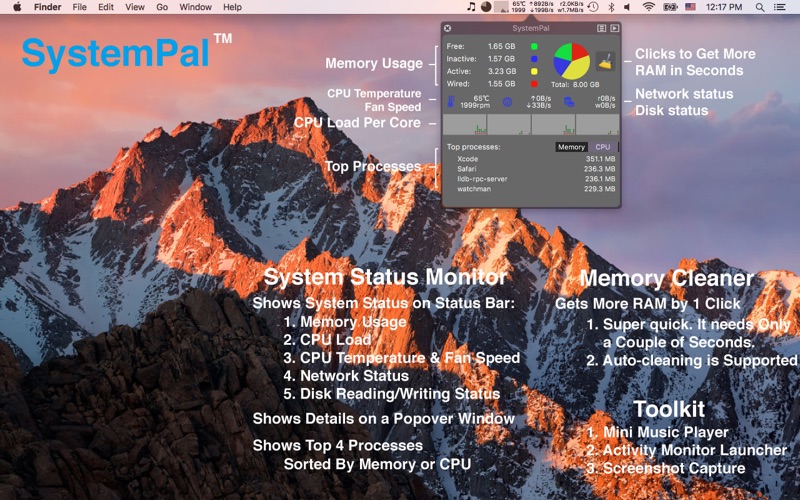
Shows memory/CPU usage status, CPU temperature and fan speed, network status and disk reading/writing status on status bar. SystemPal is becoming an ALL-IN-ONE app. It also provides a tool kit including mini music player, screenshot capture, memory cleaner.
Great Features:
1. Showing status directly on the status bar. It is very convenient to check system status.
2. Showing a mini music player on the status bar. This mini music player controls iTunes to play songs in your iTunes library. It is very convenient to see song name and artist on the status bar. You can also check the album artwork, read the lyrics, rate the song. When you close iTunes, the mini music player will just become a …
Read the full description
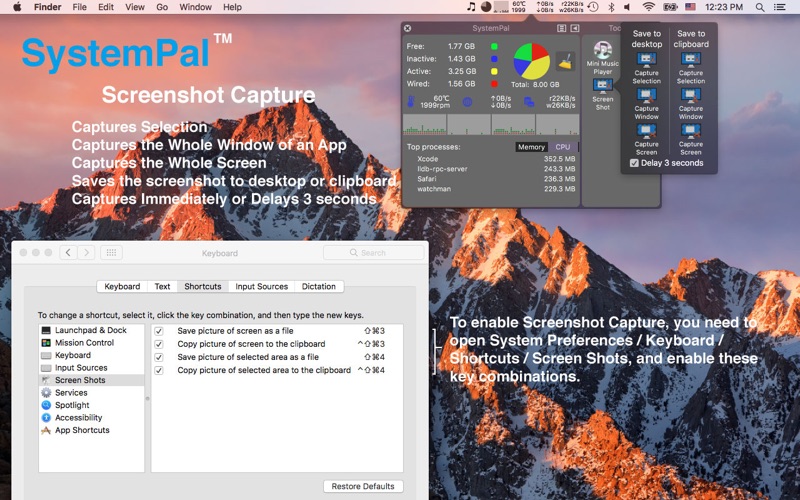
Shows memory/CPU usage status, CPU temperature and fan speed, network status and disk reading/writing status on status bar. SystemPal is becoming an ALL-IN-ONE app. It also provides a tool kit including mini music player, screenshot capture, memory cleaner. Great Features: 1. Showing status directly on the status bar. It is very convenient to check system status. 2. Showing a mini music player on the status bar. This mini music player controls iTunes to play songs in your iTunes library. It is very convenient to see song name and artist on the status bar. You can also check the album artwork, read the lyrics, rate the song. When you close iTunes, the mini music player will just become a tiny icon. 3. Providing a screen shot utility. You can use it to capture mouse selection, capture a window, capture the whole screen. You can save the screen shot to desktop or save to the clipboard. You also have the option to delay 3 seconds before capturing. 4. Providing a quick launch for Activity Monitor of Mac OS X. 5. Memory usage pie chart. 6. CPU usage chart. Working well with multi-core processors. 7. Network status (uploading speed and downloading speed). 8. Disk reading/writing status. 9. Configurable items showing on the status bar. 10. 1-Click cleaning memory. When you are short of free memory, you can just click 'Clean Memory' on SystemPal and it will finish in a couple of seconds. 11. Auto-cleaning memory. If the free memory is smaller than a certain number, SystemPal will begin to clean memory automatically. 12. Displaying the top processes which consume much memory or CPU resource. You can the terminate the app which consumes too much Memory/CPU resource. 13. Providing an option to play alert sound when the CPU temperature is too high. (This option is disabled by default.) 14. Special enhancement for OS X. This utility works perfectly in full screen mode and every space. 15. Auto-run at login (you need to set it in the preferences). 16. SystemPal consumes much less resource than other apps with similar functionalities. Great For: - Internet surfers - Movie creators - Graphic artists - Architects - Developers - Musicians - Photographers - Scientists - Virtual machine users - Gamers Notes: - If you find any problem, please report it to us and provide your computer's model (e.g. MacBook Pro 13-inch Mid 2010). We will try to reproduce it and fix it as soon as possible. Thank you. - We are open to your suggestions. Contact us by email: [email protected] History: 2015-02-03 5.1 Fixed the minor UI issues. 2015-01-12 5.0 Added top processes which consume network bandwidth, supported OS X 10.10 Yosemite, and added other improvements. 2014-04-01 4.1 Bug fixes. 2014-01-23 4.0 Added disk status. Increased speed of cleaning memory. 2012-07-21 3.2 Fixed the temperature problem on Macbook Air/Pro/Retina Mid 2012 models. 2012-12-12 3.0 Added a mini music player on the status bar. Added a screen shot utility. Added a quick launch for Activity Monitor. 2012-12-20 2.3 Bug fixes. 2011-12-14 2.2 Supports network unloading and downloading speed. Supports auto-cleaning memory. 2011-09-27 2.1 Supports CPU temperature and fan speed. 2011-09-20 2.0 Supports CPU load status. MemoryTool is renamed to SystemPal. 2011-08-11 1.0 MemoryTool, shows memory pie chart on status bar, cleans memory.
Installs
Apple does not publish download counts. Estimates are in testing.
We publish iOS estimates only after they pass a back-test against real numbers. Chart history below is measured.
Estimated store revenue Estimated Beta
App Store, worldwide, monthly rate from the last 13 chart days to 20 Nov 2026
Below the top 100 grossing apps in the markets we calibrate. In the United States that usually means under about $6.4M a month. App Store purchases and subscriptions only, before Apple's 15 to 30% fee. Ads and web payments are not included.
Ratings
No rating breakdown published for this app.
Recent reviews
Latest public reviews from the store
No reviews in our sample for this app yet.
Top chart positions
Latest App Store chart ranks by country, last 10 days
Not in any tracked top chart in the last 10 days.
SystemPal history
Release, install milestones, listing and store changes
- First released on the store 12 Aug 2011
Update frequency
How often SystemPal ships a new version, month by month
0 updates in the last 12 months. Less often than most similar apps: they shipped a median of 1 updates in the same year.
Recent versions
Current version 5.2
- Version 5.217 Oct 2016
1. Made the UI look good. Supports macOS Sierra. 2. Supported macOS dark mode! 3. Removed mini music player’s ugly background. 4. Made other minor fixes. 5. The Contact Developer email will have the diagnosis info which does not contain any personal info and helps us solve problems. You can remove it if you don’t want to share it to us. 6. Because the per-process network monitoring does not work well on macOS Sierra, we have removed this feature.
Listing keywords
Words and phrases SystemPal repeats most in its store listing
Top phrases: status bar (7), mini music player (5), mini music (5), music player (5), cleaning memory (4).
Highlighted words also appear in the title. Counts cover the title, short description and description.
Compliance
What the listing and the app package show
- Store status
- Live
- Upkeep
- No update since 17 Oct 2016
- Age rating
- 4+
Apps like SystemPal
 Library of AviationNazmi Yavuz★ 4.82
 MyNOVECNorthern Virginia Electric Cooperative★ 2.28
 打工人小组件光翔 卓★ 4.96
 TruckbaysTruckbays LLC★ 4.3
 Tornado PRO PlayerMohammed Altam★ 4.44
 VDX - Video ManagerARISEPEAK LP★ 1.74
 TV CastingZeasn Info Technology Co., Ltd.★ 1.86
 Mil-Dot BallisticsTom Holsten★ 3.82
 MySontiqSontiq, Inc.★ 2.4
SystemPal: questions and answers
Who makes SystemPal?
SystemPal is published by Pop-Hub Limited.
When was SystemPal last updated?
The latest version (5.2) was released on 17 Oct 2016.
Is SystemPal free?
No. SystemPal is a paid app priced at $2.99.
Is SystemPal still available?
Yes. SystemPal is live on App Store as of 10 May 2026.
Track SystemPal and its competitors
Watch any app for new versions, rating drops, chart moves and removals. Free plan, no card.