
- Installs
- —
- Apple does not publish download counts
- Rating
- —
- Ratings
- —
- Version
- 2.5
- Updated 7 May 2026
- Released
- 10 Jun 2013
- Tracked since 10 May 2026
- Size
- 4 MB
- Needs 10.11
Screenshots



About Tab Notes Lite
The description on the store listing
Thank you for using Tab Notes Lite.
200,000 users with average 4.7 star rating!
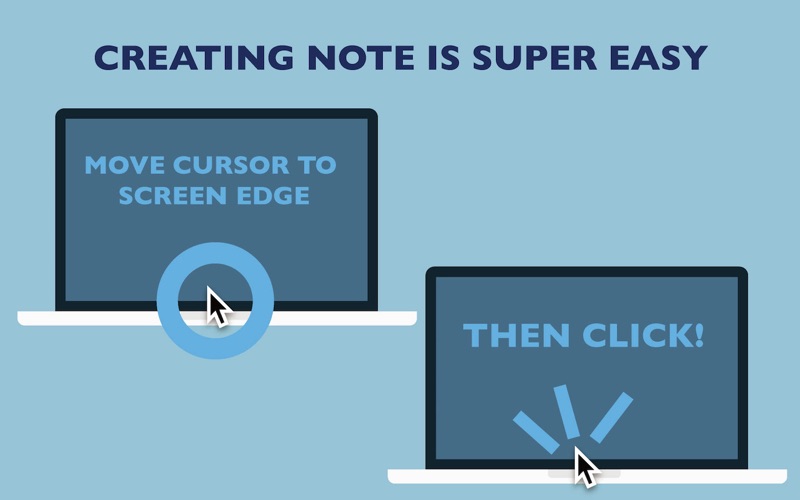
Tab Notes Lite is a Menu Bar application which keeps your notes tidy and easy to access and your screen uncluttered. Click on your screen edge, then a note pops up!
Watch the demonstration video here ▶ https://vimeo.com/62485482
• Click on your screen's edge to take a note.
• Document file types are conventional RTF (Rich Text) and RTFD (Rich Text with images). Not proprietary format. (This application uses "Comment" property in RTF. )
• Documents folder can be any folder in your home folder.
• Supports versioning. OSX keeps documents' previous versions. (This app does not contain version browser. Please …
Read the full description
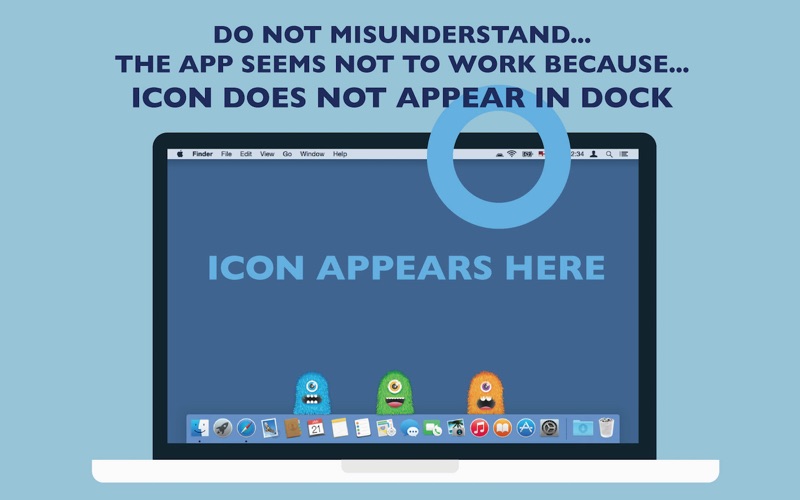
Thank you for using Tab Notes Lite. 200,000 users with average 4.7 star rating! Tab Notes Lite is a Menu Bar application which keeps your notes tidy and easy to access and your screen uncluttered. Click on your screen edge, then a note pops up! Watch the demonstration video here ▶ https://vimeo.com/62485482 • Click on your screen's edge to take a note. • Document file types are conventional RTF (Rich Text) and RTFD (Rich Text with images). Not proprietary format. (This application uses "Comment" property in RTF. ) • Documents folder can be any folder in your home folder. • Supports versioning. OSX keeps documents' previous versions. (This app does not contain version browser. Please use TextEdit to browse version files.) • The app has built-in short term backup system. Changes made to notes will be kept for 3 days in the backup folder (you can open it from the preferences). For more comprehensive backup system, we recommend other application. • Customisable with original themes created in Tab Notes Theme Editor: https://itunes.apple.com/us/app/tab-notes-theme-editor/id665702825?ls=1&mt=12 * This application is a "menu bar app". The application icon does not appear in "Dock". Instead it appears in main menu bar. You can change preferences from the icon in the main menu bar. ■■FAQ■■ Q. The application does not open. It does't work. A. This app is a menu bar app. App icon does not appear in Dock. It is designed to serve you discreetly without occupying Dock space. The application icon appears in the right part of the main menu bar at the top of the screen. Q. Tab did not appear. Where can I add my notes? A. Just click the screen edge. Please see the video https://vimeo.com/62485482 Q. It would not let me delete the app. A. Finder does not let you delete an app that is currently running. Quit the app first. To quit the app, choose Quit from this application's menu in the main menu bar at the top of the screen. (Even though this app may be running, while in stand by, its CPU power usage is almost nothing.) Q. Isn't there any "Preferences" for this app? A. Yes there are. The menu icon of this app is located in the right part of the main menu bar at the top of the screen. You can choose this app's Preferences here. Q. How do I change themes or background colour? A. Press and hold Control key then click a tab. Contextual menu appears. (Depending on device configurations, right-click on mouse or two finger click on track pad may be used.) ---- Copyright CuteCritters http://www.Tutorial9.net/ Copyright SpoonGraphics http://blog.spoongraphics.co.uk
Installs
Apple does not publish download counts. Estimates are in testing.
We publish iOS estimates only after they pass a back-test against real numbers. Chart history below is measured.
Estimated store revenue Estimated Beta
App Store, worldwide, monthly rate from the last 12 chart days to 19 Nov 2026
Below the top 100 grossing apps in the markets we calibrate. In the United States that usually means under about $6.4M a month. App Store purchases and subscriptions only, before Apple's 15 to 30% fee. Ads and web payments are not included.
Ratings
No rating breakdown published for this app.
Recent reviews
Latest public reviews from the store
No reviews in our sample for this app yet.
Top chart positions
Latest App Store chart ranks by country, last 10 days
Not in any tracked top chart in the last 10 days.
Tab Notes Lite history
Release, install milestones, listing and store changes
- First released on the store 10 Jun 2013
Update frequency
How often Tab Notes Lite ships a new version, month by month
1 updates in the last 12 months. More often than most similar apps: they shipped a median of 0 updates in the same year.
Recent versions
Current version 2.5
- Version 2.57 May 2026
Show path hierarchy when Command-clicking the header
Listing keywords
Words and phrases Tab Notes Lite repeats most in its store listing
Top phrases: menu bar (8), main menu bar (5), main menu (5), tab notes (4), tab notes lite (3).
Highlighted words also appear in the title. Counts cover the title, short description and description.
Compliance
What the listing and the app package show
- Store status
- Live
- Upkeep
- Updated 7 May 2026
- Age rating
- 4+
Apps like Tab Notes Lite
 Super VPN: Fast Private ProxyGeek Incorporated★ 4.4
 Hubtel RetailerHubtel Limited★ 4.32
 Monthly Calendar 2022 - CalistOmoboto LLC★ 4.38
 Firstly: To-Do List & PlannerfocusCove LLC★ 4.7
 CBUS 311City of Columbus, Ohio★ 1.8
 Themes for Powerpoint - DesiGNGraphic Node★ 4.22
 iSiloDC & Co.★ 3.82
 Flashlight Pro [Multipurpose LED light]KAVAPOINT★ 3.88
 WiPryOscium LLC★ 2.68
Tab Notes Lite: questions and answers
Who makes Tab Notes Lite?
Tab Notes Lite is published by Catalystwo.
When was Tab Notes Lite last updated?
The latest version (2.5) was released on 7 May 2026.
Is Tab Notes Lite free?
Yes. Tab Notes Lite is free to download.
Is Tab Notes Lite still available?
Yes. Tab Notes Lite is live on App Store as of 10 May 2026.
Track Tab Notes Lite and its competitors
Watch any app for new versions, rating drops, chart moves and removals. Free plan, no card.