
- Installs
- —
- Apple does not publish download counts
- Rating
- 4.8
- Ratings
- 2.9K
- 2.9K reviews
- Version
- 3.1
- Updated 24 May 2026
- Released
- 22 Apr 2013
- Tracked since 10 May 2026
- Size
- 3 MB
- Needs 15.6
Screenshots
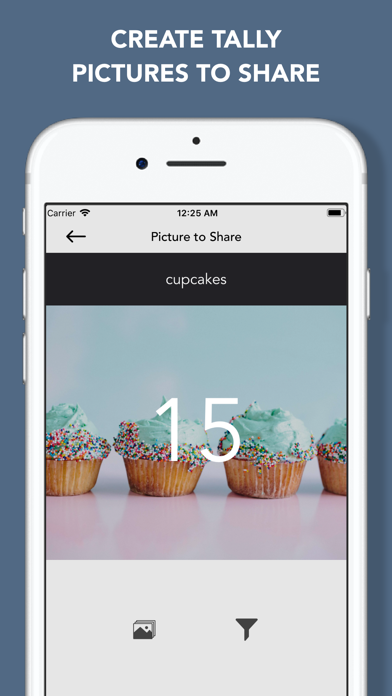
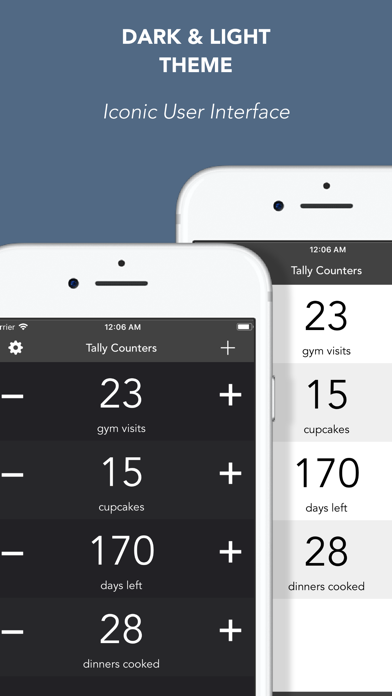
About Tally Counters
The description on the store listing
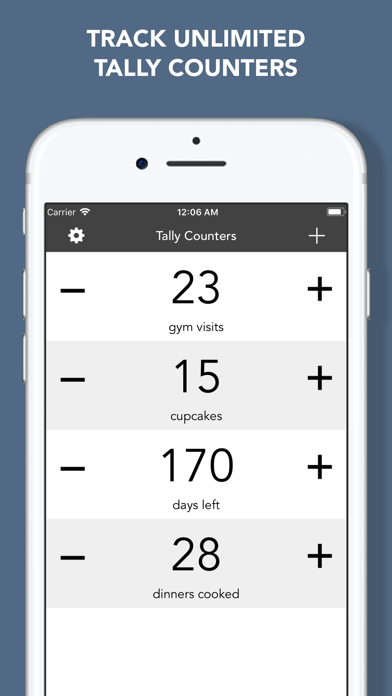
Tally Counters is a personal counter to let you easily track unlimited things in your life
USE IT FOR EVERYTHING:
• How many hours did i paid for?
• How many cupcakes did i eat this month?
• How many cigarettes did i have?
• How many times did i hit the gym?
• How many days left for my big event?
• How many coins in my precious collection?
• How many money do i have in my bank account?
Anything else you can think of….
PRODUCTIVITY
- Large buttons to increase and decrease counters
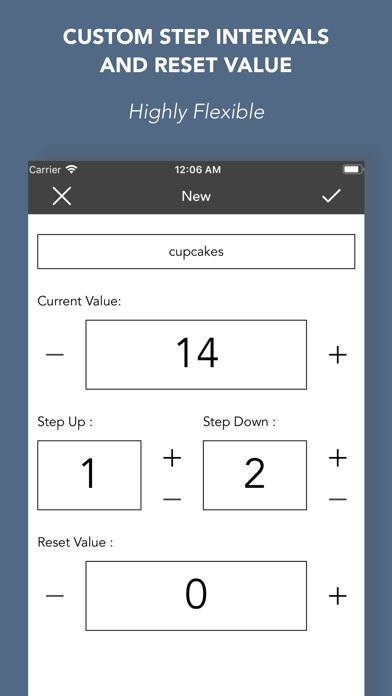
- Set STEP UP, STEP DOWN and RESET values
- Option to turn on/off sound effects
- No limit to counter value
INTUITIVE DESIGN
• Tally Counters app was designed with simplicity and functionality
• Stunning …
Read the full description
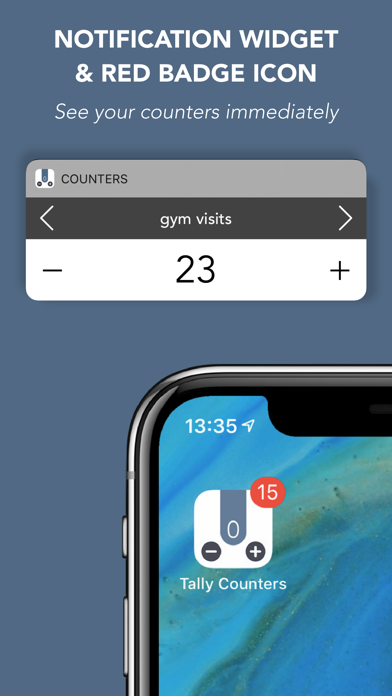
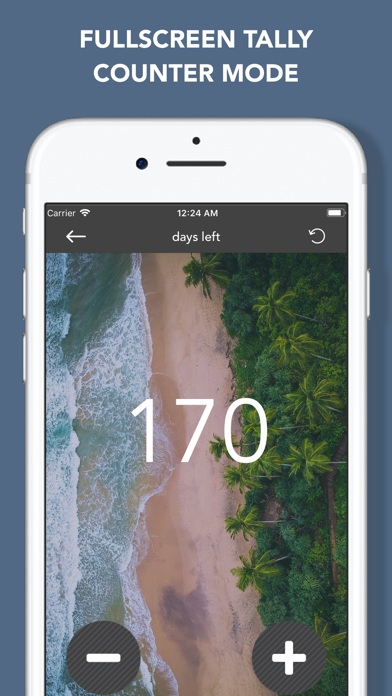
Tally Counters is a personal counter to let you easily track unlimited things in your life USE IT FOR EVERYTHING: • How many hours did i paid for? • How many cupcakes did i eat this month? • How many cigarettes did i have? • How many times did i hit the gym? • How many days left for my big event? • How many coins in my precious collection? • How many money do i have in my bank account? Anything else you can think of…. PRODUCTIVITY - Large buttons to increase and decrease counters - Set STEP UP, STEP DOWN and RESET values - Option to turn on/off sound effects - No limit to counter value INTUITIVE DESIGN • Tally Counters app was designed with simplicity and functionality • Stunning graphics make capturing values easy and awesome • Two amazing themes: dark and light • Set background image for each counter iCLOUD SYNC Sync your counters on all your devices, signed in with the same iCloud account, automatically. You don’t have to do any setup!!! RED BADGE ICON • Use the red badge icon of the app to show the value of a counter WIDGET ON TODAY OF NOTIFICATION CENTER • See your counters on notification center at a glance • Count up, down and reset • Navigate through your counters • Open the app from the widget SHARE • Share your counters from inside the app (mail, social networks, messages, copy to clipboard,…) • Create counter pics, set backgrounds, filters and share them on social networks: Instagram, Facebook, Twitter,… MORE FEATURES • Instant counter search • Sort your counters manually • Full landscape support • Ability to take screenshot of counters list • Auto-lock enable/disable • Master Reset Button: reset all counters at once LOVED BY USERS: ——————————————— Perfect!!! This app is perfect!! Simple, practical, elegant, and not needlessly complicated!! Blah2, 2014 A simple, east to use counter. Works flawlessly. If you're looking for a simple tool to count, this app works. Exactly what I wanted Tried many others. This has the best, most simple interface for my needs. Very straight forward tallying. Love it! Perfect! This was exactly what I was looking for - an app that let's you tick off numbers of things you need to do, but where the things themselves can't be differentiated, e.g. Papers you need to read, exercises you need to do. Thank you! Really useful app!!! It is very simple and easy to use. It's not like most other apps in which the apps are extremely complex and hard to use. I recommend this app for your counting jobs
Installs, last 30 days
Apple does not publish download counts. Estimates are in testing.
Estimated store revenue Estimated Beta
App Store, worldwide, monthly rate from the last 12 chart days to 19 Nov 2026
Below the top 100 grossing apps in the markets we calibrate. In the United States that usually means under about $6.4M a month. App Store purchases and subscriptions only, before Apple's 15 to 30% fee. Ads and web payments are not included.
Ratings
2,885 ratings, 2,885 reviews
- 5 ★86%
- 4 ★9.8%
- 3 ★2.3%
- 2 ★0.6%
- 1 ★0.9%
Recent reviews
Latest public reviews from the store
- 12 Jan 2025
Easy to use and handy
Needed a simple counter to insert into a video. This counter is perfect for that. It uses nice clean font with the option of a plain background. It supports multiple counters which can be named. The start, increment and decrement values can be set for each counter, and there’s a handy reset (with confirmation) if needed. I used the iPhone screen recording feature to capture the count as the events happened on a playback screen on another device, then edited to fit into the Picture in Picture. While the increment buttons are nice and big (which helps when running a counter while looking at something away from the phone) I think a great feature would be to repurpose the hard volume buttons as clickers, this would be useful when running the counter in a dark, shaky environment, like a moving car. Great utility app to have in your toolbox!
- 3 Aug 2020
One annoying drawback or I’d give 5 stars
I wanted a simple, easy to use counter for tasks. This is almost the best. The one annoying drawback is not being able to turn off the “Are you sure you want to reset?” question each time you reset a counter. I’m usually exercising or practicing my guitar when I use this and it can be irritating when you’re working. The reset button is small and in the corner. I had to aim carefully to tap it. Yes I’m sure! Maybe it could be bigger also, like when I’m using the counter to count “rounds” hitting my heavy bag I don’t have to aim precisely at a tiny button, and then hit OK every time. Make it simpler and quicker to reset a counter and I’d say it’s the best, easiest-to-use counter app.
- 1 Mar 2019
Essentially practical...
Essentially practical. I use this to keep track of progess in huge projects. I break up huge "reading projects," (as well as transcriptions, etc.), into smaller, "bite-sized chunks, each of which is given a numerical value, on a PDF-chart that I keep on my iPhone/iPad. Then, this counter-app allows me to easily "chart my progress" — one by one — along the very same charts that I make. Very essential!... And, it syncs across all of my iOS devices, such that there is always an up-to-date "progress chart," showing me where I left off, and where to pick up again. (For example, reading St. Thomas Aquinas's "Summa," etc.)
- 5 Nov 2016
🎵Fantastic!
This is a fantastic application! It does exactly what I wanted to do, which is record the number of minutes that I've practiced piano per day, and count my crunches and squats per day, and count the number of times I go swimming per week. Plus other stuff. I just press the reset button every week. I use multiples of five for piano minutes, and leave piano at zero, and click up for when I practice. But for exercise repetitions, I set the counter on an even number, like forty, and go down by twos throughout the day. This way i remember how many I'm at on that particular day. The app lets you set things this way so you don't have to set it up each time. There are customizable options like that. I AM GLAD I BOUGHT THIS APP. I'm using an iPad Pro as well as an iPhone, and they both sync together. I also love how I can use pictures in the background for this app – it makes me want to open the app and see the picture. I imagine I'm in the scene of the picture, or makes me feel like I've set a theme for my practice session or whatever else it is that I decide to count. I'm sure this app is useful for other things that I haven't thought of, but that's how I use it. I am glad I bough
What reviewers bring up
Topics mentioned in the latest 8 reviews, by how many reviews mention them
Liked in good reviews (7 reviews)
- count 4
- see 4
- multiple 3
- another 3
- needed 3
- option 3
- iphone 3
- screen 3
Raised in bad reviews (0 reviews)
No topic comes up twice.
Top chart positions
Latest App Store chart ranks by country, last 10 days
- Countries ranked
- 2 of 50
- Best rank
- #31
- Top 10 placements
- 0
- of 2 chart placements
- Average rank
- #47
Best countries on App Store
- 🇳🇿 New Zealand · Top paid, Utilities#31
- 🇩🇪 Germany · Top paid, Utilities#63
Tally Counters history
Release, install milestones, listing and store changes
- First released on the store 22 Apr 2013
Update frequency
How often Tally Counters ships a new version, month by month
2 updates in the last 12 months. More often than most similar apps: they shipped a median of 1 updates in the same year.
Recent versions
Current version 3.1
- Version 3.124 May 2026
Minor bugs fixed!
- Version 3.04 May 2026
Minor bug fixes
Listing keywords
Words and phrases Tally Counters repeats most in its store listing
Top phrases: tally counters (3), down and reset (2), red badge icon (2), badge icon (2), notification center (2).
Highlighted words also appear in the title. Counts cover the title, short description and description.
Compliance
What the listing and the app package show
- Store status
- Live
- Upkeep
- Updated 24 May 2026
- Age rating
- 4+
Apps like Tally Counters
 Calculator Pro LiteCider Software LLC★ 4.65
 Followers Insights trackerAnshun Lingyun Technology Development Co., Ltd.★ 4.12
 Master Spin & Daily GiftPhu Nguyen★ 4.71
 Bubble Level - Spirit LevelNetviking AB★ 4.63
 Парковки РоссииДепартамент транспорта Москвы★ 4.59
 Net Optimizer : Optimize PingAPP CASTLE YAZILIM LIMITED SIRKETI★ 4.62
 Tier List Maker: Set List MakeAleksei Metelkin★ 4.38
 Optiwatt: Local Energy RewardsOptiwatt, Inc.★ 4.75
 ev.energy: Smart EV Car Chargeev.energy★ 4.77
Tally Counters: questions and answers
Who makes Tally Counters?
Tally Counters is published by Thomas Tsopanakis.
When was Tally Counters last updated?
The latest version (3.1) was released on 24 May 2026.
Is Tally Counters free?
No. Tally Counters is a paid app priced at $1.99.
Is Tally Counters still available?
Yes. Tally Counters is live on App Store as of 19 Nov 2026.
Track Tally Counters and its competitors
Watch any app for new versions, rating drops, chart moves and removals. Free plan, no card.