
- Installs
- —
- Apple does not publish download counts
- Rating
- 1.0
- Ratings
- 1
- 1 reviews
- Version
- 1.0.2
- Updated 19 Jan 2021
- Released
- 2 Dec 2020
- Tracked since 10 May 2026
- Size
- 71 MB
- Needs 10.0
Also on Google Play: Tempo Training, Tempo Training
Screenshots
About Tempo Training
The description on the store listing
We wanted to create this app as intuitive as possible. We want you to be able to focus on your workout and not bother with counting or anything else.
How to:
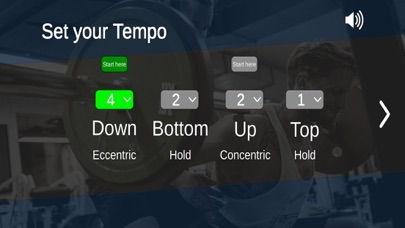
First: Set your Tempo.
You have four numbers/counts. They are always in the same order.
1. Eccentric/DOWN - you lowering the weight e.g. Squat from standing to the bottom.
2. Bottom/HOLD - you pausing at your lowest position.
3. Concentric/UP - you standing up with the weight.
4. Top/HOLD - you fully extended/standing with the weight.
Second: Set where you want to start the movement.
In a Squat or a Bench Press you start from a standing or extended position.
Therefore your counts will start with the „DOWN" command.
In a Deadlift or …
Read the full description
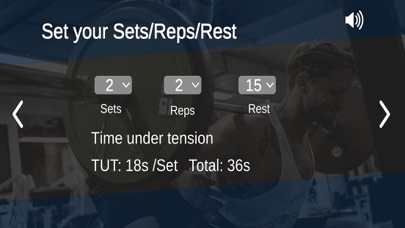
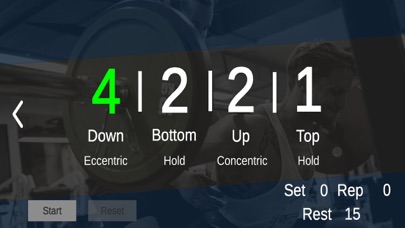
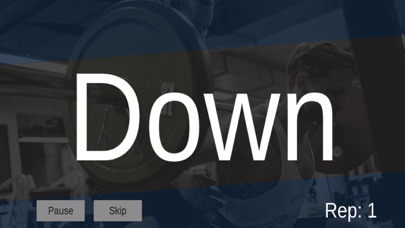
We wanted to create this app as intuitive as possible. We want you to be able to focus on your workout and not bother with counting or anything else. How to: First: Set your Tempo. You have four numbers/counts. They are always in the same order. 1. Eccentric/DOWN - you lowering the weight e.g. Squat from standing to the bottom. 2. Bottom/HOLD - you pausing at your lowest position. 3. Concentric/UP - you standing up with the weight. 4. Top/HOLD - you fully extended/standing with the weight. Second: Set where you want to start the movement. In a Squat or a Bench Press you start from a standing or extended position. Therefore your counts will start with the „DOWN" command. In a Deadlift or Pull up you have to lift the weight or pull yourself up first! Therefore your counts will start with the „UP" command. The starting phase number will be highlighted in green. Third: Set your Sets/Reps/Rest Here you will see the time under tension for each set and for the total workout. That’s it! Easy peasy lemon squeezy! Pro Tips: „SKIP“ if you don’t manage to fulfill your reps in a set, just hit „SKIP“ and the set ist done. The „Rest Time“ you set before will automatically start after hitting „SKIP“. On the Pause screen you will see your actual set and reps. Varying Reps in a workout Let’s say you don’t want to do the classic 5 x 12 Reps. Something more fancy like 7 - 11 - 15 - 11- 7 Reps. Just set your Reps to „15“ your highest rep number of the workout and then just „SKIP“ every set after you did your target reps. Acoustic and optic output: Mute or don’t mute ;-) You will hear the commands like this: DOWN and UP with up to three seconds will be seen or heard as DOWN-DOWN-DOWN or UP-UP-UP. From a four second count it will be like this: DONW - 2 - 3 - 4 or UP - 2 - 3 - 4 The „HOLDs“ either BOTTOM or TOP will always be just seen or heard as „HOLD“ no matter how long you want to hold.
Installs
Apple does not publish download counts. Estimates are in testing.
We publish iOS estimates only after they pass a back-test against real numbers. Chart history below is measured.
Estimated store revenue Estimated Beta
App Store, worldwide, monthly rate from the last 13 chart days to 20 Nov 2026
Below the top 100 grossing apps in the markets we calibrate. In the United States that usually means under about $6.4M a month. App Store purchases and subscriptions only, before Apple's 15 to 30% fee. Ads and web payments are not included.
Ratings
1 ratings, 1 reviews
No rating breakdown published for this app.
Recent reviews
Latest public reviews from the store
No reviews in our sample for this app yet.
Top chart positions
Latest App Store chart ranks by country, last 10 days
Not in any tracked top chart in the last 10 days.
Tempo Training history
Release, install milestones, listing and store changes
- First released on the store 2 Dec 2020
Update frequency
How often Tempo Training ships a new version, month by month
0 updates in the last 12 months. Less often than most similar apps: they shipped a median of 3 updates in the same year.
Recent versions
Current version 1.0.2
- Version 1.0.219 Jan 2021
Minor fixes
Listing keywords
Words and phrases Tempo Training repeats most in its store listing
Top phrases: counts will start (2), seen or heard (2), therefore your counts (2), down down (2).
Highlighted words also appear in the title. Counts cover the title, short description and description.
Compliance
What the listing and the app package show
- Store status
- Live
- Upkeep
- No update since 19 Jan 2021
- Age rating
- 4+
Apps like Tempo Training
 Digital LinkCompetition Electronics★ 3.02
 Powder ProjectAdventure Projects Inc.★ 4.26
 Takes: Sports Quiz & PicksTakes Incorporated★ 4.86
 NFL Collect by Topps®The Topps Company, Inc.★ 3.86
 Temple OwlsTemple University★ 4.6
 Bowling Score Keeper ToolkitBiographics Consultoria e Design LTDA★ 4.42
 Hunting Calls: CrowSergii Nesterenko★ 4.52
 ProdefySaga Group★ 3.82
 Goodland PickleballPINGPOD INC★ 5.0
Tempo Training: questions and answers
Who makes Tempo Training?
Tempo Training is published by Marco Sowa-Israel.
When was Tempo Training last updated?
The latest version (1.0.2) was released on 19 Jan 2021.
Is Tempo Training free?
No. Tempo Training is a paid app priced at $1.99.
Is Tempo Training still available?
Yes. Tempo Training is live on App Store as of 1 Jul 2026.
Track Tempo Training and its competitors
Watch any app for new versions, rating drops, chart moves and removals. Free plan, no card.