
- Installs
- —
- Apple does not publish download counts
- Rating
- —
- Ratings
- —
- Version
- 1.4.0
- Updated 15 Mar 2026
- Released
- 4 Dec 2023
- Tracked since 10 May 2026
- Size
- 30 MB
- Needs 15.6
Screenshots


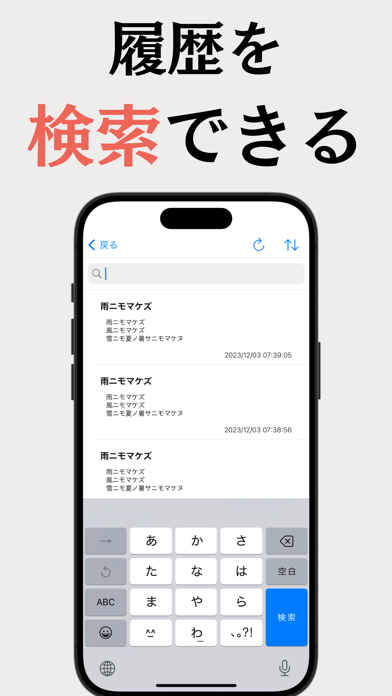
About Text Recognition - OCR Scanner
The description on the store listing
1.
"Text Recognition" is an app that easily reads and digitizes text in images.
Extract text from photos of reports, textbooks, handwritten notes, etc., to improve learning and work efficiency.
2. Features
a. High Accuracy Text Recognition
The app uses Apple's text recognition technology to detect text in images with high accuracy and speed. It supports handwritten, printed, and different fonts, and accurately converts them to text.
b. Multi-functional Learning Support
Edit and search digitized text for quick access to needed information.
c. Easy-to-Use Interface
Intuitive and user-friendly UI design eliminates complicated procedures and obstacles to learning.
d. Online and Offline …
Read the full description
1. "Text Recognition" is an app that easily reads and digitizes text in images. Extract text from photos of reports, textbooks, handwritten notes, etc., to improve learning and work efficiency. 2. Features a. High Accuracy Text Recognition The app uses Apple's text recognition technology to detect text in images with high accuracy and speed. It supports handwritten, printed, and different fonts, and accurately converts them to text. b. Multi-functional Learning Support Edit and search digitized text for quick access to needed information. c. Easy-to-Use Interface Intuitive and user-friendly UI design eliminates complicated procedures and obstacles to learning. d. Online and Offline Support Recognize and digitize text by taking photos even without an internet connection, enabling use in any situation. 3. Use Cases For Students: Take photos of lecture notes or textbooks, extract important information, and optimize study time. For Researchers & Business Users: Capture meeting notes or technical documents in photos, quickly convert to text and edit for improved work efficiency. For Language Learners: Import foreign language texts or handwritten practice problems via photos to support language learning. 4. Future Plans We continue to make improvements, adding new features and updates based on user feedback to meet user needs. 5. Premium Features (Subscription) • Ad-free experience • Batch processing (up to 20 photos) • QR/Barcode scanning • Tag management • All export formats (PDF, Word, etc.) • Full-text search 6. Conclusion "Text Recognition" is an advanced app that realizes efficiency in learning and work with its sophisticated text recognition technology and ease of use. Easily digitize knowledge and strongly support your learning.
Installs
Apple does not publish download counts. Estimates are in testing.
We publish iOS estimates only after they pass a back-test against real numbers. Chart history below is measured.
Estimated store revenue Estimated Beta
App Store, worldwide, monthly rate from the last 14 chart days to 21 Nov 2026
Below the top 100 grossing apps in the markets we calibrate. In the United States that usually means under about $6.4M a month. App Store purchases and subscriptions only, before Apple's 15 to 30% fee. Ads and web payments are not included.
Ratings
No rating breakdown published for this app.
Recent reviews
Latest public reviews from the store
No reviews in our sample for this app yet.
Top chart positions
Latest App Store chart ranks by country, last 10 days
Not in any tracked top chart in the last 10 days.
Text Recognition - OCR Scanner history
Release, install milestones, listing and store changes
- First released on the store 4 Dec 2023
Update frequency
How often Text Recognition - OCR Scanner ships a new version, month by month
1 updates in the last 12 months. More often than most similar apps: they shipped a median of 0 updates in the same year.
Recent versions
Current version 1.4.0
- Version 1.4.015 Mar 2026
[New Features] - Document Camera: Auto-detect and scan documents - Live OCR: Real-time text recognition with camera - Smart Link Detection: Tap phone numbers, URLs, addresses, and calendar events [Improvements] - Improved OCR engine stability and performance
Listing keywords
Words and phrases Text Recognition - OCR Scanner repeats most in its store listing
Top phrases: text recognition (6), learning and work (2), text in images (2), text recognition technology (2), high accuracy (2).
Highlighted words also appear in the title. Counts cover the title, short description and description.
Compliance
What the listing and the app package show
- Store status
- Live
- Upkeep
- Updated 15 Mar 2026
- Age rating
- 4+
Apps like Text Recognition - OCR Scanner
 GoTime RepairAudatex North America Inc.★ 3.94
 Super VPN: Fast Private ProxyGeek Incorporated★ 4.4
 Hubtel RetailerHubtel Limited★ 4.32
 Monthly Calendar 2022 - CalistOmoboto LLC★ 4.38
 CBUS 311City of Columbus, Ohio★ 1.8
 Themes for Powerpoint - DesiGNGraphic Node★ 4.22
 iSiloDC & Co.★ 3.82
 Flashlight Pro [Multipurpose LED light]KAVAPOINT★ 3.88
 WiPryOscium LLC★ 2.68
Text Recognition - OCR Scanner: questions and answers
Who makes Text Recognition - OCR Scanner?
Text Recognition - OCR Scanner is published by ryo muranaka.
When was Text Recognition - OCR Scanner last updated?
The latest version (1.4.0) was released on 15 Mar 2026.
Is Text Recognition - OCR Scanner free?
Yes. Text Recognition - OCR Scanner is free to download.
Is Text Recognition - OCR Scanner still available?
Yes. Text Recognition - OCR Scanner is live on App Store as of 10 May 2026.
Track Text Recognition - OCR Scanner and its competitors
Watch any app for new versions, rating drops, chart moves and removals. Free plan, no card.