
- Installs
- —
- Apple does not publish download counts
- Rating
- —
- Ratings
- —
- Version
- 1.1
- Updated 30 Aug 2021
- Released
- 10 Jul 2021
- Tracked since 10 May 2026
- Size
- 5 MB
- Needs 10.15
Screenshots



About TextShooter - OCR simplified
The description on the store listing
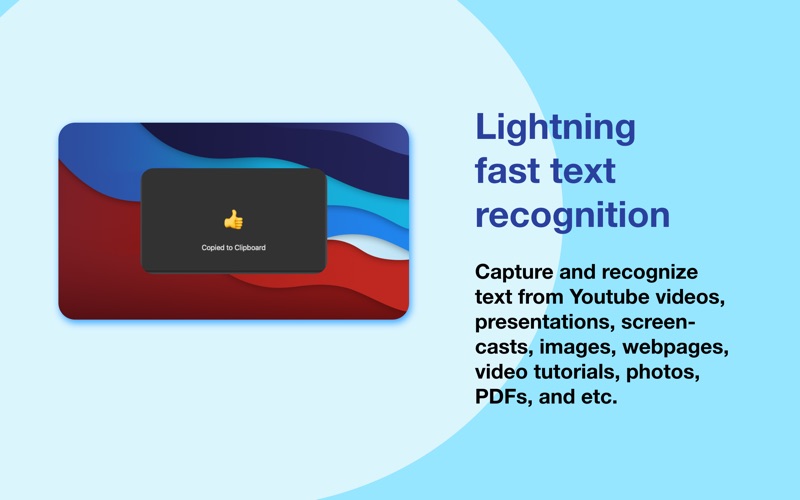
TextShooter is an easy-to-use desktop Mac OCR app that can extract and recognize any non-searchable and non-editable text on your Mac's screen. As an extra feature, it can turn OCR text into speech. It is a super convenient alternative to complicated optical character recognition tools.
No training or special skills required, fits perfectly home and business mac users. Easily accessible from the menu bar whenever you need it and has a simple user interface.
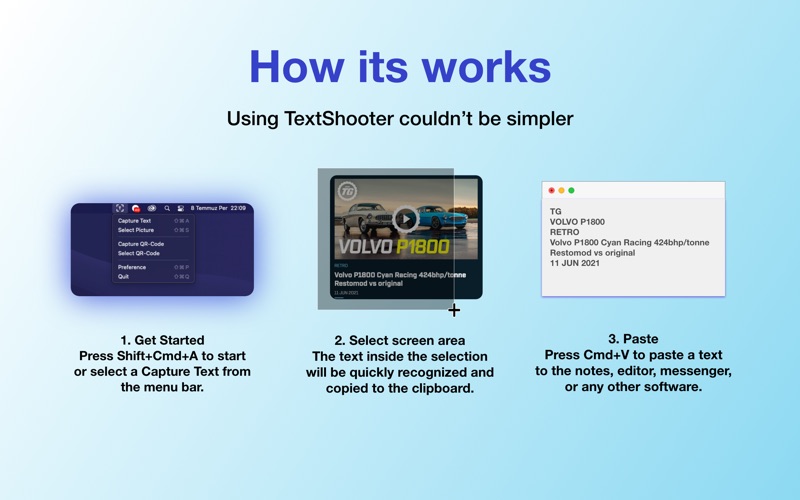
If you ever have used a built-in mac's screen capture application before, then it wouldn't be any trouble to work with TextShooter too. Select with a mouse any part of an image, photo, PDF document, or anything on your screen, and the …
Read the full description
TextShooter is an easy-to-use desktop Mac OCR app that can extract and recognize any non-searchable and non-editable text on your Mac's screen. As an extra feature, it can turn OCR text into speech. It is a super convenient alternative to complicated optical character recognition tools. No training or special skills required, fits perfectly home and business mac users. Easily accessible from the menu bar whenever you need it and has a simple user interface. If you ever have used a built-in mac's screen capture application before, then it wouldn't be any trouble to work with TextShooter too. Select with a mouse any part of an image, photo, PDF document, or anything on your screen, and the app will process and recognize any text within this selection. The text output will be saved into a clipboard, so you could paste it into your favorite macOS text editing or note-taking software. Finally, the app's optical character recognition engine doesn't need an internet connection to process documents. Great OCR solution for those who are concerned about privacy. The application does not collect any users' data. Use Cases: • Convert different image formats to text (JPEG, PNG, GIF, TIFF, BMP, etc...). • Pull text from a non-searchable PDF file without a need to process the whole document. • Read text from images, PDF documents, photos, Zoom meetings, or any other sources. • Copy text even when it is uncopiable like in ebooks or web articles. • Quickly extract emails, links, phone numbers, etc. • Grab text or turn it into speech in video games. • Read QR or barcodes. • Quickly generate alt text from the screenshot for tweets. Features: • On-device OCR technology. No internet connection is needed. • Instant text recognition. No need to upload files into the application. OCR document or file on the fly. • High accuracy and performance processing any documents. • Recognizes even tiny text on images with low quality or dense background. • Supports optical character recognition in multiple languages: English, Spanish, French, German, Portuguese, Italian, Traditional and Simplified Chinese. • Running macOS Catalina: English language only supported. • Fully compatible with macOS Big Sur
Installs
Apple does not publish download counts. Estimates are in testing.
We publish iOS estimates only after they pass a back-test against real numbers. Chart history below is measured.
Estimated store revenue Estimated Beta
App Store, worldwide, monthly rate from the last 15 chart days to 22 Nov 2026
Below the top 100 grossing apps in the markets we calibrate. In the United States that usually means under about $6.4M a month. App Store purchases and subscriptions only, before Apple's 15 to 30% fee. Ads and web payments are not included.
Ratings
No rating breakdown published for this app.
Recent reviews
Latest public reviews from the store
No reviews in our sample for this app yet.
Top chart positions
Latest App Store chart ranks by country, last 10 days
Not in any tracked top chart in the last 10 days.
TextShooter - OCR simplified history
Release, install milestones, listing and store changes
- First released on the store 10 Jul 2021
Update frequency
How often TextShooter - OCR simplified ships a new version, month by month
0 updates in the last 12 months. Less often than most similar apps: they shipped a median of 1 updates in the same year.
Recent versions
Current version 1.1
- Version 1.130 Aug 2021
#More Stable
Listing keywords
Words and phrases TextShooter - OCR simplified repeats most in its store listing
Top phrases: optical character recognition (3), character recognition (3), optical character (3), internet connection (2), mac's screen (2).
Highlighted words also appear in the title. Counts cover the title, short description and description.
Compliance
What the listing and the app package show
- Store status
- Live
- Upkeep
- No update since 30 Aug 2021
- Age rating
- 4+
Apps like TextShooter - OCR simplified
 Library of AviationNazmi Yavuz★ 4.82
 MyNOVECNorthern Virginia Electric Cooperative★ 2.28
 打工人小组件光翔 卓★ 4.96
 TruckbaysTruckbays LLC★ 4.3
 Tornado PRO PlayerMohammed Altam★ 4.44
 VDX - Video ManagerARISEPEAK LP★ 1.74
 TV CastingZeasn Info Technology Co., Ltd.★ 1.86
 MySontiqSontiq, Inc.★ 2.4
 Laboratory TimerShazino★ 4.66
TextShooter - OCR simplified: questions and answers
Who makes TextShooter - OCR simplified?
TextShooter - OCR simplified is published by Ozan AYAZ.
When was TextShooter - OCR simplified last updated?
The latest version (1.1) was released on 30 Aug 2021.
Is TextShooter - OCR simplified free?
No. TextShooter - OCR simplified is a paid app priced at $2.99.
Is TextShooter - OCR simplified still available?
Yes. TextShooter - OCR simplified is live on App Store as of 10 May 2026.
Track TextShooter - OCR simplified and its competitors
Watch any app for new versions, rating drops, chart moves and removals. Free plan, no card.