
- Installs
- —
- Apple does not publish download counts
- Rating
- 3.15
- Ratings
- 163
- 163 reviews
- Version
- 6.4.7
- Updated 30 Oct 2026
- Released
- 13 Nov 2014
- Tracked since 10 May 2026
- Size
- 124 MB
- Needs 15.0
Screenshots


About TimeBlocks - Mobile Planner
The description on the store listing
Organize your time, Simply in one place
TimeBlocks is a mobile planner that enables smart time management through simple and easy interface.
[Detailed functions]
● Intuitive schedule management, Calendar
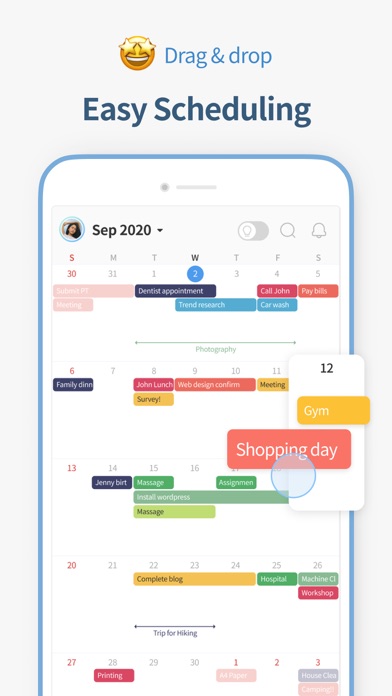
• Use it easily just like a paper diary through intuitive drag & drop action.
• Screen enlarges according to number of schedules, so you can view the schedules at a glance like a calendar.
● Don’t forget, To-do
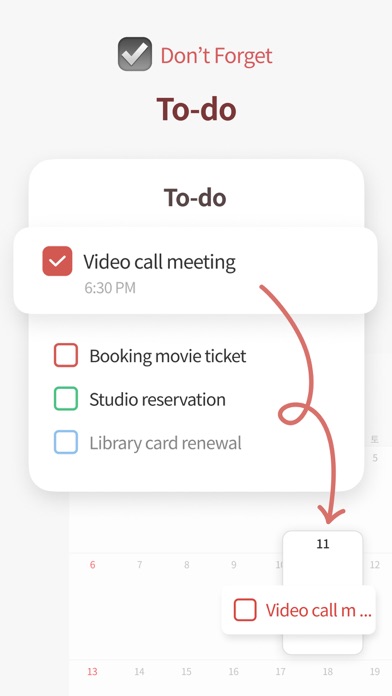
• Manage your trivial tasks on To-do list.
• Incomplete tasks are moved to the next day to help you remember.
● New challenges, Habit
• Manage new habits in Habit list.
• You can find your habit records in Habit Mini Calendar.
● Whenever it may be, Memo
• If there are plans …
Read the full description
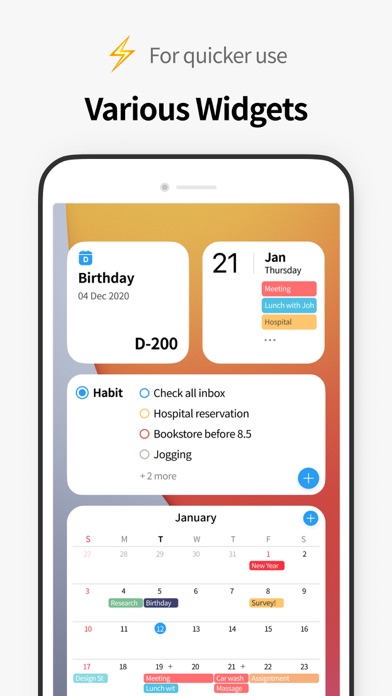
Organize your time, Simply in one place TimeBlocks is a mobile planner that enables smart time management through simple and easy interface. [Detailed functions] ● Intuitive schedule management, Calendar • Use it easily just like a paper diary through intuitive drag & drop action. • Screen enlarges according to number of schedules, so you can view the schedules at a glance like a calendar. ● Don’t forget, To-do • Manage your trivial tasks on To-do list. • Incomplete tasks are moved to the next day to help you remember. ● New challenges, Habit • Manage new habits in Habit list. • You can find your habit records in Habit Mini Calendar. ● Whenever it may be, Memo • If there are plans that you can’t fix the time right now, keep it in Memo and plan it later. • You can organize memos by month to set up general plans. ● Themes, stickers, and wallpapers for decoration • You can decorate the diary on the app. TimeBlocks in-app store provides colors, stickers, masking tapes (date background), themes, and fonts for you to decorate your own calendar. • You can find decoration items by unique artists and design companies that are working with TimeBlocks. ● Anniversary • You manage birthdays, holidays, and anniversaries, etc. • It supports both solar and lunar calendars. ● Together with other services, Connection • Did you use another calendar before? You can easily connect it through Connection service. • It can link to Google, Apple, Naver calendars, Google Keep, and Apple Reminders. ● For faster use, various widgets • You can access various functions in TimeBlocks through widgets. • It provides various widgets including monthly calendar, weekly calendar, today’s list, habit list, to-do list, etc. ● Group schedule for friends, family, loved ones • You can share your group schedule with friends, family, and loved ones. • You can designate different access level by participants, and receive real-time alarms in case of changes. ● What to do today? Event recommendations • Weekends, after work, after school… what do you do after your busy schedule? • TimeBlocks recommends various events based on user’s interest to spend time well. • You can add recommended events to the Calendar or save in Memo. ● What did I do today? Other information of the day • You can check various activity logs in the past along with the schedule. • You can link to the current photo app to find photos taken on that day along with the schedule. ● World’s first contact-free 1:1 Time management coaching (to be released) • Time management coach understands user’s time management tyle and helps 1:1 to find an appropriate time management method. • It is recorded in calendar-based time log screen, and provides feedbacks, 1:1 coaching, community, and report. ● Better time management with TimeBlocks Premium TimeBlocks Premium provides powerful functions for better time management. Improve your productivity through 1-month free trial. • Interval Marker • To-do in Calendar • Habit in Calendar • Date Countdown • Remove Ads • Auto Sync • Alert Setting • Search All Period • To-do’s % Complete • File Attachment • Color Label • Memo Scheduling • Memo Alert • Support for All Connections • Bonus Coins • Coaching Price Discount ● Authorization for app use and purpose • Alarm: Schedule alarm and push alarm • Calendar: Used to import schedules from iOS calendar. • Contact: Used for attendees in the schedule. • Location: Location information in schedule, or weather information of current location in calendar. • Reminder: Synchronize with iOS Reminder. • Photo: Photos in Other information of the day. • Biometrics: Used for biometrics login. • Camera: Profile photo for the account. ● Terms of use • https://timeblocks.com/legal/terms ● Privacy policy • https://timeblocks.com/legal/privacy ● Customer support • Developer: TimeBlocks, Inc. • E-mail: [email protected]
Installs since 29 Aug 2026
Apple does not publish download counts. Estimates are in testing.
Estimated store revenue Estimated Beta
App Store, worldwide, monthly rate from the last 13 chart days to 20 Nov 2026
Below the top 100 grossing apps in the markets we calibrate. In the United States that usually means under about $6.4M a month. App Store purchases and subscriptions only, before Apple's 15 to 30% fee. Ads and web payments are not included.
Ratings
163 ratings, 163 reviews
No rating breakdown published for this app.
Recent reviews
Latest public reviews from the store
- 15 Aug 2025
My favorite calendar app after years of use
I use TimeBlocks on both my PC and phone for work and I really like it. Whenever I have any issues, their support team gets back to me quickly and fixes them fast which is super helpful. I also love the variety of themes, colors, and fonts because it makes the app feel really personalized. I’ve been subscribing and using it for several years now and honestly, out of all the apps I pay for, this one is my favorite. It’s definitely the best calendar app I’ve used. 👍
- 27 Jul 2025
Still a Great App after all these years
2025 REVIEW: TimeBlocks developers have done it again…quickly fixed a glitch in their newest update that affected how a widget was displaying information. I do not understand how this APP doesn’t have at least a 4.5 rating—it is by far the best calendar app I’ve tried. I’ve been using it for over 5 years now. I love this app—the free and the premium versions. Great app TimeBlocks. PREVIOUS REVIEW: I love this app! And I love the development team’s responsiveness to my posts reporting bugs or glitches. I have reported several, and am always contacted by the developers for clarification on the issue. All glitches I have reported were fixed. This is a great app that I have used for several years now, and find it so useful I pay for the premium version. Thanks TIMEBLOCKS for a great mobile calendar app.
- 8 May 2025
Most Intuitive Calendar
I’ve had this app as my primary calendar/planner for about 6 years. I have tried basically all of the top planner apps out there, and to me, this one is the easiest to use, most intuitive, versatile, and pretty to look at to boot. I love customizing colors and themes in a way that is both aesthetically pleasing and makes the most sense to me. I probably wouldn’t use this if I wanted to put very detailed plans or long notes in my planner/to-do’s. TimeBlocks is perfect to quickly add events, to-do’s, memos, etc., that are clearly visually laid out and easy to organize. You can add/purchase extra color schemes, stickers, fonts, etc., but everything that comes free with the basic app is plenty to achieve an organized and aesthetically pleasing calendar.
- 10 Feb 2021
Almost perfect
There are 3 things I need from this app: 1) Weekly View 2) To-Do items that cross over into google tasks or apple reminders, since there is no widget. The instruction say that Apple Reminders cross (1 way?) over but that hasn’t been the case for me. Anyway I want a 2 way crossing from either direction. 3) Since the update, you can no longer drag and drop an item from the memo tab to your calendar. It used to be: looking at your memos and saying “Oh yeah! I need an oil change.” And pressing on that item and dragging to your next day off. That needs to come back, it was far more intuitive than choosing the day, going to more , then having to already have been to the memo tab to look at your notes to see which task or event you want to put on that day, THEN finding and scheduling it. Fix these things and the lack of response to support questions and it’s perfection. I love the do to feature, I love the customization, even though I wouldn’t mind that expanding, I love the import from google cal, and the fact that the things you don’t finish auto-roll over to the next day, and I love the ability to have separate categories and color customizat
What reviewers bring up
Topics mentioned in the latest 8 reviews, by how many reviews mention them
Liked in good reviews (4 reviews)
- timeblocks 4
- calendar 4
- quickly 3
- pay 3
- definitely 2
- developers 2
- purchase 2
- several 2
Raised in bad reviews (1 reviews)
No topic comes up twice.
Top chart positions
Latest App Store chart ranks by country, last 10 days
- Countries ranked
- 2 of 50
- Best rank
- #19
- Top 10 placements
- 0
- of 2 chart placements
- Average rank
- #51
Best countries on App Store
- 🇰🇷 South Korea · Top grossing, Productivity#19
- 🇹🇭 Thailand · Top grossing, Productivity#83
| Country | Chart | Category | Rank | Best (10 days) | Date |
|---|---|---|---|---|---|
| 🇰🇷 South Korea | Top grossing | Productivity | #19 | #15 | 20 Nov 2026 |
| 🇹🇭 Thailand | Top grossing | Productivity | #83 | #83 | 20 Nov 2026 |
TimeBlocks - Mobile Planner history
Release, install milestones, listing and store changes
- First released on the store 13 Nov 2014
Update frequency
How often TimeBlocks - Mobile Planner ships a new version, month by month
6 updates in the last 12 months. More often than most similar apps: they shipped a median of 2 updates in the same year.
Recent versions
Current version 6.4.7
- Version 6.4.630 Oct 2026
• Dark Mode Support (Premium) Dark Mode is now available with the Default Theme. Select System mode to automatically match your device’s appearance setting. • Theme Support for Widgets Themes purchased from the Store can now also be applied to widgets. *Currently, only themes created by TimeBlocks are supported. Creator themes will be supported gradually. • Improved Tint mode in widgets • Fixed app crashes and other bugs
- Version 6.3.1623 Aug 2026
• Added email verification • Minor performance improvements
- Version 6.3.119 Jul 2026
• Improved the subscription purchase flow and added offer support • Added a Manage Subscription menu to My Account (change plan, cancel subscription) • Minor bug fixes
- Version 6.3.928 Jun 2026
• Improved the subscription purchase flow and added offer support • Added a Manage Subscription menu to My Account (change plan, cancel subscription)
Listing keywords
Words and phrases TimeBlocks - Mobile Planner repeats most in its store listing
Top phrases: better time management (2), friends family (2), group schedule (2), habit list (2), loved ones (2).
Highlighted words also appear in the title. Counts cover the title, short description and description.
Compliance
What the listing and the app package show
- Store status
- Live
- Upkeep
- Updated 30 Oct 2026
- Age rating
- 4+
Apps like TimeBlocks - Mobile Planner
 CV+ Resume MakerMajed Hariri★ 4.66
 2 factor - Authenticator App25 Degrees Apps LLC★ 4.44
 Chore Chart: Family Rewards舜 吕★ 4.69
 HouwiyetiAGENCE NATIONALE DU REGISTRE DES POPULATIONS ET DES TITRES SECURISES★ 4.15
 TheBrain: Smart Notes & LinksTheBrain Technologies LP★ 4.82
 CalamariHubert Lisek★ 4.53
 Coin Pic IdentifierTech Consolidated Inc★ 4.07
 Clippit: AI Text To SpeechSpencer Yen★ 4.59
 Ai humanizer humanize ai textABDELHAFID BASAFOU★ 4.61
TimeBlocks - Mobile Planner: questions and answers
Who makes TimeBlocks - Mobile Planner?
TimeBlocks - Mobile Planner is published by TimeBlocks, inc..
When was TimeBlocks - Mobile Planner last updated?
The latest version (6.4.7) was released on 30 Oct 2026.
Is TimeBlocks - Mobile Planner free?
Yes. TimeBlocks - Mobile Planner is free to download.
Is TimeBlocks - Mobile Planner still available?
Yes. TimeBlocks - Mobile Planner is live on App Store as of 14 Nov 2026.
Track TimeBlocks - Mobile Planner and its competitors
Watch any app for new versions, rating drops, chart moves and removals. Free plan, no card.