
- Installs
- —
- Apple does not publish download counts
- Rating
- 4.6
- Ratings
- 1.9K
- 1.9K reviews
- Version
- 10.0.9
- Updated 10 Nov 2026
- Released
- 3 Mar 2018
- Tracked since 11 May 2026
- Size
- 117 MB
- Needs 15.0
Also on Google Play: TimeFinder: Time Blocking (351 ratings)
Screenshots


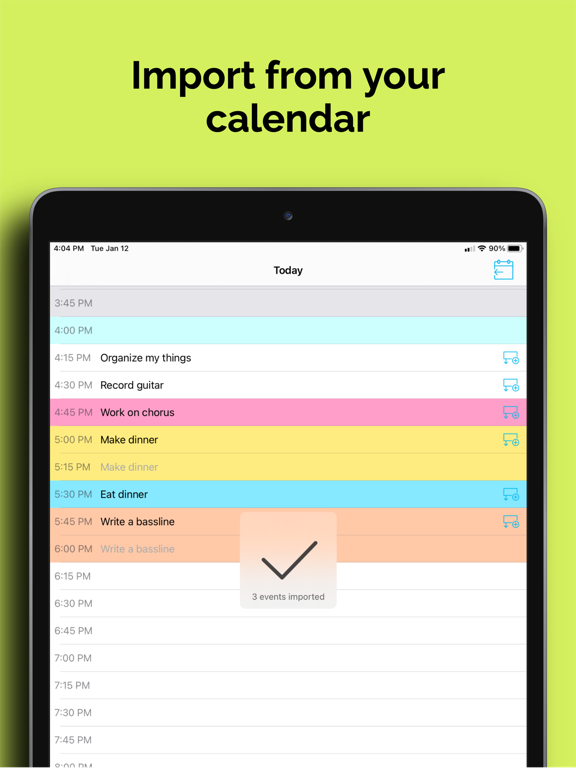


About TimeFinder: Time Blocking
The description on the store listing
Finally, a planner that works the way your brain does. 400,000+ people use TimeFinder to build flexible, color-coded plans that bend—not break—when life happens.
The #1 time blocking app on the App Store—refined over 8 years of user feedback. Whether you have ADHD, a packed schedule, or just a brain that resists plans, this is planning that finally clicks.
"This app allows me to brain dump all my tasks into a list and then decide each day which ones to slide into my schedule. It's reduced my stress because I frequently overfill my day. Now I can realistically see what I can do." — LynnProgrammer
SEE YOUR DAY. SHAPE YOUR DAY.
- Drag & Drop: Pull tasks from your lists into your schedule—or …
Read the full description
Finally, a planner that works the way your brain does. 400,000+ people use TimeFinder to build flexible, color-coded plans that bend—not break—when life happens. The #1 time blocking app on the App Store—refined over 8 years of user feedback. Whether you have ADHD, a packed schedule, or just a brain that resists plans, this is planning that finally clicks. "This app allows me to brain dump all my tasks into a list and then decide each day which ones to slide into my schedule. It's reduced my stress because I frequently overfill my day. Now I can realistically see what I can do." — LynnProgrammer SEE YOUR DAY. SHAPE YOUR DAY. - Drag & Drop: Pull tasks from your lists into your schedule—or back again - Flexible Time Blocks: Plan in 5, 10, 15, 30, or 60-minute chunks - Color-Coded Clarity: Every task gets a color so your day makes sense at a glance - Multiple Views: Day, week, month, and agenda—see your schedule your way PLANS CHANGE. THAT'S THE POINT. - Schedule Shift: Running late? Shift your tasks earlier or later with a single tap - Task Rollover: Roll unfinished tasks into available time slots—nothing gets lost - Task Bucket: Commit tasks to a date without locking them to a specific time - Zero Friction: Stretch, shrink, and rearrange by dragging—no menus needed "PRECISELY what I have been looking for, as if it were tailored for me! For ADHD persons—it is just so dang helpful!" — Summitmarlene LISTS. SCHEDULE. FOCUS. - Split View: See your lists and schedule side by side—drag between them - Focus Mode: A guided timer that helps you work through your plan, task by task - Apple Watch: See your upcoming schedule on your wrist with complications - Subtasks: Break big tasks into steps and track progress as you go SYNCS WITH YOUR LIFE - Calendar Sync: Import events from Apple Calendar, Google, and Outlook—and export your TimeFinder schedule back - Reminders Sync: Two-way sync with Apple Reminders—changes update in both apps - Widgets: Home Screen, Lock Screen, and Live Activities - iPhone, iPad, Mac & Apple Watch: Your schedule stays in sync across all your devices "I 'touch' my todo items just once—to put them on a time block to execute. These tasks aren't 'living' with me anymore. They're actually getting done." — Kurt4i MAKE IT YOURS - Color Palettes: Choose from dozens of presets—or build your own in the Palette Editor - Schedule Templates: Save your best routines and reapply them in one tap - Custom Intervals: Break up your day however works for you BUILT OVER 8 YEARS. SHAPED BY REAL USERS. TimeFinder started as one developer's answer to his own ADHD and procrastination. 8 years and 400,000+ downloads later, it's still independently built and personally supported by its founder, Luke—no faceless corporation, no VC playbook. Every update reflects real feedback from real people. - Direct support from the developer - Share ideas at feedback.timefinder.app - Regular updates driven by your feedback Try TimeFinder free for 7 days and discover why so many say it's the planner they've been looking for. Note: Some features require TimeFinder Premium.
Installs, last 30 days
Apple does not publish download counts. Estimates are in testing.
Estimated store revenue Estimated Beta
App Store, worldwide, monthly rate from the last 12 chart days to 19 Nov 2026
Below the top 100 grossing apps in the markets we calibrate. In the United States that usually means under about $6.4M a month. App Store purchases and subscriptions only, before Apple's 15 to 30% fee. Ads and web payments are not included.
Ratings
1,943 ratings, 1,943 reviews
No rating breakdown published for this app.
Recent reviews
Latest public reviews from the store
- 3 May 2026
Best Scheduling App
I have been using this for a few months and it’s been one of the only apps that I have found that works for me. It makes visualizing my time easy and clear. Every time I thought something could be improved, the developer has fixed it or added it in the next update. He obviously has a genuine care for this app and keeps adding new features that make it even better! I also love that it’s a one time charge to go premium and not a subscription. Thank you, Luke!
- 20 Apr 2026
Notes feature!!
Now with TimeFinder’s added encryption, I’d love to see the ability to add note snippets that sync with our computers/other devices! Sometimes I want to make short notes to remind myself of something each day, and that would make TimeFinder an all in one planning app for me
- 7 Apr 2026
This app just keeps getting better.
I never write reviews, but I felt compelled to here. With every update, the Developer just keeps polishing the features and adding new things! An update or two ago was Apple watch integration (I like avoiding my phone in the morning), this update was Todoist and TickTick integration! If you want to time-block your day, this is the app! So many colors and customizations and integration across all devices, it’s really the best. Only thing I don’t like is that sometimes sync is weird among MacOS, phone, and watch. Like if I update something on my laptop, it might not synchronize on my watch until I open my phone. Great app, thank you creator!
- 7 Apr 2026
CHANGING MY LIFE
I fell off track for a while. Been through some hard times and lost my momentum in everything. I needed something that could get and keep me on track with my tasks and duties for the day, not just in a list but time blocked. I’ve downloaded different tool before, even bought some Etsy templates but they didn’t work for me. I seen this in the App Store and thought I’d give it a try. I started with the free trial and knew from there I’d pay for the yearly subscription. I absolutely LOVE this app! It’s everything that I needed and more, and this is just the beginning. I’ve shared it with so many others and they love it as well. Thanks Luke! ♥️
What reviewers bring up
Topics mentioned in the latest 50 reviews, by how many reviews mention them
Liked in good reviews (26 reviews)
- schedule 6
- needed 6
- able 6
- timefinder 5
- add 5
- scheduling 4
- developer 4
- support 4
Raised in bad reviews (19 reviews)
- subscription 9
- without 6
- features 4
- trial 4
- find 4
- paid 4
- forced 3
- open 3
Top chart positions
Latest App Store chart ranks by country, last 10 days
Not in any tracked top chart in the last 10 days.
TimeFinder: Time Blocking history
Release, install milestones, listing and store changes
- First released on the store 3 Mar 2018
Update frequency
How often TimeFinder: Time Blocking ships a new version, month by month
22 updates in the last 12 months. More often than most similar apps: they shipped a median of 2 updates in the same year.
Recent versions
Current version 10.0.9
- Version 10.0.510 Nov 2026
TimeFinder 10 is here! A fresh new look, and more tools to help you make the most of your time: 1. A new look throughout: A new app icon and refreshed design across Lists, Schedule, Split View and Focus Mode. 2. Time Insights: Compare planned and recorded time, set goals and track habits. Find it under Settings → Time Insights. 3. Print and share your Schedule: Create printable PDFs and images with Day, 3-Day, Week, Agenda and Month layouts, color options and zoomable previews. 4. A refreshed Apple Watch app, widgets and Live Activities: Redesigned Watch views and updated widget and Live Activity layouts bring clearer Task titles and timer controls. The new iOS List checklist widget lets you complete Tasks from your Home Screen. 5. 20-minute timeslots: A new Schedule interval alongside 5, 10, 15, 30 and 60 minutes. Find it under Settings → Schedule → Timeslot Duration. 6. More dependable everyday planning: Reliability and performance improvements across syncing, saving, subtasks, dragging, Undo, Focus and the AI Assistant. Thanks for making TimeFinder part of your day! I’d love to hear what you think of the update. Keep the ideas coming at feedback.TimeFinder.app. Luke
- Version 10.0.49 Nov 2026
TimeFinder 10 is here! A fresh new look, and more tools to help you make the most of your time: 1. A new look throughout: A new app icon and refreshed design across Lists, Schedule, Split View and Focus Mode. 2. Time Insights: Compare planned and recorded time, set goals and track habits. Find it under Settings → Time Insights. 3. Print and share your Schedule: Create printable PDFs and images with Day, 3-Day, Week, Agenda and Month layouts, color options and zoomable previews. 4. A refreshed Apple Watch app, widgets and Live Activities: Redesigned Watch views and updated widget and Live Activity layouts bring clearer Task titles and timer controls. The new iOS List checklist widget lets you complete Tasks from your Home Screen. 5. 20-minute timeslots: A new Schedule interval alongside 5, 10, 15, 30 and 60 minutes. Find it under Settings → Schedule → Timeslot Duration. 6. More dependable everyday planning: Reliability and performance improvements across syncing, saving, subtasks, dragging, Undo, Focus and the AI Assistant. Thanks for making TimeFinder part of your day! I’d love to hear what you think of the update. Keep the ideas coming at feedback.TimeFinder.app. Luke
- Version 10.0.38 Nov 2026
You can now plan your Schedule in 20-minute intervals. We also fixed an issue that could show a future item as happening now in the Schedule widget.
- Version 9.7.323 Sep 2026
Getting started with TimeFinder is now more reliable. The app now waits until you've had time to use it before asking for your feedback on the App Store.
Listing keywords
Words and phrases TimeFinder: Time Blocking repeats most in its store listing
Top phrases: apple watch (2), color coded (2).
Highlighted words also appear in the title. Counts cover the title, short description and description.
Compliance
What the listing and the app package show
- Store status
- Live
- Upkeep
- Updated 10 Nov 2026
- Age rating
- 4+
Apps like TimeFinder: Time Blocking
 immowelt – Real EstateAVIV Germany GmbH★ 4.69
 f3 vpn - Unlimited VPNSkyline Quantum Data Systems Limited★ 4.27
 Vantage CalendarFortyfour AB★ 4.31
 Phone Drive: File StorageEightythree Technology★ 4.68
 Authenticator App - 2FA Auth +Appshub Bilgi Teknolojileri Limited Sirketi★ 4.5
 Find Bluetooth Device TrackerWergames OU★ 4.36
 Safetunnel VPN & Fast ProxyHOME BUYER SYSTEMS LTD★ 4.55
 VPN for iPhone:Super VPN ProxyVPN PROXY MASTER★ 4.64
 Green VPN - TunnelingTHREE PANDA DIGITAL LIMITED★ 4.48
TimeFinder: Time Blocking: questions and answers
Who makes TimeFinder: Time Blocking?
TimeFinder: Time Blocking is published by TimeFinder, LLC.
When was TimeFinder: Time Blocking last updated?
The latest version (10.0.9) was released on 10 Nov 2026.
Is TimeFinder: Time Blocking free?
Yes. TimeFinder: Time Blocking is free to download.
Is TimeFinder: Time Blocking still available?
Yes. TimeFinder: Time Blocking is live on App Store as of 19 Nov 2026.
Track TimeFinder: Time Blocking and its competitors
Watch any app for new versions, rating drops, chart moves and removals. Free plan, no card.